@99percentpeople/pi-codex-api
Expose Codex subscription text, vision, image, search, Fast, and usage APIs to Pi
Package details
Install @99percentpeople/pi-codex-api from npm and Pi will load the resources declared by the package manifest.
$ pi install npm:@99percentpeople/pi-codex-api- Package
@99percentpeople/pi-codex-api- Version
0.3.2- Published
- Aug 14, 2026
- Downloads
- 2,518/mo · 336/wk
- Author
- 99percentpeople
- License
- MIT
- Types
- extension, skill
- Size
- 374.2 KB
- Dependencies
- 0 dependencies · 4 peers
Pi manifest JSON
{
  "extensions": [
    "./index.min.js"
  ],
  "skills": [
    "./skills"
  ]
}
Security note
Pi packages can execute code and influence agent behavior. Review the source before installing third-party packages.
README
@99percentpeople/pi-codex-api
Turn your ChatGPT subscription into Pi superpowers — multilingual text and vision delegation, image generation, web search, Fast mode, and usage monitoring — no OpenAI API key required.
Highlights
- Ask Codex from any model —
codex_asksends a standalone multilingual text or vision request to a live Codex subscription model. Use it for an explicit Codex second opinion, translation, rewrite, review, or screenshot analysis while DeepSeek, Google, Claude, or another provider remains active. - Tool manager — one
/99settingssubmenu independently switches Search, Image, and Ask Codex On or Off. Disabled model tools disappear from the active prompt immediately. - Answer detail —
/99settingscan leave Codex verbosity at the model default or override normal Codex replies andcodex_askwith Low, Medium, or High detail. - Image generation & editing —
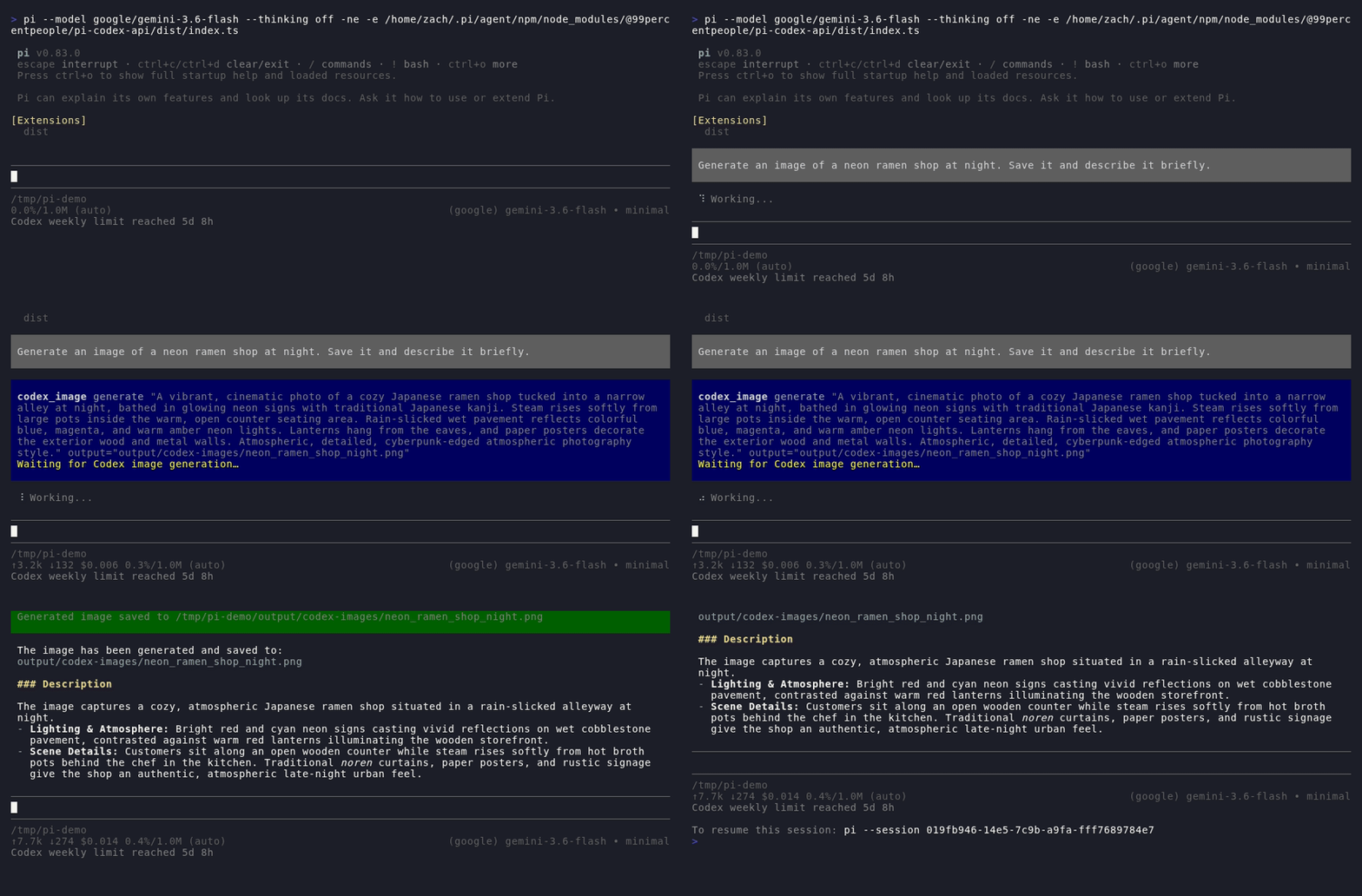
codex_imagecreates or edits images via your Codex subscription'sgpt-image-2, and works from any model: even with a third-party provider active (DeepSeek, Google, …), it reuses Pi's logged-inopenai-codexOAuth account (enable Other providers in/99settings). - First-party search —
codex_searchruns web and image queries, page navigation, PDF screenshots, finance, weather, sports, and time lookups, and renders clean result cards instead of raw citations. - Fast mode — optional priority service tier for snappier responses.
- Usage at a glance — the status bar shows remaining Codex quota and
reset time;
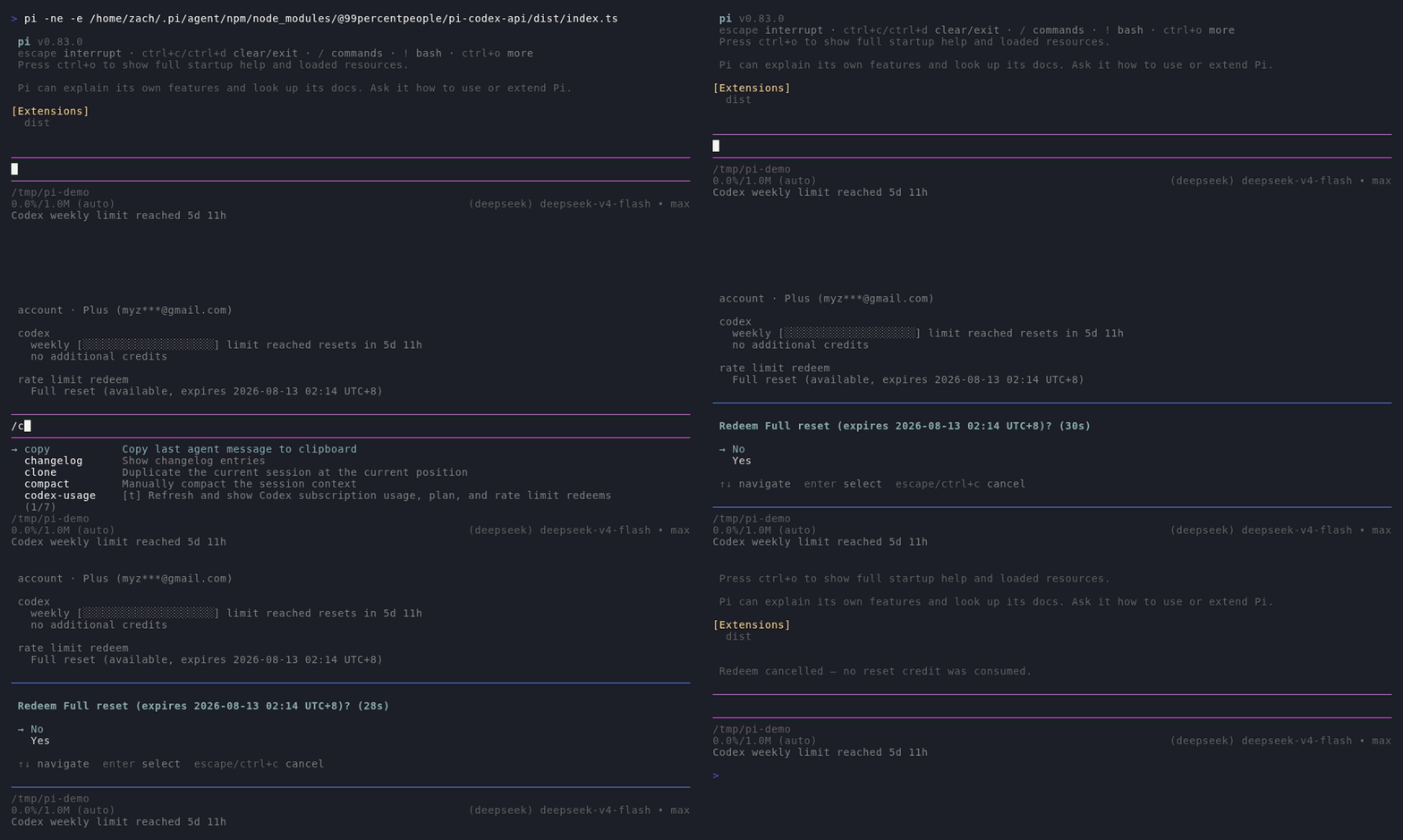
/codex-usageshows your plan, masked account, limits, credits, and earned rate-limit reset cards. - Reset cards — when you run out of messages,
/codex-redeemredeems an earned reset card safely: pick a card, confirm, done.
Demo
Subscription usage, limit-reached state, and reset-card redemption:
Web search with clean result cards (search → open a result → summarize):
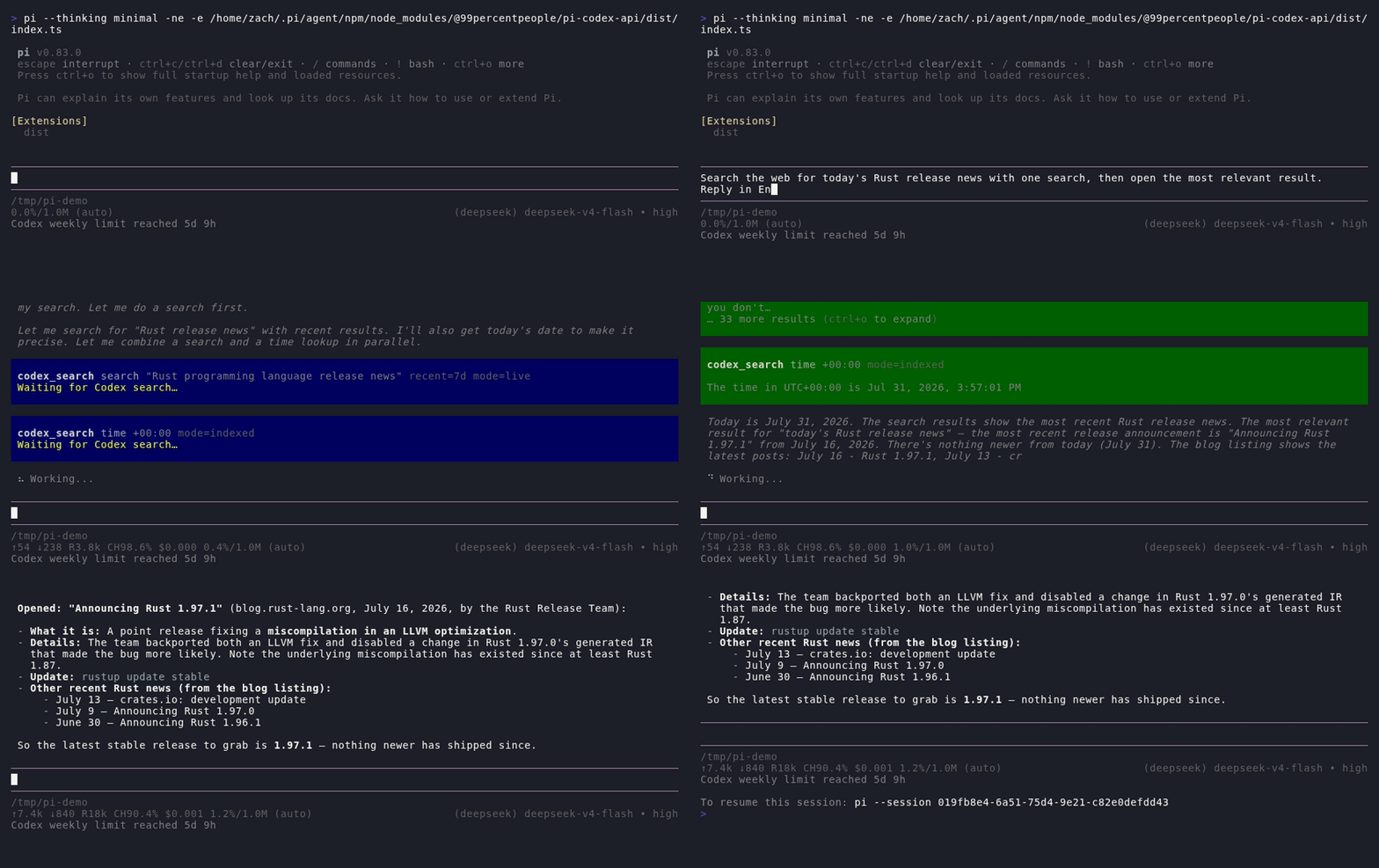
Image generation with gpt-image-2 (saved PNG + description):
Ask Codex
codex_ask is deliberately opt-in. The active model should call it only when
someone explicitly asks to consult Codex or requests a Codex second opinion;
it must not recursively delegate routine work just because Codex is available.
Each call is standalone. Pi does not copy the surrounding conversation or workspace into the request automatically, so the tool prompt must contain the necessary context, target language, and output format. Optional controls include:
- an exact
openai-codexmodel ID from Pi's existing model list (otherwise the current official ChatGPT Codex default is resolved from its live model catalog); - reasoning effort and per-call answer detail;
- up to five workspace images or recent conversation images for vision;
- an explicit output-token cap when the default 8,192 tokens is unsuitable.
Text calls reuse Pi's model-provider implementation and record their nested LLM usage on the tool result. One-off delegated requests use a fresh routing session and disable prompt-cache retention. With SSH Remote active, workspace image inputs are read through the remote binary file adapter.
Search output
codex_search keeps each result family readable:
- Web and image searches render compact source cards.
open,click, andfindrender grouped document previews; collapsed output shows at most three documents, while expanded output keeps every result.- Weather forecasts, finance quotes, sports standings/schedules, and time lookups render structured cards. Weather alert details are reduced to their actionable summaries instead of injecting the provider's full object dump.
- Structured lookup text is compacted before it reaches the model. Other search output is bounded to 2,000 lines or 50 KB and tells the model to open fewer references if truncation occurs.
For page workflows, search first and open returned reference IDs. Direct URLs
are best effort because Codex's browsing backend can reject otherwise valid
URLs. Keep page-navigation batches to three pages or fewer; response_length
and open.lineno do not reliably shorten page bodies.
Current Codex backend limitations are surfaced as actionable result hints:
- Weather can become temporarily unavailable even with valid locations; retry once, then fall back to web search rather than looping over modes or locations.
- Crypto quotes require bare tickers such as
BTCorETH, notBTC-USD. - NHL standings are not served by the structured sports lookup.
finance.marketis only a provider hint and does not reliably resolve international exchange listings such as0700.HK.
When a batched lookup silently omits one item, the extension compares returned reference indexes with the request and reports the missing item's applicable hint instead of presenting the batch as fully successful.
Quick start
pi install npm:@99percentpeople/pi-codex-api
Requirements:
- Pi 0.84.1 or newer for
codex_ask - Pi logged in with
/loginforopenai-codex - An active
openai-codexmodel, or Other providers enabled in/99settingsto use the subscription from any model
That's it — just ask "generate an image of a neon ramen shop" or "search the web for today's Rust releases" and the model calls the tools for you.
When @99percentpeople/pi-ssh-remote is active, codex_image.output_path and
referenced_paths resolve through @99percentpeople/pi-workspace-files
and its remote binary backend. Generated
Base64 data is written directly through the remote adapter and references are
read directly from it, without creating local staging files.
Commands
The commands below are registered only after Pi confirms an openai-codex
OAuth login. Sessions that start without Codex login do not show them; login
and model/auth changes are detected during the session. Pi currently has no
command-unregister API, so after logging out in the same running session use
/reload (or open another session) to remove commands registered earlier.
/codex-usage
Shows a fresh snapshot of your subscription in one block:
Codex usage

account · Plus (user@example.com)

codex
  weekly [█████████████░░░░░░░] 65% left resets in 5d 3h
  no additional credits

rate limit redeem
  Full reset (available, expires 2026-08-13 02:14 UTC+8)
- Plan type and masked email from Codex's official usage endpoint
- Each limit window shows remaining capacity as a bar; when exhausted it reads
limit reachedinstead of0% left - Earned reset cards, sorted by expiry, with local-time expiry timestamps
- The status bar mirrors this compactly:
Codex weekly 65% 5d 3h→Codex weekly limit reached 5d 14h - When a refresh fails the status never stays on the transient
Codex syncing…: expired/invalid OAuth tokens showCodex auth expired(red), other failures keep the last known usage or showCodex usage unavailableuntil the next successful refresh
Usage refreshes automatically on session start, model select, and the configured
usage-poll interval; /codex-usage always forces a fresh read. Between refreshes,
the status-bar reset countdown advances locally from the last server timestamp
once per minute without making another request. A refresh simply re-synchronizes
that timestamp and the usage snapshot. Every usage request is capped at a
15-second timeout so a stalled backend cannot leave the status bar spinning.
/codex-redeem
Redeems an earned rate-limit reset card when you're out of messages:
──────────────────────────────────────────────
Select a reset credit to redeem (30s)

→ Full reset (expires 2026-08-03)
  Full reset (expires 2026-08-12)

↑↓ navigate  ↵ select  esc cancel
──────────────────────────────────────────────
      ↓ pick a card
──────────────────────────────────────────────
Redeem Full reset (expires 2026-08-12)? (30s)

→ No
  Yes

↑↓ navigate  ↵ select  esc cancel
──────────────────────────────────────────────
- Multiple cards show a picker (earliest expiry first); a single card skips to confirmation
- No is the default, so a stray Enter never consumes anything
- Redemptions are idempotent: a retry after a network failure can never consume a second card
- Without dialog UI, it falls back to a two-step confirm flow
Settings
Configure under Codex API in /99settings:
- Tools opens one tool manager where Search, Image, and Ask Codex can each be switched On or Off. Disabled tools are removed from the active model prompt immediately; stale or concurrently queued calls are rejected before they reach Codex.
- Fast mode remains a direct On/Off setting for the priority service tier.
- Usage monitor remains a direct On/Off setting. Turning it off stops
background status refreshes, while explicit
/codex-usageand/codex-redeemcommands remain available. - Answer detail selects model default, Low, Medium, or High verbosity for
normal Codex replies and
codex_askunless a call overrides it. - Other providers lets any model (DeepSeek, Google, …) use the logged-in Codex subscription.
- Search mode and Search context configure search when its feature is on.
- Image quality sets the GPT Image 2 default when its feature is on.
- Usage poll controls the monitor refresh interval when its feature is on.
Settings live in ~/.pi/agent/99extensions.json under the codex-api
namespace. Existing configurations migrate with Search, Image, and Ask Codex
enabled, so upgrading does not remove tools unless you explicitly switch them
off.
How it works
- Reuses Pi's existing
openai-codexOAuth — no API key, no MCP server, no separate search provider - Tokens are fetched per call from Pi's model registry, never stored in settings or tool results
codex_askuses Pi 0.84+'s authenticated model completion API so OAuth, provider overrides, and request transport stay inside Pi's model registry- Text, image, and search requests go to OpenAI's Codex backend and follow your ChatGPT workspace's policies
- The extension also ships the
gpt-image-promptsskill for crafting production-grade image prompts — invoke it with/skill:gpt-image-prompts
Development
bun run build:packages
bun run --cwd extensions/codex-api build
pi install ./extensions/codex-api