@agimon-ai/doompi
Opinionated, composable Pi distribution for scoped agent tools, skills, MCP servers, and developer workflows.
Package details
Install @agimon-ai/doompi from npm and Pi will load the resources declared by the package manifest.
$ pi install npm:@agimon-ai/doompi- Package
@agimon-ai/doompi- Version
0.0.1-alpha.57- Published
- Sep 5, 2026
- Downloads
- 6,503/mo · 1,142/wk
- Author
- agiflow-ai
- License
- MIT
- Types
- extension
- Size
- 3.1 MB
- Dependencies
- 21 dependencies · 1 peer
Pi manifest JSON
{
  "extensions": [
    "./dist/extensions/pi.mjs"
  ]
}
Security note
Pi packages can execute code and influence agent behavior. Review the source before installing third-party packages.
README
DoomPi
A coding agent that loads only the skills and tools you name.
It begins with one useful MCP server. Then another. Soon the agent fixing a heading wakes up with database tools, browser controls, and their small novel of schemas. This is our config.
DoomPi is an opinionated, composable distribution of Pi. It is closer in spirit to Spacemacs, Doom Emacs, or a curated Neovim setup than to a single plugin. It is tailored for people whose agent has one MCP server too many. It turns extensions, skills, MCP servers, and system prompts into config instead of background noise.
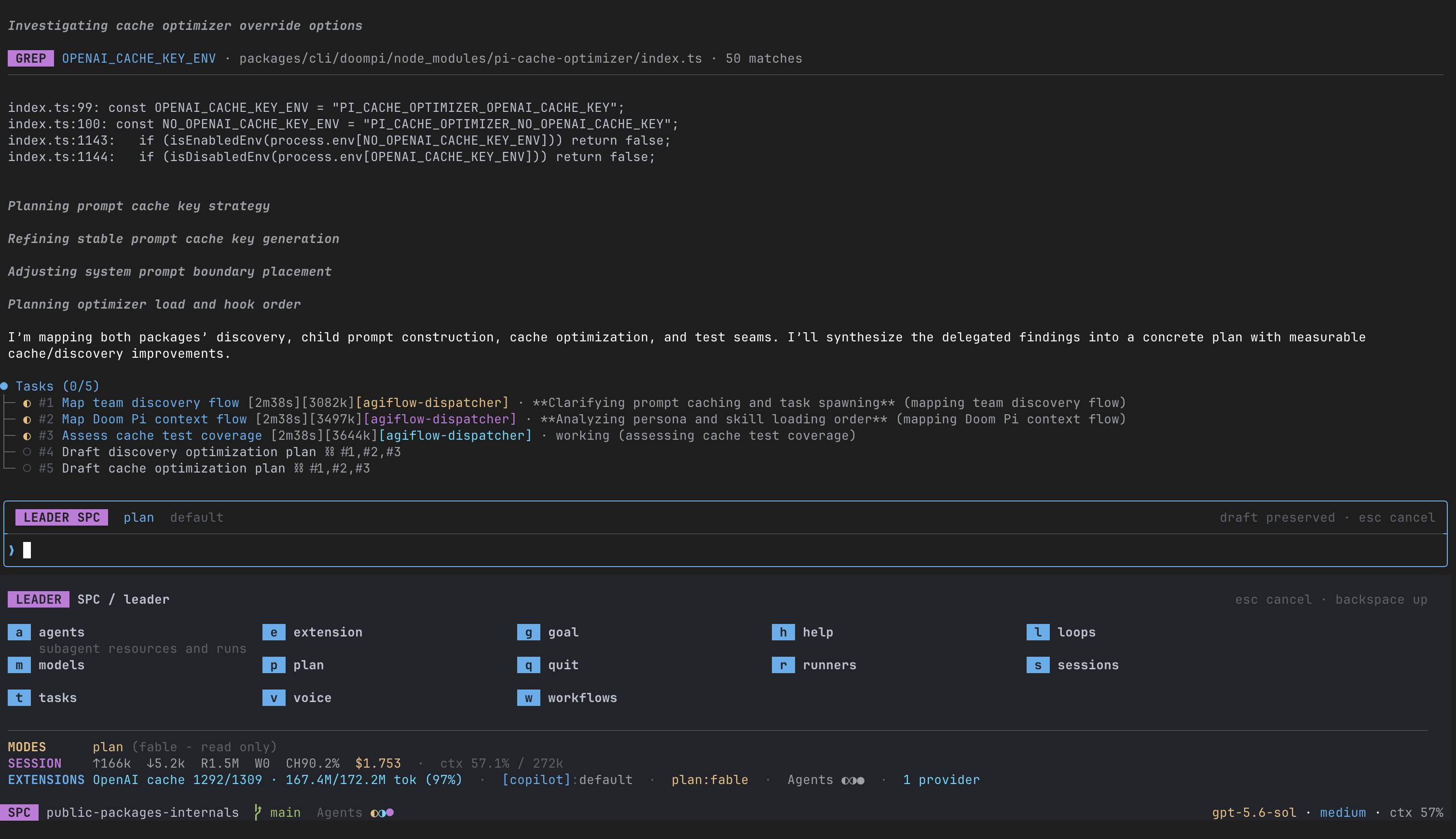
Plugin systems scope what an agent knows. They do less to scope which configured plugins and MCP
servers a particular session can load. Claude Code's enableAllProjectMcpServers and static
denylist are repository-wide. DoomPi draws that loading boundary around the session. Pick a major
mode and some domains; add a profile if you want one. Four YAML files decide what loads;
doompi --explain tells you what got in, why, and what it costs before launch.
It borrows its shape from Doom Emacs Core: quick to start, close to Pi, opinionated where defaults help, and easy to pull apart when they do not. Use it as-is, build your own config on top, or raid it for parts.
Contents
Install · Try DoomPi · Philosophy · What this buys you · Features · Configuration · Trust and data boundaries · CLI reference · Troubleshooting · Architecture · Development
Install
npm install -g @agimon-ai/doompi
The package pins and installs the upstream Pi version used by dpi.
The root package contains the fixed host foundation only. Feature packages are selected by
.doom/modes.yaml and installed into the consumer repository when they are first needed.
Status and requirements
DoomPi is alpha software. Configuration and package boundaries may still change between alpha releases.
- Node.js 22.19.0 or newer
- macOS or Linux on arm64 or x64 for the bundled Runner backend
- Pi 0.85.0 and Pi TUI 0.85.0 for packages that declare them as peer requirements
Try DoomPi without replacing your Pi setup
dpi is the comparison runner. Use it to try DoomPi beside your current pi customization
before registering anything in Pi's settings:
dpi init                                   # create this repository's .doom configuration
dpi sync                                   # resolve and synchronize the DoomPi experiment
dpi                                        # run the DoomPi experiment
pi                                         # run your existing Pi setup for comparison
dpi init creates .doom/config.yaml, .doom/modes.yaml, .doom/domains.yaml, and
.doom/profiles.yaml in the current repository. It preserves existing files unless you pass
--force and does not create or change .pi/settings.json.
dpi sync installs missing configured feature packages and publishes a generated runtime, web bundle,
and API route set for the current repository and worktree. It does not change either normal Pi settings
file. It prepares every declared layer so switching modes does not depend on the root package's
dependency closure.
Sync storage and worktrees
DoomPi stores generated sync data under ~/.pi/.doom/sync, outside the repository. Repository and
worktree identities select separate namespaces. Outside a repository, the canonical ~/.pi/.doom
configuration gets its own global composition and registration. Each successful sync writes a new immutable
generation, then atomically publishes that generation's registration as the final commit step. A failed sync
removes its unpublished generation and leaves the previous registration active. One sync target never rewrites
another target's registration or generation.
dpi preserves Pi's normal global and repository settings, then applies DoomPi's extension and theme
settings in memory. It never writes those values to .pi/settings.json.
Run doompi sync --check to detect missing, invalid, or stale registered state. Unregistered legacy state
is not loaded. Inside a repository, doompi sync publishes that repository and worktree. Outside every
repository, it publishes the global composition from ~/.pi/.doom.
When you are comfortable with DoomPi and no longer need the side-by-side experiment, initialize the normal Pi integration and synchronize the scopes you use:
doompi init                                  # seed ~/.pi/.doom and register the managed Pi integration
doompi sync                                  # publish the current repository, or the global composition
pi                                           # use the nearest repository, otherwise the global composition
doompi remains available as an explicit harness when you want per-run matrix flags:
doompi --major-mode copilot --no-domains
doompi --major-mode minimal --no-domains
doompi --major-mode copilot --no-domains --explain
Philosophy
An agent does not need every tool for every job. DoomPi separates the base session from the things you switch on for a while: modes choose behavior, domains choose subject matter, and profiles choose a point of view.
Major and minor modes
A major mode is the base config. It names the extension layers for development, marketing, or whatever else you do. Define as many as you like; only one is active at a time, and you can switch it without leaving the session.
Minor modes are batteries-included switches inside that base. They start off, stack freely, and keep their model tools and skills out of context until turned on. DoomPi ships six:
- Help mode: expose package-owned guidance only while you need it.
- Plan mode: remove Pi's file-editing tools while you agree on an approach.
- Loop mode: run a prompt now, then run it again on a schedule.
- Goal mode: keep one objective in view until it is done or dismissed.
- Workflow mode: run jobs with dependencies, timeouts, and artifacts.
- Voice mode: replace typing with local speech.
Domains
A domain is a named group of agent plugins. It carries the skills and MCP servers for one
kind of work, and /domains switches it while the session is running.
Plugins are cataloged once and domains refer to their names. A configured root may be a Codex-compatible marketplace or a folder whose direct children are plugins, so a repository with many plugins does not need one entry per directory:
plugins:
  roots: [plugins]
  entries:
    remote-review:
      source: url
      url: '<REVIEW_PLUGIN_GIT_URL>'
      ref: v1.2.0

domains:
  development:
    description: Implementation and code-review tools.
    plugins: [pi-development, remote-review]
DoomPi also checks personal and repository Codex marketplace layouts. Marketplace IDs use
plugin@marketplace. Remote Git and npm sources are downloaded once into the persistent
~/.pi/.doom/plugin-cache directory. Cache entries are reused until their source descriptor
changes; use a Git SHA or exact npm version for reproducible installs. Home and repository
catalogs merge, and repository names replace matching home names.
A blog is not one task. Research it, draft it, make the assets, then review it. Turn on the
visual domain while making assets; the other three steps have no reason to carry it.
Profile
An LLM has no house style until you give it one. A profile can supply a narrative, brand rules, or a different voice. It is optional; no profile is a perfectly good profile.
Profile roots remove the need to list every persona folder. A root may itself contain the
persona files, or its direct-child folders become profiles named after those folders. DoomPi
recognizes profile.md, SOUL.md, and AGENTS.md and never searches deeper directories.
profiles:
  roots: [agents/acme]
  entries:
    editor:
      persona: agents/special/editor
      env:
        EDITOR_MODE: strict
Roots from the home and repository files accumulate relative to their declaring config.
Repository discoveries replace same-named home discoveries. Explicit entries override
discovery and can add string environment defaults; repository entries replace matching home
entries. Select one at launch with --profile editor or switch with /profile.
What this buys you
Every tool schema and skill name competes for the same context. Loading less has two immediate effects:
- You spend fewer tokens before the work begins.
- The model has fewer plausible-but-wrong tools and skills to choose from.
The savings get larger when each workflow job starts with its own config instead of inheriting the last job's toolbox.
Copilot
I got tired of remembering slash commands, so SPC is the map. It opens only when the
draft is empty; a space in the middle of a prompt remains a space. Press it, read the
choices, then press the next key.
When the keyboard is the wrong tool, autonomous Voice mode keeps the conversation going. You can talk to the agent while doing the chores instead of carrying a laptop around the house, and the primary agent can speak its own opening, milestone, and final updates.
Autopilot
Copilot helps while you are present. Loop and Workflow keep work moving when you are not. Together they can dispatch structured jobs from one live session.
Workflows
GitHub Actions already has a decent vocabulary for long jobs, so DoomPi reuses it. Each job declares the DoomPi session it wants. Here, implementation gets development tools; an article waits for it and gets focused blog-writing context:
on:
  workflow_dispatch:

jobs:
  implement:
    steps:
      - name: Build the feature
        timeout-minutes: 180
        interactiveRun:
          default: |
            doompi --major-mode examples --domains development --auto-stop \
              --cwd "$PWD" "$JOB_SYSTEM_PROMPT"

  article:
    needs: implement
    steps:
      - name: Write the article
        timeout-minutes: 30
        interactiveRun:
          default: |
            doompi --major-mode examples --domains blog --auto-stop \
              --cwd "$PWD" "$JOB_SYSTEM_PROMPT"
Native plugin and workflow examples
This source repository includes a complete, deliberately small example stack:
plugins/
  development/   implementation skill and developer agent
  testing/       testing and review skills, tester and reviewer agents
  blog-writing/  research, outline, drafting, and editorial skills and agents
automations/workflows/
  dev-feature.workflow.yml
  dev-fix.workflow.yml
  blog-writing.workflow.yml
Each plugin has both .codex-plugin/plugin.json and .claude-plugin/plugin.json, while its
skills/ and agents/ content is shared. .doom/domains.yaml exposes the development,
testing, and blog domains plus the engineering alias. .doom/modes.yaml mirrors the
standalone package set with workspace-local paths, keeps its canonical modes, and adds a layer-free
examples base mode for the tracked workflows. Inspect the exact session before launch:
doompi --major-mode examples --domains engineering --explain
doompi --major-mode examples --domains blog --explain
The same bundles can be installed directly through either native marketplace:
# Codex
codex plugin marketplace add .
codex plugin add development@doompi-examples

# Claude Code
claude plugin marketplace add ./ --scope user
claude plugin install development@doompi-examples --scope user
Substitute testing or blog-writing to install another bundle. No DoomPi-specific plugin
schema is involved.
List and dry-run the tracked workflows before spending a model call:
pnpm exec workflow-mcp list-workflows automations/workflows
pnpm exec workflow-mcp run-workflow automations/workflows/dev-feature.workflow.yml \
  --dry-run --skip-launch --prompt "Add a health check"
pnpm exec workflow-mcp run-workflow automations/workflows/blog-writing.workflow.yml \
  --dry-run --skip-launch --prompt "Write a practical guide to scoped agent tooling"
Real runs delegate to tmux by default and accept WORKFLOW_LAUNCHER=cmux. Development runs do
not create branches, commits, or pushes. Blog runs leave review-ready Markdown, sources, and a
publication checklist in the workflow run directory without writing into a site or calling a CMS.
These examples live in the source repository and are not part of the published npm tarball.
Loop
Workflow definitions are exposed like skills, so the agent can choose one for the job. A loop can send a subagent to fetch the next task, then dispatch the workflow that matches it. One session becomes the dispatcher instead of the place every job has to fit.
Features
DoomPi is a distribution, not one giant extension. Each package owns one job; shared TUI,
Cordis services, and session contracts make them behave like one. Use the generated
default.packages list together, remove packages you do not want, or replace its entries one
at a time. Selectable packages are not runtime dependencies of the root package or of one another.
Foundation and interface
Configuration and composition
@agimon-ai/doompi is both an extension and the command-line config compiler.
dpi init creates repository config for an isolated experiment, while doompi init creates the
personal config and registers the permanent Pi integration. The sync commands resolve every major
mode and domain into a distribution Pi can load quickly.
Supporting packages
@agimon-ai/doompi-config resolves the four YAML files and exposes the
configuration API. @agimon-ai/doompi-domain owns domain selection, plugin
materialization, resource staging, and MCP scoping.
@agimon-ai/doompi-extension-contracts contains the shared
Cordis service and event contracts used by extension authors.
@agimon-ai/doompi-hashline provides the shared snapshot tags and line-anchor
protocol. @agimon-ai/doompi-read and @agimon-ai/doompi-grep
produce editable anchors for writable files while preserving Pi's native output for non-writable files.
@agimon-ai/doompi-edit replaces Pi's search-and-replace edit tool with
stale-safe ranges anchored to the file content the model read or searched.
@agimon-ai/doompi-file-edit opens files in the configured editor and
keeps the edit timeline. @agimon-ai/doompi-log collects session events, while
@agimon-ai/doompi-telemetry is the library-level telemetry adapter.
Runner selects matching RMUX and RTK native artifacts automatically. Do not install them directly. The packages cover macOS and Linux on arm64 and x64 for both RMUX and RTK.
Leader key
@agimon-ai/doompi-ui turns SPC into a map of the available commands. It stays out of
the way when a draft is not empty, and other packages contribute bindings through one
leader API instead of hardcoding their own menus.
Coordinated work
Agent team
@agimon-ai/doompi-team runs named subagents asynchronously. It owns agents,
runs, membership, intercom, and model policy; Task owns the persistent task graph used for
delegation. Agents can work in parallel and message one another. SPC a l lists available agents;
SPC a r opens current-session runs and their controls.
Tasks
@agimon-ai/doompi-task keeps a task graph on disk, not a disposable checklist in the
transcript. Dependencies persist independently of transcript compaction, and work can be handed to
a subagent, including a smaller model when the job does not need the expensive one. Seeded
minimal and copilot modes select its task layer; omit that layer when a major mode
should not expose the task tool.
Runner
@agimon-ai/doompi-runner replaces Pi's blocking bash tool with
supervised command execution. doompi init includes Runner in default.packages, so every
generated mode gets it. Short commands still return inline; commands that pass the configurable
threshold of 60 seconds by default move into the background with durable logs. Use
background: true for an immediate detached run or interactive: true when the command needs
terminal input. Runner IDs and complete raw logs remain available to the current session through
Runner Space at SPC r l or the doom-runner CLI. Platform-specific RMUX binaries are selected
automatically; non-interactive commands use a supervised subprocess fallback when RMUX is absent,
while interactive commands require RMUX. Conservatively recognized single commands use the matching
RTK stdin filter after completion. Compound commands, pipelines, incompatible formats, and
unsupported commands keep bounded raw output. Remove Runner from default.packages to keep Pi's
bash, or add it to a named layer when only selected modes should replace bash.
Auto-compact
Ordinary compaction waits for one summary to save an overgrown session.
@agimon-ai/doompi-autocompact leaves checkpoints instead:
- At 50%, it writes the first compact summary.
- Later, it combines that summary with the messages since; the model decides whether the result is ready to use.
- On the third pass, it combines them again and forces compaction.
The work runs off-thread and can make up to three additional summarization calls. The standard adapter preserves staged conversation checkpoints; Task and Team keep their own state rather than being embedded as special snapshots in the compact summary.
Context and access
Help mode
@agimon-ai/doompi-help keeps package guidance out of the default prompt. A
fresh parent session performs no Help retrieval and exposes no Help skills. Use SPC h e, or the
existing minor_mode client in headless sessions, to activate the package indexes; use the same
action to deactivate them before the next interaction. Help names state their intent: authoring
guides use doompi-author-*, while operational guides use doompi-use-*. Core authoring guidance
covers extensions, runtime config, major modes, domains, profiles, hooks, workflows, and skills.
Parent and detached-child sessions both include the Help runtime, while root and axis authoring
guides remain parent-owned and all guidance stays withdrawn until Help mode is activated.
MCP
@agimon-ai/doompi-mcp is the gate between a session and its servers. It reads
repository and legacy plugin .mcp.json plus Agent Plugins v1 mcp.json, then exposes only the
servers and proxy upstreams allowed by the selected domains. A domain switch persists an immutable
projection; after Pi replaces the factories, Config publishes it through the session Cordis
registry and MCP starts a fresh in-memory mcp-proxy container. No Hono server or localhost proxy
sits in this path.
Ask user question
@agimon-ai/doompi-user-feedback gives the agent a structured question
that actually waits for an answer. In autonomous Voice mode it skips the modal, narrates the
choices, and accepts the next spoken response as an ordinary user message.
Logging and telemetry
DoomPi logging records operational metadata such as counters, spans, session IDs, tool names, and
errors. Callers remain responsible for values they attach to telemetry. SPC h l opens current-session
metrics, and @agimon-ai/log-sink-mcp provides historical lookup when a sink is
configured.
Modes and automation
Plan mode
A promise to "only plan" is not a permission boundary. @agimon-ai/doompi-plan
removes Pi's edit and write tools while the agent explores, persists the plan, and hands it back
for approval. It does not sandbox Bash, external tools, or the operating system. SPC p e enters
normal planning and leaves it again once on; SPC p d is debug planning and SPC p f the Fable
flow.
Turn it on when the approach should be settled before the files move.
Loop mode
@agimon-ai/doompi-loop is an in-session scheduler. It runs a prompt immediately
and then repeats it on an interval; several loops can coexist. Use SPC l s to start one and
SPC l l to list or stop them. It is for recurring checks and prompts that belong to the current
session.
Goal mode
@agimon-ai/doompi-goal pins one objective to the session until it completes or
you end it. SPC g e starts a goal and ends it once one is held; SPC g g shows status and
SPC g l lists repository history. Finished goals stop contributing active instructions and tools but remain in history when
you want to restart one.
Workflow mode
@agimon-ai/doompi-workflow runs GitHub Actions-style job graphs with
dependencies, timeouts, artifacts, and a separate DoomPi session for each step. Use SPC w l to
browse the repository's workflows and launch one with r, SPC w r to inspect this session's runs,
SPC w c to recover a failed run, and SPC w e to give the agent workflow tools or take them back. It is for work that needs hard job boundaries and explicit
handoffs rather than one long conversation.
Voice mode
@agimon-ai/doompi-voice captures PCM audio through the local platform helper
and can transcribe it locally. Transcript text, session state, and model requests may still cross
process or provider boundaries according to the configured engines. SPC v v is one-shot manual
dictation and never enables Voice tools. SPC v e enters autonomous capture and exits it again; only its exact-active
TUI session receives the two Voice façades plus the standalone narrate tool.
While narrate is available, the primary agent calls it before every user-facing final
response. Final narration contains the complete answer, including every user-relevant
conclusion, question, warning, result, and next action in the written response, rather than
leaving essential information only in text. Short turns need one complete spoken answer;
longer work also gets an opening and meaningful milestone calls. Each ready-to-speak
utterance is limited to 4,096 characters, waits for physical playback, and returns
completed, interrupted, superseded, or failed.
If the agent never attempts narrate during a run, exact-active Voice speaks one sanitized
turn-end fallback rather than leaving the final response silent. Finals of at most 320
characters use deterministic speech; longer finals use the configured
voice.autoCapture.model for one bounded summary, with deterministic degradation on
failure or timeout. Any narrate attempt suppresses this safety net, so it cannot duplicate
or retry direct speech. Voice does not generate automatic intent, plan, milestone, or tool
progress narration. External task, workflow, and user-feedback narration remains
available, and the same model continues to provide bounded command correction.
Configuration
DoomPi reads four configuration files:
config.yamldefines runtime settings such as trust, editor, planning, and voice behavior.modes.yamldefines default packages, extension layers, and major modes.domains.yamlcatalogs plugins and sets session access.profiles.yamlsupplies persona files and environment defaults.
Each matrix file has two optional layers: personal defaults in ~/.pi/.doom/ and repository
overrides in <repository>/.doom/. DoomPi loads both. Unique named entries from either layer
remain available; a same-named repository entry replaces the complete personal entry. Plugin
and profile roots from both layers are retained. Relative paths in personal config resolve
from ~/.pi/.doom/; relative paths in repository config resolve from the repository root.
modes.yaml: choose behavior
A layer is an ordered bundle of extension packages and hook groups. A major mode names the
layers that should run together. The top-level default.packages list is the ordered package
baseline for every major mode. doompi init and dpi init write the distribution's current
feature packages there so the baseline is visible and replaceable. If default is absent,
DoomPi adds no default feature packages. Use default.packages: [] for an explicit empty
baseline. The fixed host core remains active independently of this setting, and named layers
keep their existing behavior.
Launch installs missing required packages from the defaults and selected layers. doompi sync
installs missing required packages from the defaults and every declared layer, moves every
package in Pi's managed .pi/npm store to its newest published version, then builds the
synchronized matrix. A package whose published version cannot be read, because the machine is
offline or the registry refuses the request, keeps its installed version and is named in the
sync output. doompi sync --check reports missing packages without modifying the repository. Optional packages and local paths are not installed automatically. Removing an
entry stops activating it but leaves Pi's package cache available for later reuse.
Packages in default and named layers may be bare strings, or mappings when the package accepts
configuration:
default:
  packages:
    - '@agimon-ai/doompi-help'
    - '@agimon-ai/doompi-hook'
    - '@agimon-ai/doompi-goal'
    - '@agimon-ai/doompi-voice'
    - '@agimon-ai/doompi-runner'
    - '@agimon-ai/doompi-read'
    - '@agimon-ai/doompi-grep'
    - '@agimon-ai/doompi-edit'
    - '@agimon-ai/doompi-file-edit'
    - '@agimon-ai/doompi-autocompact'
    - '@agimon-ai/doompi-loop'
    - '@agimon-ai/doompi-plan'
    - '@agimon-ai/doompi-workflow'
    - '@agimon-ai/doompi-log'
    - '@agimon-ai/doompi-mcp'

layers:
  team:
    packages:
      - name: '@agimon-ai/doompi-team'
        config:
          models:
            - model: provider/model-id
              thinking: high
  review:
    packages:
      - '@scope/review-extension'

defaultMajorMode: copilot
majorMode:
  minimal:
    description: Lean sessions with delegation and little else.
    layers: [team]
  copilot:
    description: General coding with delegation and review tools.
    layers: [team, review]
Order matters: DoomPi assembles default.packages first, then the selected layers and their
packages from left to right. Put settings under the package that consumes them; a layer is
composition, not a mystery bag of shared configuration. Home and repository layers and
majorMode records merge by name, with the repository definition winning a collision. If both
sources declare default, the repository block replaces the personal block as one whole package
list.
Configurations created before the hashline tools were split may contain only doompi-edit.
Replace that entry with the ordered doompi-read, doompi-grep, and doompi-edit trio. Init
preserves existing configuration unless it is run with --force.
Choose a mode with --major-mode copilot, switch it with /mode, or change
defaultMajorMode when one mode should be the ordinary starting point.
domains.yaml: choose content and access
Plugins are cataloged once, then domains refer to their names. A root can be a marketplace, a single plugin, or a container whose direct-child folders are plugins. Discovery is intentionally nonrecursive: a tool buried five directories down should not load by accident.
defaultDomains: [development]

plugins:
  roots: [plugins]
  entries:
    remote-review:
      source: url
      url: '<REVIEW_PLUGIN_GIT_URL>'
      ref: v1.2.0
    published-research:
      source: npm
      package: '@acme/research-plugin'
      version: 1.4.0

domains:
  development:
    description: Repository implementation tools.
    plugins: [coding-tools]
  review:
    description: Focused review skills with a narrow MCP boundary.
    plugins:
      - name: remote-review
        skills: [typescript]
        agents: [reviewer]
        hooks: false
        mcp: true
    mcp:
      servers: [filesystem]
      proxy: [github]

aliases:
  work: [development, review]
Here, coding-tools is discovered from plugins/coding-tools; its manifest name, or its
folder name when no manifest name exists, becomes the catalog ID. Local roots and entries
resolve beside the declaring file. Git and npm entries are cached in
~/.pi/.doom/plugin-cache; pin a Git SHA or exact package version when reproducibility
matters. Domains may load an entire plugin or select only its skills, agents, hooks, and MCP
configuration. The optional mcp mapping is an allowlist, not a request to start every server
in the repository.
Select one or more domains with --domains development,review, use an alias such as
--domains work, or switch them with /domains. --no-domains is useful when the right
amount of repository context is none.
profiles.yaml: choose a point of view
A profile directory becomes discoverable when it directly contains profile.md, SOUL.md,
or AGENTS.md. A root may be one profile or a container of direct-child profiles. The folder
name becomes the profile name; DoomPi concatenates those three files in that order.
profiles:
  roots: [personas]
  entries:
    release-writer:
      persona: personas/release-writer
      env:
        BRAND: acme
        TONE: concise
With that config, personas/release-writer/profile.md is enough to discover
release-writer. The explicit entry is optional; use one when the profile needs another name,
an exact persona path, or string environment defaults. Explicit entries override discovered
folders. Already exported environment values win, so selecting a profile never quietly
replaces a value supplied by the caller.
Discovery never recurses. Persona paths must remain under agents/ or a root declared in the
same file, and symlinks may not escape the persona boundary. Legacy profiles written directly
under profiles still load, but new configuration should use roots and entries.
Select a profile with --profile release-writer or switch it with /profile. Leaving the
catalog empty is valid; no profile remains a first-class choice.
Check the matrix before launch
The fastest configuration debugger is the one that does not start a model:
doompi --major-mode copilot --domains work --profile release-writer --explain
dpi sync
doompi sync --check
--explain prints the resolved mode, domains, profile, plugins, skills, agents, MCP boundary,
and estimated prompt cost. dpi sync resolves the repository configuration and synchronizes
DPI without registering it in normal Pi settings. doompi sync --check turns drift into a
non-zero exit code for CI. If the explanation is surprising, fix the YAML before paying a model
to be surprised with you.
Trust and data boundaries
DoomPi executes the extensions, remote Git/npm plugins, hooks, MCP stdio commands, workflows, and shell commands you configure. Treat them as trusted executable code. Runner commands inherit the process environment and operating-system privileges; their logs may contain command output and secrets. MCP credentials may live in the system keyring or private configuration files.
Voice can keep PCM capture and transcription local when local engines are selected, but transcript text and model requests follow the configured providers. Loop, Workflow, Plan, Autocompact, Team, and autonomous Voice can make additional model calls. Telemetry is disabled or redirected through its owning package's controls; values supplied by callers are not automatically scrubbed.
CLI reference
| Command or option | What it does |
|---|---|
dpi init, dpi sync, dpi |
Creates, synchronizes, and runs the repository-scoped comparison setup |
doompi init |
Seeds personal config and installs the managed Pi dispatcher, settings, and theme |
doompi sync |
Publishes the current repository, or the global composition outside repositories |
doompi sync --check |
Exits non-zero when the applicable registered generation is missing or stale |
doompi compat <codex|claude|antigravity> |
Resolves the selected matrix and launches the compatibility adapter |
doom-runner |
Inspects and controls supervised Runner processes and logs |
--explain |
Prints the resolved matrix and estimated prompt cost without launching Pi |
--emit-mcp <dir>, --no-mcp |
Writes the resolved MCP config or disables MCP for one run |
--cwd <path>, --auto-stop |
Chooses the working directory or exits after an interactive agent settles |
-- and remaining arguments |
Forwards provider or Pi arguments unchanged where the selected command allows it |
Troubleshooting and direct use
- Run
doompi sync --checkto detect drift or missing configured packages, anddoompi syncto install them and rebuild synchronized state. - If RMUX is unavailable, non-interactive Runner calls report the supervised subprocess fallback. Interactive calls require RMUX. Linux native artifacts require a compatible loader and libc.
- Leader menus and overlays require Pi's interactive TUI. Commands and tools remain the interface for JSON, RPC, and other headless sessions where the owning package supports them.
- Install a directly loaded Pi subsystem with
pi install npm:@agimon-ai/<package>. Library consumers usenpm install; native RMUX and RTK artifacts are selected by Runner and should not be installed directly. The rootdoom-runnercommand delegates to Runner from the active repository and asks you to add Runner tomodes.yamlwhen it is absent. The distribution remains the supported way to get the coordinated defaults.
Architecture
See Architecture for standard Pi package composition, canonical fingerprints, transition classification, synchronized bundles, shared-host Cordis lifecycle ownership, and parent/child isolation.
Development
pnpm install
pnpm build
pnpm examples:check
pnpm nx build @agimon-ai/doompi
pnpm nx test @agimon-ai/doompi
pnpm nx typecheck @agimon-ai/doompi
pnpm nx lint @agimon-ai/doompi
DoomPi is maintained by Agimon.
License
MIT
Maintainer release order
Publish @agimon-ai/doompi-extension-contracts and
@agimon-ai/doompi-hashline first, then
@agimon-ai/doompi-help, and only then the
@agimon-ai/doompi runtime that consumes them. Generated changelogs remain owned
by the release tooling.
The deploy workflow blocks publishing unless the deterministic DoomPi architecture sweep and the packed-install system tests both pass. This keeps the shared Cordis host contract and independently loaded extension graph inside the same release boundary as the packages that consume them.