@aiwayds/pi-jarvis-sphere
pi-coding-agent extension — Jarvis particle sphere overlay: four-state animation (flow-field / stars / orbital) shifting color with pi's live state, plugin-architected and config-driven
Package details
Install @aiwayds/pi-jarvis-sphere from npm and Pi will load the resources declared by the package manifest.
$ pi install npm:@aiwayds/pi-jarvis-sphere- Package
@aiwayds/pi-jarvis-sphere- Version
1.2.1- Published
- Aug 17, 2026
- Downloads
- 176/mo · 32/wk
- Author
- aiwayds
- License
- MIT
- Types
- extension
- Size
- 503.1 KB
- Dependencies
- 0 dependencies · 2 peers
Pi manifest JSON
{
  "extensions": [
    "index.ts"
  ]
}
Security note
Pi packages can execute code and influence agent behavior. Review the source before installing third-party packages.
README
pi-jarvis-sphere 🜄
Jarvis particle sphere for the pi agent — a particle-sphere overlay floating in the bottom-right corner of your pi terminal. It shifts color and animation with pi's live state — amber hand-drawn star loop while thinking, yellow clockwise particle ring during tool calls, cyan clockwise orbital particle flow while streaming the answer, and a denser pulse while TTS speaks — like a little assistant that's alive. Sub-agent activity (via pi-subagents) also animates the sphere as the tool state.
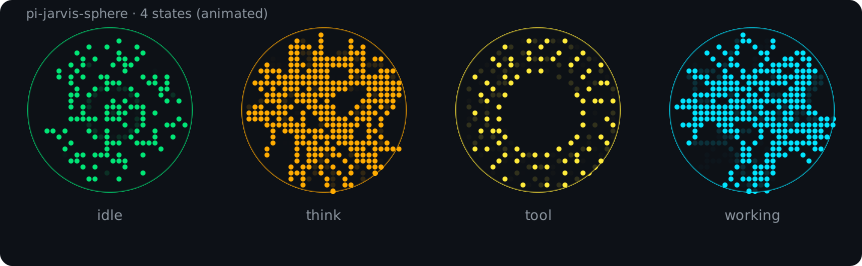
Simulated four-state animation (SMIL SVG, generated from the actual render code — flow field / refraction / orbital particle ring)
✨ Features
Four-state animation, color = state:
State Color Animation Idle green #00e676curl noise flow field (slow) + center water ripple Thinking amber #ffab00star shapes (7-shape loop hand-drawn, fixed counter-clockwise) Tool call yellow #ffeb3buniform particle ring, clockwise — center hollow, 4 layers × 20 dots (80 particles), differential rotation: inner slower, outer faster Working (streaming answer) cyan #00E5FForbital particle flow (clockwise, same as tool) Sub-agent yellow (tool) sub-agent activity reuses the tool animation via subagents:started/subagents:completed/subagents:failedsignalsWind-down keeps current color 1-second ease-out deceleration after thinking/tool/working ends, then back to idle TTS sync: when pi-ext-tts-mimo plays speech, the sphere pulses denser and faster, as if talking (idle 10 FPS → 30 FPS while speaking).
Direction anchor: the flow field rotates clockwise/counter-clockwise; deceleration is eased so direction stays readable.
Non-intrusive: a
nonCapturingoverlay — typing and keybindings are completely unaffected.Toggleable:
/jarvistoggles it on/off, persisted toconfig.json(on by default).Lifecycle-safe: mounts on
session_start, cleans up onsession_shutdown; sub-agent sessions don't double-mount;/reloaddoesn't leak listeners.
📦 Installation
Option A — npm (recommended)
pi install npm:@aiwayds/pi-jarvis-sphere
Option B — from source
# 1. Clone into its own directory (same convention as other ~/github pi extensions)
git clone https://github.com/fan56/pi-jarvis-sphere.git ~/github/pi-jarvis-sphere

# 2. Symlink into pi's extension dir (pi auto-discovers ~/.pi/agent/extensions/<name>)
ln -s ~/github/pi-jarvis-sphere ~/.pi/agent/extensions/pi-jarvis-sphere

# 3. /reload inside pi — done
Optional dependency:
pi-ext-tts-mimoprovides thetts:started/tts:stoppedsignals so the sphere can react to speech. Without it the sphere still works — just no talking pulse.
🎮 Usage
| Command | Effect |
|---|---|
/jarvis |
Toggle the sphere on/off (state written to ~/.pi/agent/pi-jarvis-sphere.json) |
config.json is user-editable in your agent dir (created on first /jarvis toggle):
{ "enabled": true }
Config precedence:
~/.pi/agent/pi-jarvis-sphere.jsonis read first if it exists; otherwise the package's bundledconfig.jsonis used as a read-only default. The package file is never overwritten —pi updatewon't lose your settings.
🧩 Plugin Architecture
Each animation lives in its own plugin file (closure-owned particle state) behind a unified interface; the scene → animation mapping is driven by config.json — swap animations by editing config, no code changes.
animations/          # animation plugins (new animation = new file + one registry line)
  flow-field.ts      # flow field + water ripple (idle default)
  refract.ts         # refraction particles
  stars.ts           # star shapes (think default; 7-shape loop hand-drawn)
  stars2.ts          # staggered star shapes (think default v2; two shapes overlapping)
  orbital.ts         # orbital particle ring (tool default)
  registry.ts        # id -> factory registry
lib/                 # shared layer: types / grid geometry / braille primitives / noise / scene config
config.json          # your editable "plugin catalog"
The scenes field of config.json controls which animation each scene mounts and its parameters:
{
  "enabled": true,
  "scenes": {
    "idle":    { "animation": "flow-field", "params": { "fieldSpeed": 0.06, "dir": 1, "fieldCount": 120, "fieldScroll": 0.02 } },
    "think":   { "animation": "stars",    "params": { "starSpeed": 0.02, "cycleFrames": 160, "starSize": 0.82, "breathSpeed": 0.04 } },
    "tool":    { "animation": "orbital",  "params": { "spinSpeed": 0.15, "dir": 1 } },
    "working": { "animation": "orbital",  "params": { "spinSpeed": 0.15, "dir": 1 } }
  }
}
Stars — think scene default
The default animation for the think scene: loops through 7 hand-drawn shapes — triangle → square → pentagram → hexagram → heptagram → octagram → enneagram — from simple to complex, each shape drawn edge-by-edge, rotating fixed counter-clockwise.

Seven shapes sampled at the hold-mid frame of each cycle, rendered from the actual render code (center breathing dots included)
| Param | Meaning | Default |
|---|---|---|
starSpeed |
rotation speed (rad/frame; positive = counter-clockwise) | 0.02 |
cycleFrames |
frames per shape cycle — first 40% draws edges one-by-one + scales up, middle 45% full hold, last 15% shrink & hand-off | 160 |
starSize |
star circumradius as a fraction of the sphere radius | 0.82 |
starStep |
skip-step override (-1 = per-shape table; positive int mod n) |
-1 |
breathSpeed |
center breathing speed (0.04 ≈ one breath every 2.6 s) |
0.04 |
Center breathing: a 2×2 dot cluster at the sphere's center pulses with a sine wave (1 → 4 dots lit).
Example — plug the "particle ring" (orbital) into the think scene: change one line of config.json:
"think": { "animation": "orbital", "params": { "spinSpeed": 0.15, "dir": 1 } },
Then /reload in pi. Missing params fall back to each plugin's defaults; dir controls rotation (1 = clockwise / -1 = counter-clockwise).
Note: think and working are independent animation slots — you can mount different animations per scene; the same animation in multiple scenes holds separate particle instances (no interference). working uses the same clockwise orbital particle flow as tool (
dir: 1).
Stars2 — think scene default (v2)
The default think animation as of v1.1.0: staggered star shapes — the next shape starts generating when the current one is halfway through its lifecycle, so two shapes are always on screen simultaneously (50% phase offset). Shape order is randomized but never repeats the same shape twice in a row.
| Param | Meaning | Default |
|---|---|---|
starSpeed |
rotation speed (rad/frame; positive = counter-clockwise) | 0.02 |
cycleFrames |
frames per shape cycle (second shape starts at the 50% phase of the first) | 160 |
starSize |
star circumradius as a fraction of the sphere radius | 0.82 |
breathSpeed |
center breathing speed (0.04 ≈ one breath every 2.6 s) |
0.04 |
🧪 Development & Debugging
- After editing,
/reloadin pi hot-reloads (jiti runs.tsdirectly — no build step). - Syntax check:
node -e "…typescript.transpileModule…"(no tsc build). - To test: dispatch a
sleep Nsub-agent to observe the sub-agent/tool state (yellow · clockwise vortex); a normal Q&A to observe the think state (amber · star shapes).
🗺️ Roadmap
- V2: standalone external window (extension spins up a local WebSocket + browser, real 3D WebGL particle sphere)
- Think-level color ramp (off→max thermal gradient; once implemented, later superseded by the four-state colors)
📜 Changelog
See CHANGELOG.md for the full version history.