@blueocean223/pi-question
AskUserQuestion tool for pi: single/multi questions, multiSelect, previews, tab navigation
Package details
Install @blueocean223/pi-question from npm and Pi will load the resources declared by the package manifest.
$ pi install npm:@blueocean223/pi-question- Package
@blueocean223/pi-question- Version
1.0.0- Published
- Aug 27, 2026
- Downloads
- 141/mo · 141/wk
- Author
- blueocean223
- License
- MIT
- Types
- extension
- Size
- 95.6 KB
- Dependencies
- 0 dependencies · 3 peers
Pi manifest JSON
{
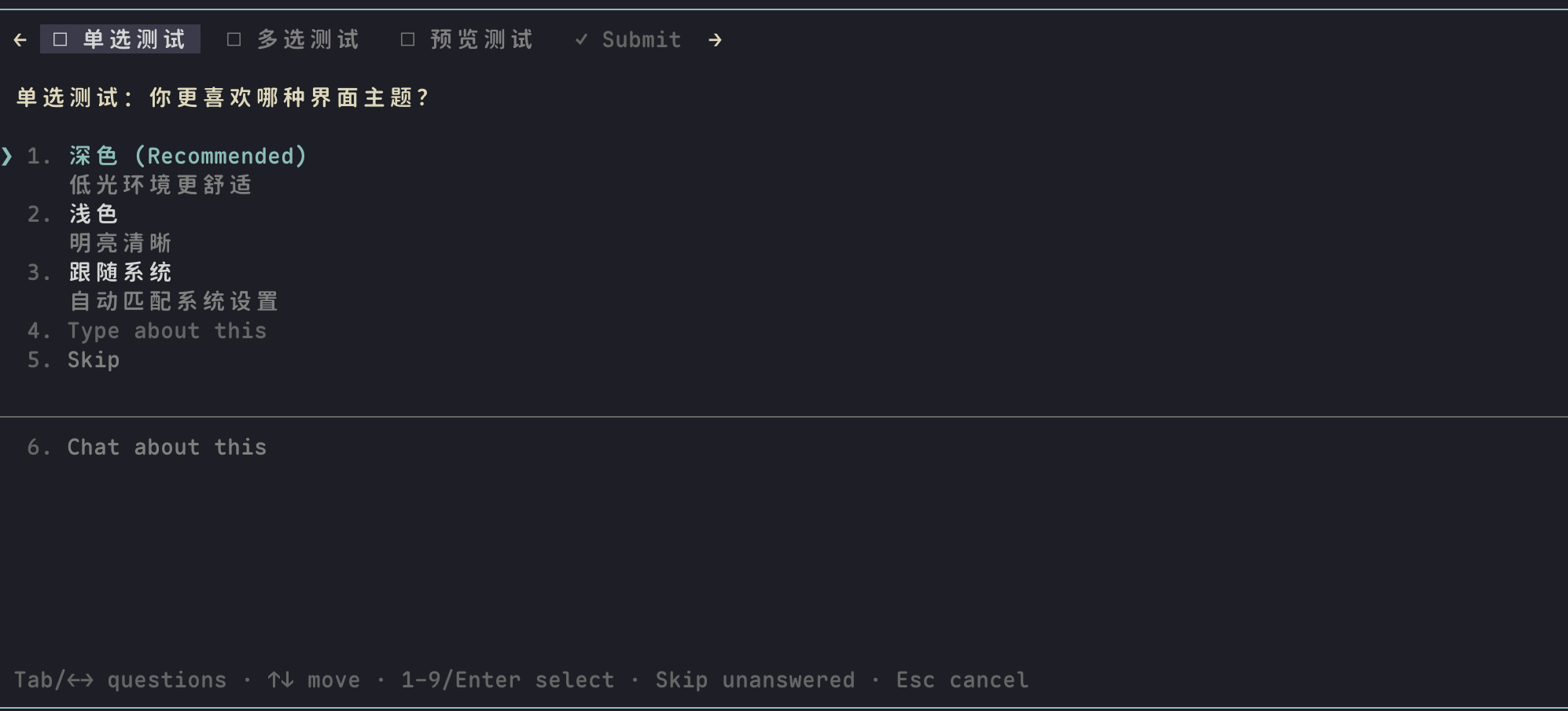
  "image": "https://raw.githubusercontent.com/BlueOcean223/pi-question/main/public/single-select.png",
  "extensions": [
    "./index.ts"
  ]
}
Security note
Pi packages can execute code and influence agent behavior. Review the source before installing third-party packages.
README
pi-question
English | 简体中文
A Pi extension that gives the LLM a Claude Code-style ask_user_question tool: when the model is blocked on a decision that's genuinely yours to make, it presents an interactive option picker instead of guessing.
What it looks like
| Single-select | multiSelect |
|---|---|
 |
![Multi-select question with `[ ]` checkboxes and an explicit Next button](https://cdn.jsdelivr.net/npm/@blueocean223/pi-question@1.0.0/public/multi-select.png) |
| Option previews | Submit review page |
 |
 |
Features
- Single question: numbered option list — press
1-9to pick instantly, or↑↓+ Enter; single-select submits as soon as you pick - Multiple questions (up to 4): tab bar with short header chips (
■answered /–skipped /✎notes /□unanswered),Tab/←→to switch, auto-jumps to the next unanswered question, final Submit review page — unanswered questions can be skipped; Enter on Submit sends whatever is selected - "Type about this" built in: every question without option previews gets an inline free-text row — focus it and just start typing. Multi-line (
Shift+Enter), paste-aware, andCtrl+Ghands the draft to your configured external editor. Text persists per question with its undo history; if you end up picking a regular option instead, your text is attached as a note rather than discarded - multiSelect:
Space/Entertoggle[x]/[ ], an explicit Next/Submit button confirms the question — no ambiguous Enter. Skip is the other half of that pair: it settles the question without a selection - Option previews: single-select options can carry a multi-line markdown
preview(code snippet, mockup, config example) rendered side-by-side with the option list (stacked on narrow terminals); digits move focus for comparing,Enterdecides,nadds a note. the focused option's description and the Notes line sit in the preview column, under the box. Preview questions carry no free-text row — typing a fifth answer has nothing to compare against, sonnotes are the escape hatch there - Skip / partial submit: every question has a Skip row; you can leave some questions unanswered and still submit. Notes-only (typed a note, picked nothing) is sent as
(notes only)so the model doesn't treat it as a vote - "Chat about this": every question offers an escape hatch that ends the dialog and asks the model to clarify instead — any answers you already picked are carried along. A rule sets it apart from the option and action rows, so it never reads as one more option
- 5-minute idle auto-submit: if you walk away, the dialog submits whatever is selected so far (last 20s show a countdown). Idle is not treated as "continue with your best judgment"
- Model-friendly results: answers are keyed by the full question text (no chip-label decoding), selected previews and notes are echoed back as annotations, and an answer you typed yourself is marked as typed instead of blending in with the options the model wrote — typed text is often an instruction, not a pick. The model sees a different wrap-up depending on the outcome (all answered / typed / partial or notes / idle / empty / cancelled), so a skipped question or a "don't ship this" note is not read as full approval
- Input validation: 1-4 questions with 2-4 options each; duplicate question texts or option labels are rejected with retryable error messages. A question with fewer than 2 options is not a decision — the model is told not to retry and not to invent a filler option, and to take its one path and continue
- The model brings an opinion: the prompt tells it to recommend by default — it has just read the code and knows something you don't — putting its pick first with
(Recommended)appended and the reason in the description. It is told to leave the recommendation off rather than manufacture one when the choice is genuinely your taste - Collapse to read the transcript:
Ctrl+]shrinks the dialog to a single line so you can scroll back through the conversation before answering, and brings it back with your answers intact - Your keybindings are honored: confirm, cancel, and navigation resolve through pi's keybinding manager, including a chat-style setup that folds
Enterinto newline and moves submit toCtrl+Enter - Polished terminal UX: full-width digits/space normalized (CJK input methods), wrap-around navigation,
Home/End/PageUp/PageDown, an option column beside previews that sizes itself to the labels, and a stable layout — switching tabs never shifts the UI - Bounded by your terminal: a tall questionnaire scrolls inside its own body (
↑ N more/↓ N more, following the cursor) instead of pushing its own header off the top of the screen - Graceful fallbacks: cancel with Esc at any point; in non-TUI runs (e.g.
pi -p) the tool is removed from the model's tool list entirely, so it never spends a call to be told there is no UI - No runtime dependencies of its own:
@earendil-works/pi-coding-agent,@earendil-works/pi-tui, andtypeboxare provided by your pi install
Installation
pi install npm:@blueocean223/pi-question
Restart pi, or run /reload inside a session. Add -l to install into the project (.pi/settings.json) instead of globally, and pi remove npm:@blueocean223/pi-question to uninstall.
To try it for a single run without installing:
pi -e npm:@blueocean223/pi-question
From source (for development)
git clone https://github.com/BlueOcean223/pi-question.git
cd pi-question
pi install "$(pwd)"
A local path is added to settings without copying, so edits apply on the next /reload.
Try it
Ask pi something ambiguous, e.g.:
I want to add auth to my app — ask me about my preferences using ask_user_question before you start.
Keys
Confirm, cancel, and up/down follow your pi keybindings; the table shows the defaults.
| Key | Action |
|---|---|
1-9 |
Pick an option directly (single-select commits, multiSelect toggles; in preview layout digits only move focus). Full-width digits 1-9 work too |
↑ ↓ |
Move between rows (wraps around; inside a multi-line draft they move the cursor, and leave the row at its first/last line) |
Home End PageUp PageDown |
Jump to the first / last row |
Enter |
Select (single) / toggle (multiSelect) / confirm on the Next/Submit button / save the inline input |
Space |
Toggle option (multiSelect); on the "Type about this" row, toggle your typed answer in/out |
| Any character | On the "Type about this" row: start typing your answer right away |
Shift+Enter |
Add a line to the text you are typing |
Ctrl+G |
Edit the current draft in your configured external editor |
n |
Add a note (preview questions) |
Ctrl+] |
Collapse the dialog to one line to read the transcript; press again to bring it back |
| Skip row (or its number) | Leave this question unanswered and continue |
Tab / ← → |
Switch questions (multi-question mode) |
Esc |
Cancel dialog (inside the inline input: save text and go back) |
Development
bun run test        # pins the strings the model reads back, plus rows/layout/keys
bun run typecheck
License
MIT