@petrel-cn/workspace-guard
Keep file writes within the current workspace, prompting for approval on anything outside it.
Package details
Install @petrel-cn/workspace-guard from npm and Pi will load the resources declared by the package manifest.
$ pi install npm:@petrel-cn/workspace-guard- Package
@petrel-cn/workspace-guard- Version
2.4.0- Published
- Aug 28, 2026
- Downloads
- 101/mo · 101/wk
- Author
- petrel-cn
- License
- MIT
- Types
- extension
- Size
- 1.1 MB
- Dependencies
- 0 dependencies · 1 peer
Pi manifest JSON
{
  "extensions": [
    "./index.ts"
  ]
}
Security note
Pi packages can execute code and influence agent behavior. Review the source before installing third-party packages.
README
workspace-guard
A pi extension that keeps file writes within the current workspace, prompting for approval on anything outside it.
English | 简体中文
What it does
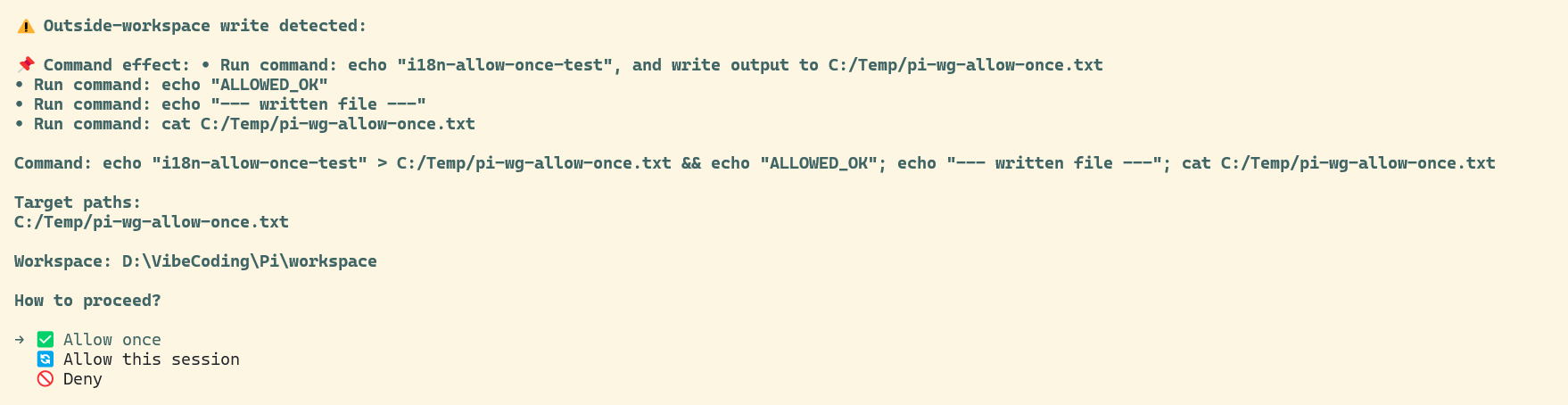
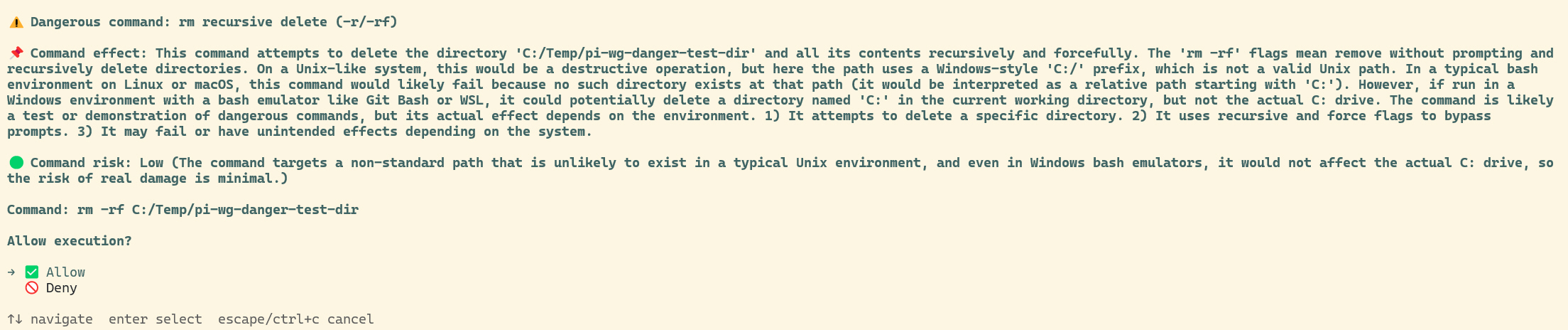
workspace-guard constrains write operations to the current workspace (the session cwd). Anything that would write outside the workspace — or a dangerous command anywhere — requires your approval first.
Approval dialogs
Features
write/edittools — the target path must be inside the workspace, otherwise an approval prompt appears. Denying it blocks the write.bashtool — detects write targets in the command (redirects>,>>, andcp/mv/rm/mkdir/touch/tee/install/dd/ln). Targets outside the workspace prompt for approval.- Dangerous-command protection —
rm -r/-rf,sudo, andchmod/chown 777require confirmation regardless of whether they stay inside the workspace. - LLM explanation + risk assessment — for dangerous commands, an LLM (reusing the current session's model and credentials, nothing hard-coded) generates a natural-language explanation and a risk level. On failure/timeout/no model it falls back to a local template.
- Non-interactive mode (print/json/rpc, no UI) — outside-workspace writes and dangerous commands are always rejected.
- Session approval cache — "Allow this session" keeps a path/command approved for the rest of the current session.
- Bilingual — the whole UI follows the system/PI_LANG language, falling back to English.
Install
# From any local path (extension directory)
pi install /absolute/path/to/workspace-guard

# Relative to the current project
pi install ./workspace-guard
Then /reload in pi to activate. When published on npm or git, you will also be able to:
pi install npm:@petrel-cn/workspace-guard     # or
pi install git:github.com/petrel-cn/pi-extensions@v1
Extensions run with full system permissions. Only install sources you trust.
Usage
| Command | Effect |
|---|---|
/wsguard |
Show current status |
/wsguard on |
Enable approval (enabled by default) |
/wsguard off |
Disable approval (writes no longer intercepted) |
/wsguard lang zh / /wsguard lang en |
Switch UI language (persisted to config.json) |
Status priority: environment variable PI_WORKSPACE_GUARD (off/0/false/no disables) > state.json memory > default enabled.
Configuration
Environment variables
| Variable | Effect |
|---|---|
PI_WORKSPACE_GUARD |
off/0/false/no disables the guard; on/1/true/yes enables |
PI_WORKSPACE_GUARD_LLM |
off disables the LLM explanation (falls back to the local template) |
PI_ALLOW_WRITE_DIRS |
Extra directories always allowed (multiple separated by the OS path delimiter — ; on Windows) |
PI_LANG |
zh or en — override the UI language |
The extension also reads state.json (enabled flag) and config.json (language) next to itself, both auto-generated on first use.
Language / Internationalization
The approval UI, command descriptions, LLM prompt, risk labels, and local templates are all bilingual. Language resolution priority:
PI_LANGenvironment variable (zhoren)- Persisted language in
config.json(set via/wsguard lang) - System language — POSIX env vars (
LANG/LC_ALL) or the system ICU locale (most reliable on Windows, e.g.zh-CN) - Fallback: English
The LLM system prompt requests Chinese 低/中/高 or English low/medium/high depending on the language; the risk parser accepts both and normalizes to low/medium/high, displayed per the current language.
Dependencies
- Weak (depends on nothing) — uses only pi's public extension API and Node built-ins.
- Broadcasts to — emits
pi-status:approval/pi-status:approval-endevents so the pi-status-window floating window can show an "approval pending" state (weak; missing it does not affect approval itself). - Runtime deps:
@earendil-works/pi-coding-agent(provided by pi; list inpeerDependencies).
Compatibility
- pi version: tested against
0.84.1+. - Node.js:
>= 20.
Notes
- Device files (
/dev/*,nul) are not treated as disk writes and do not trigger approval. - Paths containing variables or command substitutions are skipped (cannot be statically analyzed).
git/npm/yarn/pnpm/pipsubcommands get a natural-language explanation from the local template.
License
MIT — free to use, modify, and redistribute.