pi-coder
Interactive code workbench and diff review UI for Pi, with annotations, GitHub pull-request reviews, and agent handoffs.
Package details
Install pi-coder from npm and Pi will load the resources declared by the package manifest.
$ pi install npm:pi-coder- Package
pi-coder- Version
0.6.2- Published
- Sep 3, 2026
- Downloads
- 205/mo · 35/wk
- Author
- dantetekanem
- License
- MIT
- Types
- extension
- Size
- 892.4 KB
- Dependencies
- 2 dependencies · 4 peers
Pi manifest JSON
{
  "image": "https://raw.githubusercontent.com/dantetekanem/pi-coder/main/docs/assets/code.gif",
  "extensions": [
    "./src/index.ts"
  ]
}Security note
Pi packages can execute code and influence agent behavior. Review the source before installing third-party packages.
README
pi-coder
pi-coder adds two full-screen coding tools to Pi:
/diffand its/reviewalias review local changes, commits, branches, ranges, and configured remote pull requests./codebrowses and edits a workspace without leaving Pi.
It also keeps a compact repository summary in Pi's footer so you can see the current file count, additions, and deletions between reviews.
For a deeper walkthrough of the workflow, usage, and the engineering reasoning behind it, read The Human in the Loop.
Try without installing
pi -e npm:pi-coder
This runs the published package for the current Pi invocation without adding it to your project configuration.
Install
pi install npm:pi-coder
To install the latest source directly from GitHub instead:
pi install https://github.com/dantetekanem/pi-coder
Restart Pi or run /reload.
Review changes
Run /diff or /review inside a repository:
/diff
/review
/review is an alias for /diff; both commands accept the same targets.
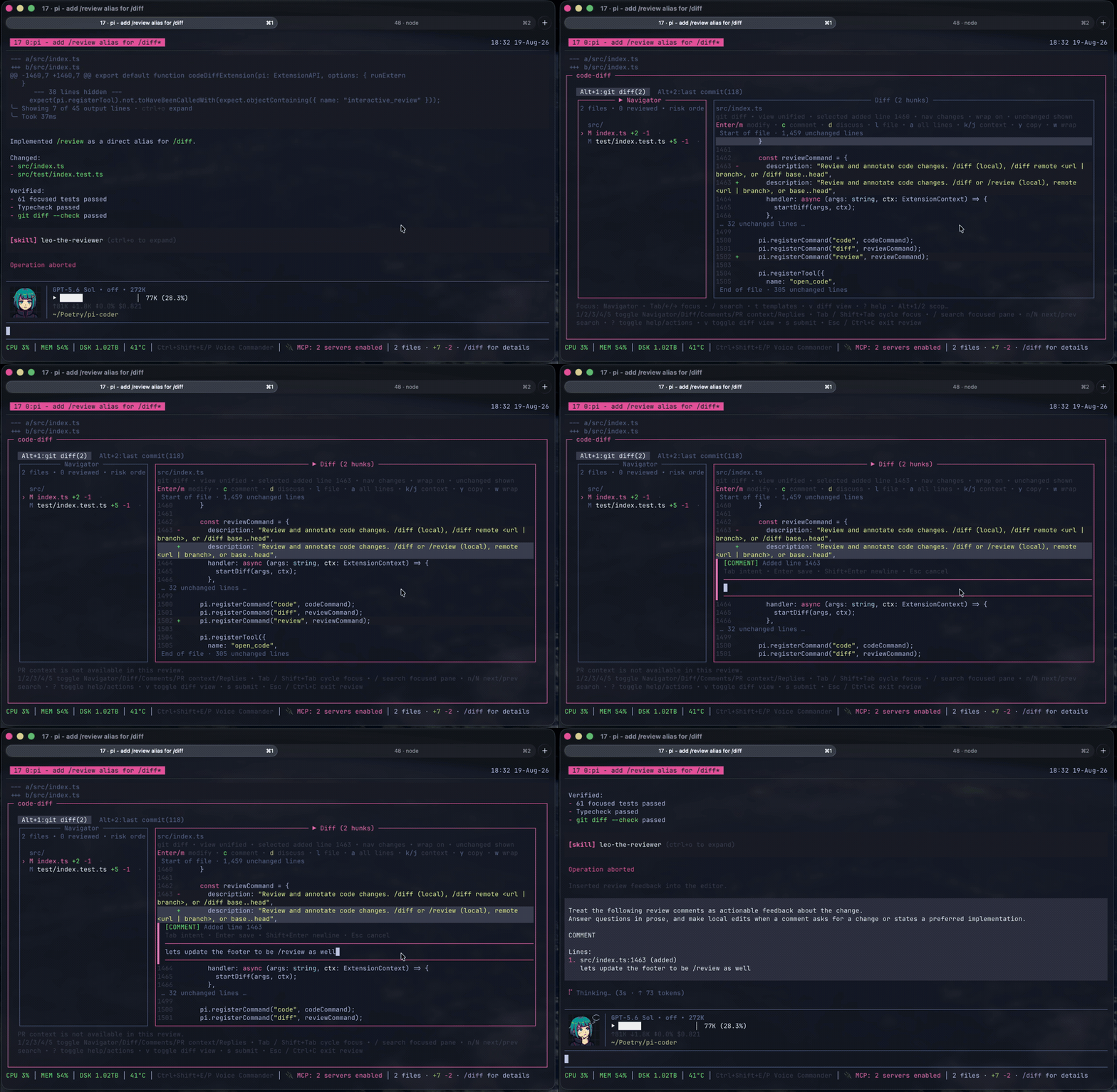
Useful targets:
/diff                         # uncommitted changes
/diff main...HEAD             # a Git range
/diff remote <branch-or-url>  # a remote branch or configured pull request
/diff --resume                # a parked review
/diff fullscreen on|off       # toggle Herdr pane zoom for future reviews
In Herdr, /diff zooms the current pane while the review is open and restores the previous layout afterward. Fullscreen is on by default; /diff fullscreen off disables it persistently until /diff fullscreen on enables it again. Launchers can set PI_CODE_DIFF_HERDR_FULLSCREEN=on|off to override the initial behavior for one Pi process without changing the saved preference.
The review UI supports line, file, and review-wide feedback. Feedback can be marked as:
DISCUSS— send the question back to the agent.COMMENT— keep review feedback for a local or remote review.MODIFY— propose or apply an exact code change.
GitHub pull requests work by default through the authenticated gh CLI. Confirmed reviews receive a grammar-safety pass before submission, and saved drafts are revalidated when the reviewed revision changes.
Remote providers
GitHub pull requests work through the authenticated gh CLI without extra configuration. See Remote providers to add another code host or configure repository-specific paths.
Common review controls:
| Key | Action |
|---|---|
| Arrow keys | Navigate files and diff lines |
c / d |
Add a comment / discussion |
Enter or m |
Edit the selected line |
v |
Toggle unified and side-by-side views |
s |
Finish the review |
Esc |
Go back or close safely |
Browse and edit code
Run the Explorer, or open a repository-relative file directly in INSERT mode:
/code
/code app/models/user.rb
The Workbench remains the default. To use one command for every code-opening interface instead, add it to ~/.pi/agent/pi-code-diff-settings.json. This example runs TTT through tmux:
{
  "code": {
    "command": ["tmux", "split-window", "-h", "-c", "{cwd}", "ttt", "{cwd}"],
    "targetArgs": ["{file}:{line}"]
  },
  "providers": {},
  "repositories": {}
}
command is direct argv, not a shell string, and supports only {cwd}. Optional targetArgs are appended for file targets and support {cwd}, {file}, and {line}. Pi waits for the command to finish. In this example, tmux returns after creating the pane, so Pi is ready while TTT stays open.
The same command handles /code, open_code, open_code_diff, and the review UI's open-code action. Without a configured command, the existing Workbench and review UI behavior remains unchanged.
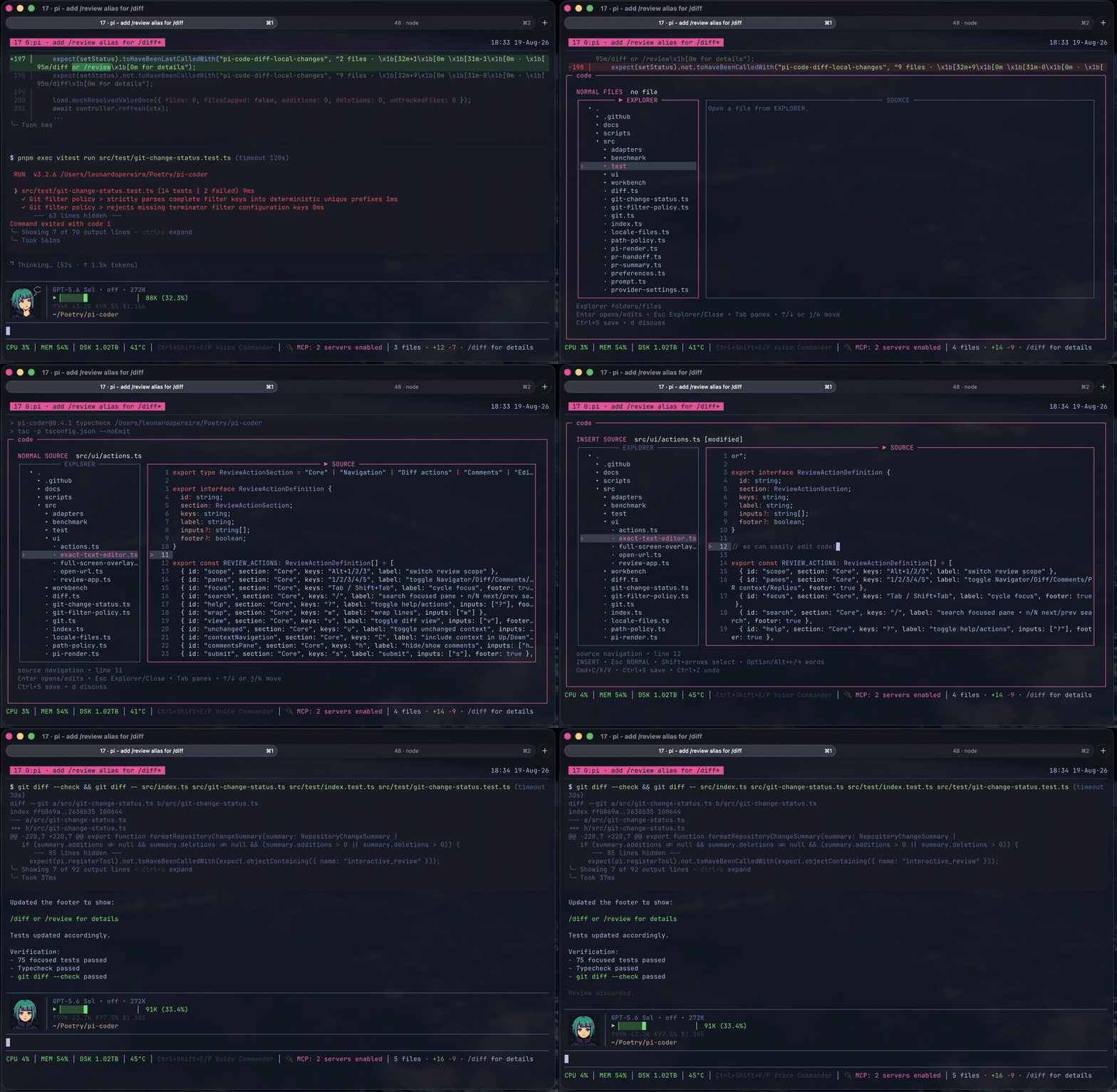
/code fills the small gap between the coding agent and you. It is for the last 1% of the work, when you want to open the file yourself, read the code around it, make a small change, or point to exact lines and ask a question. Instead of leaving Pi or asking the agent to paste fragments into the conversation, you can work with the code directly and continue where you left off.
/code is not a replacement for Vim, Neovim, VS Code, or the editor you already use. If one of those is already part of your workflow, keep using it. But learning Vim or Neovim just to inspect one function makes no sense, and opening something as heavy as VS Code can be more than the moment needs. /code is the minimum viable coding tool: a small project explorer, readable source, search, and enough editing for focused changes. The agent can take you to the exact file and lines, guide you through related parts of the code, and bring a selected piece back into the conversation when you want to discuss it. It protects unsaved work, will not overwrite a file changed somewhere else, and stays away from staging, commits, and pushes. The goal is not less human involvement. It is keeping the human loop powerful without slowing the work down.
Run /code syntax to choose and remember any syntax theme bundled with Shiki. The selection applies the next time /code opens.
Common Workbench controls:
| Key | Action |
|---|---|
Arrow keys or j / k |
Navigate files and source lines |
Enter |
Open a file or enter INSERT mode |
Tab / Shift+Tab |
Move between Explorer and Source |
/ |
Find a file or search the current buffer |
n / N |
Move through buffer matches |
Ctrl+S |
Save |
Esc |
Leave INSERT, return to Explorer, or close safely |
See docs/workbench.md for the full Workbench behavior and standalone runner.
Agent tools
Agents can use the same interfaces through:
open_code— run the configured code command at an optional path or structured target; without one, open the Workbench.open_code_diff— run the configured code command; without one, open/diffwith an optional target and prepopulated comments.submit_pr_review— submit a confirmed configured-provider review.
Security and data access
Read SECURITY.md for private vulnerability reporting and docs/access.md for the exact subprocess, filesystem, and network access used by the package.
Development
pnpm install
pnpm typecheck
pnpm test
Build the standalone Workbench with pnpm workbench:build.
Acknowledgments
Inspired by Mario Zechner's pi-diff-review, with thanks to Rob Zolkos for his contributing work on the review workflow.
License
MIT