pi-color-preview
Visual color swatch previews (TrueColor ANSI, WCAG contrast, RGB/HSL/Hex) for Pi coding agent
Package details
Install pi-color-preview from npm and Pi will load the resources declared by the package manifest.
$ pi install npm:pi-color-preview- Package
pi-color-preview- Version
1.0.1- Published
- Aug 29, 2026
- Downloads
- 123/mo · 123/wk
- Author
- pedrorojasf
- License
- MIT
- Types
- extension
- Size
- 224.4 KB
- Dependencies
- 0 dependencies · 3 peers
Pi manifest JSON
{
  "extensions": [
    "./src/index.ts"
  ],
  "image": "https://raw.githubusercontent.com/PedroRojasF/pi-color-preview/main/assets/after.png"
}
Security note
Pi packages can execute code and influence agent behavior. Review the source before installing third-party packages.
README
pi-color-preview
| Before (Default Pi) | After (pi-color-preview) |
|---|---|
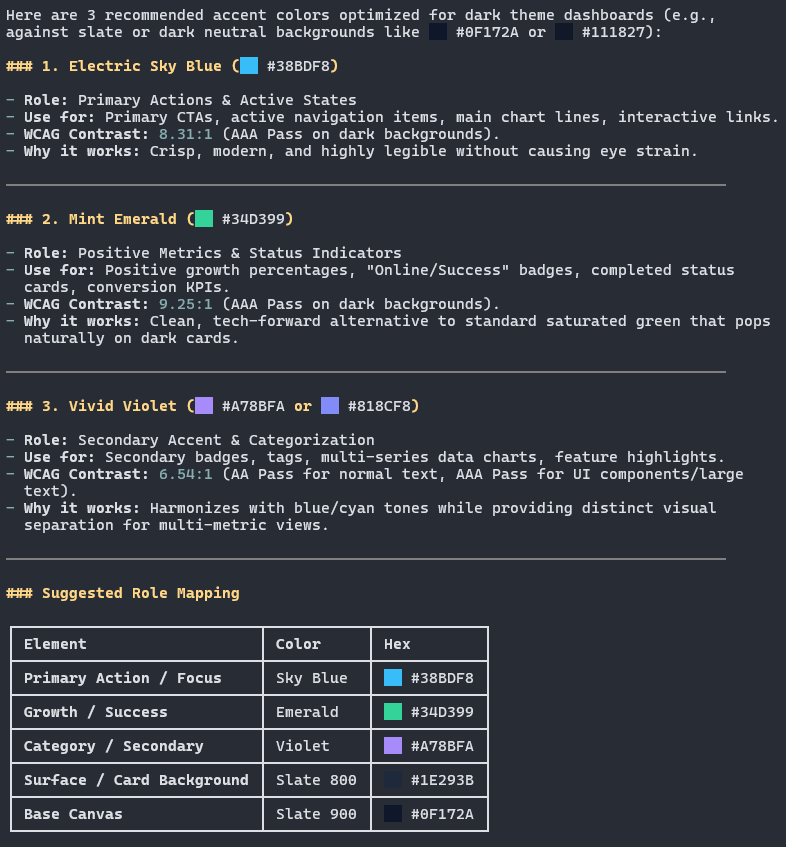
Renders live 24-bit TrueColor swatches inline whenever your AI assistant outputs color codes (#hex, rgb, hsl, CSS names) in Markdown.
Runs entirely inside Pi's local terminal renderer, adding zero extra tokens to your session. It also includes an optional /colors command to inspect custom palettes and check WCAG 2.1 contrast ratios.
Install
pi install npm:pi-color-preview
Or directly from GitHub:
pi install git:github.com/PedroRojasF/pi-color-preview
Usage
1. Automatic Live Swatches
Ask the assistant about any colors or palettes in normal chat. Swatches appear inline automatically:
"What colors are in the Nord palette?"
"Recommend 3 accent colors for a dark theme dashboard."
2. Manual Inspector & WCAG Contrast
Inspect colors or built-in designer presets directly:
/colors #FF5733 #33B5E5 #00C851
/colors nord
/colors catppuccin
License
MIT © PedroRojasF