pi-dumb-zone
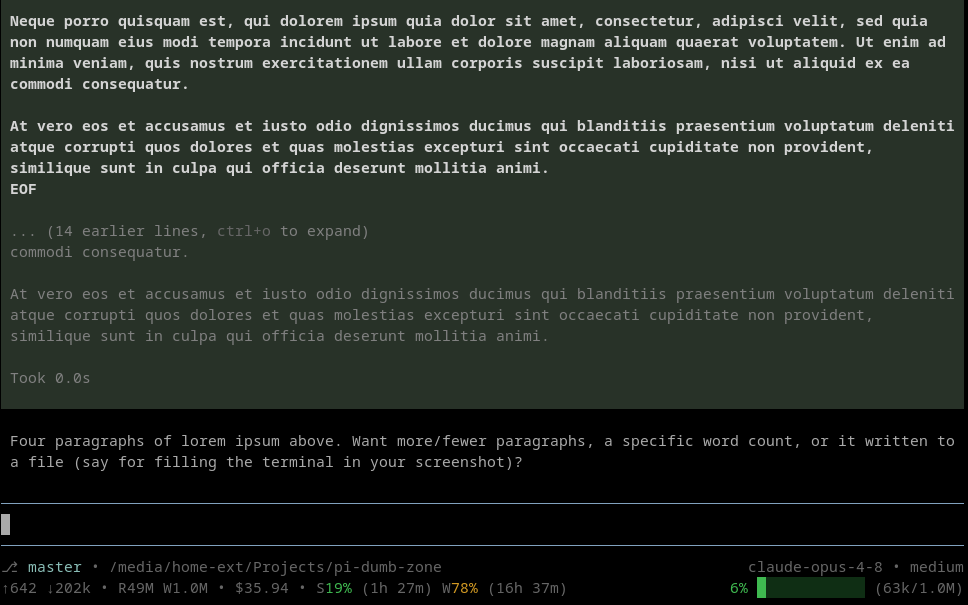
A pi coding agent footer built around a colored context-usage bar that warns when you drift into the dumb zone (a context window so full the model gets sloppy). Also shows git branch and path, token/cost stats, model and thinking level, and Anthropic subs
Package details
Install pi-dumb-zone from npm and Pi will load the resources declared by the package manifest.
$ pi install npm:pi-dumb-zone- Package
pi-dumb-zone- Version
0.1.0- Published
- Aug 20, 2026
- Downloads
- 180/mo · 25/wk
- Author
- stylesuxx
- License
- MIT
- Types
- extension
- Size
- 97.5 KB
- Dependencies
- 0 dependencies · 1 peer
Pi manifest JSON
{
  "extensions": [
    "./index.ts"
  ],
  "image": "https://raw.githubusercontent.com/stylesuxx/pi-dumb-zone/master/docs/screenshot.png"
}
Security note
Pi packages can execute code and influence agent behavior. Review the source before installing third-party packages.
README
pi-dumb-zone
A pi coding agent footer built around a colored context-usage bar. As the context window fills, the bar goes green → orange → red to warn you that you may be drifting into the dumb zone: a context so full the model starts dropping details and getting sloppy. Around it the footer also shows git branch and path, token/cost stats, the active model and thinking level, and Anthropic subscription usage.
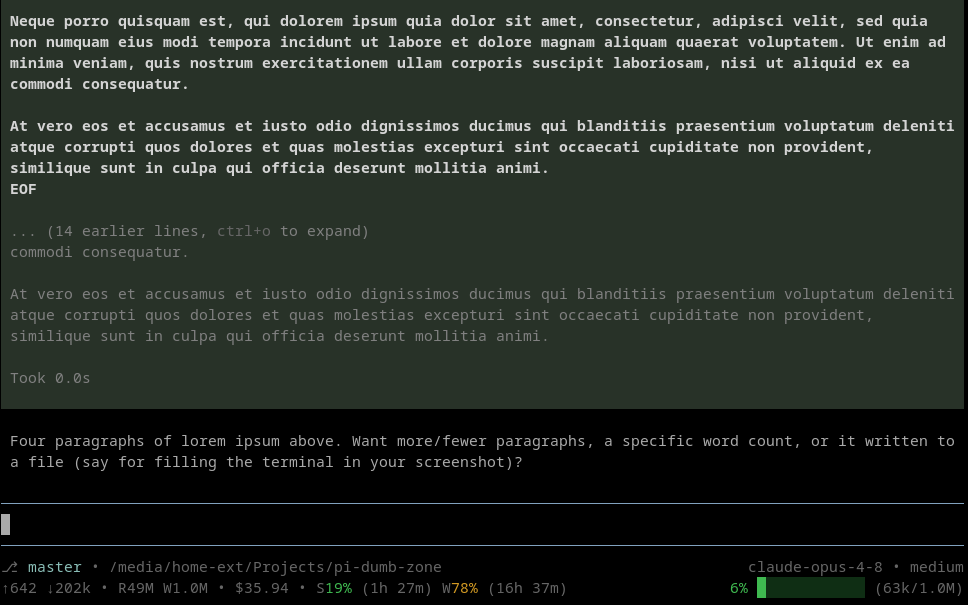
⎇  master • ~/projects/app                            claude-opus-4-8 • high
↑120k ↓8.4k • R90k W12k • $0.41 • S45% (2h 13m) W73% (5d)   62% ███████░░░░░ (620k/1.0M)
The footer is two rows:
- Row 1 — left: git branch
•working directory; right: model name•thinking level. - Row 2 — left: session token stats (
↑sent↓received•Rcache-readWcache-write•cost•subscription usage); right: the colored context-usage bar.
Segments are separated by a bullet; empty segments (no branch, no thinking level, no subscription data) are dropped. Works with any provider; only the subscription-usage segment is Anthropic-specific and simply hides for other providers.
The percentage and the whole bar are colored by absolute token usage:
- green (
colors.green) while at or belowthresholds.orangeAbove(default 200k) - orange (
colors.orange) while above that and at or belowthresholds.redAbove(default 500k) - red (
colors.red) abovethresholds.redAbove
The Claude subscription usage percentages use the same three colors, keyed on 70% and 90%.
After compaction, when the exact token count is briefly unknown, the widget renders ?% ░░░░░░░░░░░░ (?/1.0M).
Claude subscription usage
When you use an Anthropic model through an OAuth subscription (Claude Pro/Max via /login), Anthropic returns rate-limit headers that this extension reads via the after_provider_response event. It shows the session window (S, roughly a 5-hour rolling limit) and the weekly window (W), each with the percentage of the allowance consumed and a compact time until reset. With a raw API key or a non-Anthropic model these headers are absent and the segment is hidden. Disable it with showClaudeUsage: false.
Install
From the pi package catalog:
pi install npm:pi-dumb-zone
Or from the git repo:
pi install git:github.com/stylesuxx/pi-dumb-zone
Commands
/dumbzonetoggles the footer on and off (restores the built-in footer when off)./dumbzone-reloadre-reads the config file from disk.
Configuration
Configuration layers, lowest to highest precedence:
- Built-in defaults.
- Global:
~/.pi/agent/dumbzone.json. - Project:
.pi/dumbzone.json(only when the project is trusted).
All fields are optional; missing fields fall back to the defaults. See dumbzone.example.json.
| Field | Type | Default | Meaning |
|---|---|---|---|
thresholds.orangeAbove |
number | 200000 |
Absolute tokens above which the bar turns orange. |
thresholds.redAbove |
number | 500000 |
Absolute tokens above which the bar turns red. |
colors.green |
hex | #3fb950 |
Color for the low (green) state. |
colors.orange |
hex | #d29922 |
Color for the medium (orange) state. |
colors.red |
hex | #f85149 |
Color for the high (red) state. |
barWidth |
number | 12 |
Number of cells in the progress bar. |
showModel |
boolean | true |
Show the active model name on the right. |
showClaudeUsage |
boolean | true |
Show Anthropic subscription session/weekly usage when available. |
filledChar |
string | █ |
Character for filled bar cells. |
emptyChar |
string | ░ |
Character for empty bar cells. |
The three state colors are 6-digit hex, rendered as 24-bit ANSI. Labels, paths, cost, and other dim text still come from the active pi theme; only the green/orange/red states are fixed hex so they stay legible across themes.
Notes
The footer only renders in interactive TUI mode. In print, JSON, and RPC modes the extension is a no-op.
Development
The pure logic (config, colors, formatting, header parsing, rendering) lives in core.ts with no pi-runtime imports, so it is unit-tested in isolation. index.ts is the thin runtime glue.
npm install
npm test        # node:test suite over core.ts
npm run typecheck