pi-rpc-web
Headless RPC-powered browser interface for the pi coding agent
Package details
Install pi-rpc-web from npm and Pi will load the resources declared by the package manifest.
$ pi install npm:pi-rpc-web- Package
pi-rpc-web- Version
0.1.0- Published
- Aug 28, 2026
- Downloads
- 149/mo · 149/wk
- Author
- tohlh
- License
- MIT
- Types
- extension
- Size
- 441 KB
- Dependencies
- 0 dependencies · 1 peer
Pi manifest JSON
{
  "extensions": [
    "./src/extension.ts"
  ],
  "image": "https://raw.githubusercontent.com/tohlh/pi-rpc-web/main/media/pi-rpc-web.png"
}
Security note
Pi packages can execute code and influence agent behavior. Review the source before installing third-party packages.
README
pi-rpc-web
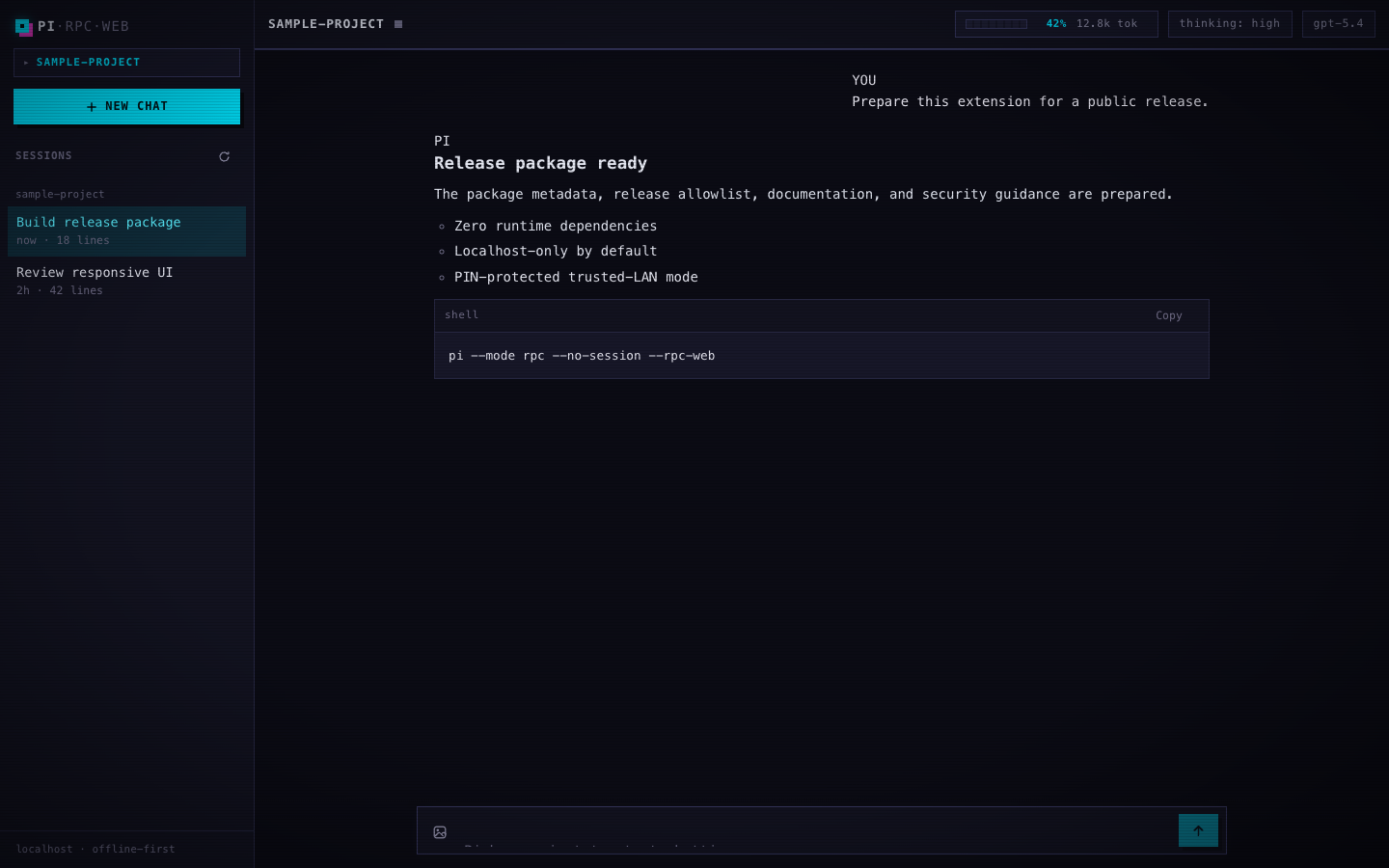
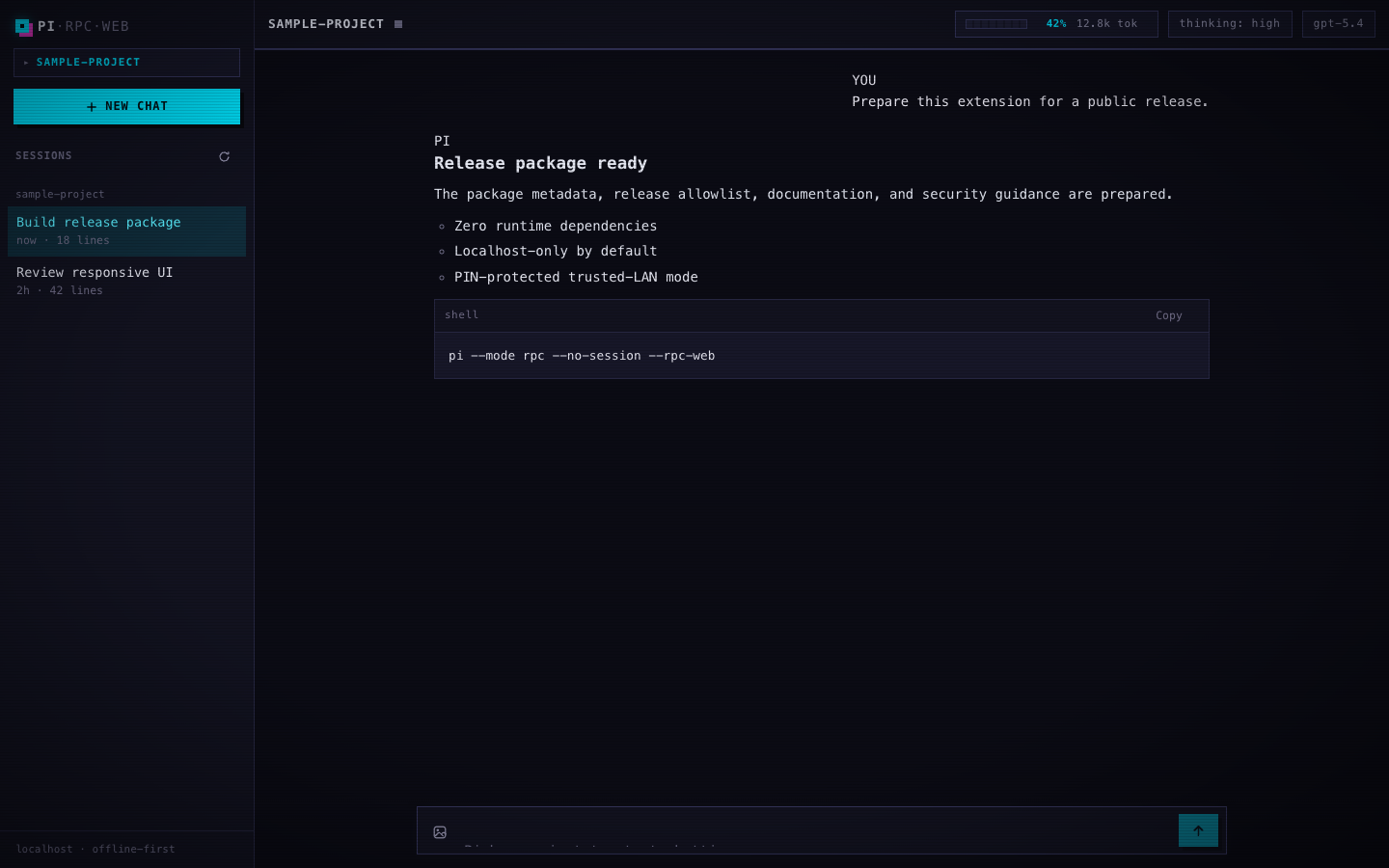
A pi extension that serves a beautiful web UI for the pi coding agent on localhost by default, with an optional trusted-LAN mode protected by a six-digit PIN.
Zero runtime npm dependencies: Node built-ins only on the server (including a hand-rolled RFC 6455 WebSocket implementation), vanilla JS/CSS with no build step in the browser.
Usage
Headless mode is the only supported launch.
Localhost remains the default and stays unauthenticated because only the
host machine can reach 127.0.0.1:
pi --mode rpc --no-session --rpc-web
Trusted-LAN access requires both flags:
pi --mode rpc --no-session --rpc-web --rpc-web-lan
--rpc-webalone serves the web UI on$PI_WEB_PORTor 7690, binding 127.0.0.1 only (an ephemeral port is used if the port is taken).--rpc-web --rpc-web-lanbinds IPv4 0.0.0.0 only, exposes the UI to your local network, and requires PIN login before any protected HTTP page or WebSocket bridge is available.- Startup details go to stderr, never stdout, so the outer host keeps a valid JSONL RPC stream.
- The server is session-scoped and shuts down when the session ends
(
SIGTERMandSIGINTboth stop it cleanly).
Representative stderr output:
pi-rpc-web serving at http://127.0.0.1:7690
pi-rpc-web LAN server:
  http://192.168.1.233:7690
Login PIN: 123 456
In LAN mode:
- the six-digit PIN is reusable until the pi host process restarts;
- the PIN is never placed in URLs or persisted;
- successful login sets a memory-only
pi_rpc_web_sessioncookie withHttpOnly; SameSite=Strict; Path=/and no persistent expiry; - refreshes and new tabs in the same browser profile reuse that cookie automatically;
- restarting pi invalidates every PIN-derived browser session.
The cookie intentionally does not use Secure: LAN mode is plain HTTP on
trusted local networks, and browsers would not send a Secure cookie over that
HTTP connection.
Environment variables
| Variable | Purpose |
|---|---|
PI_WEB_PORT |
Server port (0 selects an ephemeral port; default 7690) |
PI_BIN |
Path to the pi binary spawned per browser tab |
Sessions and tabs
- Each browser tab opens sessions from the sidebar; every switch terminates
the current agent child and cold-resumes into the target via a fresh
pi --mode rpcchild with the target session. - The same session may be opened by multiple tabs at once: each tab gets its own independent RPC child. No writer lease is enforced — concurrent writes to one session are not reconciled; last writer wins on disk.
- Browser session navigation never sends
switch_sessioninto a running child; children are always spawned fresh against the chosen session.
Features
- Full RPC bridge — each browser connection lazily spawns its own
pi --mode rpc --no-sessionchild process; prompts, streaming deltas, tool-execution cards, queue updates, model switching, thinking levels, session stats - Sessions sidebar — lists recent sessions per project, open any session cold-resumed in place, open in a new tab, rename, delete, manage projects (hide / bulk-delete)
- Slash-command autocomplete fed by
get_commands - Extension UI passthrough —
select/confirm/input/editordialogs, toasts fornotify, status/title/widget updates rendered in the browser - Streaming UX — live markdown rendering, collapsible thinking blocks, auto-scroll with "jump to latest", steer/follow-up chips while busy, image attachments (paste or file picker)
- Image normalization — uploads are verified and converted to JPEG;
macOS can additionally normalize HEIC and other formats through
/usr/bin/sips. On other platforms, select an image the browser can decode as JPEG, PNG, GIF, or WebP. - Resilient — reconnects with backoff, respawns the pi child on demand after exit
Install
From npm:
pi install npm:pi-rpc-web
Or directly from GitHub:
pi install git:github.com/tohlh/pi-rpc-web
Then launch the localhost server:
pi --mode rpc --no-session --rpc-web
Or manually, copy/symlink this directory into your extensions folder:
ln -s /path/to/pi-rpc-web ~/.pi/agent/extensions/pi-rpc-web
For a quick trial without installing:
pi -e /path/to/pi-rpc-web/src/extension.ts   # without the web server
pi --mode rpc --no-session --rpc-web -e /path/to/pi-rpc-web/src/extension.ts
pi --mode rpc --no-session --rpc-web --rpc-web-lan -e /path/to/pi-rpc-web/src/extension.ts
Security
- Localhost mode binds 127.0.0.1 only and is intended for local use on the host machine.
- LAN mode is plain HTTP and is suitable only for trusted local networks.
- Do not port-forward LAN mode to the public internet.
- Anyone who can reach the port can try the login flow and, once authorized, gains full control of the agent running with your permissions.
- For untrusted-network access, use SSH tunneling or Tailscale instead of exposing the port directly.
- Child RPC processes never inherit or accept
--rpc-webor--rpc-web-lan: recursive spawning of the browser host is rejected outright.
Disclaimer
This project was entirely vibe coded. It is provided as is, without any warranty or guarantee of reliability, security, or fitness for a particular purpose. Review the source before installing it, back up important projects and session files, and use it at your own risk. The maintainer accepts no responsibility for breakage, data loss, security incidents, or other damages arising from its use.
Architecture
browser ⇄ HTTP/WebSocket + optional LAN PIN gate ⇄ src/server.ts ⇄ src/bridge.ts ⇄ `pi --mode rpc`
                                                         ⇅
                                                     ui/ static files
src/ws.ts— dependency-free RFC 6455 server WebSocket: SHA-1 handshake, masked-client-frame validation, fragmentation, ping/pong, close handshake, 2 MB message cap.src/server.ts— HTTP static file serving (path-traversal safe), public/loginhandling in LAN mode, protected-route redirects, and a WebSocket endpoint on any path.src/bridge.ts— one child process per socket, strict JSONL framing (\n-only records,\rstripped, UTF-8 chunk-safe viaStringDecoder), verbatim passthrough both ways,sessions.list/pingmeta actions, lazy respawn, graceful kill (SIGTERM → SIGKILL after 3 s) on disconnect.src/extension.ts— registers--rpc-weband--rpc-web-lan, starts the server onsession_startin rpc mode (URL/PIN → stderr), stops it onsession_shutdown.
See CONTRACT.md for the full WebSocket and LAN-auth protocol contract.
Development
npm run typecheck   # tsc --noEmit (requires devDependency types)
npm test            # ws, LAN auth, server auth, e2e, RPC-web lifecycle, localhost/LAN smoke
Tests need Node ≥ 22.18 (unflagged TypeScript type stripping). The e2e suite
spawns a real pi --mode rpc; LLM-dependent assertions are skipped unless
PI_RPC_WEB_E2E_LLM=1.
Preview