@0xbigboss/silo
Isolated local development environments for Tilt and k3d.
Package details
Install @0xbigboss/silo from npm and Pi will load the resources declared by the package manifest.
$ pi install npm:@0xbigboss/silo- Package
@0xbigboss/silo- Version
1.4.0- Published
- Nov 20, 2026
- Downloads
- 2,369/mo · 755/wk
- Author
- alleneubank
- License
- MIT
- Types
- skill
- Size
- 7.8 MB
- Dependencies
- 1 dependency · 0 peers
Pi manifest JSON
{
  "skills": [
    "./.claude-plugin/silo/skills"
  ]
}
Security note
Pi packages can execute code and influence agent behavior. Review the source before installing third-party packages.
README
silo
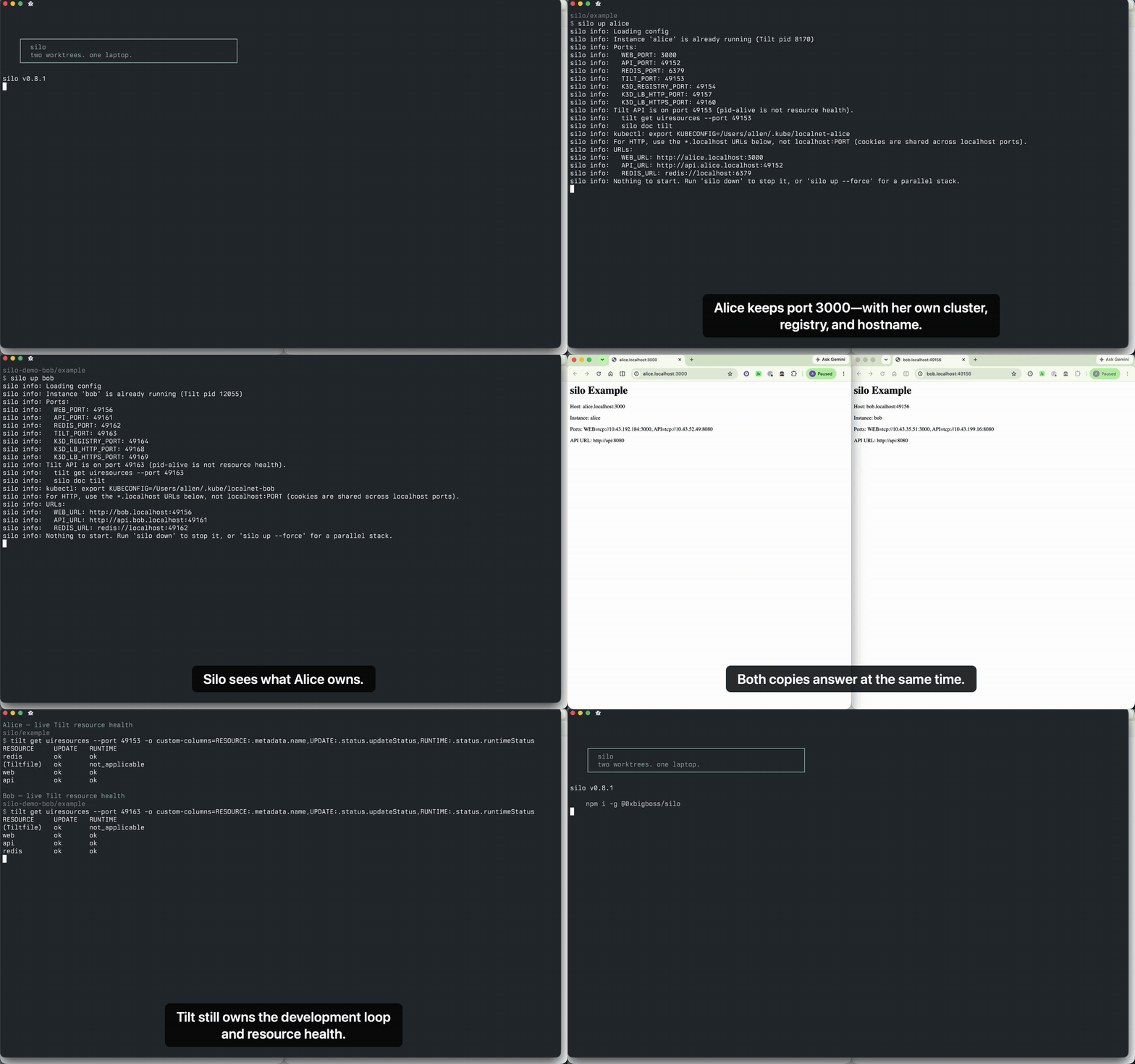
Isolated local development environments. silo solves instance isolation and k3d bootstrap sequencing for Tilt-based projects.


Requirements
- Bun 1.4.4 (qualified runtime)
- Docker with a local Unix endpoint
- Tilt
- k3d (optional, only if
k3d.enabled = true)
Install
npm i -g @0xbigboss/siloClaude Code Skill
Install the silo skill in Claude Code so your AI assistant knows how to use silo:
/plugin marketplace add alleneubank/silo
/plugin install silo@alleneubank-silo
Pi package
Install silo as a pi package to expose the silo skill to the pi coding agent:
pi install git:https://github.com/alleneubank/silo.gitThe skill shells out to the silo binary; install it first via npm i -g @0xbigboss/silo or the source build.
Quick start
This breaking version requires a host cutover: announce it, upgrade or retire
every permitted old invocation, and wait for all old operations to finish
before the first new allocation. Each owner stops and recreates its ephemeral
projects. Legacy JSON entries/root locks cause read-only LEGACY_STATE;
nothing migrates or deletes automatically. See silo doc troubleshooting.
silo init
# edit silo.toml
silo up dev
Print the bundled silo.toml reference:
silo doc configCommands
silo init            # Create silo.toml starter config
silo up [name]       # Start environment (creates k3d if needed, starts Tilt)
silo down            # Stop environment (stops Tilt, keeps k3d by default)
silo status          # Show current instance state
silo env [name]      # Generate env file only, don't start anything
silo ci [name]       # Run Tilt in CI mode (tilt ci) after env + k3d setup
silo run --slot <name> -- <cmd>  # Run a command while holding host slots
silo run --timeout 20m -- <cmd>  # Run a supervised command; stop its whole group at the deadline
silo profiles        # List available profiles
silo doc [topic]     # Print bundled docs (config, profiles, k3d, hooks, etc.)
silo version         # Print version
The first silo run on a host upgrades the account store to format 4. After
that, silo 1.0.0 on the same account refuses the store with
LEASE_STORE_UNAVAILABLE (a newer silo upgraded it): upgrade every silo on
the host before the first silo run.
Configuration
silo.toml defines ports, hosts, URLs, k3d settings, and hooks. For the canonical reference, run:
silo doc configYou can also browse SPEC.md for a detailed specification.
Child process environment
When silo launches child processes (Tilt, hooks, k3d, kubectl), it injects:
SILO_ACTIVE=1SILO_WORKSPACE=<workspace name>SILO_ENV_FILE=<absolute path to generated env file>
Process supervision
All mutating tools use durable gated groups under
Janitor 0.3.1, a process-group
supervisor that ships inside silo (no separate install), with --pgroup-only;
silo run also ends descendants that left its group.
Owner loss drains the recorded group; uncertain effects retain ownership.
A missing supervisor refuses startup. --force reconfigures only a stopped,
reconciled generation; parallel stacks need separate roots and names.
silo run --timeout uses the same supervisor to stop a command's whole process
group at a deadline while silo stays in its caller's group, so Ctrl-C still
reaches the command.
See silo doc tilt for the details.
Working with a running stack
silo status --json reports canonical account ownership (generation, claims,
receipts and retained resources). It does not report Tilt resource health.
After silo up, source .localnet.env and talk to the Tilt API:
tilt get uiresources --port "$TILT_PORT"For HTTP, use the printed *.localhost URLs, not localhost:PORT. See silo doc tilt.
CI usage
silo env and silo ci auto-export env vars to $GITHUB_ENV when running in
CI (or when --export-ci is provided), and skip the export with a warning when
$GITHUB_ENV is not set. silo ci also sets CI=true for Tilt, so Tiltfiles
that gate e2e resources on CI run them:
silo ci e2e --timeout 300sIf your Tiltfile uses the silo requirement extension in CI, prefer loading it
from installed dependencies instead of v1alpha1.extension_repo():
load('./node_modules/@0xbigboss/silo/tilt-extensions/silo/require/Tiltfile', 'SILO_REQUIRE')Development
See CONTRIBUTING.md.
License
MIT. See LICENSE.
Report vulnerabilities to the address in SECURITY.md.