@burnto/pi-neuralwatt
Neuralwatt provider for pi. Shows the reported request cost in pi's footer and provider-reported session energy in the status area.
Package details
Install @burnto/pi-neuralwatt from npm and Pi will load the resources declared by the package manifest.
$ pi install npm:@burnto/pi-neuralwatt- Package
@burnto/pi-neuralwatt- Version
0.3.1- Published
- Oct 5, 2026
- Downloads
- not available
- Author
- burnto
- License
- MIT
- Types
- extension
- Size
- 405.5 KB
- Dependencies
- 0 dependencies · 2 peers
Pi manifest JSON
{
  "image": "https://raw.githubusercontent.com/burnto/pi-neuralwatt/main/assets/equivalents.gif",
  "extensions": [
    "./index.ts"
  ]
}Security note
Pi packages can execute code and influence agent behavior. Review the source before installing third-party packages.
README
@burnto/pi-neuralwatt
Neuralwatt model provider for pi. It reports the request cost Neuralwatt sends and, optionally, the provider-reported energy a session consumes.
What it does
Neuralwatt sends per-response telemetry on its response stream: a reported request cost, and reported GPU energy where it is available. The extension records both as session entries that never enter model context, and can write the reported cost into the response's usage record so pi's footer shows what Neuralwatt reported rather than the token list price.
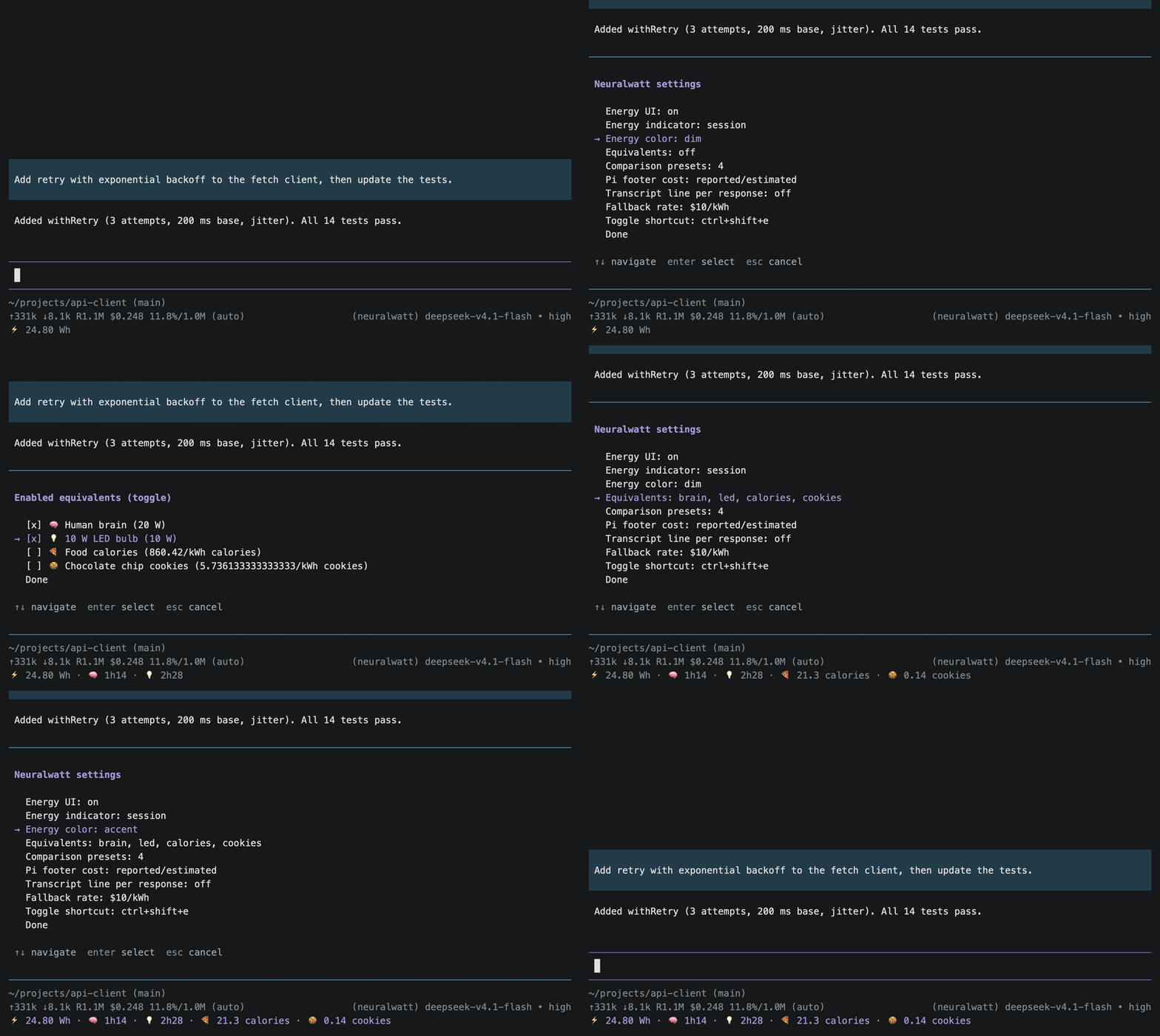
A separate ⚡️ indicator shows reported energy in pi's status area while a Neuralwatt model is active. You can add everyday comparisons, like how long the session's energy could run a human brain or a 10 W LED bulb, or how many food Calories it is worth.
Totals follow the active branch, so rewinding or forking a conversation does not double-count abandoned turns.
Reported energy is provider-reported, not measured by this extension, and a reported dollar value is not proof of an incremental charge. It covers the accelerator work Neuralwatt attributes to the request and excludes broader system and datacenter overhead (host power, cooling, networking, facility losses). Coverage is explicit: if energy or cost metadata is missing for a response, it is recorded as missing rather than counted as zero.
Install
# from npm
pi install npm:@burnto/pi-neuralwatt

# from git
pi install git:github.com/burnto/pi-neuralwatt
Requires pi 1.0.0 or later.
Setup
The provider uses pi's normal credential handling.
Add a key under
neuralwattin~/.pi/agent/auth.json:{ "neuralwatt": { "type": "api_key", "key": "sk-..." } }or set
NEURALWATT_API_KEY.
The model catalog comes from https://api.neuralwatt.com/v1/models and is cached at ~/.pi/agent/cache/neuralwatt-models.json. An authenticated catalog includes enrolled preview models and never gets replaced by the smaller public catalog. Startup reads NEURALWATT_API_KEY or a plain api_key entry; a $-templated key is not sent as a bearer token before a session exists.
Status area
With the energy UI on and a Neuralwatt model active, the status area shows reported energy according to the indicator mode. A reading that was never reported renders as ⚡️ 0 Wh, and so does a reported zero; the missing reading is still left out of totals and coverage, so the zero is presentation only. Enabled equivalents render at zero too (⚡️ 0 Wh · 🧠 0s).
| Mode | Example |
|---|---|
session (default) |
⚡️ 1.42 Wh |
both |
⚡️ 1.42 Wh (+0.080 Wh) |
last |
⚡️ 0.080 Wh |
Equivalents append to the indicator as an icon and a duration:
⚡️ 1.42 Wh · 🧠 4m16The energy UI is presentation only. Hiding it does not stop telemetry collection, persistence, or cost patching, and pi's normal dollar-cost display stays available. Turn it off and on with /neuralwatt:energy-ui, /neuralwatt:energy-ui off, /neuralwatt:energy-ui on, or the optional shortcut.
Commands
/neuralwatt:cost prints recorded responses, reported energy with its coverage, reported cost plus estimates with its coverage, the effective rate, the last response, account context, and any enabled equivalents. It works even when the energy UI is hidden, and does not turn it on.
/neuralwatt:energy-ui [on|off] shows or hides the energy UI and saves the choice.
/neuralwatt:settings opens a menu for the master switch, the indicator mode and color, enabled equivalents, the editable comparison presets, pi footer cost patching, the per-response transcript line, the fallback rate, and the shortcut.
Cost sources
request_cost_usdfrom the response stream. This is the reported cost and wins when present. A reported0is kept and never triggers an estimate.energy_kwh × ratewhen the response has no reported cost, but only when the account's billing method is confirmed as energy. Token and unknown accounts keep pi's normal token-price estimate instead.
The default rate is $10/kWh. Estimates are recorded with the rate used at the time, so changing the setting does not rewrite history. The settings menu and cost report show the effective rate and whether it comes from the saved setting or NEURALWATT_USD_PER_KWH (which takes precedence).
The same rate is used for the energy-rate equivalent line in /neuralwatt:cost when subscription or token-account energy is present. That line is an illustrative reference: it excludes account allowances and may differ from actual pay-as-you-go pricing because of flex discounts and caps.
Comparison presets
Each preset compares energy to something everyday, in one of two kinds.
A power preset compares energy to the duration of a constant power draw:
durationSeconds = energyKwh × 3_600_000 / wattsA unit preset converts energy into a quantity of a literal unit:
quantity = energyKwh × perKwhPower is in watts; energy is Wh or kWh. Unit quantities render automatically by magnitude: 1000 and above as an integer, 10 and above with one decimal, and the rest with two (3377 J, 37.8 ft, 0.81 calories). Unit labels are literal, with no singular/plural handling. Results are approximate equivalents, not claims about identical work, lifecycle energy, or emissions.
| ID | Icon | Label | Kind | Value | Basis |
|---|---|---|---|---|---|
brain |
🧠 | Human brain | power | 20 W | Approximate whole-brain metabolic power, not electrical consumption |
led |
💡 | 10 W LED bulb | power | 10 W | Defined 10 W electrical load |
calories |
🍕 | Food calories | unit | 860.42 /kWh, calories |
Food Calories (kcal); 1 kWh is about 860.42 |
cookies |
🍪 | Chocolate chip cookies | unit | 860.42 / 150 per kWh, cookies |
One cookie taken as 150 food Calories (kcal); an energy equivalence, not food eaten |
At 1 Wh the equivalents are about 3 minutes, 6 minutes, 0.86 calories, and 0.01 cookies. Presets are editable: add a power or unit preset, edit its label and icon, edit the kind-specific value (watts, or the factor and unit), remove with confirmation, and restore defaults with confirmation, all from /neuralwatt:settings. Removing a preset deletes its definition; disabling removes only its enabled id. An empty catalog survives restart; defaults are restored only by an explicit action.
The calories and cookies presets convert reported energy into food energy: 1 kWh is about 860.42 food Calories (kcal), and one cookie is taken as 150 kcal. These are energy equivalences only. They say nothing about food actually eaten or nutrition, and they do not isolate GPU-only energy — they convert the same reported figure the power presets use.
Settings
Settings live in ~/.pi/agent/neuralwatt.json.
{
  "settingsVersion": 3,
  "energyUiEnabled": true,
  "energyStatus": "session",
  "energyColor": "dim",
  "equivalents": [],
  "equivalentPresets": [
    { "kind": "power", "id": "brain", "icon": "🧠", "label": "Human brain", "watts": 20 },
    { "kind": "power", "id": "led", "icon": "💡", "label": "10 W LED bulb", "watts": 10 },
    { "kind": "unit", "id": "calories", "icon": "🍕", "label": "Food calories", "perKwh": 860.42, "unit": "calories" },
    { "kind": "unit", "id": "cookies", "icon": "🍪", "label": "Chocolate chip cookies", "perKwh": 5.736133333333333, "unit": "cookies" }
  ],
  "patchPiCost": true,
  "perResponseLine": false,
  "fallbackRateUsdPerKwh": 10,
  "toggleShortcut": "ctrl+shift+e"
}energyUiEnabled: master switch for extension-owned energy UI.energyStatus:session,last, orboth.energyColor:dim,muted,text,accent,success,warning, orerror.equivalents: ordered list of enabled preset ids.equivalentPresets: editable preset definitions, eachkind: "power"(with awattsdraw) orkind: "unit"(with aperKwhfactor and a literalunitlabel). An absent field uses defaults;[]is intentionally empty.patchPiCost: write the reported or estimated cost into pi's footer cost.perResponseLine: show a one-line entry per recorded response.fallbackRateUsdPerKwh: rate for the energy-rate estimate and equivalent.toggleShortcut: a key binding, ornullto disable.
Older settings files migrate on load: energyStatus: "off" becomes energyUiEnabled: false with energyStatus: "session", the removed doomscroll equivalent is dropped, and a v2 preset without a kind is read as a power preset. The file is rewritten with settingsVersion: 3 on the next save.
Shortcut
Extension shortcuts are registered at loading, and pi has no unregister API, so changing or disabling toggleShortcut takes effect after /reload or restart. ctrl+shift+e only fires when the terminal supports the Kitty keyboard protocol or modifyOtherKeys; legacy terminals may deliver the same bytes as Ctrl+E, so the binding will not work there. Use alt+e as an alternative, configured in neuralwatt.json (on macOS, enable Option as Meta in your terminal). The /neuralwatt:energy-ui command always works.
Limitations
- "Recorded responses" counts foreground Neuralwatt responses this extension saw. Retries, cache-warm calls, background compaction, and activity outside this extension may not be represented.
- Existing transcript annotations refresh on
/reloador a natural transcript rebuild; toggling the energy UI changes the status area and equivalents immediately but not already-rendered annotations. - Tree decorations are not supported on pi 1.0.0 (no public decoration API).
- pi's footer shows a bare numeric total without an extension-specific source label, so a mixed reported-plus-estimated total is not annotated there;
/neuralwatt:costexplains the breakdown.
Development
npm install
npm run check

# load the extension from source without other installed extensions
pi -ne -e . -p "hi" --model neuralwatt/deepseek-v4-flash
License
MIT