@crisboarna/pi-context-refs
Save context refs and insert them from a picker as compact placeholders that expand to real content when the message is sent.
Package details
Install @crisboarna/pi-context-refs from npm and Pi will load the resources declared by the package manifest.
$ pi install npm:@crisboarna/pi-context-refs- Package
@crisboarna/pi-context-refs- Version
0.1.0- Published
- Nov 13, 2026
- Downloads
- 250/mo · 250/wk
- Author
- crisboarna
- License
- MIT
- Types
- extension, skill
- Size
- 274.4 KB
- Dependencies
- 0 dependencies · 2 peers
Pi manifest JSON
{
  "image": "https://raw.githubusercontent.com/crisboarna/pi-extensions/main/packages/pi-context-refs/media/cover.png",
  "video": "https://raw.githubusercontent.com/crisboarna/pi-extensions/main/packages/pi-context-refs/media/hero.mp4",
  "skills": [
    "./skills"
  ],
  "extensions": [
    "./src/index.ts"
  ]
}
Security note
Pi packages can execute code and influence agent behavior. Review the source before installing third-party packages.
README
@crisboarna/pi-context-refs





Save the context you keep giving the model (a path, a file, a snippet of text, the output of a command or a URL) as named refs, and send one by typing #name or picking it from a list. The editor shows a short [ref:name] placeholder; the real content is read when you send the message. It adds a # picker, an alt+r overlay with a preview, and the /ref command to pi. It is for anyone who retypes the same paths, pastes the same files or copies in git diff by hand, and for teams that want to share the context a repository needs.
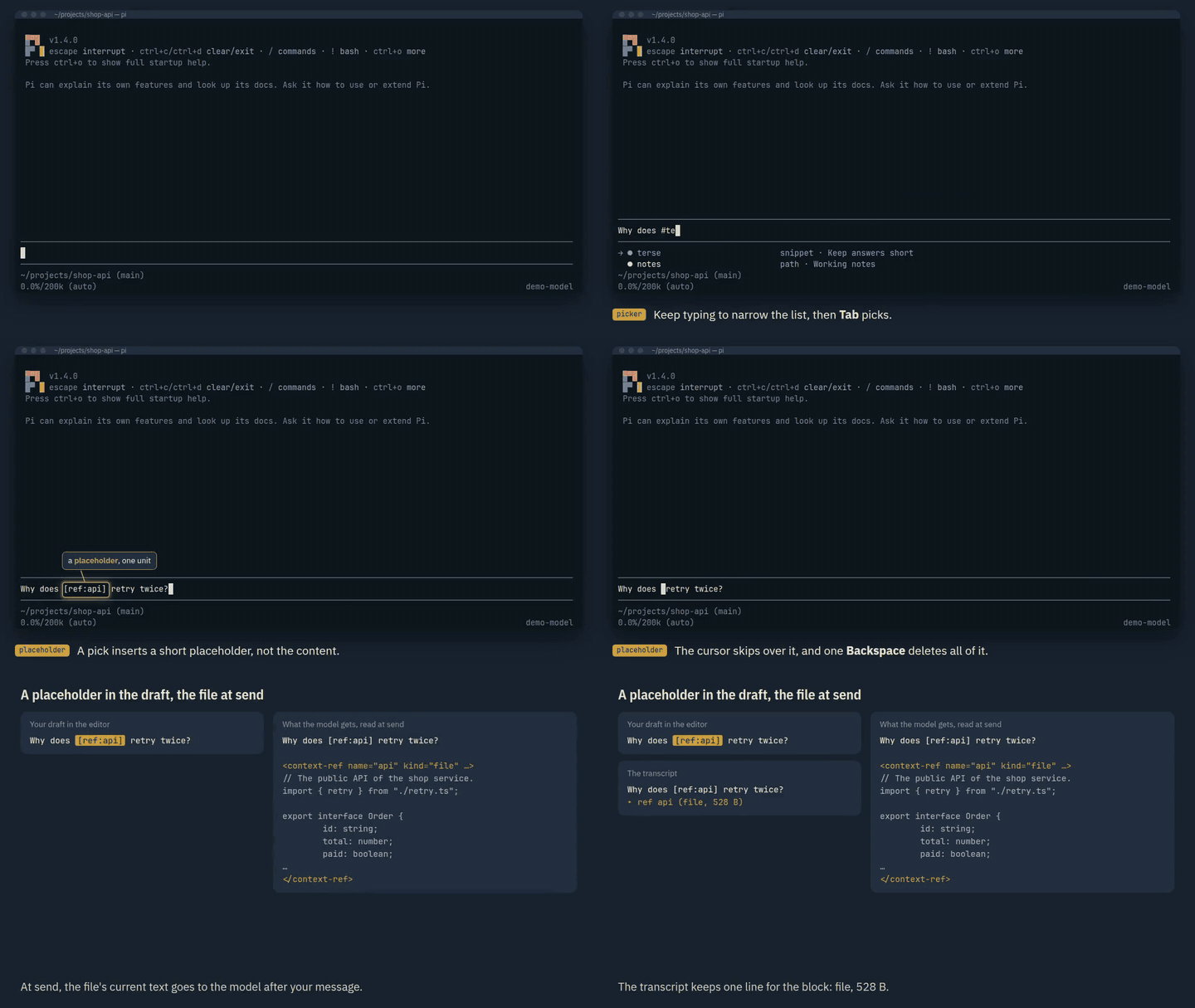
▶ Watch the one-minute demo, with narration: real pi and pi-context-refs; only the model replies are scripted.
Install
pi install npm:@crisboarna/pi-context-refsRestart pi.
Quick start
- Save a file as a ref:
/ref add api file src/api.ts desc="The public API". Pi answersAdded file Ref "api" to the Global library. - In pi's editor, type
#. A list of your refs opens, with a mark for the library each one comes from, its name, its kind and its description. Pickapi. - The draft now holds
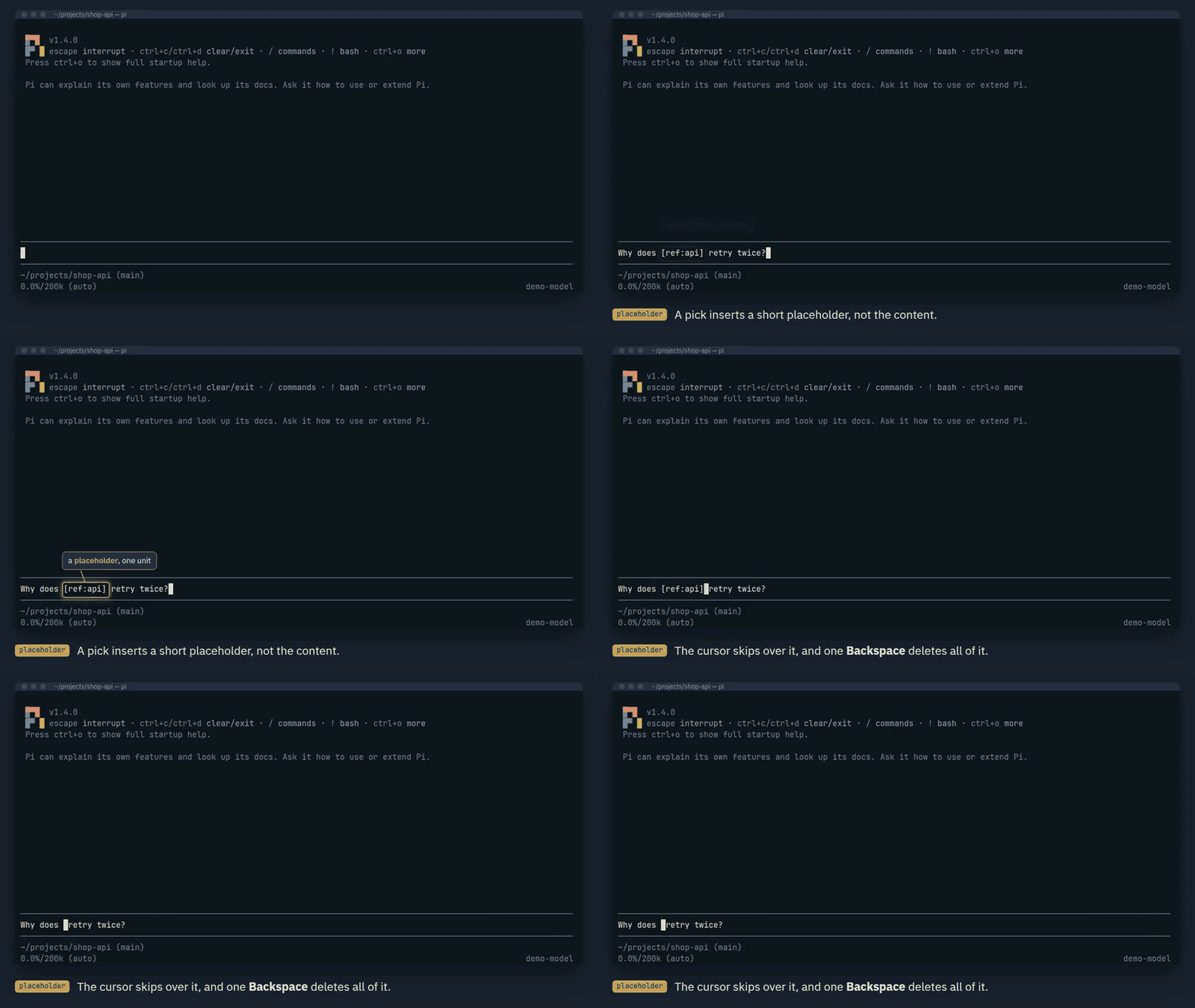
[ref:api]. One Backspace deletes the whole placeholder, and the cursor skips over it. - Type your question around it, for example
Why does [ref:api] retry twice?, and send. - The model gets the current text of
src/api.tsin a<context-ref>block after your message. The transcript shows one line for it:▸ ref api (file, 1.8 KB).
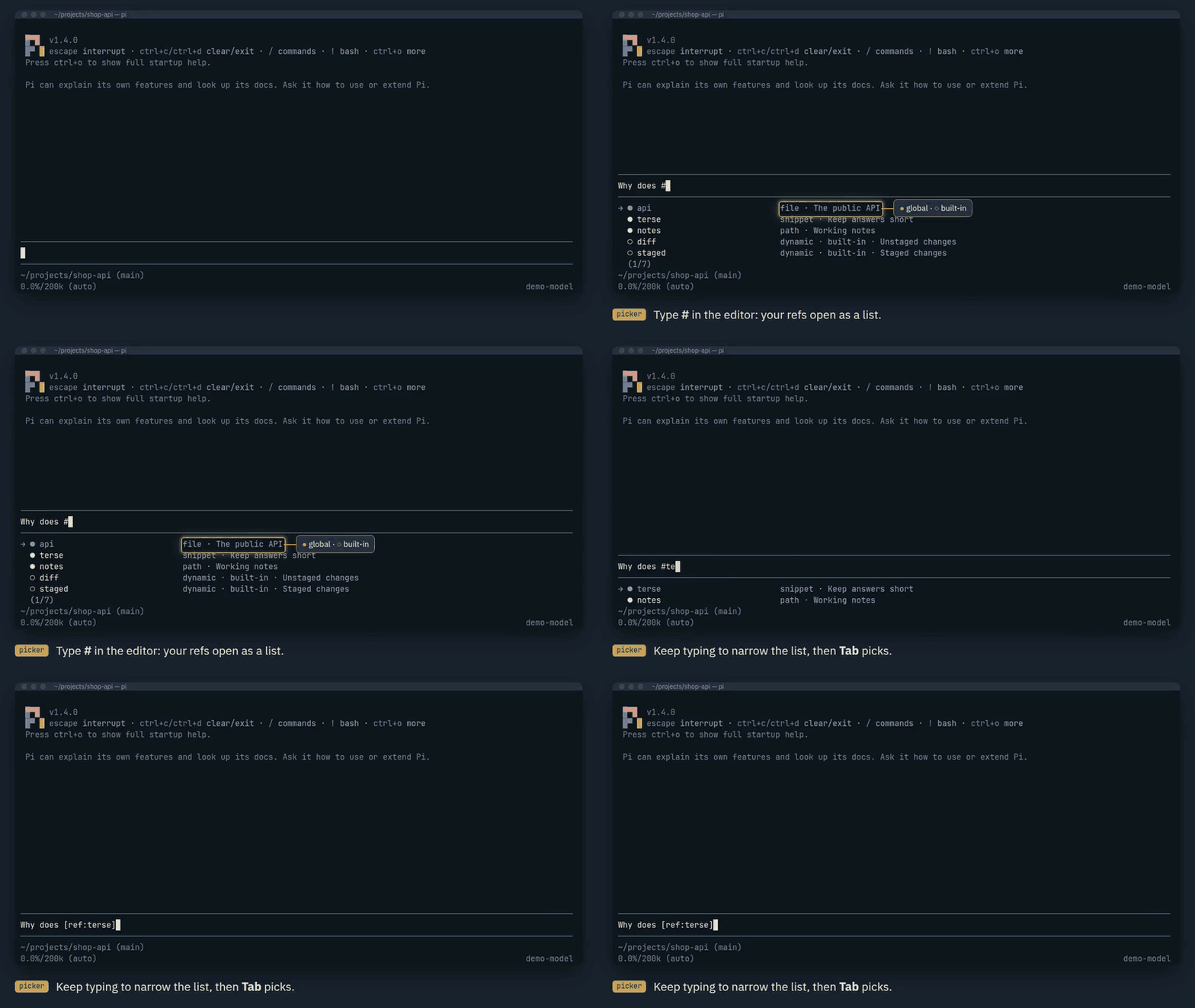
Four refs work with no setup: #diff, #staged, #status and #log send git output inside a git work tree.
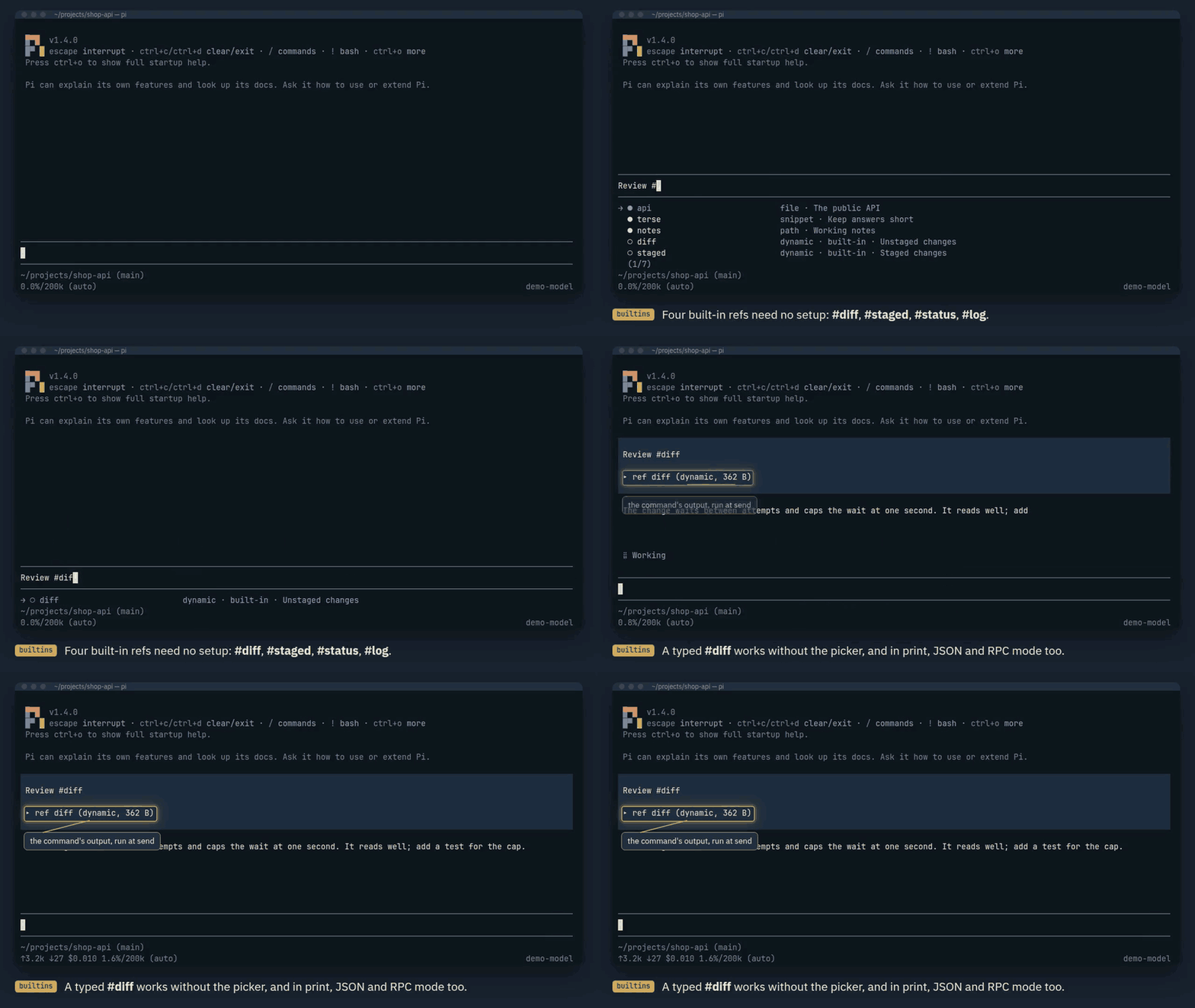
You can also type the ref by hand. Review #diff and Review [ref:diff] mean the same, and they work in print, JSON and RPC mode too, where there is no picker.
The package ships a skill, pi-context-refs, that pi loads with it. Ask the agent why a #name did not expand or how to share refs with your team: it reads your libraries, explains which of the usual causes applies and proposes /ref commands for you to run. It never approves a command for you.
What you get
- Context without retyping. A ref is a Path, a File, a Snippet or a Dynamic ref (a command or a URL), saved once with
/ref add. - A draft you can read. A pick inserts
[ref:name], and the editor treats it as one unit, so you cannot half-delete it. - Fresh content. Every ref is read when you send, never when you pick, so the model never gets a stale copy.
- Safe commands. A command is an argv array run with no shell. A command or URL in a project's shared library runs only after you approve its exact definition.
- Shared with a team.
.pi/pi-context-refs.jsonin a trusted project holds refs for everyone; your own refs stay in your agent directory and can be scoped to one repository. - A preview before you send.
alt+ropens an overlay with a filter and the expansion of the selected ref. It also saves files this session used as refs. - A short transcript. Each block collapses to one line, and
/ref sentshows the full text of the last message.
Configuration
Your library is ~/.pi/agent/pi-context-refs.json (in the directory PI_CODING_AGENT_DIR names, when set). /ref add, edit and remove write it; you can edit it by hand, and a change is picked up at the next send. Add "$schema": "https://raw.githubusercontent.com/crisboarna/pi-extensions/main/packages/pi-context-refs/schema/pi-context-refs.schema.json" and your editor validates it.
A team library is .pi/pi-context-refs.json in the project, written with /ref add … in=project. It loads only when pi trusts the project, and its paths must stay inside the project.
Two settings sit beside refs in your own file. /ref list shows them; there is no command to set them.
| Setting | Effect | Default |
|---|---|---|
trigger |
The character that opens the picker. One character; not /, @, ! or a space. A change needs /reload. |
# |
builtins |
false turns off #diff, #staged, #status and #log; a list of names turns off just those. |
all four on |
Limits, the order in which refs win, scopes and every field of a ref are in docs/configuration.md. Tag refs with tags=a,b, then #tag:<tag> sends every visible ref with that tag.
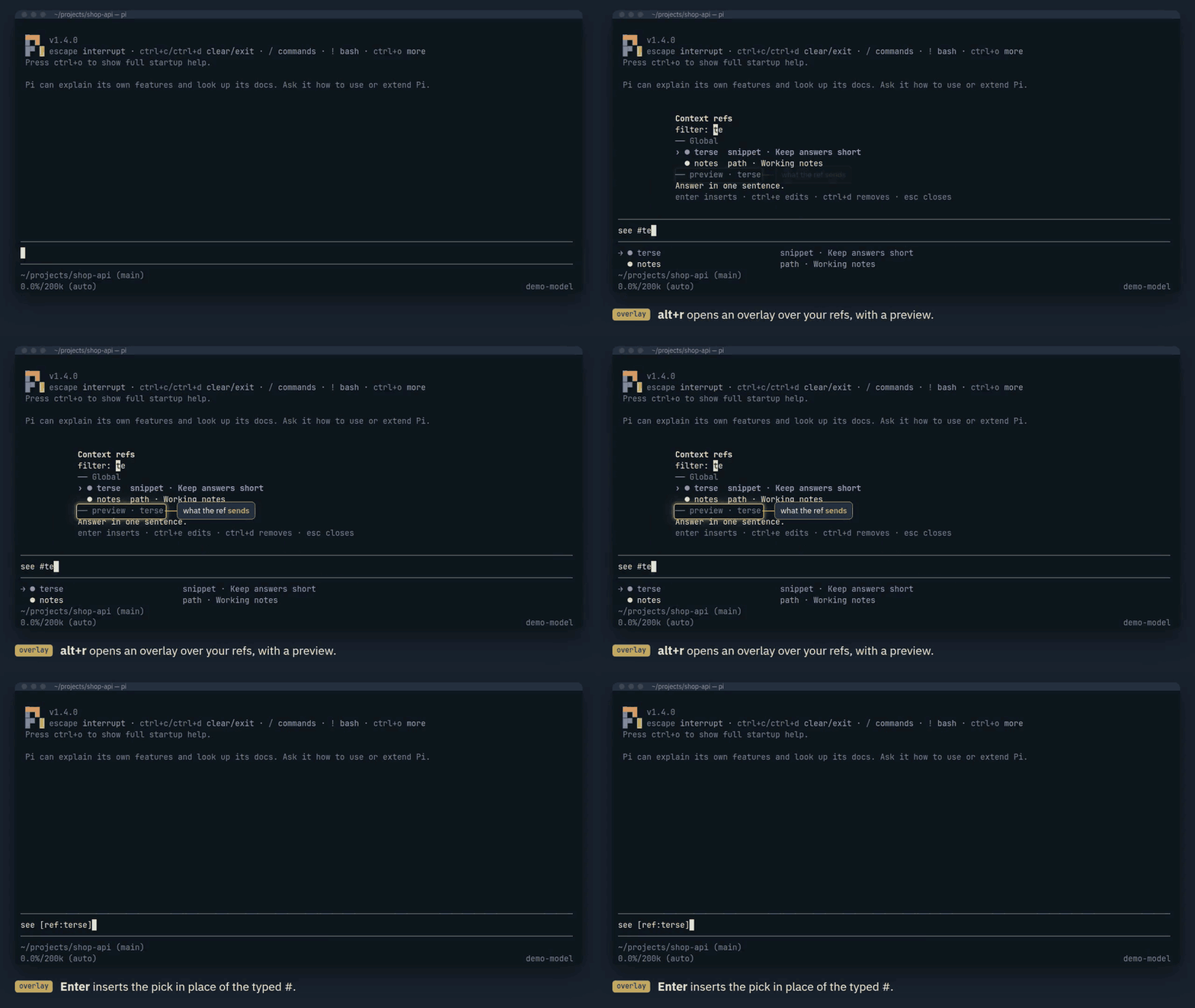
alt+r opens the overlay. Every /ref command and every key is in docs/commands.md.
Reference
- docs/commands.md: every
/refcommand and key. - docs/configuration.md: the library files, the fields of a ref, the settings and which ref wins.
- docs/upgrading.md: what an upgrade keeps and how a breaking change is announced.
- docs/benchmarks.md: what loading the package adds to pi's start, measured and charted.
- docs/alternatives.md: other extensions that touch the same job, and when to choose them.
- docs/headless.md: print, JSON and RPC mode, failures and approvals without a UI.
- docs/with-other-extensions.md: the editor, the message and the transcript beside other extensions.
- docs/privacy.md: what leaves your machine, what an approval does not cover, and where the guards stop.
- docs/faq.md and docs/troubleshooting.md: why it behaves as it does, and what to do when it does not work.
- DESIGN.md: the full design, with the pi behaviour it relies on (section 16.1) and the known limits (section 17).
- GLOSSARY.md: the terms used here and in the code.
- docs/adr/: the seven decisions that are hardest to reverse.
- docs/manual-checklist.md: the checks that need a person at a real terminal, and their status.
- schema/: JSON Schemas for the library files and the approvals file, and examples/ for a library to copy.
Requirements
Node 22.19 or later; pi 1.4 up to, not including, 2.0, the range CI tests. Linux is tested in CI; macOS is checked by hand, not in CI; Windows is not tested, so use WSL.
| How pi runs | What works | What does not |
|---|---|---|
| Interactive | The # list, the alt+r overlay, the one-unit placeholder, every /ref command, the approval dialog |
|
Print (-p) and JSON |
Typed #name, #tag:<tag> and [ref:name] expand; /ref output goes to stderr |
The list and the overlay. A Project command you have not approved does not run: its block is a failure note |
| RPC | Typed refs expand; the client answers the approval question | The list and the overlay |
See docs/headless.md.
Data and privacy
- Network: only to fetch an address ref that you saved: a plain
GET, with up to five redirects, and a redirect from a public host to a loopback, private or link-local address is refused. There is no telemetry and no update check. - Processes: the command of each Dynamic ref you send, as an argv with no shell and with your environment;
git diff,git diff --staged,git status --shortandgit log --oneline -20for the four built-ins; andgit remote -vto match a scope. A command from a Project library runs only after you approve its exact definition. - Files it reads: your library, the Project library when pi trusts the project, the approvals file, and each file or path a ref names, when you send.
- Files it writes: your library in the agent directory, the Project library in
.pi/when you save within=project, and the approvals file in the agent directory. Each write is one atomic step. - What reaches the model: the content of each ref you send, in the message. The session stores it in full, so export, fork and compaction see it too.
- Limits: it does not redact what a ref sends, and an approval covers a command line or an address, not the files a command runs. docs/privacy.md lists them.
Troubleshooting
| Symptom | Cause | Fix |
|---|---|---|
# opens nothing |
Another extension replaced the editor or owns the key, or a space follows the # |
Set trigger to another character and run /reload; alt+r always works |
| The project library is missing | Pi does not trust the project | Run /trust, then restart pi: a saved decision applies from the next start |
A project command shows (pending) |
You have not approved its definition | Run it from the TUI and answer the question, or run /ref approve <name> |
| A placeholder is sent as typed | No visible ref has that name now | Run /ref list; the ref may be removed, out of scope or in an untrusted library |
/ref prints nothing in pi -p |
Pi shows no extension notices there | The output is on stderr |
Run /ref doctor first: it checks both libraries, the approvals, git, the editor and the trigger, says what to fix and changes nothing. More causes and fixes are in docs/troubleshooting.md.
Limitations
- A path used only through
bashorlsnever becomes a recent file, and files outside the project never do. - The stored message holds the full expansion, so the fork selector, the editor after a fork, up-arrow after a resume, HTML export and a compaction summary show it in full. Only the live transcript collapses it. Pi gives user messages no expand control, so use
/ref sent. - The placeholder relies on one private method of pi's editor. A pi upgrade can turn it into plain text, which still expands on send; a contract test in this package checks it on every build.
- Text in a snippet or path is escaped, so it cannot pass for a block. The content of a file, command or page that contains
</context-ref>is not; the block's byte length keeps the transcript right. - Images are attached at their original size.
- Content is never refreshed after the message is sent: a resent message keeps the block it had.
- A snippet cannot contain refs.
- Approving a project command or URL approves the command line or the address only. A changed script, Makefile,
package.jsonor page runs without asking again, and a command runs with your environment. - The built-in refs run
gitwithout asking, in a repository whose.git/configcan be hostile. - A global ref scoped by
remoteapplies wherever.git/confignames that remote, and a hostile clone can name any remote. - A redirect is judged by the host's text and by the addresses its name resolves to when it is looked up, not at the moment of connection. A link in a project that changes between the check and the read still wins that race.
- Two pi sessions that save a ref or an approval at the same moment can lose one of the changes; a lost approval is asked for again.
- A foreground pi-subagents child cannot be told from
pi -p, so refs in the task text the parent model writes for it expand there. A background child is skipped. - A very long command in the approval prompt can scroll its first lines off a short terminal.
- A project ref silently hides a global or built-in ref of the same name;
/ref listnames the hidden ones. - A text file is read up to 16 MB; a bigger one is cut at its cap and the closing line gives no line total.
@completions only see files that appeared in sent text, and each extension gets one Markdown transformer.- A
#wordin prose that matches a ref name expands, so a ref namedtodomakes every#todoexpand. - Another extension that reads the user message (a classifier, a guard) sees the full expansion.
- Not yet checked by a person in a real terminal: the look of the list and the overlay at narrow widths and in themes, fork, resume, export and compaction,
ctrl+o, the wording of the approval prompt, and living beside pi-image-view, pi-up-history, pi-cc-steer, pi-multi-pass and pi-powerline-footer. The list is in docs/manual-checklist.md.
Uninstall
pi remove npm:@crisboarna/pi-context-refsThen delete pi-context-refs.json and pi-context-refs-approvals.json from the agent directory (~/.pi/agent/), and .pi/pi-context-refs.json from any project that shares a library. A placeholder left in an old draft is plain text.