@ellieyujin/pi-reopen
Resume and restore your Pi coding agent sessions as WezTerm tabs after the terminal closes. Registers open Pi sessions and reopens them with original cwd and conversation. Linux, macOS, Windows, WSL.
Package details
Install @ellieyujin/pi-reopen from npm and Pi will load the resources declared by the package manifest.
$ pi install npm:@ellieyujin/pi-reopen- Package
@ellieyujin/pi-reopen- Version
1.1.0- Published
- Nov 22, 2026
- Downloads
- 3,729/mo · 2,009/wk
- Author
- ellieyujin
- License
- MIT
- Types
- extension
- Size
- 232 KB
- Dependencies
- 0 dependencies · 2 peers
Pi manifest JSON
{
  "image": "https://raw.githubusercontent.com/AuthurX/pi-reopen/main/assets/preview.png",
  "extensions": [
    "./extensions/index.ts"
  ]
}Security note
Pi packages can execute code and influence agent behavior. Review the source before installing third-party packages.
README
pi-reopen — restore Pi sessions in WezTerm
English | 简体中文 · Pi package · Releases
Reopen WezTerm. Restore your Pi coding agent sessions, working directories, and conversations with one command.
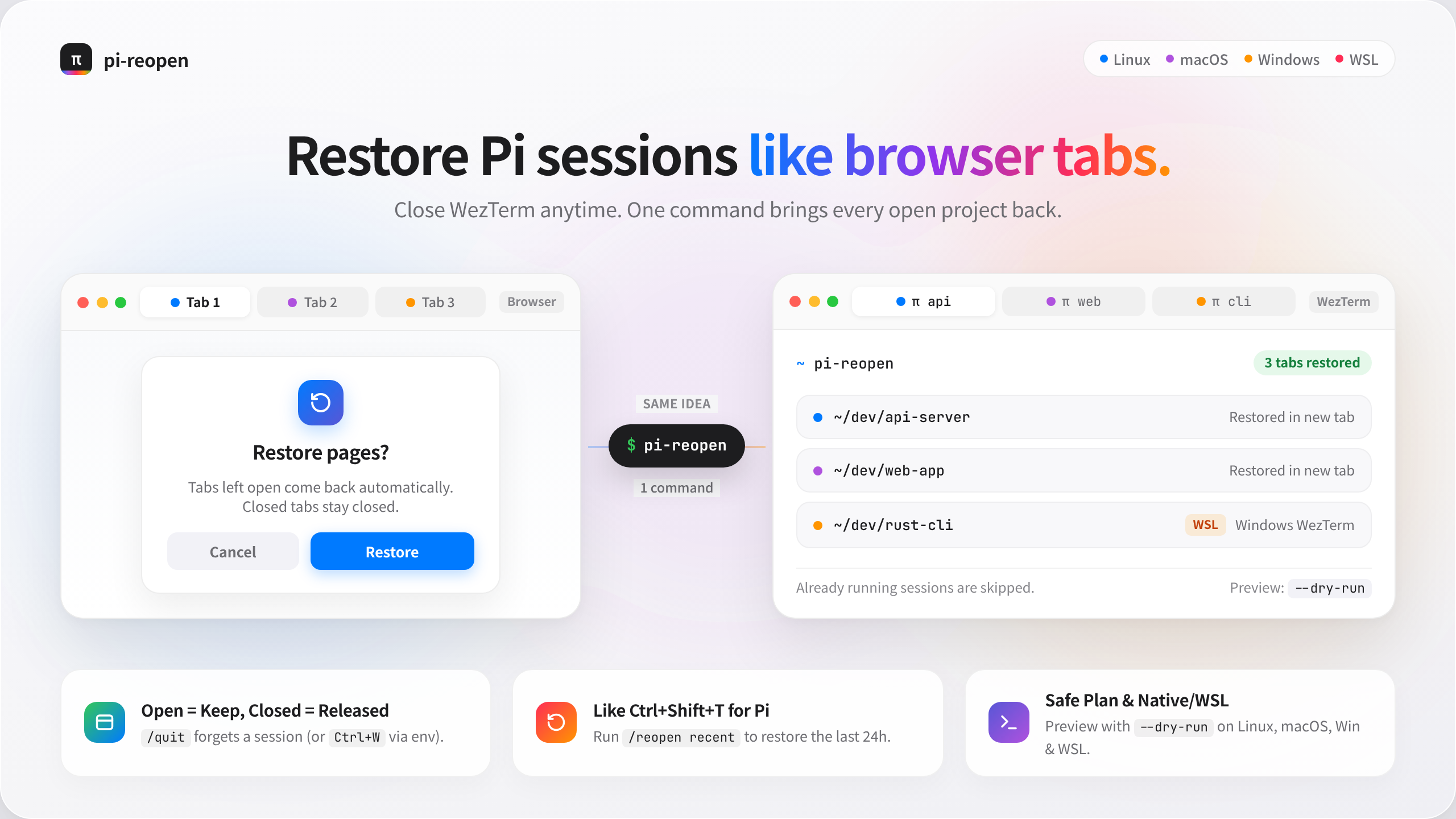
A Pi extension and CLI for session recovery after closing the terminal. It records open Pi sessions and reopens them as WezTerm tabs, skipping sessions that are already running.
Resume one session or restore a workspace?
| Goal | Use |
|---|---|
| Continue the latest session in your current directory | Built-in pi -c |
| Pick a historical conversation | Built-in pi -r or /resume |
| Reopen the recorded Pi sessions across projects after WezTerm closes | pi-reopen |
| Preview the recovery plan without opening tabs | pi-reopen restore --dry-run |
This is workspace session restoration, not a replacement for Pi's session picker. It starts new Pi processes with the original session files; it does not restore running tools, unsaved state, split-pane geometry, or arbitrary shell programs. Deliberately quitting Pi removes its registration. WezTerm startup does not automatically trigger recovery; run pi-reopen after reopening it.
How to use it: think of it like browser tabs
| Browser | pi-reopen |
|---|---|
| Tabs still open when you quit | Pi sessions still open when WezTerm closes |
| Open tabs come back on next launch | pi-reopen restores the kept records as new tabs |
| Tabs you closed yourself stay out of the restore list | A tab closed with ctrl+w is forgotten by default (or always, when you /quit inside Pi) |
| “Recently closed” via Ctrl+Shift+T | /reopen recent — the last 24h, even without a record |
| Crash → “Restore pages?” | Crash / closing the whole WezTerm / WSL shutdown → all records kept, pi-reopen brings them back |
The rule to remember: open = keep, closed = released. No markers or extra commands — a tab you leave open is your “I want this back” signal, and closing one says “I'm done with it”. (Default: closing a tab drops it from the restore list, browser-style; set PI_REOPEN_FORGET_ON_TAB_CLOSE=0 to always keep records.)
Use case and platform support
Built for working across projects in WezTerm: you have several Pi sessions open, close the terminal, and want the recorded sessions back with their working directories and conversations. Reopen WezTerm, then run pi-reopen to restore pending sessions in new tabs.
| Runtime environment | Support status | Where sessions reopen |
|---|---|---|
| Native Linux | Implemented | New tabs in the local Linux WezTerm instance |
| Native macOS | Implemented | New tabs in the local Mac WezTerm instance |
| Native Windows | Implemented | New tabs in the local Windows WezTerm instance, running native Windows Pi |
| WSL | Implemented | New tabs in Windows WezTerm, launching Pi in the corresponding WSL distribution |
| FreeBSD and other operating systems | Not supported | Restore preflight rejects unsupported platforms |
The only restoration target is local WezTerm. Restoring into Windows Terminal, iTerm2, the VS Code integrated terminal, or tmux is not supported. PowerShell, Bash, and zsh are shells, not target terminal applications; running the command from PowerShell still requires WezTerm to be open. Native Windows and WSL are separate environments: an installation on one side cannot restore sessions from the other. Cross-machine migration is not supported.
“Implemented” means a platform-specific restore path exists, not that every real-machine scenario has been verified. See platform notes for validation coverage and limitations.
Quick start
@ellieyujin/pi-reopen is the only maintained npm package. The CLI command remains pi-reopen.
pi install npm:@ellieyujin/pi-reopen@latest
npm install -g @ellieyujin/pi-reopen@latest --omit=peer
pi-reopen setup
setup consolidates checks for the extension source, whether its recorded process is still alive, the global CLI and PATH, version alignment, and duplicate legacy entries. It prints platform-specific next commands but never runs sudo, setx, or changes system configuration.
Run /reload in each existing Pi so it starts recording. After closing and reopening WezTerm:
pi-reopen restore --dry-run
pi-reopen
See installation and migration before switching package names.
Requirements
- Linux / macOS / native Windows + local WezTerm, or WSL + Windows WezTerm
- Node ≥ 22.19, with Pi installed in the same OS environment
- Open WezTerm before restoring; this tool adds tabs to a running instance, not a remote SSH domain
- Linux/macOS/WSL require Bash. Native Windows requires Windows PowerShell 5.1 (including CIM); install Git for Windows for Pi's Bash tool, and prefer a recent WezTerm nightly
- WSL restore uses the distro's default user; run this tool as that user. Do not share one registry between native Windows and WSL
Version 1.0.0 is the first stable release. CI runs platform tests on Linux, macOS and Windows, with the full regression suite, packaged-tarball checks and real Pi PTY lifecycle on Linux; macOS/Windows GUI close/reopen acceptance still needs real-machine verification. See platform notes.
Usage
pi-reopen ✔ pi-workspace: started and confirmed (/home/ellie/work/MY/code/pi-workspace)
⚠ other-proj: tab created, pi start not confirmed in time (/home/ellie/work/other-proj)
Processed 2Output follows the locale: Chinese for zh_*, English otherwise. Force it with PI_REOPEN_LANG=zh|en.
| Output | Meaning |
|---|---|
✔ started and confirmed |
launched and confirmed |
⚠ tab created, pi start not confirmed in time |
tab created, but pi start confirmation timed out |
Processed N |
N processed |
Equivalent entry points inside Pi:
/reopen— restore registered Pis/reopen recent— pick up from conversation history of the last 24 hours (for unregistered windows)/reopen clear— clear the registry (does not delete conversation files)Ctrl+Shift+O— one-click restore
/all still works as a deprecated alias for /reopen (shows a rename notice).
Commands
| Command | Description |
|---|---|
pi-reopen (i.e. pi-reopen restore) |
Reopen the Pis still open at last close; running ones are skipped |
pi-reopen restore --dry-run |
Show the plan only, do not open tabs |
pi-reopen restore --no-wait |
Skip waiting for each pi's start confirmation |
pi-reopen restore --only <pattern> |
Restore only matching sessions (substring, * glob or current-list index; name, path or id) |
pi-reopen restore --interactive |
Show the current list and enter indexes to select sessions |
pi-reopen restore --limit <N> |
Open at most N tabs this run; the rest are deferred to next time |
pi-reopen restore --json |
Machine-readable output |
pi-reopen list [--wide|--json] |
List registered members and status; long content is truncated to terminal width by default |
pi-reopen show <index|id|prefix> ... |
Show state, paths, session file and registration details |
pi-reopen forget <index|id|prefix> ... |
Drop specific records (conversation files untouched) |
pi-reopen prune [--dry-run] |
Drop expired/unrecoverable records (keeps the last 14 days) |
pi-reopen setup |
Guided first-run checks; prints commands without changing the system |
pi-reopen doctor |
Environment and registry check (extension process identity, version match and WSL single-tab close detection) |
pi-reopen clear |
Clear the registry and start claims (does not delete conversation files or legacy-format records) |
pi-reopen --help / --version |
Usage / version |
The # column is an index in the current list snapshot, not a stable ID. Each command resolves it against the latest list in the same order; after additions, removals or timestamp reordering, run pi-reopen list again. Pure numeric input is treated as an index first; session IDs and unique prefixes remain supported.
pi-reopen list
pi-reopen restore --only 1,3 --dry-run
pi-reopen show 2
pi-reopen forget 2
pi-reopen restore --interactive
list statuses: running (运行中) / start claimed (启动占用中) / pending restore (待恢复) / expired (已过期) / open in another window (已在其他窗口打开) / working directory missing (工作目录缺失) / session file missing (会话文件缺失) / not matched by --only / deferred by --limit / other platform or distro (其他平台/发行版) / duplicate entry (重复条目).
Exit codes: 0 success; 1 restore request failed or unknown command; 2 environment preflight failed; 3 requests sent but not confirmed; 4 skipped only (claimed/deferred).
Installation
From npm
Use @ellieyujin/pi-reopen with the stable latest dist-tag. The unscoped pi-reopen package has been unpublished. The unscoped pi-workspace on npm is a different author's project.
pi install npm:@ellieyujin/pi-reopen@latest
npm install -g @ellieyujin/pi-reopen@latest --omit=peer
pi-reopen setup
pi installregisters and loads the extension, but does not guarantee the CLI is on a regular shell's PATH;npm install -ginstalls the external CLI (the npm global bin directory must also be on PATH)- The CLI does not depend on Pi's peer packages, hence
--omit=peerto avoid installing the host as well; the two installs must be updated separately and kept at the same version (pi-reopen setup/doctorreports drift) pi installdeclares only a minimum peer version (>=1.5.0), with no upper bound: any newer Pi can be installed directly
Registration requires the extension: installing only the CLI cannot record sessions. After install, run /reload or restart in each already-open Pi; a fresh install cannot precisely recover previously unregistered windows. Do not load a stale local extension entry (for example an old open-all.ts symlink or a separate pi-reopen copy) at the same time as the package. pi-reopen setup checks package sources and likely duplicate entries in the personal extension directory; verify them with pi list, disable only old entries, and do not delete session or auth files. doctor/setup verifies the self-record using PID, process start time and boot ID; an old extension.json alone no longer means the extension is currently running.
Migrating from the unpublished package
@ellieyujin/pi-reopen users do not need to change package names. If you installed the now-unpublished pi-reopen, remove it before installing the maintained package to avoid duplicate loading and CLI conflicts. Check pi list and remove the exact old source shown there. For an installation using @latest:
pi remove npm:pi-reopen@latest
npm uninstall -g pi-reopen
pi install npm:@ellieyujin/pi-reopen@latest
npm install -g @ellieyujin/pi-reopen@latest --omit=peer
Restart Pi, then run pi-reopen doctor. Session files and ~/.pi/agent/pi-reopen/ registrations are unchanged; do not delete them. CLI and extension versions should match. Do not combine a local extension link (for example an old open-all.ts or a pi-reopen symlink) with the npm package.
From source
The following commands run on Linux/macOS/WSL and install the currently checked-out source:
git clone https://github.com/AuthurX/pi-reopen.git
cd pi-reopen
pi install .
mkdir -p "$HOME/.local/bin"
ln -s "$PWD/bin/pi-reopen.js" "$HOME/.local/bin/pi-reopen"
export PATH="$HOME/.local/bin:$PATH"
pi-reopen setup
Save the PATH configuration in your shell startup file for future use. If the CLI symlink already exists, check its target first; do not blindly overwrite it.
On native Windows, from the checked-out repository in PowerShell:
pi install .
node .\bin\pi-reopen.js doctor
node .\bin\pi-reopen.js
Use pi.cmd instead of pi if PowerShell execution policy blocks npm's .ps1 shim; no policy change is needed.
If you only need the extension, you can also install the pushed Git version directly:
pi install git:github.com/AuthurX/pi-reopenOptional Configuration
| Environment variable | Purpose |
|---|---|
PI_REOPEN_WEZTERM |
Absolute path of local WezTerm (wezterm / wezterm.exe); in WSL use its Windows path, e.g. /mnt/c/Program Files/WezTerm/wezterm.exe |
PI_REOPEN_PI_BIN |
Absolute Pi executable path, no arguments; Windows accepts npm pi.cmd, the package's JS entry, or .exe; aliases/functions are unsupported |
PI_CODING_AGENT_DIR |
Use a different Pi config/registry directory; CLI and extension must stay consistent |
PI_REOPEN_SRC |
Development only: overrides the shared src/ directory; not needed for normal package installs |
PI_REOPEN_LANG |
Force output language: zh or en (defaults from LC_ALL/LANG) |
PI_REOPEN_TERMINAL |
Terminal adapter id; only wezterm is implemented (see docs/TERMINALS.md) |
PI_REOPEN_MAX_AGE_DAYS |
Days after which dead records stop being restored (default 14, 0 disables) |
PI_REOPEN_FORGET_ON_TAB_CLOSE |
Closing a single tab (WezTerm still has other tabs) is treated as “task done” and its record is deleted (default on); closing the whole terminal or an inconclusive check keeps the record. Set 0/false to always keep records |
Legacy names (PI_WORKSPACE_*) are still honored; the canonical PI_REOPEN_* name wins when both are set.
For example, if Pi is installed via nvm, pnpm, or a custom npm prefix, set it explicitly:
export PI_REOPEN_PI_BIN="$(type -P pi)"
export PI_REOPEN_WEZTERM="/mnt/c/Program Files/WezTerm/wezterm.exe"
pi-reopen doctor
On Linux/macOS/WSL, Pi is located from PATH and the Bash login environment. Native Windows resolves pi.exe or npm's pi.cmd from PATH; npm shims are resolved to Node + the installed package entry, avoiding cmd.exe quoting and PowerShell script-policy issues. Nonstandard Windows shims require an explicit JS entry or .exe. Restored tabs receive the caller's PATH and agent directory, not the full environment or authentication data. WezTerm discovery checks platform-specific PATH and common install locations; only WSL uses where.exe + wslpath. For custom layouts set an explicit path. Restart Pi after changing environment variables; /reload does not read the parent shell's new environment.
How It Works
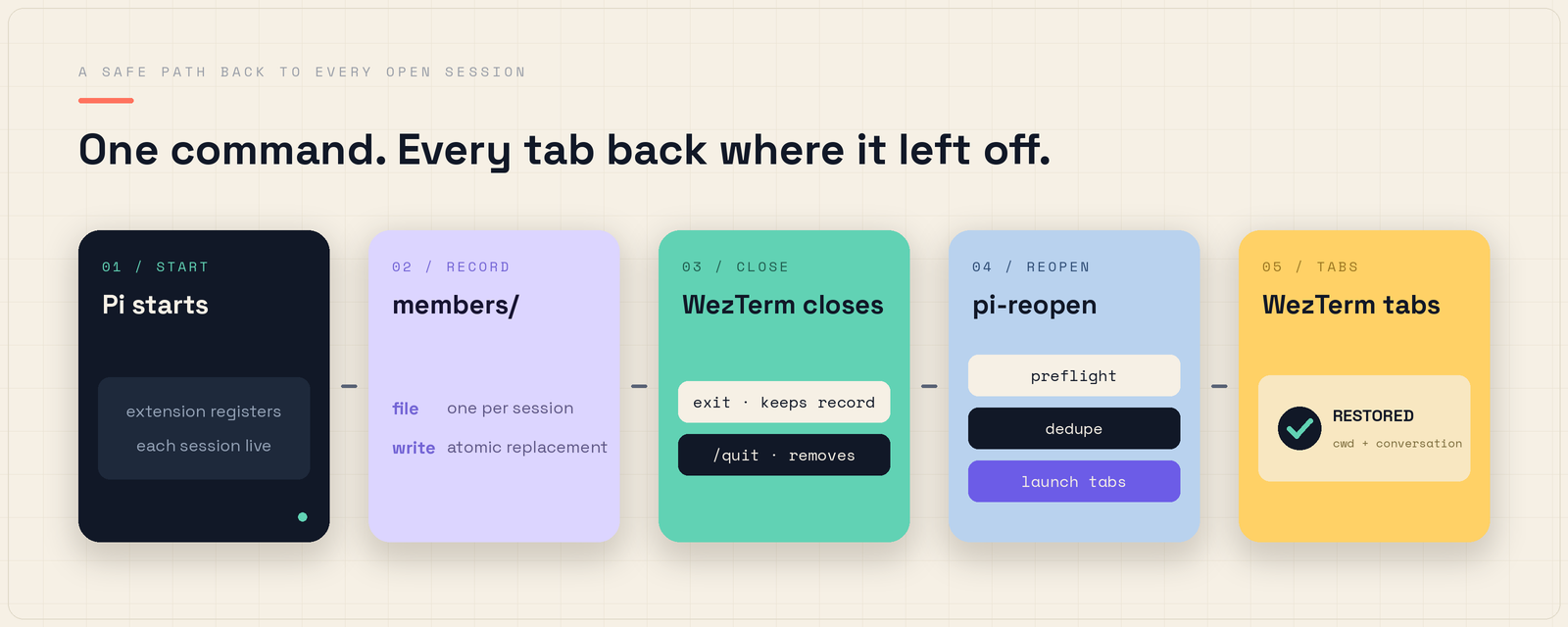
- Registration: on every Pi startup,
{session file absolute path, cwd, pid, processStart, bootId, platform, distro, user, schemaVersion}is written in real time to~/.pi/agent/pi-reopen/members/(one file per session, atomic replacement). Records written by 0.3.0 and earlier underpi-workspace/are still read and cleaned. - Close detection: Pi's signal exits also emit a
quitcleanup event, so the event name alone is not reliable. The extension records SIGHUP/SIGTERM within the TUI lifecycle; a signal-less deliberate/quitor session switch deletes the record; reload keeps the record and cleans up listeners. Without a tracked signal it also asks WezTerm whether the current pane still exists (WEZTERM_PANE): a vanished pane means the window was closed, so the record is kept. By default (opt out withPI_REOPEN_FORGET_ON_TAB_CLOSE=0) a vanished pane is deleted instead when WezTerm still has other panes (closing one tab = task done, browser-style “closed tabs don't join the restore set”); no other panes or an inconclusive check keeps the record. When a hard kill prevents cleanup, the leftover is recorded. On power loss, at most the persisted records are recovered; the latest unflushed changes are not guaranteed. - Safe startup: tabs open concurrently (5 at a time by default); each
wezterm cli spawnrequest is aborted with an error after 15s of no response, and 3 consecutive request failures stop early, avoiding long waits when WezTerm is stuck.--limitbounds the burst. - Deduplication: before restore, process liveness is checked (pid + start time + bootId; stale PIDs after a reboot are not misjudged), running processes are scanned for
--session <file>so an unregistered window is not opened twice, and start claims (60s TTL + holder liveness check) reduce duplicate requests. The global restore lock (restore.lock, 30-minute TTL + pid liveness + bootId check) is created withO_EXCL, so concurrent restores cannot both start a batch; it can be taken over after the lock holder dies or the OS reboots. - Verification: "request accepted" and "pi registered" are reported separately; the confirmation window scales with the batch size (15s + 2s per session, capped at 90s).
- Titles and hygiene: tabs are titled with the session name, else the cwd folder name. Records older than 14 days are
expiredand no longer auto-restored;forget/pruneclean up without touching conversation files. - Safety: if preflight (process identity / running WezTerm / Pi / terminal adapter / registry health, plus WSL interop where applicable) fails, nothing is launched in bulk; never auto-sudo; ENOEXEC comes with a fix hint.
Development & Testing
# from the repo root
npm test                    # full Linux/WSL regression suite (integration test skipped)
npm run test:platform       # native Linux/macOS/Windows suite
npm run verify-pack         # build the tarball, assert contents, run the unpacked CLI
npm run test:integration    # real WezTerm spawn/title test (needs a running WezTerm)
python3 test/pty-shutdown.py # real Pi PTY: signal keeps the record, /quit removes it
extensions/index.ts Pi extension (thin adapter layer): registers live Pis, provides /reopen
src/ shared core (pure JS ESM, used by both extension and CLI)
terminals/ terminal adapters (wezterm; see docs/TERMINALS.md)
platform/windows/paths/liveness/members/claims/plan/preflight/discover/
launch/spawn/verify/restore/cli/prune/health/inuse/pane/sessions/i18n/version
bin/pi-reopen.js CLI entry point (run directly with node, no build step)
test/ Node built-in tests (isolated dirs + injected mocks, no real terminal calls)
docs/ requirements, status, platforms, terminals, publishingTests cover core restore, signal handling order, reload cleanup, pane-based close detection, /reopen recent picking, non-standard Pi install paths, shell escaping, record merging from the legacy directory, schema gating, i18n and loading after the package moves; tests are isolated via temporary directories and a mock launcher. The test hook PI_REOPEN_HOOKS should not be set during normal use.
CI runs the platform suite on Linux/macOS/Windows, the full suite on Linux, the packaged-tarball check and the real Pi PTY lifecycle (it installs the Pi host). CI cannot open a WezTerm GUI, so the real spawn/title test stays opt-in via PI_REOPEN_INTEGRATION=1.
Maintainer release steps: see the publishing guide and CHANGELOG.
Feedback and sharing
If this solves your terminal restart workflow, share the repository with other Pi / WezTerm users. Report recovery problems with your OS, Pi/WezTerm versions, and redacted pi-reopen doctor output. Never upload credentials or private conversation files. See the outreach drafts and measurement plan.
Contributors
License
MIT, Copyright (c) 2026 ellieyujin