@howarewoo/pi-btw
Pi coding agent extension for concurrent read-only /btw side conversations with saved thread history.
Package details
Install @howarewoo/pi-btw from npm and Pi will load the resources declared by the package manifest.
$ pi install npm:@howarewoo/pi-btw- Package
@howarewoo/pi-btw- Version
0.1.2- Published
- Nov 13, 2026
- Downloads
- 614/mo · 614/wk
- Author
- howarewoo
- License
- MIT
- Types
- extension
- Size
- 128.7 KB
- Dependencies
- 0 dependencies · 4 peers
Pi manifest JSON
{
  "extensions": [
    "./index.ts"
  ]
}
Security note
Pi packages can execute code and influence agent behavior. Review the source before installing third-party packages.
README
@howarewoo/pi-btw — Pi extension for concurrent side conversations
Run several independent, read-only /btw conversations alongside the Pi coding agent.
Switch between threads in one hub, ask follow-up questions while the main agent works,
and restore saved thread history with the parent session. Side conversations use a
snapshot of the main conversation and stay out of its future model context.
Requires Pi 1.5.2 or later. Available on npm as
@howarewoo/pi-btw.
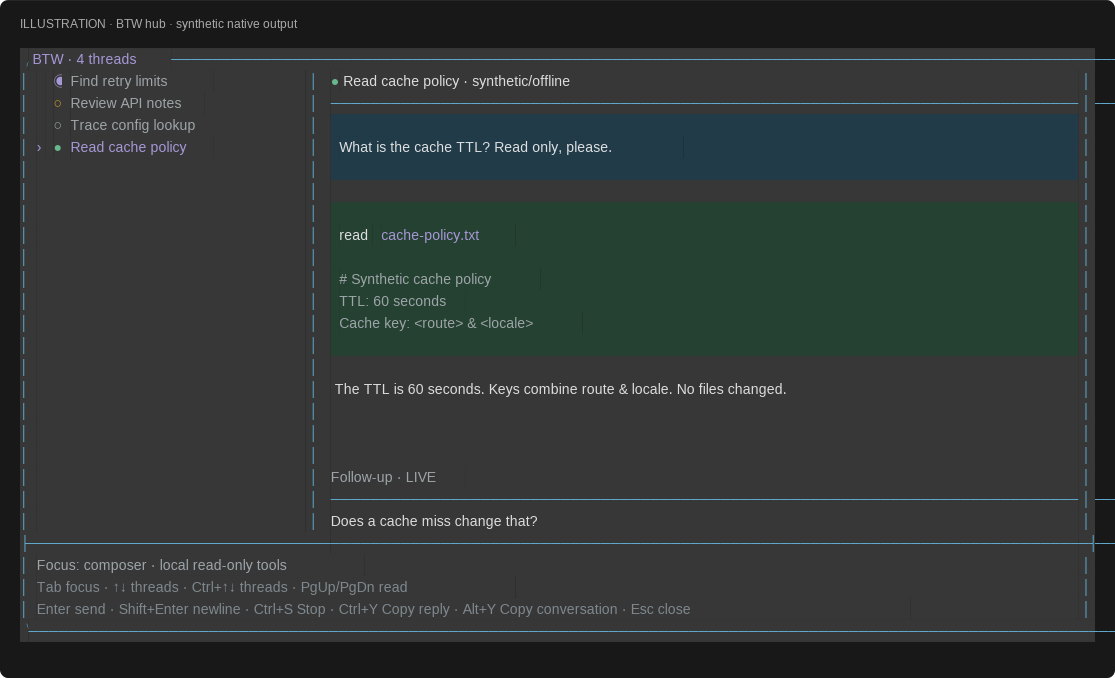
Two-panel BTW hub with colored status circles and a neutral gray panel, rendered by the production UI with synthetic in-memory data. Not a terminal screenshot or live-provider evidence.
Install
Requires Node.js >=22.19.0, Pi >=1.5.2 and a working model/provider login. Review extension source before installing: extensions themselves run with Pi's operating-system permissions.
pi install npm:@howarewoo/pi-btwRestart Pi, or run /reload in an existing idle session after installing.
Moving from the older unscoped pi-btw extension
This is a standalone replacement, not an upgrade of the unscoped npm package. Before
installing, use pi list and pi config to identify the old package or extension.
Disable/remove that old extension yourself, then install this package and reload. Do not
leave both enabled: they register the same /btw command and Pi may suffix the names.
There are no old aliases, mode commands, model overrides, or old-history migration.
Old saved session data is not deleted or imported.
Quick start
In a project containing README.md and package.json:
Start a side question:
/btw Read README.md and summarize this project's purpose in three bullets.Press Esc to close the hub, then start another question:
/btw Read package.json and explain the main npm scripts.Use Up / Down to select either thread. After its request finishes, send a follow-up in that thread's composer.
The hub now lists two independent threads. Requests can run concurrently; closing
the hub does not cancel them. Every /btw <prompt> creates a new thread; use the
selected thread's composer to continue an existing conversation. Bare /btw reopens
the hub without making a model request.
Use the hub
/btw <prompt>always creates a fresh UUID-identified thread, even for an identical prompt. It selects the thread, starts its request, and opens the hub./btwonly opens the hub. It does not create a thread or make a model request.- Write a follow-up in the selected thread's composer. Different threads run concurrently. Submitting to a busy thread is visibly rejected and keeps the draft; nothing is queued or steered.
The centered overlay uses approximately 90% of the terminal. Wide terminals show the oldest-first roster (new threads append at the bottom) on the left and native Pi chat/tool components on the right. Status circles appear beside each title and in the selected header: accent ◉ starting/running, green ● idle, red ● failed, muted ○ cancelled, warning ○ interrupted. The separate › marker indicates selection. Panel backgrounds are neutral gray at the current theme’s lightness; native user/tool blocks keep their own styling. Narrow terminals show the selected thread with compact navigation. Very small terminals ask you to resize rather than accepting invisible composer input.
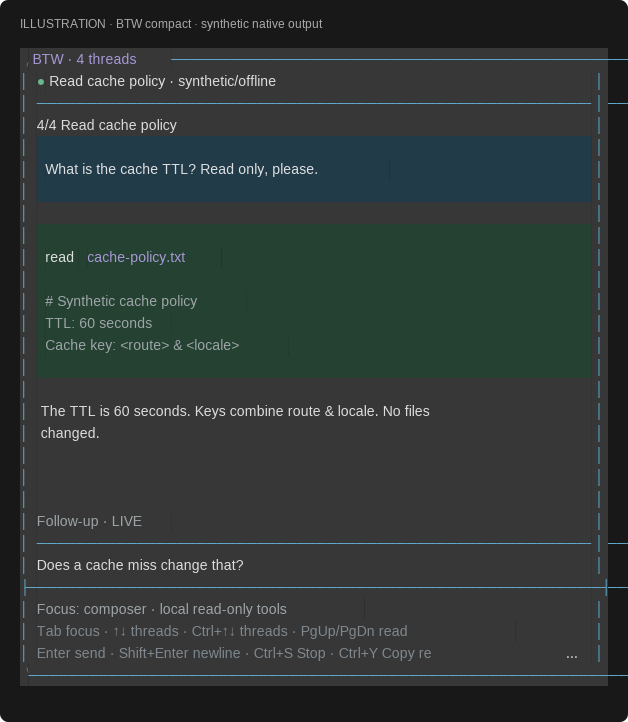
Compact selected-conversation view with a status circle and neutral panel from the same production renderer and synthetic threads. Not a terminal screenshot or live-provider evidence; narrow layouts truncate some shortcut hints, while the full controls are listed below.
| Control | Action |
|---|---|
| Esc | Close the hub, without stopping requests |
| Tab | Switch between composer and roster focus |
| Up / Down in either pane | Select the previous/older or next/newer thread (no wrap) |
| Enter in roster | Focus the composer |
| Ctrl+Up / Ctrl+Down | Select the previous/older or next/newer thread from either panel |
| Enter in composer | Send follow-up |
| Shift+Enter or Ctrl+J | Insert a newline |
| PageUp / PageDown | Scroll the selected transcript |
| Mouse wheel over transcript (Pi fullscreen mode) | Scroll the selected transcript |
| Ctrl+End | Return to live output at the bottom |
| Ctrl+S | Stop only the selected thread's current request |
| Ctrl+Y | Copy the latest assistant reply |
| Alt+Y | Copy the user/assistant conversation with Markdown role labels |
Composer submit, newline, thread navigation, and cancel honor Pi's corresponding TUI keybindings. Plain Up/Down are always reserved for thread navigation, even in the multiline composer; use other editor controls (Left/Right, Home/End, etc.) to edit. Ctrl+Up/Down remain fixed navigation aliases. The other hub shortcuts above are fixed. Modified-key support depends on your terminal; see Pi's terminal setup documentation.
Drafts and reading position are kept per thread when switching or closing/reopening the hub in the same runtime. Streaming follows the bottom until you scroll up; scrolling back to the bottom or pressing Ctrl+End resumes live output. The selected header and its separator stay fixed while the transcript scrolls. Native wheel scrolling is available only in Pi fullscreen mode and only over the transcript (not the roster, header, or composer). In regular mode the terminal owns mouse scrolling; use PageUp/PageDown and Ctrl+End to scroll the BTW transcript instead. Stop retains the SDK's partial assistant response. A failed, cancelled, or interrupted thread accepts new follow-ups; other threads are unaffected.
Copy excludes inherited parent context, thinking, tool calls/results, terminal escapes, and UI framing. Partial text can be copied; the notice reports the observed thread state. Pi's exported clipboard helper is used, and errors are shown rather than reported as success.
Context and read-only boundary
At creation, the extension captures the current parent's branch model context once (with compaction applied) and its effective system/project instructions. That snapshot is persisted with the thread, kept separate from visible/copyable side messages, and never refreshed from later parent conversation turns. Later follow-ups use only that snapshot and their own thread history. Child reads can still see subsequent local file changes.
Each turn inherits the parent's current model and thinking level. The hub displays the selected/effective model; it never silently substitutes a different model when authentication fails. Provider or credential failures are visible on that thread. There are no override controls.
Each child is a real SDK session with only read, grep, find, and ls registered.
An explicit tool allowlist and a resource loader with no extensions, skills, templates,
or arbitrary resource discovery enforce this structurally—not just through a prompt.
Inherited historical tool calls do not grant tools. There is no bash, edit, write,
subagent, MCP, codemode, or SSH support in children.
This is a capability restriction, not a filesystem sandbox: the four tools can read local paths accessible to Pi, including paths outside the working directory. The extension itself and the model provider remain trusted code. Do not ask it to read secrets.
Persistence and recovery
Thread snapshots and SDK transcripts are stored in versioned, hidden custom entries
(howarewoo.btw.v1) in the parent session file. These entries do not enter the parent's
model context and do not create visible save notes. They can contain the same sensitive
conversation/project information as the parent; protect the session file accordingly.
Creation and meaningful message/turn checkpoints are saved. Restoration reads only the current session branch. Unfinished restored turns become interrupted, and no paid request is automatically replayed. An abrupt crash can lose an unfinished streaming tail since the last checkpoint. Resume manually with a follow-up if you want another call.
Clean reload, shutdown, session replacement, and tree navigation stop/dispose the affected
children. Late async completions cannot append into a replacement branch/session. Returning
to an older branch restores its last saved state rather than importing another branch's threads.
Drafts and viewport positions are runtime-only and are not restored after restart/reload.
--no-session parent sessions are ephemeral, including their BTW checkpoints.
No automatic compaction or retry is enabled in child sessions. Very long side threads may
hit provider context limits and fail visibly; start a fresh /btw <prompt> when needed.
Development
git clone https://github.com/howarewoo/pi-btw.git
cd pi-btw
npm ci
npm run check
pi install .
The package loads only the root index.ts entry point; source modules, README and its
images, changelog, and license are included in its install contents. No build step is
required. For a one-invocation trial without changing package settings, use
pi -e ./index.ts from the checkout.
Maintainers: see the release guide.
Verification and limits
npm test uses Node's test runner and the real Pi 1.5.2 SDK with a deterministic provider
fixture. It checks tool declarations and execution/rejection, context isolation, concurrency,
stop, restore/branch fencing, commands, copy filtering, and Unicode/narrow/wide hub rendering.
npm run typecheck checks source and fixtures. npm run lint runs Oxlint with warnings
treated as failures; npm run lint:fix applies safe lint fixes. npm run format formats
the repository with Oxfmt, and npm run format:check checks formatting without writing.
Generated README images and package-lock.json are excluded from formatting.
npm run check runs lint, formatting, typechecking, and tests; CI and prepublish use
the same checks.
npm run release:check validates planned release metadata; npm run test:package packs,
inspects and installs the actual tarball in a disposable offline consumer, then checks Pi
1.5.2 loading and the noninteractive command boundary. These do not publish or verify npm
account access. npm pack --dry-run only lists install contents.
A small offline model fixture in test/interactive-fixture.ts is available for isolated
manual TUI checks; it is not installed with the package. Automated SDK tests and an offline
TUI smoke do not establish live-provider compatibility or every terminal/clipboard backend.
Pi 1.5.2 is the minimum supported version and the automated-test baseline, not an
exact-version requirement. Newer Pi versions are allowed; you do not need to stay on
1.5.2 to use this extension. Later versions have not yet been verified, and future
breaking SDK changes may require an extension update.
Regenerate README illustrations
From a checkout after npm ci, run npm run render:readme to regenerate
docs/images/btw-hub.svg and docs/images/btw-compact.svg. The generator uses the
production hub and native Pi transcript components with synthetic Threads and
in-memory SessionManager data only. It loads no parent session and makes no provider
requests. It uses the real theme and live neutral panel paint without illustration-only
theme overrides. The ANSI-to-SVG converter is adapted from pi-extended-subagents (MIT).
The generator and tests are not installed with the package; the README images are.
License
MIT. Includes adapted SDK isolation patterns from Dan Bachelder's pi-btw and native transcript rendering from Adam Woo's pi-extended-subagents. See LICENSE.