@howarewoo/pi-subagents
Pi subagent extension for supervised coding tasks with live monitoring, steering, and explicit tool permissions.
Package details
Install @howarewoo/pi-subagents from npm and Pi will load the resources declared by the package manifest.
$ pi install npm:@howarewoo/pi-subagents- Package
@howarewoo/pi-subagents- Version
0.5.0- Published
- Nov 22, 2026
- Downloads
- 1,650/mo · 553/wk
- Author
- howarewoo
- License
- MIT
- Types
- extension
- Size
- 1 MB
- Dependencies
- 1 dependency · 3 peers
Pi manifest JSON
{
  "extensions": [
    "./index.ts"
  ]
}
Security note
Pi packages can execute code and influence agent behavior. Review the source before installing third-party packages.
README
@howarewoo/pi-subagents — Pi subagent extension


Delegate code exploration, reviews and implementation tasks in the Pi coding agent. Follow each subagent's conversation and tool use, then steer or stop tasks from Subagent Hub. Subagents use your selected physical model by default, or an independently configured profile chain, with their own assignments and explicit tool grants.
Use this extension to supervise delegated work inside a running Pi session. Keep the parent running until tasks finish; writers run concurrently by default, and you coordinate shared writes and any worktrees. See why choose this repo and the feature comparison for the full trade-offs.
Install · Quick start · Subagent Hub · Compare extensions · Documentation
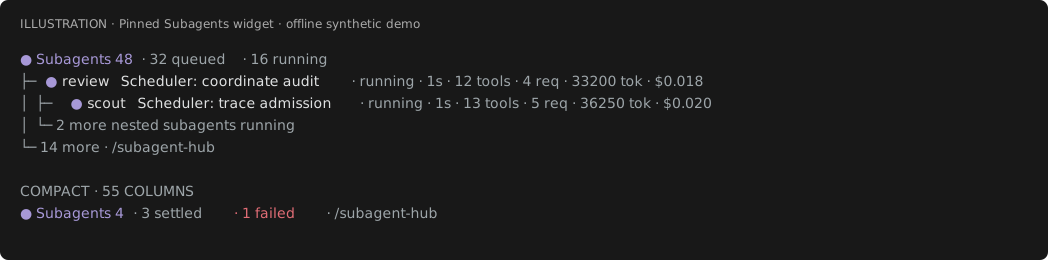
Pinned Subagents widget at default capacity: 16 running tasks and 32 queued. Below it, a separate 55-column example shows the failure count and /subagent-hub even when no tasks are running. Synthetic demo data, not a live load test.
Installation
Requires Node 22.19+ and stable Pi 1.5.2 or newer. Tested host: Pi 1.5.2; newer stable versions are allowed, not guaranteed compatible. Prerelease, older, malformed and unknown host versions are rejected before task reads, allocation or model requests. Wildcard host peer dependencies follow Pi's package format, not a compatibility promise. See host support for version rules.
If the host is unsupported, let active tasks drain, update Pi and restart. Status, stop/cleanup and diagnostics remain available where the extension can load; arbitrary older SDKs may fail at module load. The minimum-host restriction is a breaking change in 0.2.0. When upgrading from 0.1.x, drain active tasks, install stable Pi 1.5.2 or newer, update the extension and restart Pi.
Install from npm:
pi install npm:@howarewoo/pi-subagentsAlternatively, install from Git with pi install git:github.com/howarewoo/pi-subagents.
Use only one source: when switching between npm, Git or a local checkout, remove the
previously registered source first so Pi does not load the extension twice.
Restart Pi and run /subagent-profiles to check the installation.
Migrate from the old package
If you installed the former unscoped package, follow the 0.1.1 migration instructions before installing the current package.
Quick start
Start Pi in a project containing a README.md file. Choose a model through Pi's /login and /model setup. Delegation uses that provider and may incur charges; it does not automatically switch to a cheaper model.
Ask Pi:
Use delegate_task with profile scout to read README.md and summarize this project's purpose in three bullets. Run it in the foreground.
The corresponding tool call is:
{
  "assignment": "Read README.md and summarize this project's purpose in three bullets",
  "profile": "scout",
  "background": false
}
The foreground call returns the scout's summary to the parent. Open /subagent-hub to inspect its conversation and tool calls. This example needs only the read tool; it does not require enabling grep, find, ls or bash.
Use delegation
Submit a batch for parallel read-only work:
{
  "tasks": [
    { "assignment": "Locate startup code", "profile": "scout" },
    { "assignment": "Review lifecycle tests", "profile": "review", "limits": { "requests": 20 } }
  ],
  "background": false
}
The default is 16 concurrent tasks, a 32-item queue and up to 16 tasks per batch. Every item passes preflight before any starts. One failed task does not cancel its siblings.
scout and review allow up to read, grep, find and ls. general and implementation also allow write, edit and bash. Each role receives only the builtins already callable in the parent. With Pi's default tools, scouts get read only. Tool calls retain the parent's permission hooks; incompatible tool overrides are rejected.
general inherits available parent skills, not parent instructions or history. Its role prompt and assignment remain intact. Operator/trusted-project tools and skills settings can narrow inheritance; [] removes grants. General can write when its effective tool set allows it.
Extension/MCP tools require operator review. Set general.leafTools to exact names only for trusted tools that never call other Pi tools or change the tool/model/session loadout. Descriptions and annotations do not grant trust. Orchestrating/reaching tools, codemode, tool search, owned controls, hidden/model-only tools and builtin replacements cannot be forwarded. Leaf tools require the root workspace; only builtins support cwd adaptation. See restricted inheritance.
Foreground calls return the final results. Set background:true to return immediately and receive one ordered completion message after the batch actually drains, automatically waking the owning parent (or queuing a follow-up if busy).
Direct delegate_coordinate resume/followup/revive and subagent resume likewise send one
wake-enabled outcome per new execution window; followup/revive identify the new generation.
Foreground calls add no extra notice; rejected calls add none. Paused, failed and cancelled
outcomes notify too, but do not authorize automatic resume. A wake requests a model turn,
not guaranteed task continuation. All notices remain parent-bound and are suppressed on
shutdown/reload; no polling or forced continuation loop is added.
0.4.0 migration (breaking behavior): native background/direct resume now wake the parent,
and followup/revive now notify and wake. This can add parent model turns and provider costs.
Drain active tasks, install npm:@howarewoo/pi-subagents@0.4.0, then restart Pi. Grants,
configuration and the stable Pi 1.5.2 minimum/tested host are unchanged. Updating a checkout
does not repair an already loaded runtime. See the delegation contract.
0.5.0 migration (breaking): subagents no longer pause after 30 minutes by default, and each
resume starts fresh request/tool budgets; set "scheduling": {"deadlineMs": 1800000} in
~/.pi/agent/delegation.json to keep the old pause. /subagent-status and /subagent-steer
are removed (see below), and Subagent Profiles edits now autosave per item. Drain active tasks,
install npm:@howarewoo/pi-subagents@0.5.0, then restart Pi. Existing configuration and the
stable Pi 1.5.2 minimum/tested host are unchanged. See CHANGELOG.md for
rollback steps.
The extension adds three commands:
/subagent-hub                     # watch, steer and control subagents
/subagent-profiles                # inspect or edit profiles
/subagent-stop <id> <generation>  # stop and drain one task
Open /subagent-hub to check status or steer a running task from its composer. Outside the TUI (RPC, JSON or print mode), /subagent-hub prints the current task list instead. For anything else, such as per-task status or a fallback reset, ask the orchestrator; it controls tasks with the subagent and delegate_coordinate tools.
Removed commands: /subagent-status, /subagent-steer and /subagent-fallback-reset no longer exist and have no aliases. Use Subagent Hub (or the non-TUI /subagent-hub list) for status, the Hub composer for steering, and ask the orchestrator to call delegate_coordinate reset_fallback for fallback resets.
Native orchestration
Pi discovers the native subagent tool at startup through its tool description and coding-worker guidance; no enable call is needed. For replacement use, load only one extension providing subagent: Pi uses the first registration, not an automatic provider preference. Switching providers does not migrate or remove old runs.
{
  "agent": "worker",
  "task": "Implement the approved change; follow the supplied repository guidelines and task references",
  "cwd": "/absolute/path/to/task-worktree"
}workermaps to the configuredimplementationprofile;scout,reviewandgeneralare also available.- Calls are async by default and wake the parent after drain. Set
async:falseto wait; usetasks:[{agent,task,cwd?}]for a batch. - Control a task with its returned
idandaction:"status","steer","stop"or"resume". Steer/resume also requiremessage. - Resume continues a drained paused or completed conversation, preserving the same identity, generation, session count and full SDK conversation/tool history. Completed idle/parked agents restore their canonical session into a new SDK runtime using the same transcript, not a result summary. Missing restoration state, stopped identities, failed identities without a fallback reset, and retired descendants reject; there is no fresh-context fallback. Explicit
delegate_coordinatefollowup/revive still start fresh work.
The coordinator supplies an existing workspace and the complete handoff, including accessible skill/reference paths. The extension does not create or manage worktrees. This is the supported orchestration interface, not compatibility with every competing workflow script or ambient Markdown agent definition.
Subagent Profiles
Run /subagent-profiles to inspect bundled, global operator and trusted-project profiles. The read-only Inspector is the landing view: a profile rail beside a spaced label/value overview, with complete setting details, provenance and configuration paths available on demand; no write destination is selected automatically.
Select a role with ↑/↓. Tab switches focus between profiles and settings; 1–4 jump to Profile, Model, Access and Advanced in the overview. Enter (or the configured confirm key) opens the selected setting read-only; Escape returns to its overview row. Narrow screens keep a compact selected-role strip above settings. Press
eto edit, then choose Global operator settings or Trusted project settings, checking the exact path. Project editing is unavailable until the host already trusts the workspace; the editor never changes trust.Open Description or Instructions, then select its edit control to use native input. Ctrl+Left stays native word navigation; it never saves or leaves text input. Commit a description with Enter or by tabbing back to the profile rail (once only). Submit multiline instructions with the native editor; Tab instead keeps a changed buffer as an unsaved draft and focuses profiles. Browse another profile, then select Resume Global general.prompt draft (for example) to return to the original buffer and caret. Reopening its field also resumes it. Escape while editing explicitly cancels only that active buffer, not other drafts or accepted saves. Opening unchanged text creates no draft. Each committed action autosaves in order, without Apply/Cancel or ordinary file review. Pending badges and Saving / Pending values are distinct from Saved · verified and unsaved drafts. The destination and exact path stay pinned across profile changes.
Open Tools, Skills or General’s Reviewed tools to inspect complete entries. On
[x]/[ ]membership rows, Space or the configured confirmation key toggles once and saves immediately; arrow movement only selects. Space is not an action on model-navigation, reset/revoke or disabled rows. Delegation groups Spawn targets (spawn) and Coordination (coordination) separately. Overview counts are ceilings; inherited and explicit-empty declarations remain distinct in details. Exact skill/leaf additions use native text input; removing the last member stores[], while Reset … to inherited removes the layer key. These are ceilings, not proof that tools are callable. Within settings, ↑/↓ selects controls, Enter activates, j/k and PgUp/PgDn scroll, and Home/End selects the first/last control. Text and catalog search retain printable Space, j/k and?. Focused hints distinguish opening, editing, immediate saves, reset/revoke, disabled controls and structural review; native text submission uses its own binding, not the selection-confirm binding. Narrow screens stack the profile selector; tiny/short screens request resize without activating hidden controls.Open Models to edit the chain: one row per target, in the order they run. The first row is the default, shown as
provider/idwith its effort on the right (for examplegoogle-antigravity/claude-sonnet-5-5 ◔ low). Fallbacks follow as↳ provider/id:effort. A saved target that this session can't run keeps its row with⚠ unavailableor⚠ restricted, and stays movable and removable. The help line shows the selected target's friendly name, exactprovider/id · effortand any full warning. Select a row with ↑/↓, then use the keys listed in the bottom hint:- ←/→ previews another supported, eligible effort. The row shows
[◑ medium] · unsaved, plus· adds grantwhen that exact effort has no grant yet. Efforts that another row of the chain already uses are skipped, and at 64 grants only granted efforts are offered. Enter saves the change, adding at most one grant and keeping the old one. Escape, moving the selection, switching profile or opening the picker discards the preview without saving. - Enter, with nothing previewed, opens the model picker (next step) to replace that target in place, titled for example Replacing fallback 1 in general. Any accessible model and effort that isn't already in the chain can take its position.
- Shift+↑/↓, or
[and], moves the target earlier or later. The selection follows it, so moving a fallback above the first row makes it the default. - x or Delete removes the target and keeps its grants; the selection moves to the next row. On the last target, the row warns before you press the key: removing it saves
fallback:false, and the resulting unchained model/parent route may still be denied by current permissions. - f, or + Add fallback…, opens the picker to add a target. Global additions atomically save routing and any needed exact grant, without a modal. Global affects other workspaces, and grants also permit explicit overrides—not only fallback. With prewalk configured, the row reads + Switch from prewalk and add… and saves that labeled compound switch, never hidden cleanup.
Below a divider, Disable chain and Reset chain to inherited are separate actions. Without a chain, a muted
— unchained → …row names the model or parent route that runs instead. Project can only keep or remove an authorized ordered subsequence: the other keys show their reason and save nothing, so change destination explicitly to Global for them. At 64 targets, adding is disabled. Escape with nothing previewed returns to the overview.- ←/→ previews another supported, eligible effort. The row shows
The model picker opens with its title (for example Adding to general chain — ⏎ assigns, ⎋ cancels) and the destination, grant and save disclosures on the muted line below it. Typing always goes to the
🔍 >search, including Space, j/k and?; it matches names, provider labels, provider IDs and model IDs, and ←/→ move the text cursor. Alt+←/→ (⌥←/→) or Tab/Shift+Tab switch the Provider tabs. Each row shows the mutedprovider/and the model ID, followed by reasoning (🧠), context window (1m,500k,8.2k) and price per million input/output tokens ($2/10;$0when the host reports zero, which may mean unknown). Narrow layouts drop price, then context, then reasoning. When adding to or replacing in a chain, models that already have an exact grant on this profile are listed first, above a divider. ↑/↓ move through the list, and the line under it describes the highlighted model (name, context, output limit, price, reasoning, vision). Press Enter to open the effort strip (for exampleEffort: ⦸ off [◔ low] ◕ high). When replacing, it starts on the replaced target's effort if the chosen model supports it eligibly; otherwise on an effort that already has an exact grant, otherwise the first eligible effort. ←/→ move across every supported effort; ineligible efforts are dimmed and show their exact reason, and Enter on them does nothing. Enter on an eligible effort rechecks a fresh host snapshot and then saves; if the model became unavailable, the reason is shown and the picker stays open. Typing or ↑/↓ leave the strip, Escape returns from the strip to the list, and Escape in the list cancels without saving. Models with no eligible effort are hidden; when space allows, a note summarizes why, and short layouts show only a hidden count. F1 opens scrollable exact-ID, supported-effort and hidden-reason details; F1/Escape returns without accepting a selection. Ctrl+R rereads the host snapshot only, never network/provider caches. Unavailable saved selections stay warning rows and do not block unrelated edits/removal/reorder. New selections are rechecked on confirmation and when their queued action executes. Unchained model/prewalk and standalone grants use the same picker and also autosave; a grant needed by routing cannot be removed until routing is adjusted.Open Advanced for prewalk policy, exact model grants, raw/inherited/effective diagnostics, custom create/copy/delete, whole-override reset, local ceilings and operator authorization/registration. While a chain is active, its default is edited only through the first entry in Models, not a separate Advanced default control. Without a chain, Advanced retains the unchained model control. Existing
modelsettings and runtime bypass/disable behavior are unchanged; editing the chain does not rewrite the unchained setting, which remains inspectable in source diagnostics. Structural operations first finish ordinary saves, then retain explicit transaction review/save and confirmations. Blank definitions start with empty grants. A copy is independent, not live inheritance; copyinggeneralexcludes automatic skill inheritance/leaf forwarding and requires explicit review of copied skill paths. For a Project-local role, first authorize named global ceilings, then choose one during trusted-Project creation. This authority is not a spawn grant. Returning from a structural transaction rereads current configuration before ordinary editing resumes. Merely opening/closing Advanced or other settings never saves or grants anything. Escape first cancels unfinished native input or a previewed effort, then returns from the setting to the overview; outer close finishes accepted saves.
The profile/model flow is sized for a physical 80×24 terminal (72×21 production overlay; the nested catalog has 68×14). Focus entering settings follows the selected label, not its full value or trailing spacer. In Advanced → Exact model grants, select a numbered Remove grant row and use j/k or paging to read its full exact provider/ID/effort and warning. Confirming revokes only that grant, and remains disabled while routing requires it. A clipped value or warning does not disable a visible label; a genuinely hidden label still cannot activate. Below baseline, resize messages retain local back/cancel without saving or dispatching hidden controls; grow the terminal to continue from the same selection.
Reset removes only the selected-layer override. Delete removes a custom definition and blocks on local configuration references and nonterminal/reusable tasks; references must be removed explicitly and tasks stopped/drained using existing controls. It does not scan other workspaces or mutate history. See the configuration and persistence contract.
On a known pre-replacement failure, Not saved retains the attempted action and freezes later mutations. Any unrelated unfinished text—including an exact-entry input—is retained separately as a named draft. Browse profiles and Resume text while paused, but submission/blur cannot enqueue it. Retry retries the same accepted action; Revert discards the disclosed number of unsaved actions. Both retain unsubmitted drafts and previously verified saves; neither submits drafts automatically. After recovery, explicitly Resume and submit a draft when ready.
A relevant external edit, any trust change, or completed/unknown replacement requires Reload, which abandons the whole unsaved tail without merge, replay, force-write or rollback. If drafts exist, Reload identifies their destination/profile/field and discloses both draft and queued-change counts before an explicit discard-and-continue decision. The default Keep drafts and return (or Escape) abandons neither. Only currently trusted Project layers are read. Malformed Reload leaves an explanatory read-only state that can be closed; confirmed discards remain discarded even if reopening fails.
Close, destination changes, structural Advanced actions and resetting/replacing a drafted field likewise ask you to keep drafts or explicitly discard affected text. Ordinary profile browsing and unrelated toggles do not. Once draft disposition is resolved, close/destination/structural navigation shows Finishing saves and navigates only after every accepted action verifies. Any failure cancels that navigation; Retry cannot unexpectedly close the Inspector. Drafts are in memory for this Inspector only, not saved on disk. Force-quitting the process can lose queued/unfinished input; there is no durable recovery journal. At the physical 80×24 baseline (72×21 overlay), draft/exit controls remain available. Smaller terminals may request resize; resize itself never discards, and Escape's local hint distinguishes cancelling active text from keeping suspended drafts. The existing external-writer race between final check and rename is not eliminated by the in-memory FIFO.
Saved instructions apply to new sessions, not retained prompt/history replacement. Grant revocations can deny later runtime operations; admitted tasks never gain new authority from an edit. No agent restarts automatically. Reopen the viewer to refresh an externally changed snapshot.
To enable nested project-local targets, explicitly register an exact name and required ceiling in Register project-local spawn targets under Advanced in Global. Review/save this structural authorization, then separately toggle the name in the parent's Delegation → Spawn targets (spawn) membership list; that item autosaves. A trusted project must define that exact name with the exact registered ceiling. Registered-but-absent names are conditional choices, not profiles or discovery placeholders, and cannot launch until the local definition exists.
Registration scope is every trusted project using these operator settings, not only the current workspace. Each trusted project may supply independent instructions for the registered name under its ceiling. Registration is neither a parent spawn grant nor authorization for every role under a ceiling. Root local launches do not require incoming registration. See the exact paired configuration.
Ceilings are not callable tools. Pi's command context has no callable-tool dispatcher, so the viewer/editor report callable tools as unknown rather than treating active declarations as executable grants. Admission performs the real intersection and remaining checks; inspect a task's tools in Hub Details or the subagent status action. RPC, JSON and print modes retain the structured {toolPolicy, profiles} message instead of opening an overlay. Invalid configuration or missing/invalid granted skills fails resolution, as at admission.
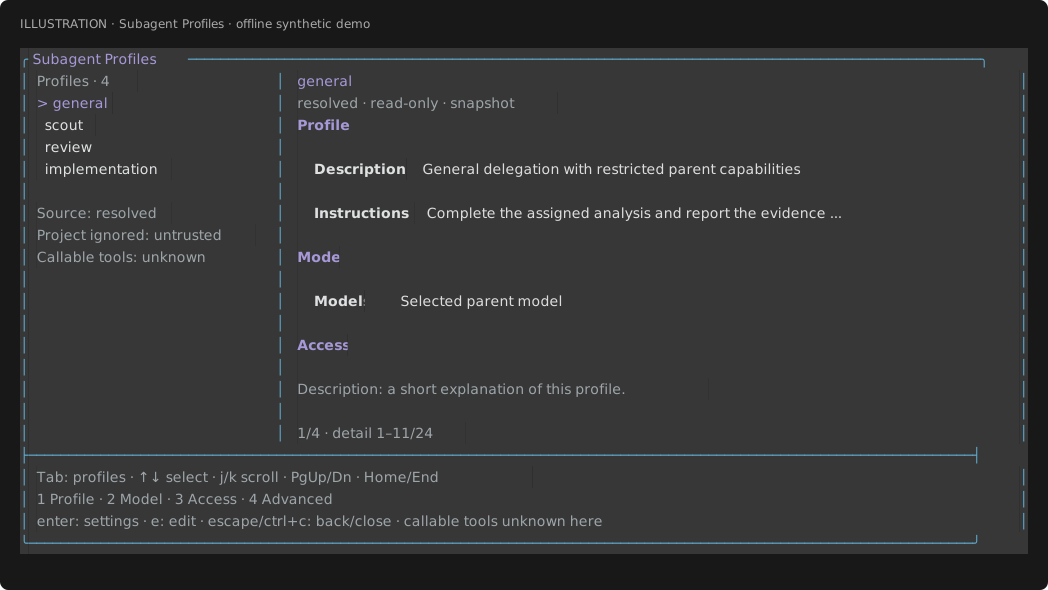
Synthetic native-component output; not a terminal screenshot or live-provider verification. Regenerate with node scripts/render-hub-hero.ts --profiles.
Subagent Hub
Subagent Hub shows the task list beside the selected conversation using Pi's native renderers. On narrow terminals, the conversation takes the full width. Details shows results, artifacts, grants and usage; Tools shows full sanitized arguments and result text.
Below the steering composer, a status row shows the selected task's current model and effort with its direct usage, like Pi's main footer:
↑12k ↓3.1k R40k $0.042 41.2%/200k anthropic/claude-opus-4-5 · effort highUsage counts only that generation, not its descendants. Unknown values are omitted. In narrow layouts, the model and effort stay visible and usage parts drop first. The row follows fallback and prewalk model switches as they happen.
The thread follows new output until you scroll up. Press End to follow again. The pinned Subagents widget appears after the first task starts. Compact summaries retain explicit failed counts, distinct from settled or cancelled tasks without relying on color. Summary-only fleets include a /subagent-hub hint within the widget's existing row budget at practical widths (for example, 55 columns). Closing Subagent Hub does not stop the work.
The Hub and widget illustrations use native renderer output with a synthetic fleet filling the default 16 concurrent slots and 32-item queue. Four read-only audit leads each have three foreground descendants, reaching the default nesting depth of two. The queue represents two further 16-task root batches, not one oversized batch. These are illustrations, not terminal screenshots or live-provider stress-test evidence. Regenerate them with node scripts/render-hub-hero.ts and node scripts/render-hub-hero.ts --widget.
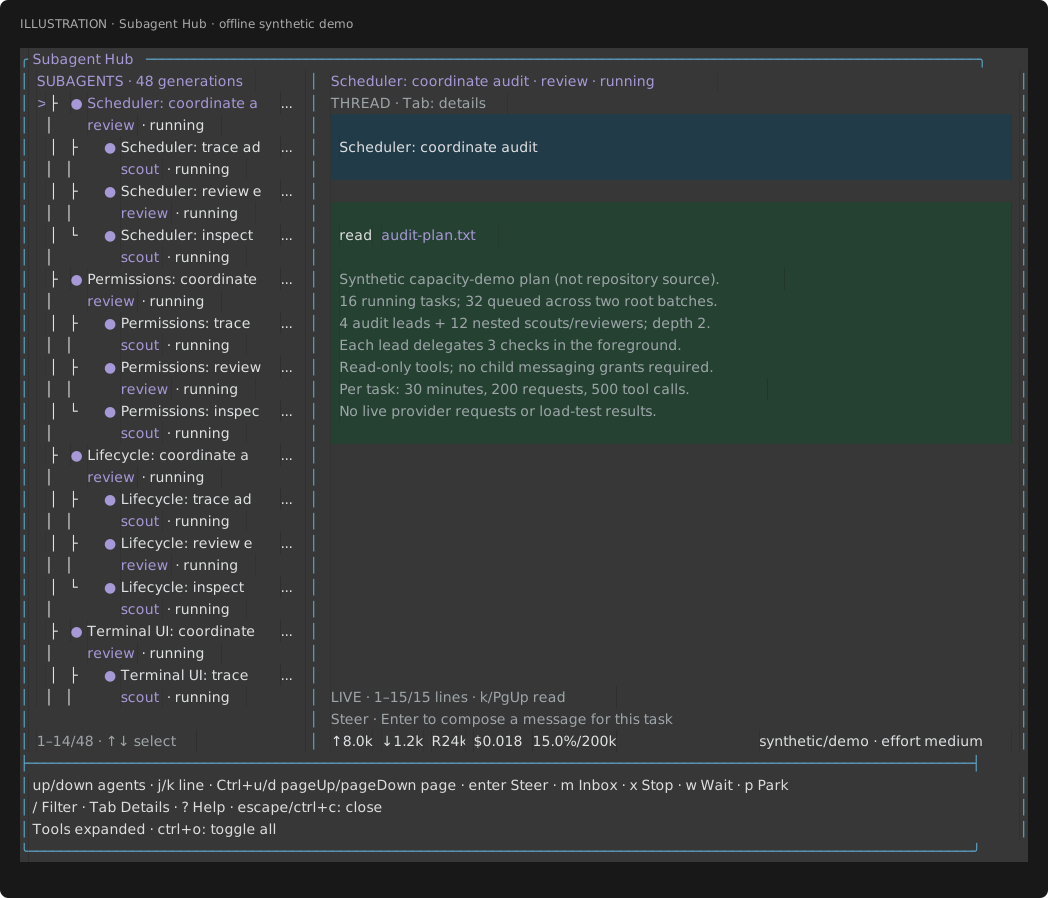
Subagent Hub at default capacity: tasks and conversations side by side, with nested scouts/reviewers at depth two. The roster scrolls through all 48 tasks.
| Key | Action |
|---|---|
| ↑ / ↓ | Select a subagent or historical generation |
| j / k | Scroll down / up one line |
| Ctrl+u/d or PgUp/PgDn | Scroll a page |
| Home / End | Top / latest output |
| Tab | Switch between thread, details and tools |
| / | Filter the subagent list |
| Enter | Focus the thread-column composer to steer the selected running task |
| m | Send an inbox message |
| x, then y | Stop the selected subtree; Enter does not confirm |
| w / p | Wait briefly for an outcome / park an idle task |
| ? | Open browse help; ? or cancel returns to the same view and reading position |
| Enter (in input) | Send the steer or inbox message, or apply the filter |
| Esc / Ctrl+C | Cancel input, return from help, or close the Hub |
These are the default keys. The footer names the next Tab view, the configured confirm key for steering and the configured cancel keys that close the Hub. Enter never closes the Hub. Tool expansion uses the configured app.tools.expand keys (default Ctrl+O), with its current expanded/collapsed state shown in the thread footer; unbound actions have no fallback key. Browse ? opens observation-only, scrollable help that blocks underlying controls. In filter/steer/inbox inputs, printable ?, j/k and Space remain text. Stop still requires y, never Enter.
The bottom row of the conversation column is a steering composer for the selected task. It shows whether the task can be steered: only running tasks accept steering. Press Enter to focus it, type the message and press Enter to send, or Esc to leave without sending. The target is pinned when the composer opens, so selecting another task or filtering does not retarget it. An empty message sends nothing. If the task stops before you send, nothing is sent and your text stays in the composer until you press Esc.
Mouse-wheel scrolling works in fullscreen mode. In regular mode, use the keyboard controls because the terminal owns mouse scrollback. Actions and pending/success/error notices identify the original task UUID, generation and task label even after selecting another task or filtering it out. Controls refuse to submit if the window cannot show the full target. A stopped-and-drained notice appears only after drain completes; inbox receipt state and queued/handled steering are not model acknowledgment. Navigation, help, resize and closing do not dispatch task controls.
Messages and follow-up work
Use delegate_coordinate to message a running subagent, wait for an outcome or assign follow-up work. Include it in any explicit tool allowlist alongside delegate_task.
{"action":"message","target":{"id":"<task-id>","generation":1},"text":"Check the shutdown path too","mode":"steer"}
{"action":"wait","target":{"id":"<task-id>","generation":1},"timeoutMs":30000}
{"action":"followup","target":{"id":"<task-id>","generation":1},"assignment":"Now review the cancellation path"}
Each line is a separate call. An accepted or queued message is not a delivery confirmation; even a delivered receipt does not prove the model understood it. Follow-ups start a new generation without replaying the old conversation, so include the context it needs. Follow-up and revival are model-tool operations, unavailable directly in Subagent Hub. Child messaging is off until explicitly granted. See the coordination reference.
Task files and structured results
Use taskFile instead of assignment to read instructions from a workspace-relative text file. Add resultSchema when you need a validated JSON value:
{
  "taskFile": "tasks/review.txt",
  "profile": "review",
  "resultSchema": {
    "type": "object",
    "properties": { "summary": { "type": "string" } },
    "required": ["summary"],
    "additionalProperties": false
  }
}
Task files must be regular UTF-8 files of 1 to 50000 bytes, outside hidden paths and node_modules. Reads use the parent's permission hooks. Schema-required children call submit_result({value:...}); missing or invalid results fail visibly. See supported schemas and task-file checks.
Configuration
No configuration is needed for the bundled roles. To change prompts or narrow tools, use ~/.pi/agent/delegation.json:
{
  "review": {
    "tools": ["read", "grep"],
    "skills": ["/absolute/operator-reviewed/review/SKILL.md"],
    "prompt": "Review this assignment and report concrete findings with source locations."
  }
}
All bundled profiles may delegate to scout and review by default, within a total depth of two (root 0, child 1, grandchild 2). Other nested targets and child messaging need explicit operator grants. Set spawn: [] to revoke nesting. General inherits available parent skills; other roles need explicit skill grants. Trusted project configuration in .pi/delegation.json can narrow grants, never expand them. Children do not load ambient extension/MCP runtimes or context files; general can forward only the reviewed leaf tools described above.
Profile-owned model chains
Configure models as permission grants and a separate ordered fallback array on a profile
in delegation.json. The chain starts at its own first available authorized physical target,
regardless of the parent's model, including when the parent selects a virtual model. It never
executes or inherits that parent's router. Profiles without a chain keep existing routing.
Every child, with or without a chain, retries a transient provider error twice on the same
model and automatically compacts its own context when it fills; each retry and summary
request consumes the request budget.
Each failed eligible request gets two same-model retries before advancing. Transient outages and exhausted quota/credits are eligible; authentication, permission, invalid requests, refusals, tool failures and cancellation are not. Backups remain selected across explicit resume until a fallback reset. Every attempt consumes the current window's request budget; backoff consumes the current deadline window, if one is configured.
An explicit task model stays pinned unless fallback:true opts into that model's suffix of
the profile chain. fallback:false disables chaining. Task models can remove destinations,
not add or reorder them. Fallback and prewalk cannot be combined. Listing a provider in a
chain authorizes sending that child's conversation to it; failed calls may still cost money.
The orchestrator inspects routing with the subagent status action. To retry an exhausted
chain, ask it to reset the idle/paused retained child with root-only
delegate_coordinate {"action":"reset_fallback","target":{"id":"<task-id>","generation":1}}
and then resume it. Reset sends no request and replenishes no budgets or deadline; the resume
opens its ordinary new window. Children cannot reset routing. No state survives parent shutdown.
See configuration, safety and diagnostics.
Default task limits are no deadline, 200 direct model requests and 500 tool calls per execution window:
- Operator
scheduling.deadlineMsin~/.pi/agent/delegation.jsonmay set a positive per-window deadline (up to 24 hours);0, the default, disables it. A trusted project or a task'slimits.deadlineMscan set or shorten a deadline but cannot disable an operator's deadline. - Requests and tools are hard caps. Before reaching them, a subagent can use reserved capacity to report partial findings or submit a structured result instead of starting new work. Wrap-up does not add capacity or guarantee a result. Trusted project and per-task limits can still only narrow the applicable budgets.
- A configured deadline pauses the active subtree after tool/provider drain, releasing capacity but retaining sessions and conversations.
- Use
subagentresume or root-onlydelegate_coordinate{action:"resume",target:{id,generation},assignment:"Continue…"}to continue the same identity and conversation. Each resume starts a fresh window: a fresh deadline (if configured) and fresh request/tool budgets. Snapshot request/tool counters stay cumulative,windowStartrecords where the current window began, and spawn counts remain cumulative (at most 64 windows per generation). Completed windows retain earlier result/artifact evidence incompletedWindows; a resumed completed structured assignment requires a newsubmit_result. - Resume the parent first, then explicitly selected children. Descendants never resume automatically.
- Paused windows publish no final artifacts, but their snapshot, background notice and task card are marked
partialwith a bounded preview of the last assistant text. A window that settles with a budget wrap-up report is also markedpartial; its result is that report. Resume clears the marker for the new window. - Stop, shutdown and hard request/tool limits cancel and dispose. Unresponsive code must drain before pause or cancellation can release resources.
See limits and nesting, profile grants, and model selection and prewalk.
Shared checkout and lifetime
Subagents use your checkout unless you supply an existing directory as cwd. Parent permission hooks still apply and may deny access. Writers and parent tools may run together, bounded by ordinary FIFO capacity. Workspace selection is not a sandbox. Coordinate shared writes, including manual commands, external editors and other sessions. See workspace safety.
Keep the parent runtime alive until work finishes. Shutdown or reload aborts and drains children; there is no restart recovery or cross-parent revival. Saved transcripts and results may contain sensitive task, tool and model output; protect them like your main Pi transcripts.
Why worktrees are managed externally
Create or select a workspace externally, then pass cwd as in the
native orchestration example. The caller owns it throughout the
assignment, including inspection, integration and removal. Automatic worktree creation,
commits, apply and cleanup are intentionally outside scope, not planned features.
Separate worktrees do not isolate shared external resources or provide a sandbox. See workspace ownership and writer coordination.
Why workflows and scheduling stay external
Separate packages can compose the public delegation tools and own when and how to run assignments within the parent runtime. This does not grant automatic tool/context inheritance or promise compatibility with existing third-party workflow packages. See orchestration boundaries.
Updates and rollback
Let active subagents finish before updating, then restart Pi. Shutdown or /reload aborts
and drains children; active tasks are not migrated to the new version. There is no extension-owned
auto-updater.
# Update an unpinned npm installation
pi update npm:@howarewoo/pi-subagents

# Or update all installed extension packages
pi update --extensions
Plain pi update updates Pi itself, not installed extension packages. For a Git installation,
use pi update git:github.com/howarewoo/pi-subagents, matching the source you registered.
An unpinned Git source tracks the repository's default branch, including unreleased commits.
For a reproducible npm installation or rollback, select an exact published version:
pi install npm:@howarewoo/pi-subagents@0.5.0For Git, select a published tag, for example
pi install git:github.com/howarewoo/pi-subagents@v0.5.0.
Exact npm versions and Git tags stay pinned; updating does not advance them to the next release.
Install a different version explicitly to change the pin.
CHANGELOG.md lists user-facing changes and migrations. Pi shows new package changelog entries on the next fresh launch after a version increase. See the maintainer release guide for publishing and recovery.
Feature comparison
Compared with three community alternatives using their documentation. Nicobailon and tintinweb were checked on 2026-11-11; tintinweb's messaging scope was additionally checked against source at revision b72b414 (2026-11-12). pi-better-subagents was checked against its published 0.32.4 documentation on 2026-11-13. This is a feature comparison, not a performance or reliability benchmark. UI cells name documented surfaces; they do not imply other features are absent.
| Feature | @howarewoo/pi-subagents | nicobailon/pi-subagents | tintinweb/pi-subagents | pi-better-subagents |
|---|---|---|---|---|
| Background tasks | ✅ Parent-bound by design; until exit or reload | ✅ Supported | ✅ Supported | ✅ Non-blocking pi -p child processes; completion callbacks |
| Nested delegation | ✅ Supported | ✅ Supported | ✅ Supported | ⚠️ Opt-in for unconfined children; disabled in sandbox |
| Task list / conversation | ✅ Subagent Hub: split panes; full-width thread on narrow terminals | ✅ Fleet inspector: roster and output pane | ✅ FleetView opens a separate conversation viewer | ✅ Background-work navigator; output/result tools |
| Message / tool rendering | ✅ Native Pi message and tool components | ✅ Structured Markdown/tool transcripts | ✅ Markdown + session-registered tool renderers | — Not assessed |
| Bi-directional agent messaging | ✅ Supported; parent/child and siblings | ⚠️ Child/supervisor requests and replies | ⚠️ Parent-to-child steering + result return; no built-in child-initiated or sibling messaging | ⚠️ Parent-to-child communication + result return; no blocking child-to-parent requests |
| Live follow / scrollback | ✅ Scroll up to pause; End to follow | ✅ Scroll away to pause; bottom resumes | ✅ Scroll up to pause; End to follow | — Not assessed |
| In-UI task controls | ✅ Hub: steer, inbox, stop, wait, park | ✅ Inspector: steer/follow-up and stop async runs | ✅ Viewer: steer, stop, foreground-to-background handoff | ✅ Navigator stop controls |
| Tool / usage inspection | ✅ Tools: sanitized arguments/results; Details: direct usage | ✅ Expandable tool details + token counts | ✅ Expandable tool output + tokens; optional cost | ✅ Output/result tools expose optional cost and tool counts |
| Schema-validated results | ✅ Supported | ✅ Supported | ⚠️ Workflow agents only | — No equivalent caller-supplied result schema documented |
| Managed Git worktrees | 🚫 By design; caller-managed worktrees supported | ✅ Supported | ✅ Supported | ⚠️ Optional self-contained Git clone; not managed linked worktrees |
| Workflow scripts | 🚫 By design; caller-owned | ✅ Supported | ✅ Supported | — Not assessed |
| Scheduled runs | 🚫 By design; no scheduler | ✅ Supported | ⚠️ Session-scoped agents only | — Not assessed |
Legend: ✅ Supported (stated design boundaries apply) · ⚠️ Supported with scope restrictions · 🚫 By design · — Not established by the cited documentation or not assessed.
🚫 marks a deliberate product boundary, not a missing implementation within the current contract. Linked explanations describe the trade-offs behind this repo's choices.
Sources: our contract; nicobailon's README, agents, workflows and observability; tintinweb's README and workflows; pi-better-subagents' usage guide (0.32.4) and agent catalog (0.32.4).
Why choose this repo?
Choose this repo for a supervised workflow in an existing checkout:
- Child tools retain parent permission hooks. Profiles cap authority; trusted-project settings and tasks can only narrow operator grants. Ambient extension/MCP runtimes are not loaded, and extra leaf tools require operator review. See permissions and resources.
- Children use the parent's physical model and effort unless an exact operator-approved override or profile-owned fallback chain applies. Unchained unavailable selections fail without fallback. See model routing.
resultSchemarequires explicit, validated submission. Batches pass preflight before any child starts, retain input order and report background outcomes after all siblings drain. See structured results.- Hub combines native Pi conversations, tool arguments/results, usage and identity-pinned controls. Granted parent/child and sibling messaging stays bounded within the live parent runtime. See Hub and messaging.
- Writers and parent tools may run concurrently in the same checkout, within ordinary FIFO capacity. Assign independent responsibilities and coordinate shared operations; the extension does not prevent collisions, lost updates or Git index contention. See workspace ownership.
Compared with nicobailon/pi-subagents
This repo keeps background assignments under one live parent responsible for grants, admission, descendant drain and bounded concurrency. Nicobailon also runs foreground children in-process, but uses a detached background runner. Both have fleet inspection and schema-validated results.
Choose nicobailon for packaged review loops, council patterns, custom agents with per-agent memory, managed worktrees, durable missions or scheduled runs. This repo leaves workflows and workspace lifecycle to the caller, with no scheduler or restart recovery.
Compared with tintinweb/pi-subagents
This repo supports granted parent/child and sibling messaging, plus schema-validated results on ordinary assignments. Tintinweb's cited implementation has parent-to-child steering and result return; its schema-validated results are documented for workflow agents. This repo's Hub keeps the roster beside the conversation on wide terminals; tintinweb's FleetView opens a separate viewer.
Choose tintinweb for Claude Code-style tool conventions, compatible JavaScript workflows, persistent agent memory, session-scoped scheduling or managed worktrees that preserve changes on a branch. Both support conversation continuation, but this repo retains it only within the owning parent runtime; tintinweb documents persisted resume. Its worktree isolation is not an OS sandbox.
Compared with pi-better-subagents
This repo supports foreground results or background completion, live family messaging
and explicitly submitted schema-validated results. pi-better-subagents uses independent,
non-blocking child processes with completion callbacks and no mid-task blocking
child-to-parent requests.
Choose pi-better-subagents for opt-in macOS/Linux sandboxing (off by default), saved
conversations another foreground session can continue, or optional sandbox-oriented Git
clones. This repo has no OS sandbox; changing cwd does not provide containment.
The other package also has an editable role/named-agent catalog and, with Background
Tasks loaded and its documented prerequisites met, workers that release slots while
waiting for long operations.
Recommendations apply to the cited versions, without a performance or reliability ranking. Unassessed controls may exist in the alternatives.
Architectural decisions
These choices define the current execution contract and its trade-offs. They are not claims that other designs are unsafe or impossible. Deferred capabilities are identified separately; an unsupported feature is not automatically a permanent exclusion.
Why background tasks are parent-bound
Background tasks belong to the live parent Pi runtime. Shutdown or /reload cancels
children and drains their tools and descendants before releasing capacity.
Closing Subagent Hub does not stop work. Stopping tasks retain their permits until
actual drain, while unrelated siblings may continue within available capacity.
Keep Pi running until tasks finish: there is no detached runner or restart recovery. Unresponsive provider, permission or tool code can delay drain; abrupt process death cannot guarantee cleanup. Saved transcripts are inspection records, not restart state.
In the cited versions, nicobailon uses detached background processes. Tintinweb stops agents on shutdown but supports persisted conversation resume and foreground-to-background handoff. Persisted conversations do not keep jobs running after exit. See the delegation contract for continuation semantics.
Why nested delegation is foreground-only
Nested calls require explicit profile grants and wait for their children while retaining their execution slot. Work that cannot start immediately is rejected rather than queued behind waiting ancestors or given extra capacity. A writing child may spawn a writer only with explicit grants and sufficient immediate capacity.
This keeps capacity and authorization predictable but limits fan-out. Parent completion or stop drains descendants; there are no detached grandchildren. See lifecycle and scheduling.
Why permissions and resources are explicit
Profiles cap tools at what the parent can call. Builtin calls retain the parent's permission hooks; operator grants set authority, and trusted-project configuration and task requests can only narrow it. Selecting another workspace does not load its trust policy.
Children receive their assignment, role prompt and granted skills, not parent instructions, history or ambient context. General also inherits available skills and may use exact operator-reviewed leaf tools. Full extension/MCP runtime inheritance and tool-to-tool forwarding are unsupported, so provide a complete handoff. Tool grants and cwd adaptation are not an OS sandbox. See permission and resource boundaries.
Why model routing is exact
Children use the parent's selected physical model and effort by default. Overrides require exact operator-approved provider/model/effort grants. Unchained unavailable selections and unsupported effort fail visibly. Optional profile-owned fallback chains recover eligible failures only across explicitly listed exact targets; grants alone do not enable routing. Authentication stays with the parent's registry, not child task directories.
A configured role prewalk can make one approved model switch after an edit/write call; it adds no hidden planning inference. See models and authentication.
Why workspaces are caller-managed and writes are caller-coordinated
Pass an existing directory as cwd, including a caller-created worktree. The extension
adapts builtin paths and shell cwd through parent permission hooks. Worktree creation,
branch/base selection, integration and cleanup stay with the caller or separate tooling,
keeping this extension focused on subagent execution, coordination and UI.
Workspace selection is not containment: paths and shell commands can reach outside the directory when parent permissions allow. Writers, reviewed leaf tools and parent tools may run together by default, including across supplied workspaces. There is no lock, file ownership, merge, rollback or conflict guarantee. Assign independent files/responsibilities and coordinate Git, generated files and other shared operations yourself. Reads and reviews during writes are not stable snapshots; repeat verification after coordinated edits finish.
Cancellation is not rollback: completed writes remain, and in-flight tools can take time
to drain. Stop/drain affected work, inspect the actual checkout, reconcile same-file
conflicts deliberately, and verify before retry/resume; do not automatically replay mutations.
Manual !/!!, external editors, other sessions and arbitrary extension JavaScript are
also caller-coordinated. To load changed extension source, let active children drain and
reload/restart the parent; editing source does not replace its running coordinator.
See tool execution and workspaces
and explicit working directory.
Why structured results require explicit submission
Schema-required children must call submit_result with a value matching the supported
bounded JSON Schema subset. Final prose is not parsed. Submission is provisional until
execution and descendants drain: it cannot override cancellation or failure, and a
missing required submission fails the task.
Whole batches pass preflight before admission. Results keep input order, and a failed child does not cancel unrelated siblings. Background batches send one outcome after drain, so fast results may wait for slower siblings. See results and persistence.
Why the UI observes one native registry
Hub, the widget and result cards observe the same coordinator; viewers do not start another executor. Pi's native components render sanitized conversations, using split panes or a full-width thread on narrow terminals.
Usage is reported directly per generation, without recursive parent totals or estimates for missing provider usage. Display sanitization does not redact saved files. See observation and terminal UI.
Why controls are identity-pinned
Controls target a UUID and generation, so stale selections cannot change newer assignments. Paused continuation keeps its conversation; follow-up or revival of completed work starts a fresh generation under current, narrowed authority. Supply needed prior conclusions: old transcripts are not replayed.
Hub uses the same registry authority as the tools, but cannot start new generations: its command context lacks Pi's permission-preserving tool dispatcher. Use model-issued tool calls for those actions. See coordination, presence and generations.
Why agent messaging is family-scoped
Explicit grants allow parent/child messages in both directions and sibling messages within the same exact parent generation. Senders must know the recipient's UUID and generation. Children cannot enumerate the registry, address arbitrary sessions or read peer transcripts.
delegate_coordinate supports inbox, steering/follow-up delivery and bounded event-driven
waits. Recipients must be running; inbox delivery does not trigger parent inference.
Receipts distinguish acceptance, queuing and visibility, not model acknowledgment.
Mailboxes and waits are finite, waits retain capacity, and cycles are rejected. Callers
must arrange identities and replies; this is not a durable broker or blocking supervisor
interview.
Nicobailon documents child contact_supervisor requests and parent subagent_supervisor
replies, including nested supervision. Tintinweb implements steering and result return.
At b72b414, its nested steering tool
targets only owned children; its completion outbox
returns results, not child-initiated dialogue. No built-in upstream or sibling messaging
was found in that source inspection.
See the coordination contract.
Why orchestration stays with the caller
The caller owns the larger plan and workspace preparation. This extension provides bounded assignments, batches and live coordination, not a workflow-script runtime or scheduling service. Scripts and recurring jobs need separate tooling and must respect the live-parent lifetime.
The native subagent interface uses the same executor; it does not interpret competitors'
workflow scripts or custom agent definitions.
See entry points and runtime ownership.
Documentation
- Delegation contract: tools, permissions, lifecycle and storage.
- Advanced policies: models, prewalk and unsupported capabilities.
- Verification: checks, terminal evidence and known limits.
- Parity inventory, provenance, third-party notices.
Local development
From a source checkout:
npm ci --ignore-scripts
npm run lint
npm run format:check
npm run typecheck
npm test
npm run exercise
npm pack --dry-run
npm run test:package
npm run check runs lint, formatting, typecheck, tests and the controlled SDK exercise.
npm run test:package packs and installs the tarball in a temporary directory, then checks
that Pi loads the production entrypoint and registers its tools. It needs registry access
for runtime dependencies, does not use model credentials and leaves your Pi settings unchanged.
Oxlint checks correctness rules; warnings fail the lint command. Control-character regexes are allowed in terminal rendering code and tests because they match ANSI escape sequences. Run npm run lint:fix for safe lint fixes and npm run format to apply Oxfmt formatting. Formatting skips the generated lockfile and the managed Pullfrog workflow.
Load the production entrypoint with pi -e /absolute/path/to/src/pi-extended-subagents.ts. Tests and examples use controlled providers without credentials or live inference.
Offline CLI walkthrough
Run this from the checkout in a disposable workspace. The controlled example deliberately starts a long background child; normal print-parent exit aborts it.
repo="$PWD"
root="$(mktemp -d)"
node_bin="$(command -v node)"
mkdir -p "$root/home" "$root/workspace"
(
  cd "$root/workspace"
  env -i PATH="$PATH" HOME="$root/home" PI_CODING_AGENT_DIR="$root/agent" PI_OFFLINE=1 \
    "$node_bin" "$repo/node_modules/@earendil-works/pi-coding-agent/dist/bundle/cli.js" \
    --offline --no-extensions --no-mcp --no-skills --no-prompt-templates \
    --no-themes --no-context-files --tools read,grep,find,ls,delegate_task \
    --session-dir "$root/sessions" -e "$repo/src/pi-extended-subagents.ts" \
    -e "$repo/examples/controlled-parent.ts" -p 'delegate example' </dev/null
)
# Inspect only these new files before removing the temporary walkthrough root:
find "$root/sessions/delegation" -name '*.jsonl'
rm -rf -- "$root"
The child's JSONL records stopReason:aborted. Do not install the controlled example as a production provider. This checks the SDK lifecycle, not live-provider reliability.
For the UI exercise, create input.txt in a disposable cwd. Run the local CLI with --offline --no-extensions --no-mcp --no-skills --no-prompt-templates --no-context-files, -e /absolute/path/src/pi-extended-subagents.ts -e /absolute/path/examples/controlled-fleet.ts, and tools read,grep,find,ls,write,edit,bash,delegate_task,delegate_coordinate. Enter fleet example, then /subagent-hub. /fleet-theme dark and /fleet-theme light switch themes. fleet coordinate <JSON> calls the coordination tool. The example writes fleet-output.txt; it is not loaded by the package manifest.
Saved output
New files live under the parent session directory:
delegation/<parent-session-id>/<task-id>/
  agent/                     # scoped child runtime cache location, no copied credentials
  transcripts/<new-id>.jsonl # actual SDK messages/tool results
  result.txt                 # complete last-assistant text after drain (when referenced)
  structured.json            # accepted JSON value, if supplied (when referenced)
Completed generations keep their own immutable files. New generations use <task-id>-g<generation>/. Old extended-subagents-proof data is left untouched and is not loaded or migrated. SDK hosts must emit the public shutdown lifecycle before disposal; bare session.dispose() does not perform that cleanup.