@juanhuttemann/pi-deep-research
Fact-checked, cited web research inside Pi: runs the deep-research CLI (drsh) on Pi's own model, with live progress, clarifying questions and plan review
Package details
Install @juanhuttemann/pi-deep-research from npm and Pi will load the resources declared by the package manifest.
$ pi install npm:@juanhuttemann/pi-deep-research- Package
@juanhuttemann/pi-deep-research- Version
0.7.0- Published
- Nov 29, 2026
- Downloads
- 2,842/mo · 968/wk
- Author
- juanhuttemann
- License
- MIT
- Types
- extension
- Size
- 200.2 KB
- Dependencies
- 0 dependencies · 4 peers
Pi manifest JSON
{
  "image": "https://raw.githubusercontent.com/juanhuttemann/deep-research/main/docs/images/pi-research.png",
  "extensions": [
    "./src/index.ts"
  ]
}Security note
Pi packages can execute code and influence agent behavior. Review the source before installing third-party packages.
README
@juanhuttemann/pi-deep-research
Fact-checked, cited web research inside Pi. The extension
runs deep-research
(drsh): it plans sub-topics, searches them in parallel, analyzes the
evidence, and checks every claim against the text of the pages it fetched.
Pi's own model answers the model calls, through Pi's sign-in.
Install
pi install npm:@juanhuttemann/pi-deep-researchThe extension runs drsh, the deep-research CLI (0.30.0 or newer). If it
is not installed, /research, /research-doctor and the agent's first
deep_research call offer to run drsh's installer, naming the command
and where drsh will go; "Not now" is the default. Where that folder
(~/.local/bin) is not on your PATH, "Install drsh and add it to PATH"
also has the installer add it to your shell's startup file, so drsh runs
from a new terminal too; Pi finds it either way. What the installer did
about PATH, or how to do it yourself, is shown when it is done. /research and the
doctor go on once it is installed; the agent is told to call again. With
no UI (print or JSON mode) nothing is offered: install it yourself.
# Linux, macOS, WSL2
curl -fsSL https://raw.githubusercontent.com/juanhuttemann/deep-research/main/scripts/install.sh | bash
# Windows (PowerShell); adds its folder to your user PATH
iex (irm https://raw.githubusercontent.com/juanhuttemann/deep-research/main/scripts/install.ps1)
From a clone, pi install ./integrations/pi. For one session,
pi -e ./integrations/pi/src/index.ts.
drsh's search and scraper settings still apply. SearXNG works with no
setup, while Exa, Tavily and Firecrawl use their keys from drsh setup.
/research-doctor checks them.
Local search
Public SearXNG instances often refuse a run's searches, and with search
off the model names pages from memory. Where search has nothing of its own,
the first run of a session (yours or the agent's) offers to set up a local
SearXNG in Docker or Podman, or to start the one you have;
/research-doctor offers it each time. Search off or public instances are
read from drsh's configuration (drsh settings), so the offer shows at
once; a SearXNG you configured gets one search first (drsh doctor --only search, shown with a spinner that Esc skips), and the offer when that
search fails. A check that runs past 15s or is skipped offers nothing, and
the run goes on. Before a run, a hosted engine (Exa, Tavily) is neither
checked nor offered; /research-doctor checks
everything, and offers local search when its search check fails. With a
drsh older than 0.42.0, only /research-doctor offers it. "Not now" is
the default, and "Don't ask again" stops the offer before runs (delete
deep-research-pi/no-search-offer in your cache folder, ~/.cache on
Linux, to undo it). Accepted, the
agent does it, following deep-research's
setup guide,
and asks you before anything that needs sudo; the run waits, and is made
again once drsh doctor says search answers.
Ask Pi
Ask Pi to research something, and it calls the deep_research tool. A run
takes minutes and makes many model calls, so Pi uses it for questions that
need sources, not quick lookups.
With Pi's UI, a run the agent starts goes as /research
does:
You confirm it first. The same settings screen opens, with the question as the agent put it on its first row: Enter on it to change it. A setting the agent chose is marked
· agent, the rest are your defaults. The last row is the model that answers the run, marked· agentwhen the agent named one; Enter picks another of Pi's models, or your default, for this run. A model Pi has no sign-in for is refused before the screen opens. Esc there ends the call before anything is spent, and the agent is told not to start it again.You answer the clarifying questions and review the plan, as with
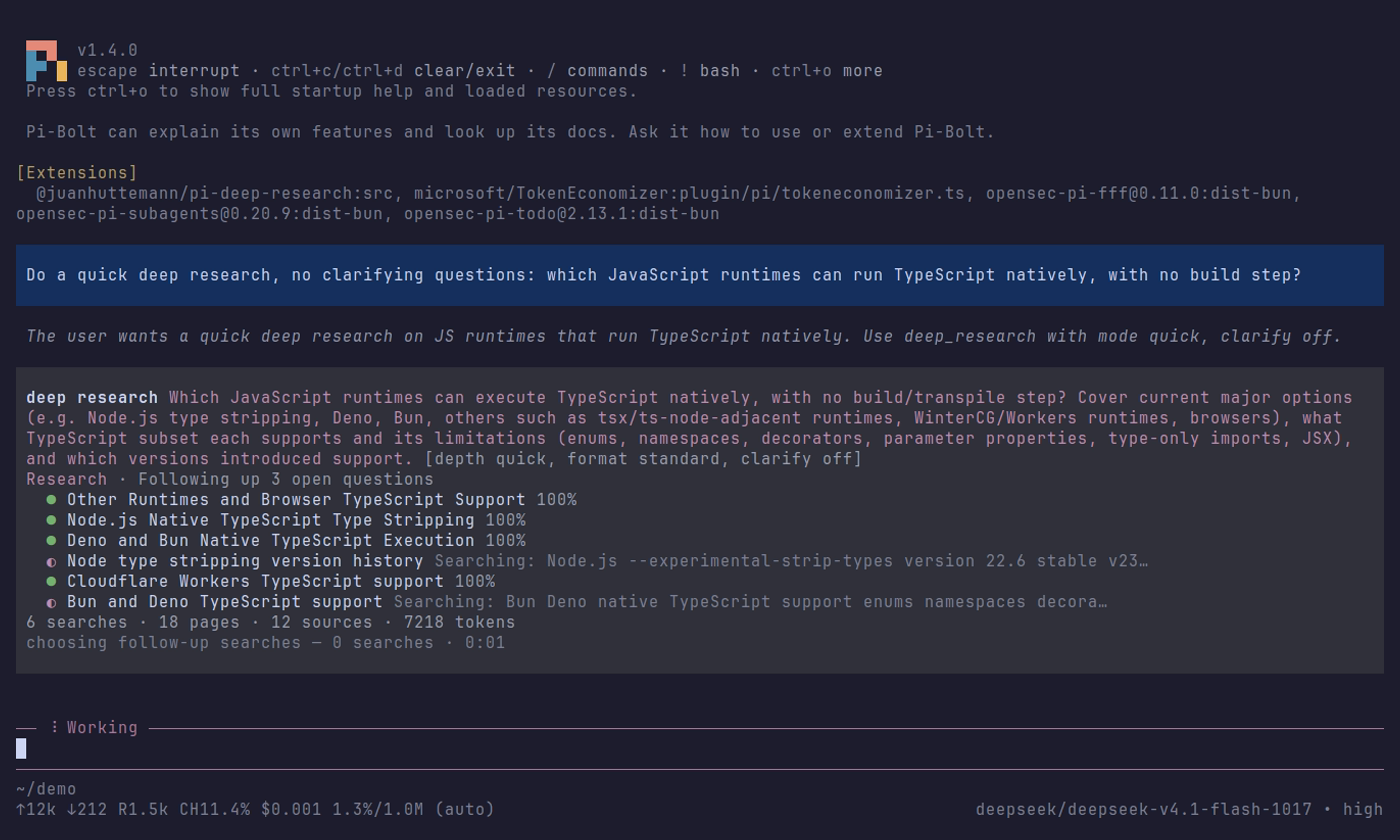
/research. Ask the agent to skip the review and it passesreview_plan: false.While it runs, the same view as
/researchshows above the prompt: the phase with a spinner and its clock, what the model is doing, each sub-agent and its search (follow-ups marked), and the searches, pages and sources so far.When it ends, the call shows the result: the confidence, the claims as the run concluded them, the ones the fact-check did not confirm, and the folder the run's files are in. Ctrl+O expands it to every claim and each file's full path. Pi then answers from the report, keeping its citations.

Esc or
/research-stopstops a run. Stopped once its search has started, it keeps a checkpoint, and/research-resumeskips the searches already done; stopped before, at the questions or the plan,/research-resumeasks it again with the same settings.One run at a time. While one goes, from
/researchor the agent, another is refused, and the agent is told to tell you rather than retry.
In Pi's RPC mode the screens are the client's plain dialogs, and the call's row shows the progress as well.
What stays different from /research: the result comes back to the agent
in the same turn instead of as a message of its own, and in print or JSON
mode, with no UI, the run goes unattended on the agent's settings, its
clarifying questions going back to the model, which asks you.
Every run setting drsh has is a tool parameter: depth (instant, quick,
standard, deep), sub-topics, pages per topic, follow-ups, format, words,
tables and clarify. domains, trace and review_plan are parameters
too. The settings come from drsh settings, so a new setting in drsh
appears here with no update.
For a follow-up, Pi uses the research_ask tool: it answers from the pages
a run already fetched, without searching again. Its answers are not
fact-checked.
Run it yourself
/research question runs a research from the prompt.
Settings. With no flags, the settings screen opens first: the question, which Enter changes, then the settings, then the model the run uses (your
/research-modelchoice; Enter picks another for this run). ←/→ steps the setting under the cursor through its values, Enter lists them all, and the line under the list says what the setting does. Flags skip it:/research --mode quick --follow-ups off --domains a.com,b.org question.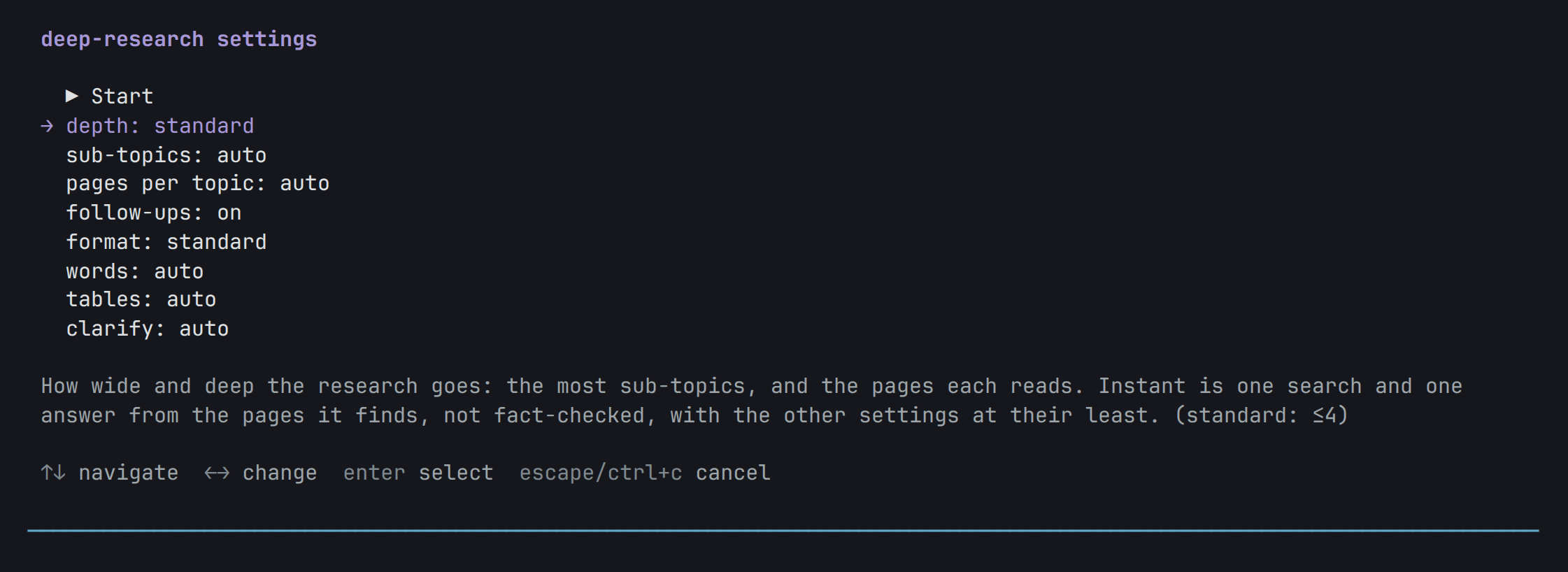
Questions. You answer the clarifying questions, if any.
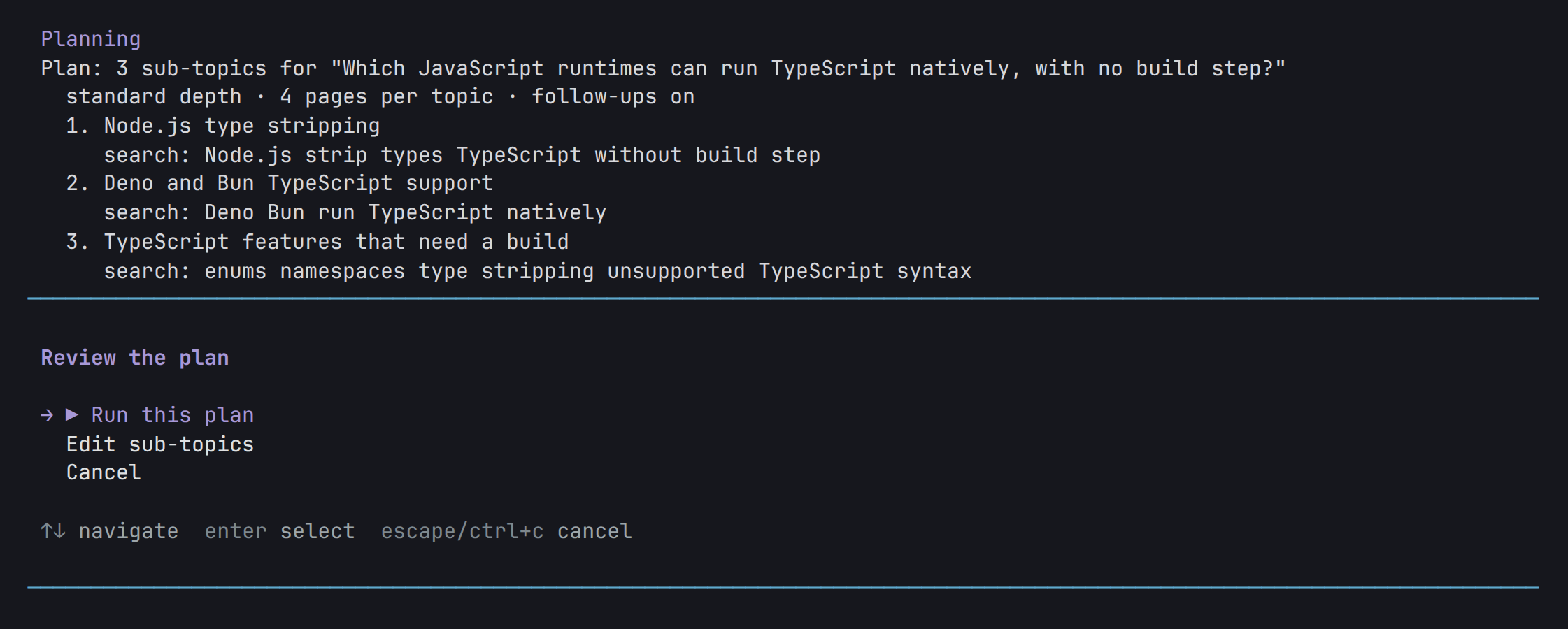
Plan. You review the plan: its depth, pages per topic, follow-ups, and the search each sub-topic starts from. Run it, edit the sub-topics (one per line), or cancel. An edit past drsh's sub-topic limit is refused here. An instant run has no plan review: it searches the question as asked.
Run. The run shows above the prompt, and ends in the same result as the tool's, with the tokens it used. Pi then reports what it found.
| Command | What it does |
|---|---|
/research [flags] question |
Runs a research, as above. |
/research-stop |
Ends the research run, /research's or the agent's. One stopped after its search began keeps a checkpoint; one stopped before can be asked again with /research-resume. |
/research-resume [checkpoint] |
Continues the last stopped, failed or incomplete run, or the checkpoint given, without repeating finished searches. A run stopped before drsh's first checkpoint starts again with the same question, settings and answers, and the plan you approved, edits included. A run on a model picked for it asks whether to resume on that model or your default, and asks before your default stands in for one Pi can no longer use. |
/research-model |
Picks the model runs use: Pi's current model (the default), another of Pi's models (a cheaper one, say, for the many calls a run makes), or drsh's own configured model. Type to filter the list. |
/research-doctor |
Checks the model (through Pi), search and the scraper; first offers a local SearXNG where search has nothing of its own (Local search). |
Files
Each run's files (.md, .pdf, .json, checkpoint) go in
~/.cache/deep-research-pi/runs/ ($DEEP_RESEARCH_PI_RUNS to change it),
never into your project. The extension runs DRSH_BIN when it is set,
else drsh on PATH, else the one drsh's installer put in
~/.local/bin (%LOCALAPPDATA%\deep-research on Windows) when that is
not on PATH.
How the model is reached
For each call, the extension starts an HTTP endpoint on 127.0.0.1 that
speaks the OpenAI chat-completions API. The endpoint accepts only a random
token, given to drsh as its API key, and closes when the call ends.
drsh runs with OPENAI_BASE_URL pointed at that endpoint, and each request
it sends is answered by ctx.modelRegistry.streamSimple. Streamed
reasoning, JSON mode, tool calls (for research_ask) and usage all pass
through. The run's usage is added to the tool result, so Pi's session
totals count it.
Development
npm ci
npm run typecheck
DRSH_BIN=/path/to/drsh npm test   # bridge tests run that drsh offline
From the repo root, make pi builds drsh from the tree and runs all three.