@lune_99/pi-subagent
Subagent runs for pi: delegated tasks in separate sessions, a Dock entry and an /agents inspector
Package details
Install @lune_99/pi-subagent from npm and Pi will load the resources declared by the package manifest.
$ pi install npm:@lune_99/pi-subagent- Package
@lune_99/pi-subagent- Version
0.2.0- Published
- Nov 29, 2026
- Downloads
- 412/mo · 41/wk
- Author
- lune_99
- License
- MIT
- Types
- extension, skill
- Size
- 1.1 MB
- Dependencies
- 2 dependencies · 3 peers
Pi manifest JSON
{
  "image": "./docs/subagent-overview.png",
  "skills": [
    "./skills"
  ],
  "extensions": [
    "./src/index.ts"
  ]
}
Security note
Pi packages can execute code and influence agent behavior. Review the source before installing third-party packages.
README
Lune Subagent



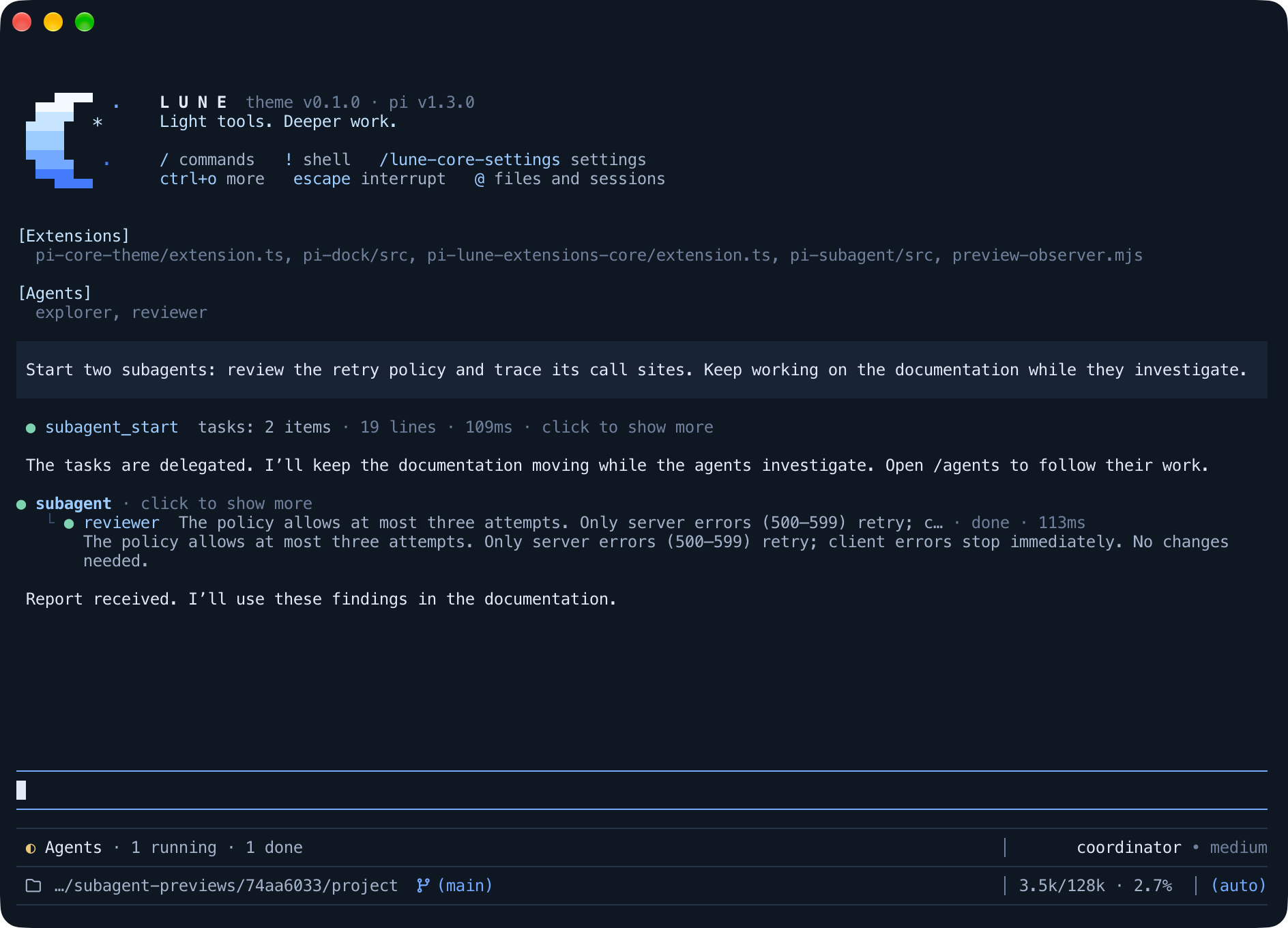
Background agents for Pi, with live transcripts, reusable roles and optional Git worktrees.
Hand a review, investigation or implementation task to a subagent while the main agent continues.
Each run gets a fresh Pi session, reports back when its turn ends and keeps its context for follow-up
work. Open /agents to read the transcript, send a message or stop the run.
Quick start
Requires Node.js 22.19.0 or newer, Pi 1.3.0 or newer, and a model configured in Pi.
pi install npm:@lune_99/pi-subagent
pi
Ask for delegated work:
Start two subagents: one to review the retry policy, and one to find its call sites.
Keep working on the documentation while they investigate.
The main agent starts both runs and receives their reports automatically. Run /agents to follow
their progress. A reusable agent definition is optional; the main agent can describe a one-off run
directly.
What it does
- Work in parallel. Start one run or several in one tool call. Each gets its own conversation and only the task you delegate; reports arrive when turns end, without status polling.
- Give each run a title. A short title such as
Review retry policylabels the run in/agents, the Dock and its end-of-turn notice. The agent still addresses runs by ID. - Keep control of a run. Read its live transcript, steer it while it works, or continue it after a completed, failed or interrupted turn. Questions return to the main agent for coordination.
- Choose where changes happen. Share the current working directory or give a run a detached Git worktree. Worktrees stay available for review and later turns; integration remains explicit.
- Reuse a role. Save Markdown definitions with instructions, tools, a model and isolation, or
use the included
create-lune-subagentskill to write one with you. - Route models automatically. Use Jev or another Pi classifier as a task router with
model: auto. It selects the subagent's model from four configured tiers and chooses a supported thinking level. A configurable floor raises the model tier for tasks rated high risk. - Stay with the session. Runs survive resume in their own session files. Reports belong to the Pi conversation branch that started the run; inherited runs in a fork or clone are read-only.
Follow the work
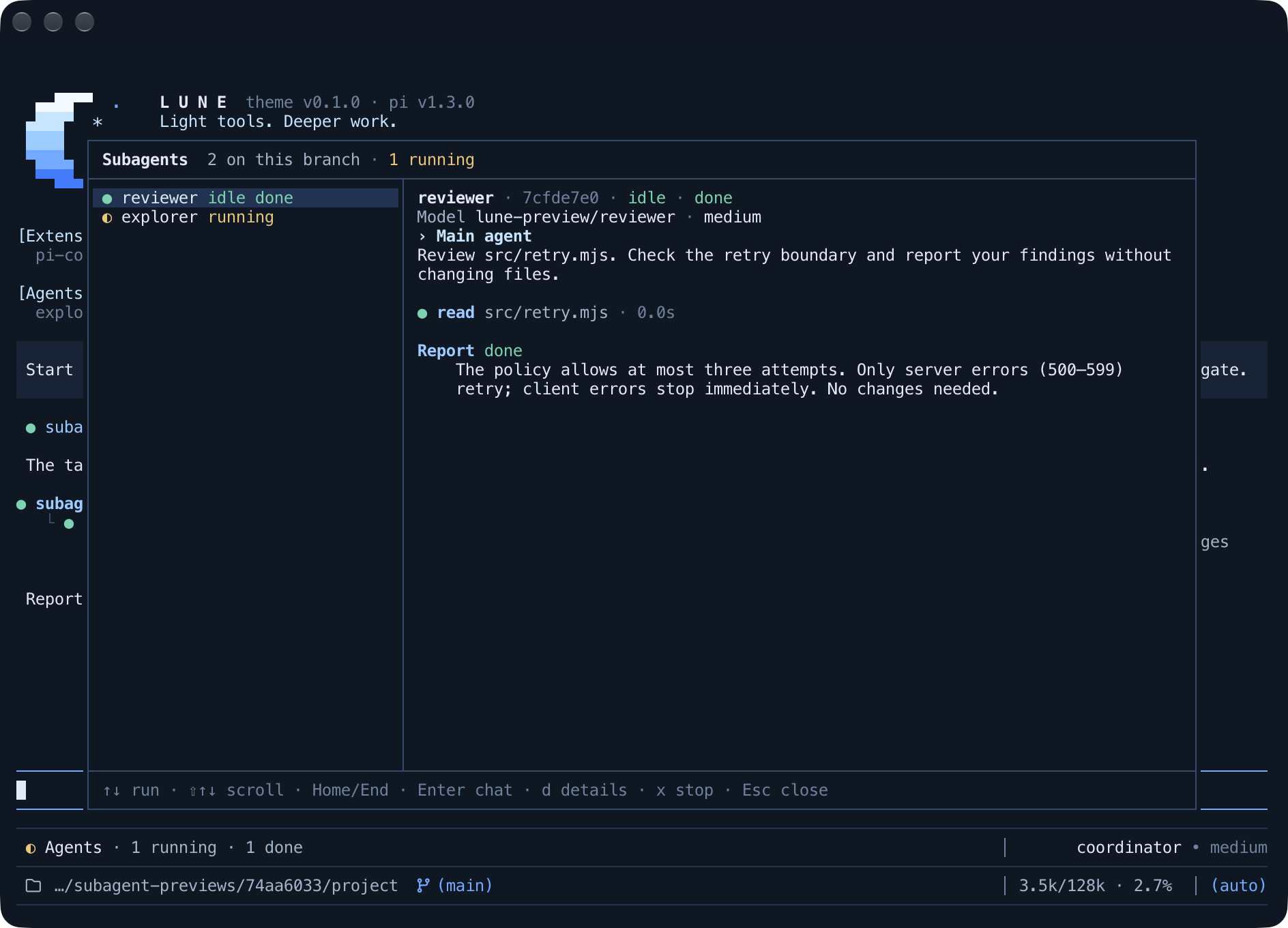
The inspector puts runs on the left and the selected transcript on the right. Running runs move to
the top of the list, and the selection stays on its run when the order changes. Tool calls and
finished thinking occupy compact rows; messages and reports remain readable in full. The heading
shows the run's state, model and thinking level. Press d for start values, token usage and workspace
details. It reopens on the run you had selected.
| Action | Keys |
|---|---|
| Select a run | ↑ / ↓ or k / j |
| Scroll the transcript | Shift+↑ / Shift+↓ or K / J |
| Jump to oldest / follow newest | Home / End |
| Write to the selected run | Enter, type, Enter to send |
| Show details / stop the turn | d / x |
| Close | Esc |
Lune Dock adds an Agents entry with run counts
and states. Without Dock, the same status appears below the editor with an /agents hint.
Reusable agents
Save a definition in ~/.pi/agent/lune-subagents/ for your own use, or .pi/lune-subagents/ for a
project. A project definition of the same name takes precedence. Pi's agent directory follows
PI_CODING_AGENT_DIR.
For example, ~/.pi/agent/lune-subagents/reviewer.md:
---
name: reviewer
description: Reviews a diff and reports actionable problems.
tools: read, grep, find, ls, bash
thinking: high
---

Review the diff named in the task. Do not change files. Report problems with their file,
line and reason, most severe first. If there are none, report that explicitly.
This role follows the main agent's model. Add model: provider/id to choose one, or model: auto
to use task tiers. Add isolation: worktree for a role that should change files separately.
Run /reload after saving a definition.
The main agent starts a role with only a task and a title. The definition's model, thinking, tools and isolation always apply; the main agent cannot change them in the call.
To create a role interactively:
/skill:create-lune-subagent Create a reusable code-review subagent.The skill asks for scope, name, description and model, then recommends tools, thinking, isolation and instructions. You review the complete definition and destination before it writes the file.
Models and settings
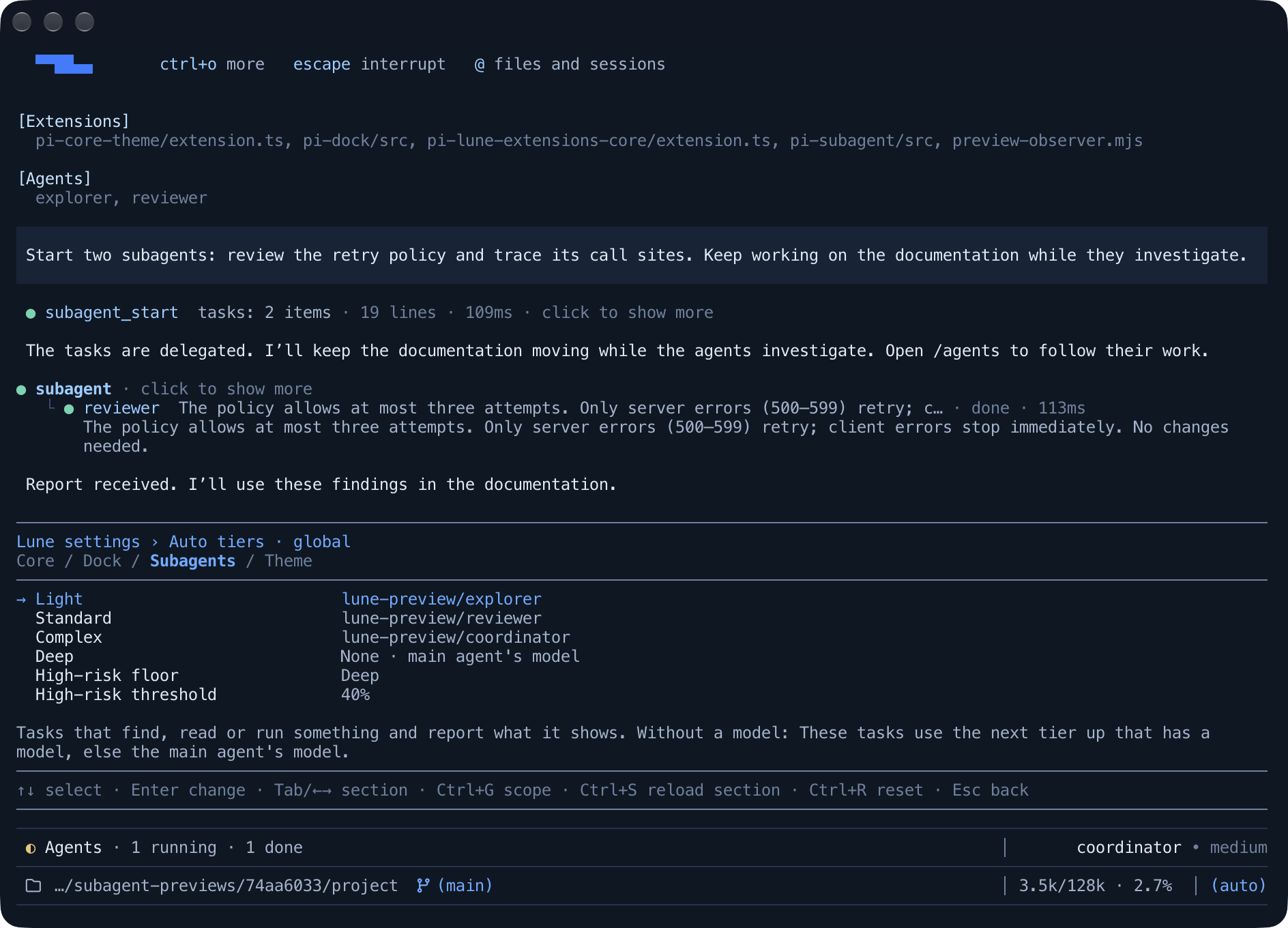
Install Core's Pi entry to use the settings command:
pi install npm:@lune_99/pi-lune-extensions-coreThen restart Pi and open /lune-core-settings subagents. Allowed models is a multi-select
list from Pi's scoped models: Space toggles a model and Enter saves. A nonempty selection replaces
the session's default allowed model list for new runs; clear it to follow Pi's scope again. Saved
models remain allowed outside a later session's scope while available in Pi. Existing runs keep
their model, and inheriting the main agent's model is unchanged.
Custom agents edits saved definitions; Classifier model and Auto tiers configure runs
started with model: auto. Auto mode only removes the model and thinking parameters from
subagent_start, so every inline run routes both automatically; custom agents keep their own model.
Model choices in Custom agents and Auto tiers follow the subagent allowed list.
| Tier | Intended work |
|---|---|
| Light | Lookups, extraction and explicitly specified steps |
| Standard | Routine changes and checks with clear requirements |
| Complex | Analysis or implementation across components |
| Deep | Design decisions, unclear failures and subtle bugs |
Automatic routing supports Pi's classifier models, including TypeSafe's Jev. The classifier
rates the task; you choose the models for the tiers. It also selects a thinking level supported
by the chosen model. Auto calls and definitions must omit thinking; a fixed level requires a
fixed or inherited model. Empty tiers use the next configured tier, then the main agent's model.
With no classifier selected, auto uses the main agent's model and thinking.
The High-risk floor defaults to Deep and applies when the high-risk probability reaches the configured threshold, initially 40%. It changes model selection; tool permissions and approvals still apply independently. Classifier errors are shown in the run's start values and inspector, and the run uses the main agent's model. See the full auto-model behavior.
Tools and lifecycle
| Tool | Purpose |
|---|---|
subagent_start |
Start one task in a new Pi session |
subagent_send |
Steer an active run or continue it with another message |
subagent_status |
Read states, usage and reports on the current branch |
subagent_stop |
Stop the turn while keeping its session and worktree |
Issue separate subagent_start calls to start independent runs in parallel. Each call requires task.
A run reports done, blocked or needs_input. Stopping it preserves its conversation. Closing
the main session interrupts active runs; resume the session and use subagent_send to continue.
Runs start with Pi's native tools and its codemode, tool-search and MCP built-ins. Selected tools
from user or trusted project extensions load their owning extensions. Runs cannot start other
runs. A model supplied only by an unloaded extension is unavailable to a run. A worktree starts
at committed HEAD, so it does not include uncommitted or untracked files.
See the reference for definition fields, tool parameters, project trust, extension-tool constraints, report delivery, worktrees and branch behavior.
Development
From the repository root:
npm ci
npm run build
npm test --workspace=@lune_99/pi-subagent
npm run typecheck --workspace=@lune_99/pi-subagent
npm run check
The preview notes describe how the native screenshots were captured.
License
MIT