@luxass/pi-subagents
Delegate tasks to named Pi agents and follow their conversations.
Package details
Install @luxass/pi-subagents from npm and Pi will load the resources declared by the package manifest.
$ pi install npm:@luxass/pi-subagents- Package
@luxass/pi-subagents- Version
0.2.0- Published
- Nov 24, 2026
- Downloads
- 634/mo · 634/wk
- Author
- luxass
- License
- MIT
- Types
- extension
- Size
- 154.5 KB
- Dependencies
- 1 dependency · 4 peers
Pi manifest JSON
{
  "image": "https://raw.githubusercontent.com/luxass/agent-extensions/main/packages/pi-subagents/docs/cover.png",
  "extensions": [
    "./src/index.ts"
  ]
}
Security note
Pi packages can execute code and influence agent behavior. Review the source before installing third-party packages.
README
@luxass/pi-subagents
Delegate tasks to named Pi agents. Each agent works in its own conversation, and its result comes back to the main conversation by itself.
Install
pi install npm:@luxass/pi-subagentsTo try it from this repository, run pi -e ./packages/pi-subagents.
Use
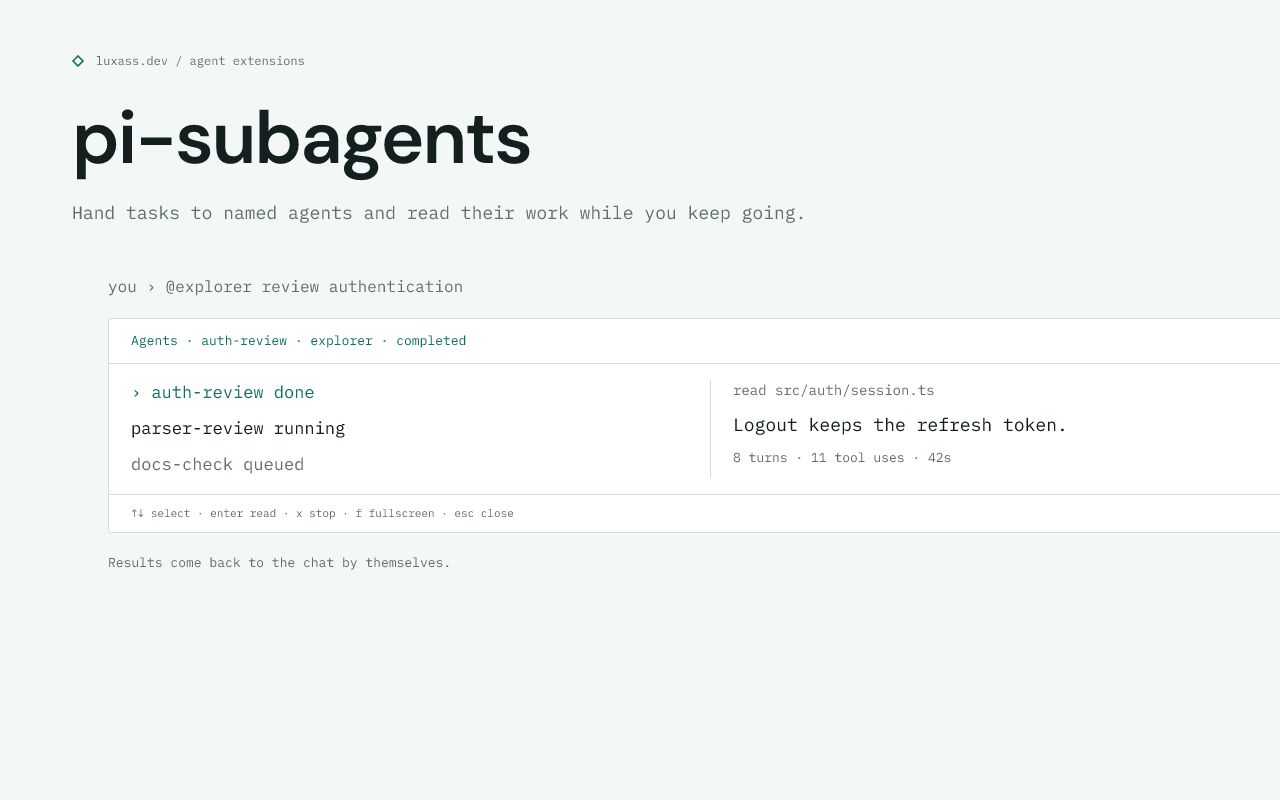
Ask Pi to delegate a task, or start a prompt with an agent type, such as @explorer review authentication. The main model starts the agent and gives it a unique task name, such as auth-review. Agents run in the background by default. Their results appear in the chat when they finish.
The extension reports each running subagent to Rex by task name, even after Pi's main turn ends. Each status clears when that subagent finishes or stops. Queued subagents do not appear. Rex controls which statuses appear on hover and when the tab spinner runs.
Two agent types are built in. general-purpose has Pi's default tools: read, bash, edit, and write. explorer is told not to change files and has read, grep, find, ls, and bash. Its instructions are not a sandbox, because bash can still change files.
To give an agent a correction, or to continue a finished agent, ask the main model. You cannot send messages to an agent directly.
| Control | Action |
|---|---|
/agents |
Show every agent of the session beside the selected agent's conversation. |
| Ctrl+B | While a foreground agent runs, move all foreground agents to the background. |
Run /agents to open a panel with every agent of the session. Each agent has two lines: its task name and type, then the start of its prompt, its status, and elapsed time. Unfinished agents come first, and the newest first in each group. Under the list are the selected agent's model and thinking level, and its answer, or its latest output while it works. The answer takes as many lines as it needs, up to the height of the panel. From 104 columns, the list and the answer are side by side.
| Key | Action |
|---|---|
| Up / Down | Select an agent, or scroll the answer when it has the focus. |
| Tab | Move the focus between the list and the answer. |
1 / 2 / 3 |
Show all, active, or finished agents. |
| Enter | Open the agent's whole conversation. |
x, then y |
Stop the selected agent. n or Esc keeps it running. |
f |
Switch between the floating panel and fullscreen. |
| Page Up / Page Down | Scroll the answer without following new output. |
| End / Home | Follow new output again, or go to the start of the answer. |
| Esc | Close the panel. |
The conversation view shows tool calls the way Pi does, collapsed at first. Up, Down, Page Up, Page Down, Home, and End scroll it. Pi's tool expansion key opens and closes all tool calls. t and T move to the next and previous tool call, and Enter opens or closes that one. f switches fullscreen, and Esc goes back to the panel.
In Pi's fullscreen terminal mode, the mouse wheel scrolls the answer and the conversation. Everything else uses the keys.
Agent types
Add an agent type as a Markdown file. Files in later folders replace types with the same name from earlier ones:
~/.pi/agent/agents/~/.agents/agents/.agents/agents/in the project.pi/agents/in the project
Project folders load only when you trust the project. The file body is added after Pi's system prompt. If PI_CODING_AGENT_DIR moves Pi's folder, the first folder is agents/ inside it.
---
description: Review code changes for bugs.
tools: [read, grep, find, ls, bash]
model: anthropic/claude-sonnet-4-5
thinking: high
max_turns: 30
skills: [review-checklist]
---

Review the changes you are asked about and report concrete problems with file paths.
Only description is required. name defaults to the file name. model is provider/id, or a name such as opus 5.5. skills adds the full text of those skills to the prompt. The file's thinking and max_turns win over the same values in an Agent call. The file's model is the type's default, and a model you ask for wins over it. A file with any other field is skipped with a warning.
A model name ignores case, spaces, dots, and hyphens, so opus 5.5 finds claude-opus-5-5. If a name fits models on several providers, the agent does not start, and the error lists the choices. Use provider/id, or set preferredProviders. The tool result names the model each agent runs on.
Extension tools, such as codemode, load their extension only in that agent. A mcp__server__* pattern loads Pi's MCP support and codemode, and connects every server in mcp.json. Agents cannot start, steer, or stop other agents, and they have no UI, so a tool that asks you a question fails inside an agent.
Settings
Set these under subagents in Pi's settings.json. Project settings apply only in trusted projects.
| Setting | Default | Meaning |
|---|---|---|
maxConcurrent |
8 |
Background agents that run at once. More wait in a queue. |
maxTurns |
0 |
Turn limit when the file and the call set none. 0 means no limit. |
backgroundByDefault |
true |
Whether Agent calls run in the background unless they say otherwise. |
disabledAgents |
[] |
Agent types that cannot start or continue. |
preferredProviders |
[] |
Providers to choose from, in order, when a model name fits models on several providers. |
widget |
"background" |
Agents counted in the line above the editor: "background", "all", or "off". |
delivery.mode |
"grouped" |
"grouped" reports agents of one request together, after at most 60 seconds. "immediate" reports each result when it is ready. |
Agent conversations are saved under ~/.pi/agent/subagents/<session id>/. After /reload or a resumed session, finished agents can still be read and continued. Agents that were running or queued show as interrupted and can also be continued. An agent that never started begins with the new prompt only. A result that finished but was not yet delivered can arrive after the reload.
If you switch branches with /tree, a background result arrives only on a branch that started the run and has not received it. Returning to a branch that already has the result does not repeat it. Running agents stay active and /agents still shows agents from the whole session.
Costs
The cost in Pi's footer counts only the main session. The footer's status line shows what agents cost in the session, for example agents $0.123. It appears when an agent has used a model, and it includes agents that are still running.
When a run ends, its token usage and cost are saved in the session as a subagents-usage entry. A run stopped by /reload or by quitting Pi saves what it used up to then. @luxass/pi-cost-explorer adds these entries to /cost as the source "Agents".