@naivezip/pi-swarm
Native-style multi-agent swarm orchestration package for Pi
Package details
Install @naivezip/pi-swarm from npm and Pi will load the resources declared by the package manifest.
$ pi install npm:@naivezip/pi-swarm- Package
@naivezip/pi-swarm- Version
0.1.1- Published
- Nov 29, 2026
- Downloads
- 363/mo · 363/wk
- Author
- naivezip
- License
- MIT
- Types
- extension, skill
- Size
- 390.3 KB
- Dependencies
- 0 dependencies · 5 peers
Pi manifest JSON
{
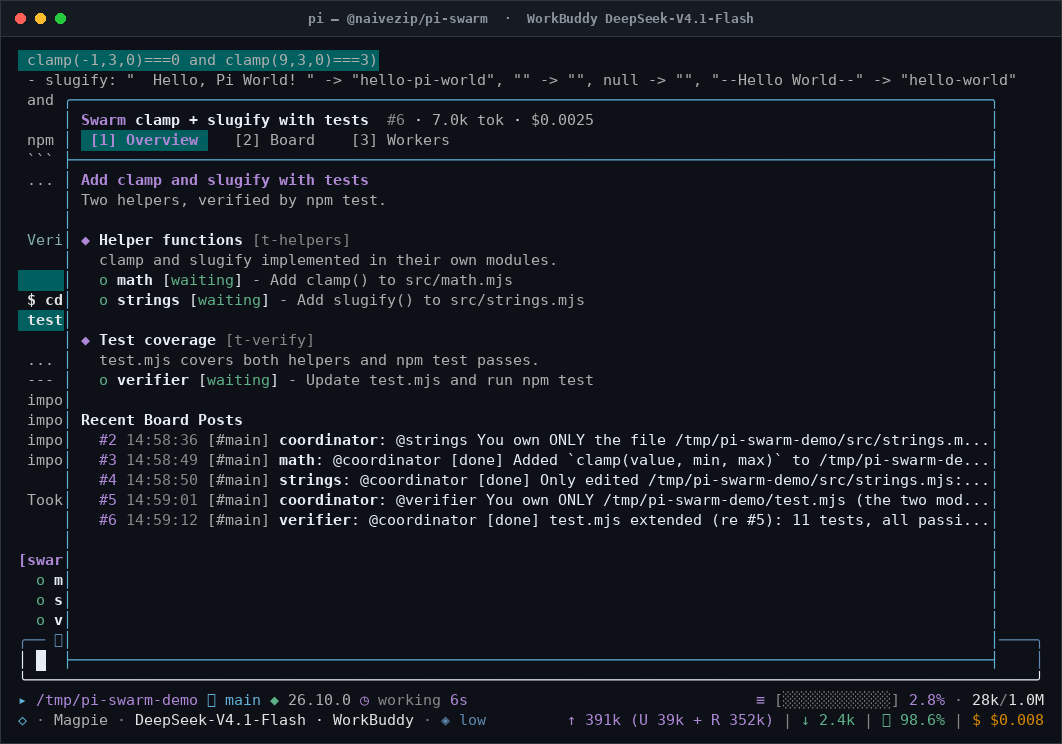
  "image": "https://raw.githubusercontent.com/naivezip/pi-swarm/main/assets/demo-overview.png",
  "video": "https://raw.githubusercontent.com/naivezip/pi-swarm/main/assets/demo.mp4",
  "skills": [
    "./skills"
  ],
  "extensions": [
    "./extensions/index.ts"
  ]
}
Security note
Pi packages can execute code and influence agent behavior. Review the source before installing third-party packages.
README
@naivezip/pi-swarm
English | 简体中文
What does this do?
Turns a single Pi coding session into a coordinated multi-agent swarm—parallel workers in isolated git workspaces, a shared @mention message board, non-blocking background shells, and a live TUI dashboard. (Inspired by Antigravity's swarm, built natively for @earendil-works/pi-coding-agent.)
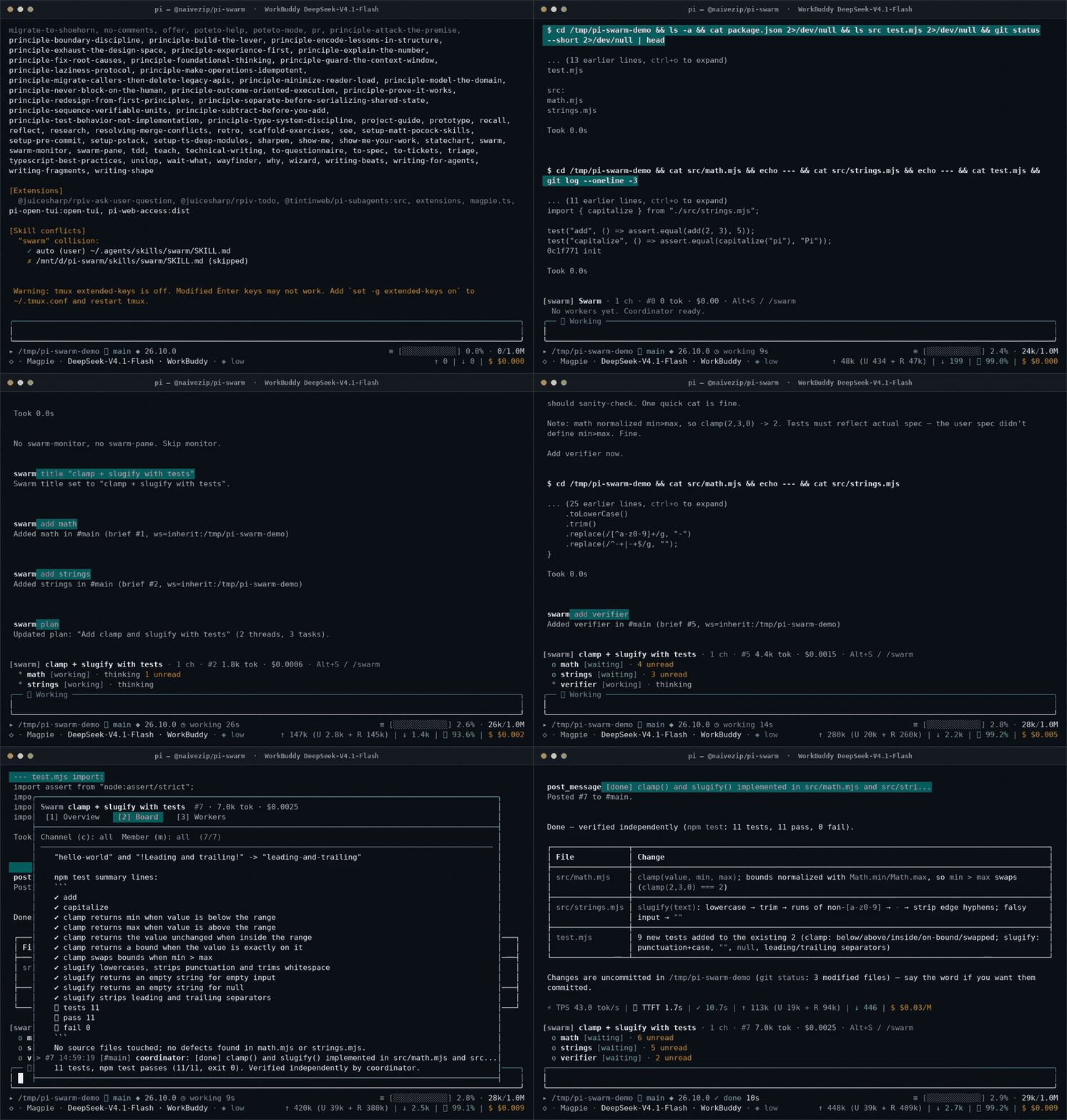
Recorded live in Pi (math + strings editing disjoint files in parallel, verifier extending and running npm test 11/11 pass, live TUI status widget, and Alt+S Board Overlay) · Watch full MP4
Why should I care?
- Parallelize real repo work without git collisions — Single-agent sessions bottleneck on multi-module tasks, while naive subagents overwrite each other's working tree.
pi-swarmisolates workers in git worktrees (share) or clones (branch) so multiple agents edit, build, and verify concurrently. - Peer-to-peer coordination without polling waste — Instead of routing every handoff through a bloated parent context or burning tokens in sleep loops, workers coordinate directly on
#mainand topic#channels, parking at zero cost (swarm_wait) until@mentioned. - Long builds and dev servers never freeze a worker — Workers get an async-promoting
bashshell (manage_process): quick commands return inline, while long test runs or daemons promote seamlessly to the background and wake the worker on exit—watched by a read-onlymonitorscheduler that catches stalls. - Full TUI visibility & hot model switching (zero overhead when off) — Swarm tools register with
defaultActive: false, adding zero prompt or tool tokens to normal Pi sessions. When active, inspect plans, board feeds, background processes, and live transcripts—or hot-swap a rate-limited worker's model without losing its conversation history.
How do I use it?
1. Kick off a swarm in one command
/swarm Implement math and string utilities in parallel, then have a verifier expand and run the test suitePi enables coordinator mode, breaks your goal into parallel threads, spawns workers in isolated git workspaces, and wakes the coordinator automatically as workers report back.
2. Watch and steer live (Alt+S)
While a swarm runs, a compact widget above your prompt tracks worker states (working, waiting, stopped, killed), active background processes (N bg), and cumulative tokens/cost.
Press Alt+S (or run /swarm ui) anytime to open the 3-tab Swarm Board Overlay:
1Overview — Structuredplan.jsonview (goal,threads, assigned worker states, and[N bg]process badges). PressEnteron any worker to jump straight into its session.2Board — Scrollable message feed with@mentionhighlights, channel/member filters (c/m), andr/Enterto prefill#<seq>into the coordinator input.3Workers — Worker roster + live transcript andBackground Processesinspector (taskId,[daemon],elapsed/silentdurations), plusM(switch model when idle),k(confirm & kill),S(stop all running workers), orEnterto open Worker View.- Full-screen Worker View (
Enter) — Interact directly with an individual worker:Enterto prompt or steer mid-turn,Alt+Enterto queue a follow-up,Ctrl+O/Ctrl+Tto toggle tool output or thinking blocks,/model,/abort,/kill,/exitslash commands,Alt+Sto return to the board, orCtrl+Dto return to the coordinator.
(Non-TUI print / json / rpc modes automatically fall back to clean plain-text summaries.)
3. Commands & shortcuts
| Command / Key | What it does |
|---|---|
/swarm <task> |
Enable coordinator mode, inject swarm skills, and start orchestrating <task> |
/swarm |
Open the Swarm Board Overlay if a swarm exists; otherwise enable coordinator mode |
/swarm ui / Alt+S |
Open the 3-tab Swarm Board Overlay |
/swarm stop |
Abort all running workers and their background processes (keeps history & workspaces) |
/swarm off |
Exit coordinator mode and remove swarm tools from active tools |
/swarm clean |
Remove stale swarm worktrees/clones from previous sessions under ~/.pi/agent/swarms/ |
Swarm & Worker Tools
Coordinator and worker sessions share four core tools (post_message, read_board, and swarm_wait activate for the coordinator once the first worker is added or restored):
swarm— Manage the swarm (status,models,add,model,kill,title,channel,plan):add: Spawn a worker or sharded/homogeneous group (tasks/n), with optionalmodel,workspace(inherit|share|branch),fork("coordinator"or worker name), andchannels.model: Switch awaiting/stoppedworker's (or own) model while preserving history and resuming unfinished turns.kill: Permanently terminate a worker or group, kill its background process trees, and delete itsshare/branchworkspace.channel:create,list,subscribe,unsubscribe,archive.plan: Persist structured goal/threads/tasks inplan.jsonfor the TUI Overview tab.
post_message— Post to#mainor a subscribed channel;@name,@group,@all, and@#channelwake recipients (code-block mentions ignored;@#mainrefused).read_board— Read visible board messages (since,limit,channel, orstatus: truefor roster, cursor, and background process diagnostics).swarm_wait— Non-blocking park (since,mentions_only) that wakes asynchronously on the next matching post.
Worker-specific tools:
- Non-monitor workers (
bash+manage_process) — Replaces blockingbashwith sync-to-async promotion (wait_msdefault10000, max30000;is_daemon;notify_after_secondsdefault120). Commands exceedingwait_mskeep running in the background (taskId+ output tail) and wake the worker onprocess_exitorprocess_still_running.manage_process(list,status,send_input,kill) enforces per-worker isolation and full process-tree termination. - Monitor workers (
schedule+manage_task) — Strictly read-only (monitor/monitor-<N>); runs one-shot timers (DurationSeconds) or 5-field crons (CronExpression,IsDaemon) to detect and unstick stalled workers.
Bundled Skills
swarm(skills/swarm/SKILL.md) — Coordinator orchestration guide (delegation, workspaces, channels, addressing, non-blocking waiting, rate-limit recovery).swarm-monitor(skills/swarm-monitor/SKILL.md) — Stall-detection protocol distinguishing active background builds from stuck silent processes and daemons.swarm-pane(skills/swarm-pane/SKILL.md) —plan.jsonschema for the TUI Overview tab.
Architecture
extensions/index.ts— Pi extension entry point (defaultActive: falsetools,/swarmcommand,Alt+Sshortcut, session restore/shutdown lifecycle, queued coordinator wakeups).src/runtime.ts—SwarmManagermanaging in-processcreateAgentSessionworkers, branch-safe session forking, non-blocking parks, and async wakeups.src/board.ts— Append-onlyboard.jsonl, atomicstate.json&plan.jsonpersistence under~/.pi/agent/swarms/<sessionId>/, channel visibility, and@mentionwake matching.src/workspace.ts— Git worktree (share), local git clone (branch),inherit, and stale workspace cleanup.src/process-manager.ts—BackgroundProcessManagerwith sync-to-async promotion, rolling tail buffers + log spillover, silence tracking, stdin delivery, and cross-platform process-tree termination.src/scheduler.ts— 5-field cron and one-shot timer engine for monitor workers.src/ui.ts&src/worker-view*.ts— Throttled TUI widget, 3-tab Swarm Board Overlay, full-screen interactive Worker View, and plain-text fallbacks.docs/specs/— Design docs and Quint formal specs (async_background_shell.qnt,swarm_worker_view.qnt).
How do I install it?
Published on pi.dev and npm as @naivezip/pi-swarm (requires Pi and Node.js >= 22.19.0).
Try it for a single session first (no config changes):
pi -e npm:@naivezip/pi-swarmInstall globally via Pi's package manager:
pi install npm:@naivezip/pi-swarmOr install per-project (writes to .pi/settings.json):
pi install -l npm:@naivezip/pi-swarmManage installed packages:
pi list
pi update
pi remove npm:@naivezip/pi-swarm
Install from GitHub or a local checkout:
pi install git:github.com/naivezip/pi-swarm
pi install ./path/to/pi-swarm
pi -e ./path/to/pi-swarm
Local development checks:
npm run typecheck
npm test