@senad-d/protectme
Pi extension that guards agent network and website access with global and project allow lists.
Package details
Install @senad-d/protectme from npm and Pi will load the resources declared by the package manifest.
$ pi install npm:@senad-d/protectme- Package
@senad-d/protectme- Version
0.2.2- Published
- Nov 28, 2026
- Downloads
- 1,296/mo · 624/wk
- Author
- senad-d
- License
- MIT
- Types
- extension
- Size
- 290.4 KB
- Dependencies
- 1 dependency · 4 peers
Pi manifest JSON
{
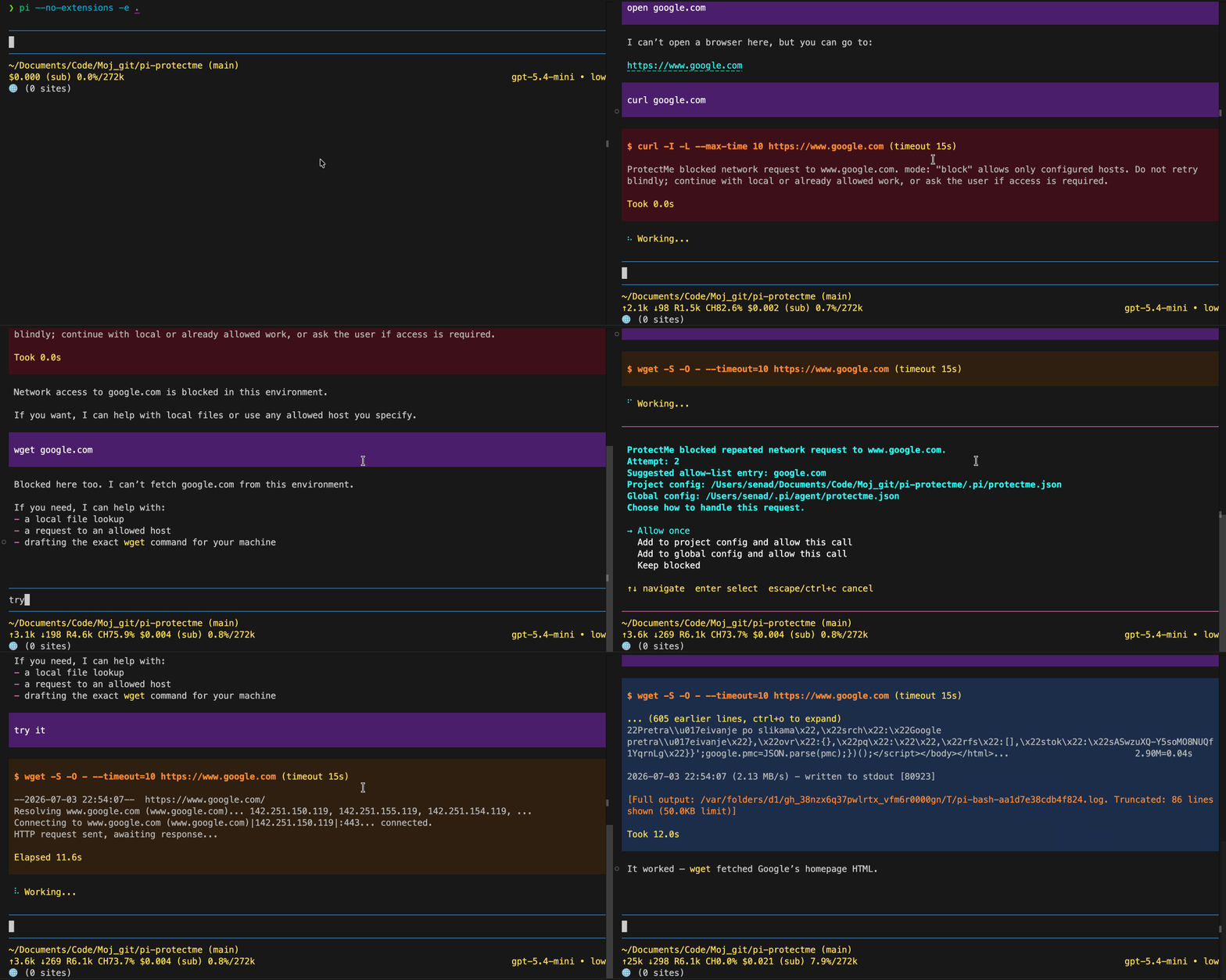
  "image": "https://raw.githubusercontent.com/senad-d/ProtectMe/main/img/demo.gif",
  "extensions": [
    "./src/extension.ts"
  ]
}
Security note
Pi packages can execute code and influence agent behavior. Review the source before installing third-party packages.
README
ProtectMe is a Pi extension for coding agents. It guards supported shell-network requests made by Pi agents or direct !/!! user bash commands, checks destinations against global and project allow lists, and blocks disallowed hosts before execution.
- Network guard boundary: covers supported
curl,wget,http, andhttpsinvocations from Pi agentbashcalls and Pi user bash commands. - Allow-list and deny-list policy: default
blockmode permits a small developer starter list and denies other unknown hosts; a deny list refuses hosts outright;allowmode is available as an explicit temporary bypass. - Project-aware configuration: trusted project config can extend global allow lists and override mode.
- Prompted approvals: a repeated blocked request opens one prompt: allow or deny, once, for the session, for the project, or globally.
- Secret-aware logging: blocked-attempt logs are local, bounded, and redact common credential-bearing command fragments.
Security: pi packages run with your full system permissions. ProtectMe is a guardrail for supported Pi command flows, not a sandbox, firewall, or proxy. Read
SECURITY.md.
Table of Contents
- Quick Start
- Installation
- Configuration
- Approval prompt
- Commands and Tools
- Troubleshooting
- Development and Validation
- Update and Uninstall
- Publishing
- License
Quick Start
pi install npm:@senad-d/protectmeReview the built-in starter allow list and add any narrow project-specific hosts as shown in Configuration, then start pi:
piOpen the ProtectMe panel:
/protectmeTry a guarded request through Pi:
Ask the agent to run curl https://example.com only if ProtectMe allows the host; otherwise explain the block.ProtectMe guards supported request-making shell commands. It does not run scanners, make network calls itself, or require API credentials.
Installation
| Scope | Command | Notes |
|---|---|---|
| Global | pi install npm:@senad-d/protectme |
Loads in every trusted pi project. |
| Project-local | pi install npm:@senad-d/protectme -l |
Writes to .pi/settings.json in the current project. |
| One run | pi -e npm:@senad-d/protectme |
Try without changing settings. |
| Git | pi install git:github.com/senad-d/ProtectMe@<tag> |
Pin a tag or commit. |
| Local checkout | pi --no-extensions -e . |
Develop or smoke-test this repository in isolation. |
Source checkout:
git clone https://github.com/senad-d/ProtectMe.git
cd ProtectMe
npm ci
npm run validate
pi --no-extensions -e .
Configuration
ProtectMe reads JSON config from global and project-local files. It does not require secrets. On runtime load, it creates a missing global config at ~/.pi/agent/protectme.json with the built-in defaults; project config is still only written when you confirm a /protectme edit or pick a project choice in the approval prompt.
| Scope | Path | Notes |
|---|---|---|
| Global | ~/.pi/agent/protectme.json |
Applies across projects. PI_CODING_AGENT_DIR moves this path in standard Pi installations. |
| Project | .pi/protectme.json |
Applies only when Pi reports the project as trusted. Inside a linked git worktree, this path resolves to the main worktree, so saved entries outlive the worktree. On save, ProtectMe adds protectme.json and .gitignore to .pi/.gitignore unless git already tracks the config. |
| Session | The file named by PROTECTME_SESSION_CONFIG |
Optional. Holds the hosts allowed or denied "for session". Without it they are kept in memory until the session ends. |
| Block log | .pi/agent/protectme_log.jsonl |
Append-only local log for blocked attempts and for choices made in the approval prompt. Requests to listed hosts are not logged. Resolves to the main worktree like project config, and ProtectMe writes a .gitignore next to it when none exists. |
Schema:
{
  "mode": "block",
  "allowList": ["example.com", "api.example2.com"],
  "denyList": ["tracker.example"]
}
Fields:
| Field | Required | Meaning |
|---|---|---|
mode |
No | "block" blocks disallowed hosts. "allow" permits detected requests without prompts or blocked-attempt logs. |
allowList |
No | Host entries allowed in block mode. Entries are normalized and deduplicated. |
denyList |
No | Host entries refused in block mode, in the same format as allowList. A deny entry wins over an allow entry: with example.com allowed and api.example.com denied, api.example.com is refused. A denied host is refused at once, with no prompt. |
A missing global config is initialized automatically with mode: "block" and this built-in starter allow list:
{
  "mode": "block",
  "allowList": [
    "localhost",
    "127.0.0.1",
    "::1",
    "pi.dev",
    "github.com",
    "npmjs.com",
    "registry.npmjs.org",
    "nodejs.org"
  ]
}
Resolution order:
- Built-in starter entries load first.
- Global config appends additional
allowListentries. - Trusted project config appends additional
allowListentries. - Global and trusted project
denyListentries are joined. The starter list has none. - Trusted project
modeoverrides globalmodewhen present. - Untrusted project config is ignored without reading project-local contents.
- Invalid or unreadable loaded config fails closed with
mode: "block"and an empty effective allow list. Deny entries of the config that is still valid keep applying.
Host matching rules:
example.comallowsexample.com, paths on that host, and child subdomains such asapi.example.com.api.example2.comallows itself and child subdomains, but not parent domainexample2.com.- Public suffix entries such as
comorco.ukare ignored and reported as warnings. - Single-label non-localhost entries such as
internal-servicematch only that exact host. localhost, IPv4, and IPv6 entries match exactly, including ports such aslocalhost:3000.- Local subdomains such as
app.localhostare not covered bylocalhost; addapp.localhostor another exact local hostname to your project allow list when needed.
Session file:
- Set the environment variable
PROTECTME_SESSION_CONFIGto a file path to keep the session lists in a file. A host program sets it to share one list between several Pi sessions. - The file has the shape
{ "allowList": ["example.com"], "denyList": ["tracker.example"] }. ProtectMe creates it on the first "for session" choice and reads it on every request. - Session entries apply on top of the config: a session deny wins over every allow, and a config deny wins over a session allow.
PROTECTME_SESSION_READSis a separate setting for research sessions.askopens the prompt on the first try of a read-onlycurlorwgetrequest and adds the row "Allow all read-only requests for this session".openlets read-only requests through unasked.
Blocked-attempt log retention:
.pi/agent/protectme_log.jsonlis append-only local state for blocked attempts and prompt choices.- ProtectMe reads recent entries with a bounded tail window and does not compact, upload, or delete the log.
- Delete or truncate
.pi/agent/protectme_log.jsonlif you want to clear local history.
Approval prompt
The first request to an unlisted host is blocked, and the agent is told to repeat it if the host is needed. The repeat opens the prompt. A session without a UI cannot ask, so the request stays blocked.
ProtectMe blocked a read-only network request.
Hosts: api.example.org, cdn.example.net
Saves: example.org (and its subdomains), example.net (and its subdomains)- The first line says whether the request is read-only or sends data. Read-only means a
curlorwgetcall with no body, form, upload or method option. Hostslists every unlisted host of the command. One choice applies to all of them.Savesis what a saved choice writes for each host: the registrable domain, which covers its subdomains. An IP address orlocalhostis saved as it is.
Choices:
| Choice | Effect |
|---|---|
Allow once |
This call runs. Nothing is saved. |
Allow for session |
The hosts are allowed until the session ends, or in the session file when PROTECTME_SESSION_CONFIG is set. |
Allow for project |
Adds the entries to allowList in .pi/protectme.json. |
Allow globally |
Adds the entries to allowList in ~/.pi/agent/protectme.json. |
Deny once |
This call is blocked. Nothing is saved. Cancelling the prompt does the same. |
Deny for session |
The hosts are refused for the session, with no further prompt. |
Deny for project |
Adds the entries to denyList in .pi/protectme.json. |
Deny globally |
Adds the entries to denyList in ~/.pi/agent/protectme.json. |
The list shows the four deny choices first, so the cursor starts on Deny once. The project choices are missing when the project is not trusted. A choice whose config file is invalid or unreadable is missing too. To save another entry than the suggested one, use /protectme or edit the config file.
Other extensions can follow the prompt: ProtectMe emits herdr:blocked on pi.events with { active: true, id, label, guard } when the prompt opens and { active: false, id } when it closes. guard holds the command with secrets redacted, the hosts, the reason, the saved entry and the choice labels.
Commands and Tools
| Surface | Name | Use it for |
|---|---|---|
| Command | /protectme |
Inspect effective config, edit project settings, and view recent blocked hosts in Pi TUI mode. |
| Event guard | tool_call |
Block unsupported destinations in agent bash tool calls before execution. |
| Event guard | user_bash |
Block unsupported destinations in direct Pi !/!! user bash commands before execution. |
| Custom tools | None | ProtectMe is event-based and does not register agent tools. |
Guarded request CLIs:
curlwgethttphttps
Destinations in any other command are checked too, whichever program runs:
- A URL with a scheme anywhere in the command, such as
git clone https://...,pip install https://..., a URL insidepython3 -c "..."ornode -e "...", a heredoc, or a variable assignment.file://andunix://are local and ignored. - An IPv4 address anywhere in the command.
0.0.0.0is a bind address and ignored. - A
user@host:pathremote, such asgit@host:team/repo.git. - The host argument of a networking tool:
ssh,mosh,scp,rsync,sftp,nc,ncat,netcat,telnet,ftp,ping,traceroute,tracepath,mtr,dig,nslookup,host,whois,nmap,socat, andopenssl s_client -connect. The first host of such a tool counts even without a dot, such as an SSH config alias.
These follow the same allow list, deny list, and approval prompt as a guarded CLI. A destination written with a shell variable (ssh $HOST, git clone https://$HOST/repo) is blocked outright.
ProtectMe finds a guarded CLI in these places and checks its host like a plain command:
- Behind a wrapper:
command,env,exec,nice,sudo,time,timeout,nohup,setsid,stdbuf,taskset,chrt,ionice,unshare,doas,runuser,systemd-run. - Inside shell structure: subshells
( ... ), groups{ ...; }, command and process substitution$( ... )and<( ... ), background jobs with&, function bodies, andif,elif,else,while,until,for, andcasestatements. - Inside a command string:
sh -c,bash -c,zsh -c,dash -c,ksh -c,eval,watch, andrunuser -c.
A command is blocked outright, with no approval prompt, when ProtectMe cannot tell what a guarded CLI would contact:
- A guarded CLI name appears somewhere ProtectMe cannot parse, such as behind an unlisted wrapper (
xargs curl,strace curl,find -exec curl), in text piped or redirected to another program (echo 'curl ...' | sh), or in an alias, variable, or trap. Run the request as a plain command instead. - The request host comes from a shell variable or command substitution (
curl $URL,curl "https://$HOST/x"). A variable after a literal host is fine (curl "https://api.example.com/$PATH",curl localhost:$PORT). - The command name itself comes from a shell expansion or glob (
$CMD ...,${C}rl ...,/usr/bin/cur? ...). A literal name after an expanded directory is fine ($HOME/bin/tool).
A guarded CLI name or a URL is treated as plain text, and not blocked, in commands that never run their arguments: grep, rg, which, command -v, type, man, ls, cat, echo, printf, head, tail, sort, uniq, wc, common file commands, go doc, and git subcommands such as commit, log, diff, and show. Package installs such as brew install wget and npm install http may name a guarded CLI, but a URL in them is still checked. The exemption is dropped when the text could reach another program: the command redirects to a file, or the line has a pipe or substitution and any other command on it is not in this list.
URL-bearing proxy and resolver options are treated as additional destinations. Static option sources that can hide destinations, such as curl --config or wget --input-file, fail closed. A bare number in a target position, such as the value of an option ProtectMe does not know, also fails closed instead of being read as an IPv4 shorthand host.
What ProtectMe cannot see:
- ProtectMe inspects only the text of the command. It is not a network sandbox.
- A destination that is not written in the command is not checked. Examples: a host built from pieces or decoded at run time, a bare hostname passed to a program that is not a listed networking tool, and a URL read from a file or environment variable by a script.
- A guarded CLI that never appears by name on the command line is not checked. Examples: a script file that calls
curl, a command decoded at run time (base64 -d | shwith no CLI name in the text), and a renamed or copied binary. - Network access a program makes on its own is not checked. Examples:
rustup-initdownloading a toolchain,cargofetching crates,npm install,pip install,git clone, scripts in any language, and anything a downloaded installer does after it starts. - Use OS or container network controls when you need every outbound connection enforced.
Suggested workflow:
- Start with
/protectmeto inspect mode, trust status, and allow-list counts. - Keep
modeasblockand add only the narrow project-specific hosts you need, such asapp.localhostfor local subdomain testing. - Let the agent or direct Pi
!/!!commands run supported request CLIs normally. - Read the approval prompt before choosing: check the hosts and the
Savesline, and prefer the narrowest scope that does the job.
Troubleshooting
| Problem | Try |
|---|---|
| Unexpected block | Run /protectme, inspect mode and counts, then add the intended host to project config or global config. A block that says "the host is on the deny list" needs the entry removed from denyList in the config or the session file. |
| Config warning | Fix invalid JSON, schema errors, unreadable files, or ignored invalid allow-list entries. |
| Project config ignored | Trust the project in Pi or use global config. ProtectMe does not read untrusted .pi/protectme.json. |
| Prompt unavailable | Use Pi TUI mode for confirmation prompts, or edit config manually. Repeated attempts fail closed without UI confirmation. |
| Direct shell command was not blocked | Run commands through Pi !/!!; commands outside Pi are outside ProtectMe's boundary. |
| Unsupported CLI was not blocked | ProtectMe v1 covers curl, wget, http, and https; use OS/container controls for other network tools. |
| Need a temporary bypass | Set project config to { "mode": "allow" }, then switch back to block when finished. |
| Want a clean smoke test | Run pi --no-extensions -e . from this repository. |
Development and Validation
npm ci
npm run typecheck
npm run lint
npm run format:check
npm run test
npm run test:coverage
npm run check:pack
npm run validate
Isolated interactive smoke test:
pi --no-extensions -e .npm run validate includes type checking, ESLint, formatting checks, script syntax checks, automated tests, and package dry-run validation. CI runs the same validation chain.
Project docs:
docs/STRUCTURE.md— repository layout and runtime boundaries.docs/manual-smoke-test.md— isolated Pi smoke-test checklist.docs/configuration-tui-design-standard.md—/protectmeTUI design standard.specs/spec-protectme-architecture.md— architecture plan.specs/spec-protectme-guidelines.md— implementation guidelines.specs/spec-protectme-tasks.md— implementation task list.
Update and Uninstall
pi update --extensions                    # update installed pi packages
pi update npm:@senad-d/protectme          # update ProtectMe only
pi remove npm:@senad-d/protectme          # remove global install
pi remove npm:@senad-d/protectme -l       # remove project-local install
Publishing
ProtectMe publishes to npm as @senad-d/protectme.
npm login
npm whoami
node scripts/publish-npm.mjs
Run the publish script only from a clean working tree after updating CHANGELOG.md.
License
MIT