@vanillagreen/pi-tool-renderer
Compact Claude/opencode-style renderers for Pi tools with rich diffs, apply_patch, generic/MCP rendering, and optional global chrome.
Package details
Install @vanillagreen/pi-tool-renderer from npm and Pi will load the resources declared by the package manifest.
$ pi install npm:@vanillagreen/pi-tool-renderer- Package
@vanillagreen/pi-tool-renderer- Version
2.0.14- Published
- Nov 24, 2026
- Downloads
- 1,309/mo · 109/wk
- Author
- vanillagreencom
- License
- MIT
- Types
- extension
- Size
- 619.8 KB
- Dependencies
- 0 dependencies · 2 peers
Pi manifest JSON
{
  "image": "https://raw.githubusercontent.com/vanillagreencom/kendex/main/pi-extensions/pi-tool-renderer/assets/tool-batch.png",
  "extensions": [
    "./extensions/tool-renderer.ts"
  ]
}Security note
Pi packages can execute code and influence agent behavior. Review the source before installing third-party packages.
README
@vanillagreen/pi-tool-renderer
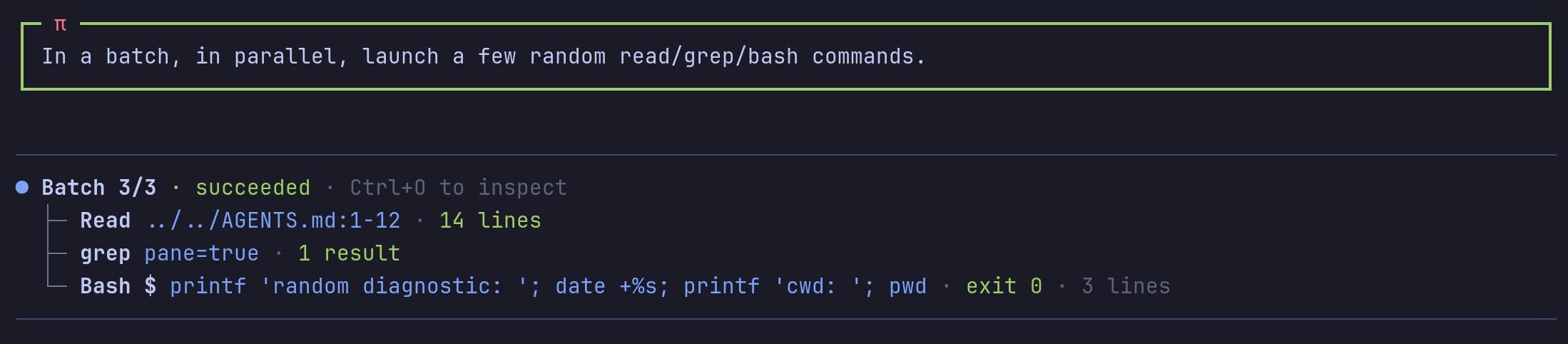
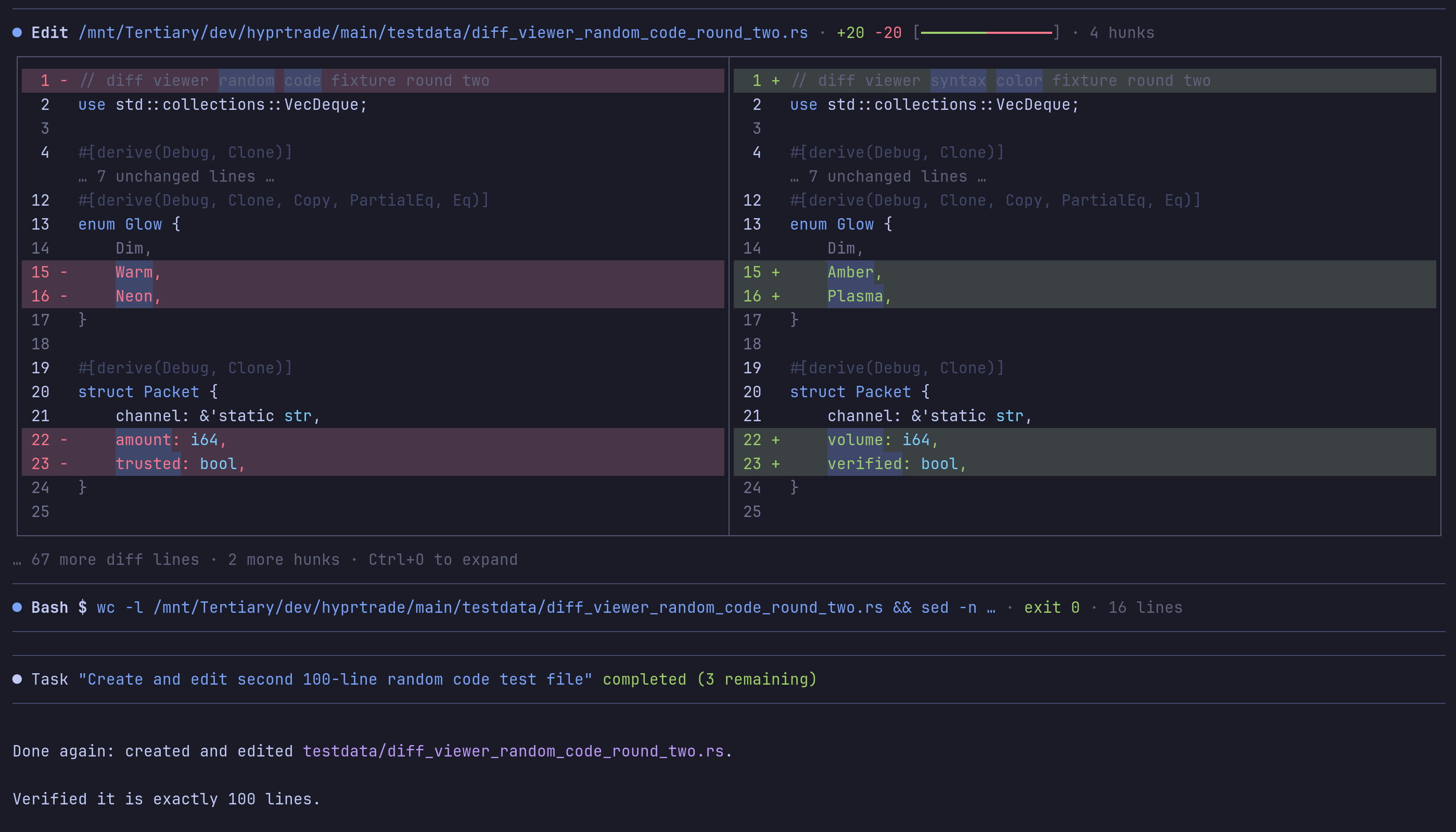
Tool and message displays for Pi. It provides compact output, optional file diffs and a tool for grouped read operations.
Features
- Show compact tool rows with expandable output.
- Display file changes with side-by-side and word-level diffs.
- Group independent read operations into one result.
- Configure message layout and terminal symbols.
Install
Requires Pi 1.0.1 or later. Update older Pi installations before installing this package.
- npm:
pi install npm:@vanillagreen/pi-tool-renderer. - kendex:
- Add the declaration below to the project's
kendex.toml, or to~/.config/kendex/kendex.tomlfor user scope. - Run
kendex update-pi.
- Add the declaration below to the project's
[pi-extensions."@vanillagreen/pi-tool-renderer"]
source = "kendex"- Restart Pi after installation.
- Use
kendex update-pi --checkto preview the installation.
How it works
Pi runs a tool and gives its call and result to the display extension. The extension formats those values using your settings. It shows a compact preview that you can expand. Optional diff views show changed files, and grouped read calls share one result display.
Memory use
- The display retains at most 256 user-message layouts, with at most 65,536 characters each of message text and displayed lines. Larger messages still display. Closing the session releases the layouts.
- Grouped tool calls are tracked only while
stackToolCallsis on. - At most 256 grouped calls are kept, in groups of at most 64; older groups are dropped. Each keeps at most 16,384 characters of its result for the preview: the start for read and search calls, the end for bash.
- A dropped call that Pi draws again (ctrl+o, a resize) is shown on its own and is not kept.
- Grouped calls and the list of tool displays to refresh are cleared when a session starts or ends. A tool display Pi no longer shows is not kept alive.
- With
pendingStatusAnimationon, a running tool row blinks until its result arrives, the agent run ends or the session ends. A row the agent run ended without a result does not blink again when Pi draws it again. The ids of those rows are kept until the session ends. - A write diff is skipped if the old file or new content exceeds 700 KB. The row reports the skip. At most 256 writes retain old content for display until they finish, the agent run ends or the session resets. Sessions without a UI retain none.
- An edit's result diff comes from the patch Pi's edit tool returns, so the renderer reads no file for it. A patch over 700 KB is not shown, and the row says the diff was skipped.
Setup
The settings editor writes project values to .pi/settings.json. The default user file is ~/.pi/agent/settings.json. PI_CODING_AGENT_DIR changes the user directory. Package values are stored under kendex.extensionManager.config["@vanillagreen/pi-tool-renderer"].
Open /extensions:settings; settings appear under the Tool Renderer tab. Project settings in .pi/settings.json apply only after Pi marks the workspace trusted.
enabled: package toggle.glyphStyle,globalGlyphStyleOverride,treeStyle: Unicode or ASCII symbols. The global override forces one style across every kendex Pi extension and leaves tool, model and user content alone.registerBatchTool,batchMaxCalls,batchCallTimeoutMs: thetool_batchtool and its limits.readOutputMode,searchOutputMode,bashOutputMode,mcpOutputMode, and the*PreviewLinesandbashLiveOutputDelayMs,bashLiveTailLines,bashCollapsedLines,commandPreviewCharsbudgets: how much of each result shows collapsed and expanded.showReadImages: images inreadresults; needs Pi's ownterminal.showImagesoff.renderMutationTools,splitDiffs,diffPreviewLines,diffExpandedLines,mutationCallPreview,mutationCallPreviewLines,shikiDiffs,wordDiffHighlights,diffBackgrounds,showDiffHunkMeta: the edit and write diff view.renderMutationToolsis off by default, which keeps Pi's own edit and write view. Tool execution, argument preparation and prompt guidance remain with Pi. Pi and your tool selection control activation; compact drawing does not enablegrep,findorls.renderBashDiffs,renderGitDiffCommandDiffs,applyPatchRenderer,applyPatchPreview,applyPatchPreviewLines,genericToolRenderers: diffs and views for tools other than edit and write.compactUserMessages,userMessageTrailingBlankLine,compactCompactionMessages,compactSkillMessages,alignAssistantMessages,styledCodeBlocks: message rendering.toolChrome,rightMarginGuard,pendingStatusAnimation,workingIndicator,maxLineWidth: borders and the hard cap on one rendered line.stackToolCalls,stackChildDisplay,hideStackChildRows: the stacking of consecutive native tool calls.stackChildDisplaystaysrowsbecause it has no effect whilestackToolCallsis off, which is its default.
Maintainer notes are in DEVELOPMENT.md.