ai-insights
Look back at how you work with AI coding agents. Local insights and actionable tips from your Claude Code and Codex history.
Package details
Install ai-insights from npm and Pi will load the resources declared by the package manifest.
$ pi install npm:ai-insights- Package
ai-insights- Version
0.11.1- Published
- Nov 19, 2026
- Downloads
- 2,616/mo · 2,616/wk
- Author
- hamedmp
- License
- MIT
- Types
- extension, skill
- Size
- 2.2 MB
- Dependencies
- 2 dependencies · 0 peers
Pi manifest JSON
{
  "skills": [
    "./skills"
  ],
  "extensions": [
    "./pi/extension.ts"
  ]
}
Security note
Pi packages can execute code and influence agent behavior. Review the source before installing third-party packages.
README
AI Insights
Your AI coding, recapped. One command turns your local agent history (Claude Code, Codex, OpenCode, Pi, Cursor, Gemini CLI), and Claude and ChatGPT chat history you import, into animated recap cards you can post, and a private analysis of what to change. Nothing leaves your machine.
Website · Sample recap · npm
AI Insights was called Hindsight until v0.2; @matrix-os/hindsight is deprecated in favour of ai-insights.
npx ai-insights@latestOr, from your agent: install the plugin (below) and run /analyze-ai-usage.
What you get
One self-contained HTML page on your disk, in three parts.
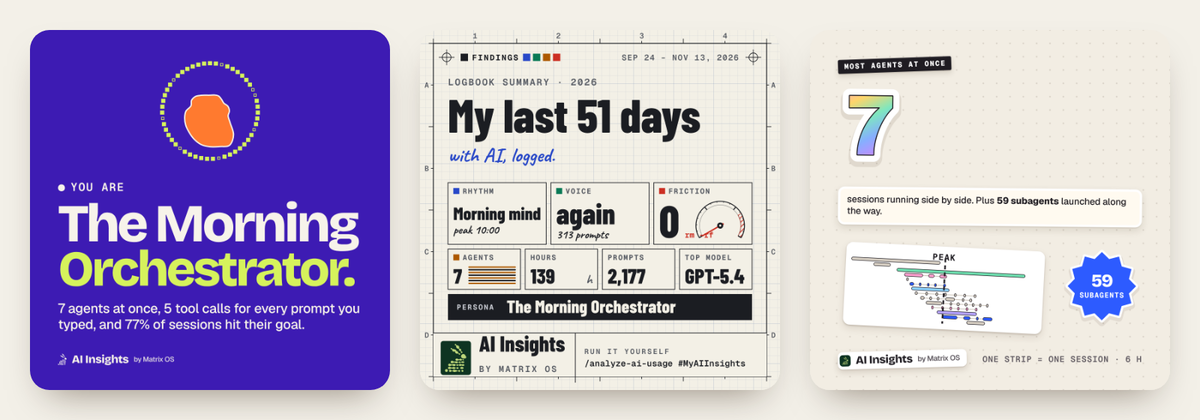
A recap to share. Up to 21 animated cards about how you work: your persona, the most agents you ran at once, living dangerously (rm -rf, force pushes), your manners, your favourite word, when you prompt, your streak, your bash hall of fame, tests, your top model, tokens, three things to try next, and a summary. A card only appears when your history has the data for it.
- Cards first: the report opens on your cards, every one of them, persona first, one large at a time with the whole set beside it. Browsing them never changes what goes into your video.
- Three styles: Pop (the default), Instrument panel and Sticker sheet.
- Four shapes: 1:1, 9:16, 4:5 and 16:9. Each card is laid out again for the shape, so nothing is cropped.
- A card studio: pick and order the cards, choose where you will post (X, Instagram feed, Reels, Stories, TikTok, LinkedIn, YouTube Shorts) and see whether the length fits.
- Export in the page: an MP4 video (in Chromium browsers today; other browsers get a terminal recipe using headless Chrome and ffmpeg), PNG images, or a square PDF with one card per page for a LinkedIn carousel.
- Share: X and LinkedIn open with a caption ready; Instagram and TikTok or Shorts get the file saved and the caption copied; your system share sheet where the browser has one.
Cards hold counts and a few allowlisted words only: no prompts, file or project names, paths or session ids. Every card carries the "AI Insights by Matrix OS" mark by default (you can turn it off), and the last card shows how to make your own. The launch hashtag is #MyAIInsights.
A private analysis to act on. Your rhythm, parallel sessions on a timeline, tokens and cost at API list prices, and findings with the evidence behind them: a command that keeps failing, instructions you keep repeating, sessions that end in a context reset, corrections that come late. Then the changes ranked, each with text to paste into CLAUDE.md or AGENTS.md, a setting, or a habit to try.
Over time. Every run saves a small snapshot. The next run shows what changed since: findings that look resolved, still open, or new.
Status
Early (0.2). History is read from six agents:
| Agent | History | Tokens | Skill install |
|---|---|---|---|
| Claude Code | read | yes | plugin |
| Codex | read | yes | plugin |
| OpenCode | read (the database needs Node 22.5 or later) | yes | untested |
| Pi | read | yes | untested |
| Cursor | read | no: its local transcripts hold no token counts | untested |
| Gemini CLI | untested: built from its source format, not yet tried on real history | yes | none yet, use npx |
| Claude chat | imported from a data export (ai-insights import claude <path>) |
no: the export records no model or token counts | not needed |
| ChatGPT | imported from a data export (npx ai-insights@latest import openai <path>) |
no: the export names the model but records no token counts | not needed |
Install
You need Node.js 20 or newer.
Without an agent: npx ai-insights@latest writes the report and asks whether to open it (--open opens it without asking, --no-open never asks; it never asks when piped, in CI or over SSH). npx ai-insights@latest doctor shows which history it found and where.
A quick look: npx ai-insights@latest today (or week, month, summary) prints one coaching tip, then sessions, active time, prompts, tokens and the cost estimate at API list prices. It writes no report, so it is cheap to run often. --by project|model|agent breaks it down, --last 4 gives one row per period, --no-cost leaves the cost out, and --json prints numbers for other tools (docs/summary-json.md).
In Claude Code's status bar (opt-in): ai-insights statusline prints one line with the model, the session's and today's cost, context use and one hint for the session. It reads only the saved digest and the session's new transcript bytes, and a warm call takes about 35 ms. ai-insights statusline --print-config prints the settings.json entry to add; it needs npm install -g ai-insights, because npx would contact the registry on every refresh.
From your agent: each install adds the same MCP server (npx -y ai-insights mcp) and three skills:
analyze-ai-usagebuilds the report, with your own agent labelling a sample of sessions and writing a short narrative;ai-insights-coachturns the findings into edits you review;ai-insights-setupchecks that everything works.
The Claude Code and Codex plugin also shows one line at the start of a new session when a monthly review is due (offline, at most once a month; npx ai-insights@latest nudge --off turns it off). nudge --cadence weekly (or daily) makes it a weekly (or daily) line with that period's sessions, active time, context resets and one tip, read from the small digest your runs save (docs/digest-json.md); the hook never reads your history. Codex runs it only after you approve the hook in /hooks; it is untested in the Codex CLI.
From the command line: npx ai-insights@latest install runs the Claude Code and Codex commands below for the agents it finds, after showing them (--dry-run only prints them). The end of a normal run offers the same once; a no is remembered for 30 days, and --no-install-prompt or AI_INSIGHTS_NO_INSTALL_PROMPT=1 turns the offer off.
Claude Code
/plugin marketplace add hamedmp/ai-insights
/plugin install ai-insights@ai-insights
Codex
codex plugin marketplace add hamedmp/ai-insights
codex plugin add ai-insights@ai-insights
Cursor (untested install): from a clone of this repository, run scripts/install.sh --harness cursor. It adds the server to ~/.cursor/mcp.json and the skills to ~/.cursor/skills.
Pi (untested install): pi install git:github.com/hamedmp/ai-insights
OpenCode (untested install): from a clone, run scripts/install.sh --harness opencode.
Several harnesses at once: clone this repository and run scripts/install.sh. The script:
- finds the harnesses on your machine;
- copies the skills into each one;
- registers the MCP server with each harness's own
mcp addcommand.
It needs no root, writes only inside your home folder, and is safe to run again. Add --dry-run to see what it would do first.
Then start a new session and run /analyze-ai-usage (or ask your agent to analyze my AI usage).
On a schedule
ai-insights schedule weekly (or daily, monthly; --at 18:30, --day fri) adds one job to your computer's own scheduler: a launchd LaunchAgent on macOS, a systemd user timer on Linux. At that time it refreshes the report and shows a notification with counts only, about the period that just ended, such as "Your weekly AI Insights are ready: 41 sessions, 6.1 h last week." (the cost only with --with-cost). It lists the files and the command line first and adds nothing until you say yes, only at a terminal. ai-insights schedule status shows it, and ai-insights schedule off or ai-insights uninstall removes it. It needs a global install (npm i -g ai-insights), because a job must never start npx. Without user systemd it prints a crontab line instead. On Windows it prints a schtasks command and is untested.
On a server
Over SSH, or on Linux with no display, a run does not try to open a browser. It ends with three ways to see the report from your own computer:
npx ai-insights@latest serveshows the report through an SSH tunnel: it listens on127.0.0.1only, serves that one file read-only at a random path, and prints thessh -L <port>:127.0.0.1:<port> user@hostcommand to run on your computer. It stops after 30 minutes without a visit, or on Ctrl-C.scp user@host:<report path> ., run on your computer, copies the file so you can open it there.npx ai-insights@latest shareprints your stats share link (the same link as the report's Publish button, after the same list of what it holds) so you can open it on your laptop or phone and publish from there.--name,--deviceand--no-daysmatch the report's fields;--copyasks your terminal to copy it, and it is also saved toshare-link.txtin the store.
What it reads
| Harness | Where |
|---|---|
| Claude Code | ~/.claude/projects/**/*.jsonl (or under CLAUDE_CONFIG_DIR), ~/.config/claude/projects, and Claude Desktop's Code and Cowork session stores |
| Codex | ~/.codex/sessions and ~/.codex/archived_sessions (or under CODEX_HOME) |
| OpenCode | ~/.local/share/opencode/opencode.db (or OPENCODE_DB, XDG_DATA_HOME), plus the older storage/ files. The database needs Node 22.5 or later. |
| Pi | ~/.pi/agent/sessions (or PI_CODING_AGENT_DIR, PI_CODING_AGENT_SESSION_DIR), and OMP's ~/.omp sessions and profiles |
| Cursor | ~/.cursor/projects/*/agent-transcripts (prompts and tool calls; no tokens) |
| Gemini CLI | ~/.gemini/tmp/*/chats (or under GEMINI_CLI_HOME) |
| Claude chat | Nothing by itself. ai-insights import claude <path> reads a Claude data export (the .zip, its unzipped folder or conversations.json) and keeps the result under ~/.ai-insights/imports/; ai-insights import --list and --remove claude manage it |
| ChatGPT | Nothing by itself. npx ai-insights@latest import openai <path> reads a ChatGPT data export (request it in ChatGPT under Settings, Data controls, Export data; then pass the downloaded .zip, its unzipped folder, or a conversations.json / conversations-000.json file) and keeps the result under ~/.ai-insights/imports/; --remove openai removes it |
From each transcript, AI Insights keeps:
- numbers: tokens, durations, tool calls, errors and lines changed;
- the prompts you typed, with secrets redacted.
It does not store the agent's replies or tool output. During analysis, your agent reads short, redacted excerpts on demand.
Imported chats. A chat export is streamed (never unpacked to disk, never read into memory whole). Each conversation becomes one session holding counts, times, Claude's own tool names (connectors and MCP servers under one label) and your own prompts, redacted. Claude's answers, thinking text, tool inputs and results, attachments, file names, chat titles, projects, memories and account details are never read. The export has no model, tokens or cost, so those are shown as not measured: chats stay out of token and spend totals, out of the per-agent split in a share link and the leaderboard arenas, and out of the coding findings, work ratios and parallel counts. Details: Import chat history.
AI Insights writes everything to ~/.ai-insights/ (set AI_INSIGHTS_HOME to move it), and only you can read those files. From 0.5 that includes device.json: a random id made once for this installation (16 random bytes, never your computer's name, username or hardware), so the website can keep one entry per computer when you publish from several. It also keeps a checkpoint (tail/) for each large Claude Code transcript it has read, and for each subagent transcript what the parse takes from its lines (counts, token counters, line counts, error types, and commands only redacted as the session keeps them; no prompts, tool output, file contents or assistant text), so a session that is still being written is read from where the last run stopped instead of from the top; a transcript that was truncated or rewritten is read in full again. Transcripts are parsed on up to four worker threads, fewer on machines with few cores or little memory (AI_INSIGHTS_WORKERS=0 turns that off, a number up to 8 sets how many). If you used it as Hindsight before 0.2 and have only a ~/.hindsight/ folder, the next ai-insights command moves it to ~/.ai-insights/ (one rename) and leaves ~/.hindsight as a symlink to it, so earlier results carry over and the old path keeps working; when that cannot be done safely, it keeps using ~/.hindsight/ as before. It never merges two folders or deletes anything, and HINDSIGHT_HOME is still honoured.
It can only look back as far as your agents keep their files. Claude Code keeps local transcripts for 30 days by default (its cleanupPeriodDays setting changes that), so run it soon, and raise that setting if you want a longer look back next time.
Privacy
- Local only. No network calls, no telemetry, no account. The report is one HTML file whose Content-Security-Policy (
default-src 'none') stops it loading or sending anything. - Share links only when you make one. The report's "Share your stats" box can build a link to a card on the AI Insights site. The link carries only aggregate numbers (an optional display name, the period, sessions, tokens, estimated spend, active days, longest streak, each coding agent's share of sessions; imported chats are left out of that split), one fun-fact line and, from 0.4, your earned titles and five work ratios (title keys and numbers only) and your recap cards as short lines of data (a card name, a headline and a caption made only from counts, dates, agent and public model-family names and fixed wording; cards whose report version shows your words, slash commands, program names or tips publish a count instead, or are left out). From 0.5 it also carries this installation's random device id and a name you may type for the computer (for example "Work laptop"), the count each work ratio is out of, and, unless you untick it, which days you were active (dates only, no counts or times), so the site can add up several computers and combine streaks. It travels in the URL fragment, which browsers do not send to the site. It holds no project names, paths, prompts or commands, the box shows every line it contains before you copy it, and nothing is sent unless you copy or click it yourself.
- The website counts visits; the tool does not. ai-insights.app (not the package and not the report) uses first-party PostHog analytics, sent through ai-insights.app itself to PostHog's EU hosts: page views and a few named clicks. It never sends a share link's
#fragment, records no sessions, captures no typed text and honours Do Not Track. - The leaderboard is opt-in, on the website. Nothing in the package publishes anything. An entry on the leaderboard exists only if you open your share link, sign in with a Matrix account and press Publish there. It sends only the lines listed above (numbers and cards), under a public handle you pick, after the page shows you exactly what will be public; your profile at
ai-insights.app/u/<handle>shows them. Your Matrix account photo is shown only if you tick that box when you publish (off by default); the site then reads it from your Matrix account on its server, and publishing again without the box removes it. The numbers are self-reported and not verified. Several computers: publish from each with the same account; each computer keeps its own numbers (told apart by its random device id) and your profile and leaderboard rank use the total. Publishing again from a computer replaces only that computer's numbers; at most 10 computers per account. A computer's name is public only if you tick that box when you publish; otherwise visitors see "Device 1", "Device 2". If two computers publish exactly the same history (a synced home folder), it is counted once and you are told. On your profile, signed in, you can rename or remove a computer, or remove everything. Links from reports before 0.5 have no device id: they publish as one "earlier" device and replace each other, as before. - Referrals are first-party and opt-in by action. Share links the site makes for a published person carry
?ref=<handle>, and arriving at a profile from outside the site counts too. The site remembers that handle in a first-party cookie on ai-insights.app for 30 days (the first one wins). If you later publish, the site credits that person once (never yourself, never an unknown handle) and records the handle in your Matrix account's metadata. Analytics only ever sees that a link had a referrer, never whose. Your own profile shows you the list of people you referred; visitors see only the count. - Share-safe cards. Cards and captions are built only from counts, allowlisted words and public program, model and agent names. The private analysis never reaches a card.
- Your agent does the analysis. AI Insights never calls a model API. The judgement runs in the agent you already use, under your existing account and settings.
- Redaction. Before anything is stored or shown, AI Insights redacts common secret formats from prompts, commands and excerpts: API keys, bearer tokens, private keys,
PASSWORD=-style assignments and email addresses. It also shortens home-folder paths to~. Redaction is pattern-based, so it can miss an unusual secret, and the skills tell your agent never to copy one into its notes.
The report links to Matrix OS, to the docs for the tools it suggests, and to X and LinkedIn when you press a share button; nothing else in it points off your machine.
How the analysis works
- Deterministic. The scan parses your history into sessions. From those it computes activity, the recap, token usage, cost and findings, each with evidence you can check. No model is involved, so the same history always gives the same result.
- Run by your agent. The
analyze-ai-usageskill has your agent read a redacted excerpt of each session in a sample spread across your history. The agent labels each session with a fixed set of labels covering goal, outcome, friction and what went well, then writes a short narrative. The labels are checked against that set before they are saved, so the charts stay comparable from run to run.
The report combines both layers.
Matrix OS
AI Insights is built by the team behind Matrix OS, the AI operating system we are building. AI Insights is free, MIT licensed and works without it.
Development
pnpm install
pnpm check                          # typecheck, tests, generated-file check
pnpm build
node scripts/generate-harness.mjs   # after changing skills/, the version, the icon or the plugin config
skills/ is the only source for the skills. scripts/generate-harness.mjs generates every harness manifest, plus the installable plugin in harness/ai-insights/ that Claude Code and Codex install. CI fails when the generated files are out of date. AGENTS.md describes the module layout and the rules.
The website lives in site/. Its pictures and sample video come from the sample report: node scripts/demo-report.mjs, then pnpm --dir site media.
Bugs and ideas go to GitHub issues.
License
MIT
Token accounting draws on CodexBar (MIT, Peter Steinberger): where Claude Desktop keeps its session stores, and how to recognise a proxy's incomplete Claude usage record.