pi-better-harness
Pi extension bundle for a write sandbox, subagents, background tasks, SSH, goals, and Outcome & Todo.
Package details
Install pi-better-harness from npm and Pi will load the resources declared by the package manifest.
$ pi install npm:pi-better-harness- Package
pi-better-harness- Version
0.55.0- Published
- Nov 25, 2026
- Downloads
- 12.8K/mo · 2,030/wk
- Author
- exoulster
- License
- MIT
- Types
- extension
- Size
- 35.8 MB
- Dependencies
- 10 dependencies · 1 peer
Pi manifest JSON
{
  "image": "https://raw.githubusercontent.com/1aboveio/pi-better-harness/main/docs/images/package-gallery/pi-better-harness.png",
  "extensions": [
    "extensions/sandbox/index.ts",
    "extensions/subagents/index.ts",
    "extensions/background-tasks/index.ts",
    "extensions/ssh/index.ts",
    "extensions/goal/index.ts",
    "extensions/task-context/index.ts",
    "extensions/project-context/index.ts",
    "extensions/minimal-output/index.ts",
    "extensions/tool-call-guard/index.ts",
    "extensions/recap/index.ts",
    "extensions/supervisor/index.ts",
    "extensions/settings/index.ts"
  ]
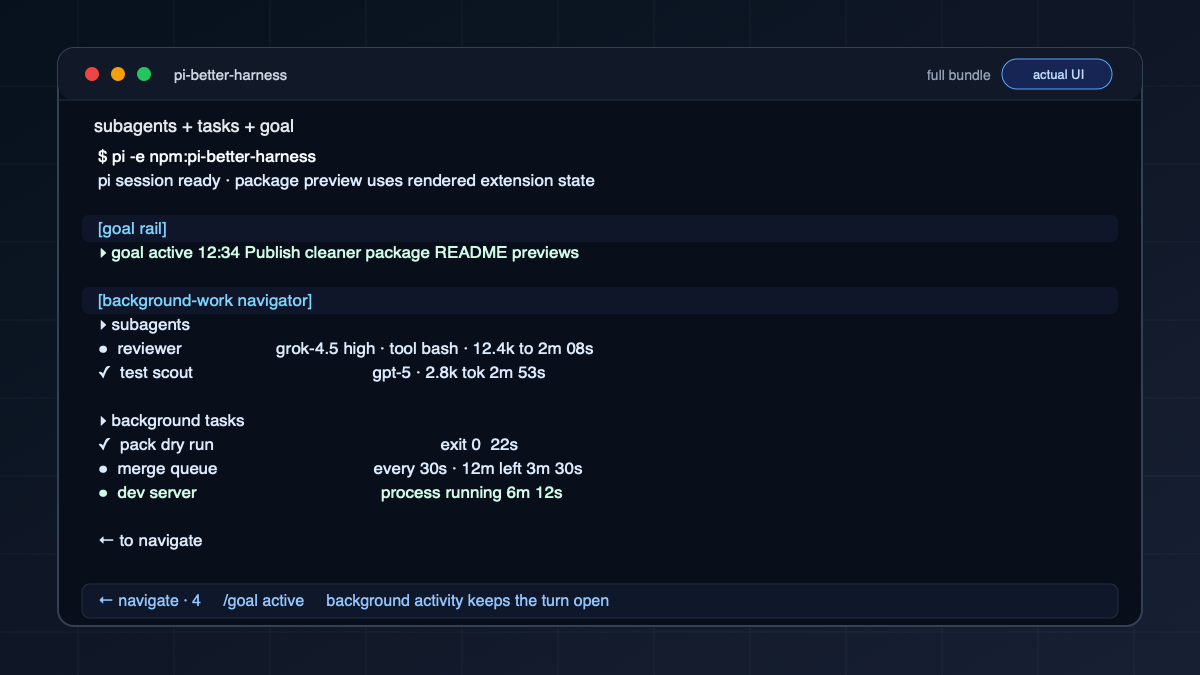
}
Security note
Pi packages can execute code and influence agent behavior. Review the source before installing third-party packages.
README
pi-better-harness
pi-better-harness is a Pi meta package for an opt-in foreground write sandbox, delegated subagents, durable background tasks, synchronous SSH commands, goal tracking, and Outcome & Todo.
Quick Answer
Use pi-better-harness when you want the full working set for Pi. It manages:
pi-better-sandboxfor an opt-in write sandbox around Pi's foreground tools.pi-better-subagentsfor detached, sandboxed subagent runs.pi-better-background-tasksfor durable shell tasks and watchers.pi-better-sshfor short remote commands over reusable SSH connections.pi-better-goalfor explicit triggers, pause/resume, and background-aware continuation.- Harness-owned Outcome & Todo for session context and checklist progress. Saved state displays by default; its hooks start off.
pi-better-read-aloud is intentionally not included yet.
Outcome & Todo
In /harness-settings, Outcome and Todo panel (outcome-todo-display)
defaults to On, and Outcome and Todo tools (outcome-todo) defaults to
Off. Project work ledger (outcome-todo-ledger) is a third independent
control and defaults to Off. Saved outcomes and checklists display even when
hooks are off; missing state creates no placeholder, state, or settings. Turning
display off does not disable hooks. Saved v1 enabled remains the hooks
authority; the optional display and ledger preferences default to their existing
or conservative values.
The compact widget has one Todo heading, with a caret after Todo and the completion
count on the left. A matching Goal's status and existing active-time clock appear
on the right. The outcome is one muted, truncated subtitle. The collapsed view
shows up to five relevant rows; the expanded view shows all rows. Click to toggle.
/todo reveals the compact Overview (when display is on) and returns it to automatic display;
/todo expand and /todo collapse control which rows it shows. The full
objective, acceptance criteria, boundaries, and plan remain available through
get_todo when hooks are enabled. Todo commands remain available with hooks off
for explicit user control.
An accepted outcome can be saved without a checklist. Completing or clearing its Todo does not complete or remove the outcome. Write labels as short, plain actions, usually 3-7 words: "Add Todo toggle", "Keep session state", or "Test keyboard controls". Keep methods, file paths, and acceptance criteria in the outcome or supporting records. This is writing guidance, not a hard limit or automatic truncation; existing saved labels remain unchanged until deliberately updated.
Use newTask: true with a new
outcome for unrelated work; a correction to the current task keeps its binding.
Hooks enable update_todo, get_todo, capture, matching Goal lifecycle bridge
writes, outcome updates, and automated cleanup. With hooks enabled, Harness records
a hidden, persistent outcome update at the next agent start only when its content
changes. It does not rebuild reminders before each model call. Turning hooks off stops those
hooks without deleting saved state or starting a turn. /goal and skills never
enable them.
In /harness-settings, Auto-start Goal optionally starts
a Goal after a successful explicit outcome save with an objective and nonempty
doneWhen criteria. It defaults Off; /goal settings auto-start-from-outcome on
enables it. Existing active, paused or budget-limited Goals stay unchanged, and
restoring state or toggling settings never starts work. The outcome and Todo are
preserved; subsequent continuation follows the existing Goal controls.
Todo uses the same workflow view for a bound task plan and a dynamic workflow. It shows tasks on the left and the workflow diagram on the right. Below 36 terminal columns, the diagram follows the task list.
Existing Plan session histories restore as Todo. Workflow task-plan files and revision checks stay unchanged; skills continue using their own records when the optional interface is off. See the usage guide.
Dynamic workflows
Run /dynamic-workflow to plan the current task once. In /harness-settings,
Automatic dynamic workflows defaults to off. On lets the planning agent
start a workflow. Adaptive lets it handle simple requests directly and use a
workflow for dependencies, role handoffs or repeated review. The command works
in every mode and keeps your saved preference.
The agent records an objective, acceptance criteria, required outputs and task
dependencies. The diagram shows dependencies and review loops.
Task icons distinguish ready (○), working (●), waiting (·), optional standby (–),
failed (×), and completed (✓) steps. In mouse-enabled Pi, click a task to highlight
its stage and inspect its latest result. Use /todo expand to show every task.
Independent tasks can run together. A join waits for each prerequisite's output.
If a reviewer requests changes, the revision opens and the revised artifact
returns to review. Delivery waits for approval of the current version.
The agent can select an inspected catalog role or named agent for a step. The ordinary subagent launch applies the catalog skills and current permissions. Harness associates the returned assignment and its verified result with the step. Resume the session branch to continue from its saved outputs. A bound Goal also requires evidence for its objective. A standalone workflow can finish on its own.
The separate Project work ledger setting enables a durable project-scoped
record of the overall outcome, boundaries, and high-level items. It stays off by
default; turning it off removes ledger views and hints without deleting records.
The same update_todo / get_todo interface carries optional ledger payloads and
selectors for create, update, attach, detach, list, and read. Updates require the
current revision, preserve completed evidence and history, and never associate old
work with a new session automatically. Use /ledger attach <id> (or an explicit
update_todo ledger attach) to continue the same record; /ledger list,
/ledger switch, and /ledger detach manage the reference without copying it. A
resumed session keeps its reference, a fresh session stays unassociated, and
bounded recovery reminders after compaction or resume are rebuilt from durable
state. Workflow-owned rows keep their canonical stage/status rendering; the
ledger adds context, not a second execution model. See
usage.
Subagent and background-task rows can be clicked to open their existing navigator
details. Enter and keyboard controls remain available, and editor input stays
passive. Harness packages do not write to Pi's status bar. Goal holds and resume
instructions remain available through /goal; permission checks are unchanged.
Screenshots
Install
Install the extensions as standalone Pi packages, so Pi displays and manages each by its own package name:
npx pi-better-harness installFor project-local Pi settings:
npx pi-better-harness install --localThe installer also registers Harness with filters for its own settings, minimal output, and Outcome & Todo extensions. It removes an old pi-better-plan registration in the selected scope. The component packages keep their separate identities. Pi's normal installation prompts and errors still apply.
The single-bundle installation remains available:
pi install npm:pi-better-harnessTo add model routing, run pi install npm:pi-better-model-router and select
router/deepseek-flash-auto in /model. The router package includes the Ollama
Cloud provider and requires Pi's registerVirtualModel API.
After a normal bundle install or pi update, Harness masks any separately loaded
pi-better-plan package before Pi registers its tools, /plan command, widgets,
or prompt hooks. This applies in either load order, including when Outcome & Todo
hooks are off. The old registration and cached files may remain, but are inactive while
Harness is loaded. Settings and session history are not rewritten. The explicit
installer above removes the old registration in its selected scope instead.
Ordinary Startup
You keep launching Pi the way you always have:
piThe foreground write sandbox starts inactive. Use /sandbox on for the current
session or /sandbox default on to persist opt-in across startup, new session,
resume, fork, and reload. There is no launcher.
While it is on, Pi's built-in bash, write, and edit tools, your own ! / !! commands, local background tasks, and subagents can write only under the directory you launched Pi from, minus the packaged deny paths (.git/hooks, .env, .env.local).
Reads and network access are unrestricted — this sandbox limits writes only. Writes are confined for those integrated first-party execution paths; Pi's own process, arbitrary pi.exec calls, and unrelated third-party extension code are not confined. Confinement is also per surface: each integrated surface denies its own control plane, not every other surface's, so with several first-party surfaces installed a confined process on one can still write another's control plane.
Sandbox state is human-only: /sandbox, /sandbox on, /sandbox off,
/sandbox default on|off, /sandbox deny ..., and /sandbox rules are slash
commands with no tool equivalent. /sandbox off and /sandbox default off
need interactive confirmation. Full policy: pi-better-sandbox.
Minimal Tool Output
The bundled harness provides Tool output with Normal and Compact in
/harness-settings. /tool-output minimal, /tool-output normal, and
/tool-output (toggle) remain compatibility shortcuts to the same preference.
Minimal mode folds each tool call into a single-line header, including running
calls. The tool-specific icon and tool name share a state color: accent while
running, muted when completed, and error-colored when failed. In fullscreen Pi, a soft highlight travels through the entire visible running tool name and its
inline command/path details; details stay dim between highlight passes. Scrollback terminals keep static state colors.
Choose Tool progress animation set to Off in /harness-settings for static running headers.
Running and failed calls retain text labels so state never depends on color or
motion alone. Tool rows are indented two columns past
the assistant text padding. Long
headers are truncated to the terminal width; result bodies,
images, boxes, and tool spacers are hidden. Built-in, extension, and MCP calls
are included. Tools without a custom call renderer use a generic icon and a
compact argument hint. Compaction summaries also collapse to one quiet row with
the pre-compaction token count; Ctrl+O reveals their original summary.
Custom transcript messages from any extension also fold to a quiet disclosure
row with the message type and first content line. This includes background
completion batches and subagent health/timing alerts. Ctrl+O or a fullscreen
click reveals the original content and any custom renderer. Direct UI notices
are unchanged.
Execution, sandboxing, and agent-facing payloads are unchanged.
When a foreground run ends, each consecutive block of tool calls folds further
into one disclosure row showing the call count and any failures. Only the failure
count uses the error color; the disclosure and total stay muted. Assistant text
stays visible, and restored history uses the same folded view. In newer Pi
fullscreen mode, click a block disclosure to reveal its call rows, then click a
call to expand its original details. Hover highlights compact call and disclosure
rows using the selection background (reverse video for themes without one), and
tool icons sit centered in a three-column gutter. Click the disclosure again to refold the
block; native expanded call/result clicks collapse individual details. Regular
terminals keep mouse input for terminal selection and scrollback; Ctrl+O expands
all original tool details in both modes and folds them again on the next toggle.
/tool-output normal restores ordinary rendering. Error result bodies are also
hidden in minimal mode and remain available when expanded.
Minimal mode also covers Harness tools: Subagents, Background Tasks, Goal, Todo, catalog inspection, and SSH. Compact calls retain the run or task ID, launch name and task, background command, goal action, or plan summary without showing result bodies. Finished calls fold into the same disclosure blocks as built-in tools; expanding them restores their original package renderers. Goal and Todo widgets and the background-work navigator are independent UI surfaces and remain visible.
Normal mode is the initial default. Changing tool output saves the choice in
global settings.json under piBetterHarness.toolOutput, as well as the current
session. New sessions inherit it; resumed branches retain their own saved choice.
This is a version-sensitive internal TUI adapter,
tested with Pi 0.82.1, 0.99.1, and the bundled Pi 1.0.4 CLI; incompatible APIs
produce a warning and leave ordinary output enabled. Print/RPC output and
exported transcripts are unchanged.
The installer includes this Harness-owned extension. To run it directly from a checkout:
pi -e ./packages/pi-better-harness/extensions/minimal-output/index.tsHarness Settings
The bundled harness provides /harness-settings, using Pi's native settings
list. Work planning comes first, followed by delegation and sandbox access,
background waits and completion delivery, then display settings. It opens
the settings screens of loaded Sandbox, Subagents, and Goal
packages without duplicating their configuration, plus the Agent catalog shortcut
to the /agents catalog. /sandbox, /subagents settings, /agents, and
/goal settings remain available in standalone installations.
Packages without a settings screen are not listed. Pi's /settings is unchanged.
Navigator layout selects Flat list (the default) or Tree. Flatten keeps the Subagents
and Background Tasks groups and includes tasks launched by subagents. Tree puts
Main and subagents at the same level, with each agent's background tasks indented
beneath it. Switching applies immediately and saves piBetterHarness.navigatorView.
Worker-owned tasks expose status and logs; their execution remains managed by the
owning agent. Older worker tasks appear when a retained assignment wait proves
their parent, so unrelated sessions are never inferred from a reused conversation.
Pin work panels controls the shared navigator used by Goal, Outcome & Todo,
Subagents, and Background Tasks. On (the default) keeps it above the input;
Off places it in the conversation so it scrolls with chat. Changes apply
immediately and save under piBetterHarness.navigator for future sessions.
Package controls and detail views remain available in either mode. Standalone
packages use the same shared navigator and saved preference.
The hub includes Tool output and Tool progress animation when the bundled renderer
extension is loaded. Changes apply immediately and save the default for future
sessions. The animation preference is stored in piBetterHarness.toolAnimation;
normal output and expanded tool details are never animated.
The hub also owns Completion delivery, shared by Subagents and Background
Tasks. Choose When idle (the default) or During run. Changes
apply immediately and autosave to the current session branch, including across
reloads. Press Ctrl+S to save the current choice as your default for future
Pi sessions; changing a session afterward does not change that saved default.
Saving a default leaves already-open sessions unchanged, including when
navigating to a branch without a session override.
The user default is stored in
<agent-dir>/settings.json under piBetterHarness.callbacks and also applies
when either callback package is loaded standalone. The former
PI_BETTER_CALLBACK_WHILE_BUSY environment variable is no longer supported.
All Harness-owned defaults use the piBetterHarness section of global
~/.pi/agent/settings.json (or PI_CODING_AGENT_DIR/settings.json): tool output,
Subagents configuration, callback delivery, Goal controls, and Sandbox activation,
permissions, and deny-rule templates. Existing preference files migrate on first
use after validation; global choices take precedence, and old files remain intact.
Updates preserve Pi's own settings and other packages' choices. SSH profiles,
plans, run records, and role/agent definitions remain in their existing stores:
they are session data or reusable definitions, not global UI defaults.
In /agents, model and effort edits are session-local until Ctrl+S saves them
to the user or trusted project's agents/settings.json. Markdown definitions
remain unchanged, so bundled prompt updates keep applying. The Settings,
Instructions, and Files tabs keep configuration separate from prompts.
Reset to bundled in Settings restores model/effort without changing the
prompt; in Instructions, it restores the prompt while preserving model/effort.
A user Markdown override is archived when its prompt is reset. Saved defaults
survive sessions and upgrades.
Session recap
In /harness-settings, Session recap enables a short summary above the editor after a conversation settles. It defaults to Off. Recap prompt opens the current instructions for editing. Save a blank prompt to restore the default or press Escape to keep your previous instructions. Both settings are saved as user defaults. Editing the prompt takes effect on the next summary.
Each recap uses a separate request to the model that answered. It sends a bounded selection of recent user and assistant text. Pi hosts with the public configured model streaming API can generate summaries; existing summaries restore locally on older hosts. Recap and the optional Next line stay on their session branch. The summary request has its own session identity and usage. The main model receives its usual prompt, tools and conversation.
Harness instructions
Open /harness-settings and toggle Harness instructions from Off to
On. Choose Instructions prompt → Edit to edit the current Markdown.
Saving updates the Harness block and stores the text in the global Pi settings
under piBetterHarness.instructionsPrompt. Turning the switch off removes the
block. Turning it back on restores the saved text. Changes apply on the next
startup or explicit /reload.
The CLI manages the same switch. To enable it from the command line:
npx pi-better-harness instructions enableBy default, Harness copies its bundled AGENTS.md into a marked block in
<agent-dir>/APPEND_SYSTEM.md. It preserves text outside the markers,
including blocks owned by other extensions. To use your own Markdown, set
piBetterHarness.instructionsFile in the global Pi settings.json to an
absolute path or a path relative to the agent directory (normally
~/.pi/agent), then run instructions sync. A prompt saved in the editor takes precedence
over this file. Remove instructionsPrompt and sync to use the file again.
| Command | Effect |
|---|---|
npx pi-better-harness instructions enable |
Create or refresh the block. |
npx pi-better-harness instructions sync |
Refresh an existing block after editing the source or changing its path. |
npx pi-better-harness instructions disable |
Remove the block and preserve the surrounding file. |
A global Harness CLI install refreshes an enabled block. A global CLI uninstall
removes it. If you remove the package directly with Pi, disable the block first.
Setting instructionsFile to false removes the block on the next sync.
The CLI stops on missing or duplicate delimiters in an existing block.
Keep other extensions' content outside the Harness markers.
Pi loads the file as a system prompt addendum. Ordinary turns and compaction
retain the loaded text. A new Pi process or an explicit /reload reads the
current file. Pi gives a trusted project's .pi/APPEND_SYSTEM.md precedence
over the global file. Explicit --append-system-prompt sources also take
precedence over automatic discovery.
Next-prompt inference is deferred pending safe public auth/header resolution in Pi's SDK. It is not loaded by the bundle, has no toggle or preference store in this version, and makes no auxiliary model requests. The integration blocker is issue #426.
The hub is TUI-only and is included by the installer. To load the settings extension directly from the checkout:
pi -e ./packages/pi-better-harness/extensions/settings/index.tsAgent Supervisor
Open Supervisor mode in /harness-settings. Turn it on and select the scenarios to run. First use starts with an empty selection. Settings apply to sessions sharing the Pi agent directory. Turning the mode off preserves the selection and lets existing tasks continue.
| Scenario | What the owner receives |
|---|---|
| CI observation recovery | A suggestion to resume observation of the original GitHub run when its local watcher exits and a fresh check confirms the run is active. Use supervisor_consult for the managed observer. |
| Diagnose stalled Outcomes | A diagnostic review after repeated identical successful repository reads return the same evidence throughout the stall interval. |
| Review Outcome scope | A review of changed Todo steps against the latest user instruction and Outcome. The owner chooses which steps to keep or prune. Use supervisor_review for an on-demand review. |
| Shared daemon fault diagnosis | A shared read-plane diagnosis with an owner-specific verification step when a runtime read fails and the daemon confirms degraded or rebuilding inventory. |
| Consolidate authorization requests | Owners in a trusted workspace can use supervisor_request_decision for the same proposal. The dialog shows the reference, operation, host, resource, side effect, workspace and validity period. Execution still needs the permissions normally required by the tool. |
| Follow up on recovery commitments | Use supervisor_followup to record the action, expected verification and actual tool results. Read progress with /supervisor-followup. Request one reminder with /supervisor-followup remind <id> <minutes>. |
When To Use
Use the installer when you want every core extension with standalone package identities. Install an individual package instead when you only need the sandbox, subagents, shell task supervision, synchronous SSH, goal tracking, or model routing. Outcome & Todo is available through Harness.
Compatibility
| Requirement | Support |
|---|---|
| Pi | Required |
| Recommended install | npx pi-better-harness install |
| Write sandbox on macOS | Seatbelt (sandbox-exec), ships with the OS |
| Write sandbox on Linux | Bubblewrap — install bubblewrap |
| Linked-worktree project context | A Pi host that applies systemPromptOptions after before_agent_start (Pi 1.x); older hosts keep the loaded prompt |
| Development runtime | Node.js 22+ |
Update Or Remove
Remove every standalone package:
npx pi-better-harness uninstallAdd --local to remove them from project-local settings. This also removes the filtered Harness registration in that scope.