pi-chafa-banner
Animated chafa splash header for pi: gif art top-left, a coding-agent card (pi version, model + thinking level) below it, context/skills/extensions on the right, tokyonight colours by default
Package details
Install pi-chafa-banner from npm and Pi will load the resources declared by the package manifest.
$ pi install npm:pi-chafa-banner- Package
pi-chafa-banner- Version
2.0.0- Published
- Nov 16, 2026
- Downloads
- 614/mo · 614/wk
- Author
- xiaocrq
- License
- MIT
- Types
- extension
- Size
- 1.3 MB
- Dependencies
- 0 dependencies · 2 peers
Pi manifest JSON
{
  "extensions": [
    "./src/index.ts"
  ]
}
Security note
Pi packages can execute code and influence agent behavior. Review the source before installing third-party packages.
README
pi-chafa-banner

Your favourite GIF, redrawn as terminal character art and parked in pi's startup header — it scrolls away with the conversation, never steals focus, and never touches a keystroke.
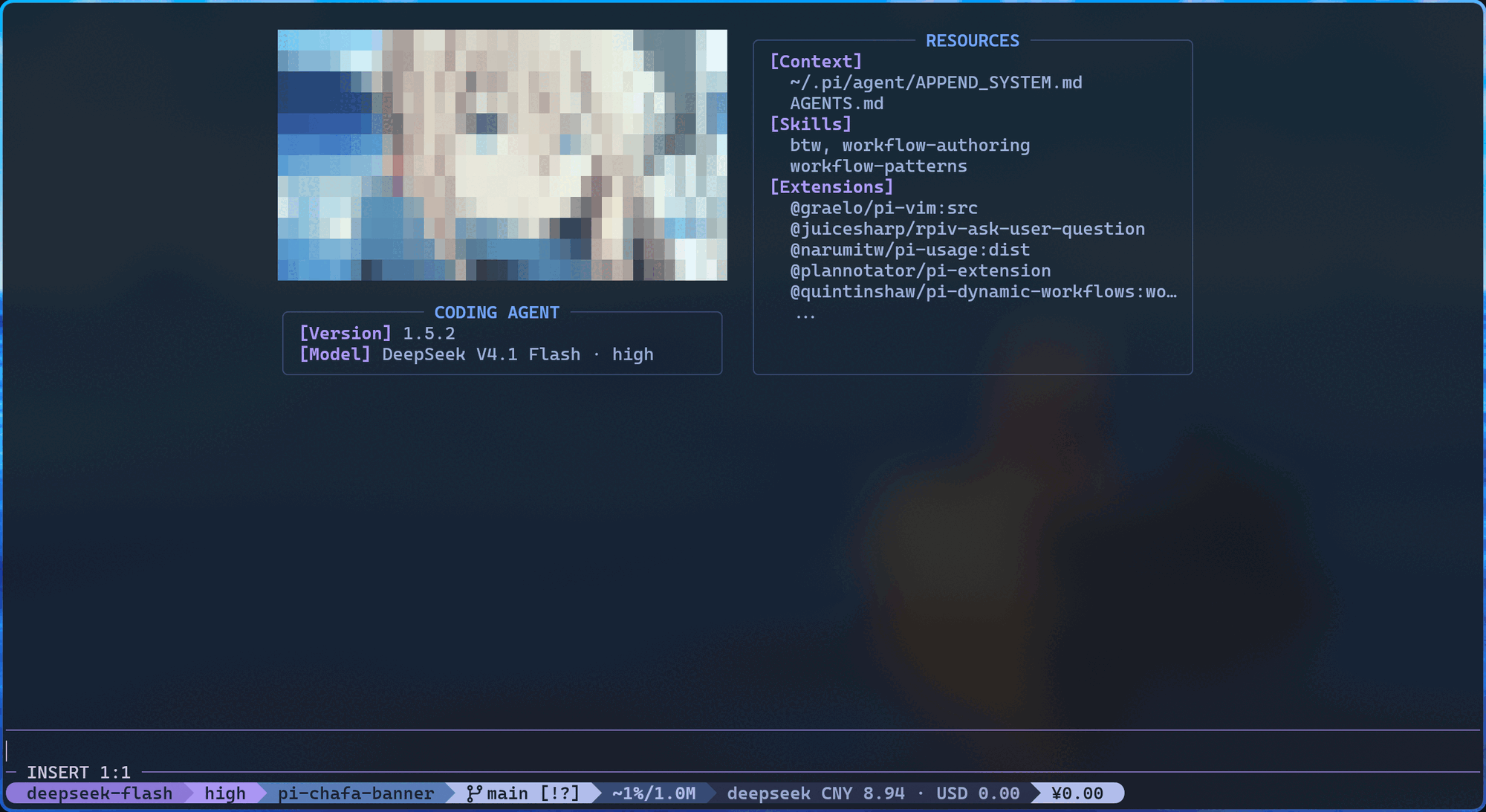
A real session: gif on the left, CODING AGENT below it, resources on the right — tokyonight palette.
Quick start
Install it as a pi package — published on npm as
pi-chafa-banner:
pi install npm:pi-chafa-banner        # add it to ~/.pi/agent/settings.json
pi -e npm:pi-chafa-banner             # or just try it for one run
You need chafa and ffmpeg on your PATH — /splash status tells you what it
found. No config file? The artwork falls back to ~/Pictures/logo/v-3.gif, then
~/Pictures/logo/v-1.gif, and finally the bundled GIF.
Prefer to hack on the code? Clone it next to pi's other extensions:
git clone https://github.com/XiaoCRQ/pi-chafa-banner ~/.pi/agent/pi-chafa-banner
cd ~/.pi/agent/pi-chafa-banner && bun install
and point pi at the extension directly:
{ "extensions": ["~/.pi/agent/pi-chafa-banner/src/index.ts"] }Want to see the layout without starting pi? There is a previewer for that:
bun run scripts/preview.ts --width 100                     # characters, colours on
bun run scripts/preview.ts --width 60                      # narrow terminal
bun run scripts/preview.ts --static --theme pi             # follow pi's theme tokens
bash scripts/demo.sh --preview does the same after printing which config file
would be used, and bash scripts/demo.sh starts pi with only this banner
loaded (pi --no-extensions -e .), which is the cleanest way to check that the
splash is what you think it is.
Configuration
Drop a pi-chafa-banner.json next to the extension: ~/.pi/agent/pi-chafa-banner.json
for a clone in the agent dir, <project>/.pi/pi-chafa-banner.json for a project
install, and ~/.pi/agent/npm/node_modules/pi-chafa-banner/pi-chafa-banner.json
for an npm package install (/splash status prints the exact path it reads).
Everything is optional — a missing key, a typo or a nonsense value just falls
back to the default for that key, and /splash status tells you which ones it
ignored. The one exception is layout: a structural mistake there is reported
instead of replaced, because silently rendering the stock splash would hide it
(see Sizing).
{
  "version": 2,
  "image": { "path": "~/Pictures/logo/v-3.gif", "fps": "auto", "stride": 3, "chafa": "--symbols block" },
  "width": 88,
  "height": 17,
  "gap": { "width": 2, "height": 1 },
  "variableWidth": false,
  "variableHeight": false,
  "compactWidth": 32,
  "theme": { "preset": "tokyonight" }
}
Omitting layout keeps the default tree documented in Layout.
| Key | Default | Meaning |
|---|---|---|
image.path |
~/Pictures/logo/v-3.gif, else ~/Pictures/logo/v-1.gif, else the bundled artwork |
Default GIF (~ expands); a chafa node's own img wins |
image.fps / image.stride |
"auto" / 3 |
"auto" plays at the gif's own pace; stride keeps every Nth frame |
image.chafa |
"" |
Extra chafa flags, one string, e.g. "--symbols block -c 16" |
width / height |
88 / 17 |
Root box in cells. height: "auto" is exactly as tall as the content needs; a number is a floor the content may raise (variableHeight: false turns it into a ceiling). The default just fits the artwork plus the two-row CODING AGENT card |
gap |
{ "width": 2, "height": 1 } |
Blank cells between the children of every layout group, per axis (a character cell is about twice as tall as it is wide). A bare number sets both axes |
variableWidth / variableHeight |
false / false |
true lets the root grow past width/height to fit its content; false makes it a hard ceiling and the overflow is marked: an over-long row ends with ..., a box that runs out of rows ends on a ... that keeps the indent of the row it replaces (heading and inline fields → column 0, item → ...). With variableHeight: true nothing is marked at all — the box just keeps growing |
compactWidth |
32 |
Below this terminal width the splash collapses into three plain lines |
layout |
the default tree in Layout | Recursive node tree — omit it to keep the stock splash |
theme.preset |
"tokyonight" |
Pins the dark palette below; pi follows pi's active theme instead |
theme.windowTitle / .sectionTitle / .border / .content |
preset | Four colour roles, any #rgb / #rrggbb — see below |
behavior.enabled / .static / .hidePiResourceList |
true / false / true |
Master switch, freeze on one frame, hide pi's own resource list |
Three flags are quietly dropped from image.chafa: --probe (chafa would wait
for a terminal reply and steal pi's stdin), --animate (breaks one-frame-at-a-time)
and --clear (wipes the screen). pi-chafa-banner.schema.json describes every key
if you want autocompletion in your editor.
Colours
theme paints the four parts of every box and nothing else. The default
"preset": "tokyonight" pins the dark palette below, so the splash looks the same
on every terminal; "preset": "pi" drops back to pi's own theme tokens, which is
what you want on a light terminal. Any single role can be overridden with a hex
colour either way:
{
  "theme": {
    "preset": "tokyonight",
    "windowTitle": "#7aa2f7",
    "sectionTitle": "#bb9af7",
    "border": "#3b4261",
    "content": "#a9b1d6"
  }
}| Role | What it paints | tokyonight |
|---|---|---|
windowTitle |
Box titles: RESOURCES, CODING AGENT, IMAGE |
#7aa2f7 blue |
sectionTitle |
[Context], [Skills], [Extensions], [Version], [Model] |
#bb9af7 purple |
border |
Box edges, and the dashes either side of a title | #3b4261 comment |
content |
Info values, resource names, the status line | #a9b1d6 foreground |
An explicit hex always wins over the preset, so {"preset": "tokyonight", "border": "#ff0000"} keeps the palette and only recolours the frames. Setting
content collapses pi's text/muted/dim trio into one colour — under
"preset": "pi" leaving it out keeps that three-step hierarchy. Colours are
emitted as 24-bit SGR for truecolor and as the nearest palette entry for
256color, matching what pi reports for your terminal.
bun run scripts/preview.ts --color border=#ff0000 recolours the frames without
restarting pi.
Layout
The splash is a recursive tree of three node kinds. layout splits its box between its
children, window draws a bordered box, chafa renders one character canvas. Writing
layout replaces the whole splash; omitting it keeps this default tree:
{
  "type": "layout",
  "mode": "horizontal",
  "children": [
    {
      "type": "layout",
      "weight": 5,
      "mode": "vertical",
      "children": [
        { "type": "chafa", "weight": 1 },
        {
          "type": "window",
          "weight": 1,
          "title": "CODING AGENT",
          "content": [
            { "type": "inline", "title": "Version", "content": "version" },
            { "type": "inline", "title": "Model", "content": "model" }
          ]
        }
      ]
    },
    {
      "type": "window",
      "weight": 5,
      "title": "RESOURCES",
      "content": [
        { "type": "outline", "title": "Context", "content": "context" },
        { "type": "outline", "title": "Skills", "content": "skills" },
        { "type": "outline", "title": "Extensions", "content": "extensions" }
      ]
    }
  ]
}| Node | Fields | Effect |
|---|---|---|
layout |
mode, children, weight |
Group. "horizontal" splits the width by weight and stacks children side by side; "vertical" splits the height. mode defaults to vertical; gap blank columns or rows sit between siblings |
window |
title, content, weight |
Bordered box. title defaults to WINDOW; each content entry's title defaults to its provider name, capitalised. content is a list of {"type":"inline"|"outline","title","content","stacked"} entries |
chafa |
img, args, weight |
One character-art canvas. img overrides image.path for this node and is used verbatim: a leading ~ is not expanded here. args is appended to image.chafa |
weight is a positive number, 1 by default, and only means "my share of the
parent's cells relative to my siblings". Shares are handed out with the
largest-remainder method, so they add up exactly to the available columns or rows and
ties go to the earlier child. Nesting groups is how the stock splash gets a 5/5
horizontal split with artwork above the info card in the left column.
inline vs outline. inline prints [Title] value on one row — that is the
CODING AGENT card. outline puts [Title] on its own row with the value indented
below — that is each RESOURCES section. For list providers, stacked: true prints
one name per line, otherwise names wrap with commas; the stock tree stacks Extensions
and wraps Context/Skills. Providers return every item and never truncate: a window
fills its box, ends a clipped list with ..., and truncates an over-long row with ....
Providers. A content value is either a provider name or a literal string; an
unknown name is simply drawn as written. The five built-in providers are:
| Provider | Renders | Notes |
|---|---|---|
version |
pi's version (pi -v) |
Falls back to ?.?.? when the probe fails |
model |
Active model name | Carries the thinking level as a suffix (Claude Sonnet 4.5 · high); omitted while unknown |
context |
Context files (AGENTS.md, CLAUDE.md, APPEND_SYSTEM.md, …) |
Comma-wrapped, or one per line with stacked |
skills |
Installed skills | May only fill in after the first turn |
extensions |
Installed packages and local extensions | pkg:entry, the exact labels pi prints on startup. Slash commands are never listed (acp/acp-cache belong to billion-context, so they collapse into that package's one label), and pi's own built-ins (builtin:llama.cpp, …) are skipped like pi does |
Sizing. width and height size the root box, and both are floors rather than
plain targets:
W = variableWidth  ? min(max(width,  natural content width ), terminal columns) : min(width,  terminal columns)
H = variableHeight ? min(max(height, natural content height), splash rows)       : min(height, splash rows)
splash rows is the document viewport: terminal rows minus pi's editor/footer
chrome, and minus one more when a status line is showing.
Content that needs fewer rows than height still gets height rows — the surplus is
left blank at the bottom. variableHeight: false (the default) keeps the box at
height and marks what does not fit; variableHeight: true instead lets the box grow
until the content fits, up to the document viewport (terminal rows minus pi's
editor/footer chrome), and never writes a marker. Same for variableWidth: pinned at
width (wider rows end with ...) or widened to the natural content width. Canvas sizes are never configured: each
chafa node's canvas is derived from width, gap and the weights, so frames can be
rendered before the terminal size is known, and a narrow terminal crops the finished
art instead of re-rendering it.
A broken layout is visible. A structural mistake (unknown type, a group without
children, a window without content, a weight of 0 or less) is not silently
replaced by the default tree: the splash becomes a LAYOUT ERROR card naming the exact
JSON path, e.g. layout.children[1].type: expected one of chafa, layout, window (got "chart"). The same card appears when a box cannot fit its children, e.g.
layout.children[0].children[1]: needs at least 12 columns, only 8 available, and
/splash status reports layout=error plus the message. weight is clamped at 100,
so 0.5 is a valid share while 0 is not.
A v1 file (flat layout/panels groups) still works: it is translated into the
equivalent tree on the fly and /splash status adds a
version 1 config: translated to the layout tree (…) warning. Translation keeps
layout.width, layout.gap, layout.compactMinWidth, panels.info.fields and
panels.resources.sections; panels.info.enabled: false / panels.resources.enabled: false drop the corresponding window (as v1 did) and warn. layout.maxWidth,
layout.twoColumnMinWidth, layout.lowerRows, panels.resources.width,
panels.resources.height, panels.resources.maxLinesPerSection and any unknown panel
field have no v2 equivalent: each one produces its own … ignored when translating
warning instead of vanishing.
Commands
| Command | Effect |
|---|---|
/splash off / on |
Hand the header back to pi / take it over again |
/splash freeze |
Hold the current frame — and unfreeze it |
/splash rebuild |
Re-run the pipeline and rewrite the cache |
/splash reload |
Re-read pi-chafa-banner.json and rebuild |
/splash status |
Effective config, cache state, detected tools, warnings |
Credits
- beautiful-pi is the inspiration.
- chafa draws the art,
ffmpegpulls the frames.
Curious how it works? docs/ARCHITECTURE.md has the module map, the data flow and the invariants.
A native kitty-image version waits on the
archive/kitty-native-imagesbranch.
中文说明:README.zh-CN.md.
MIT licensed, see LICENSE.