pi-footer-dock
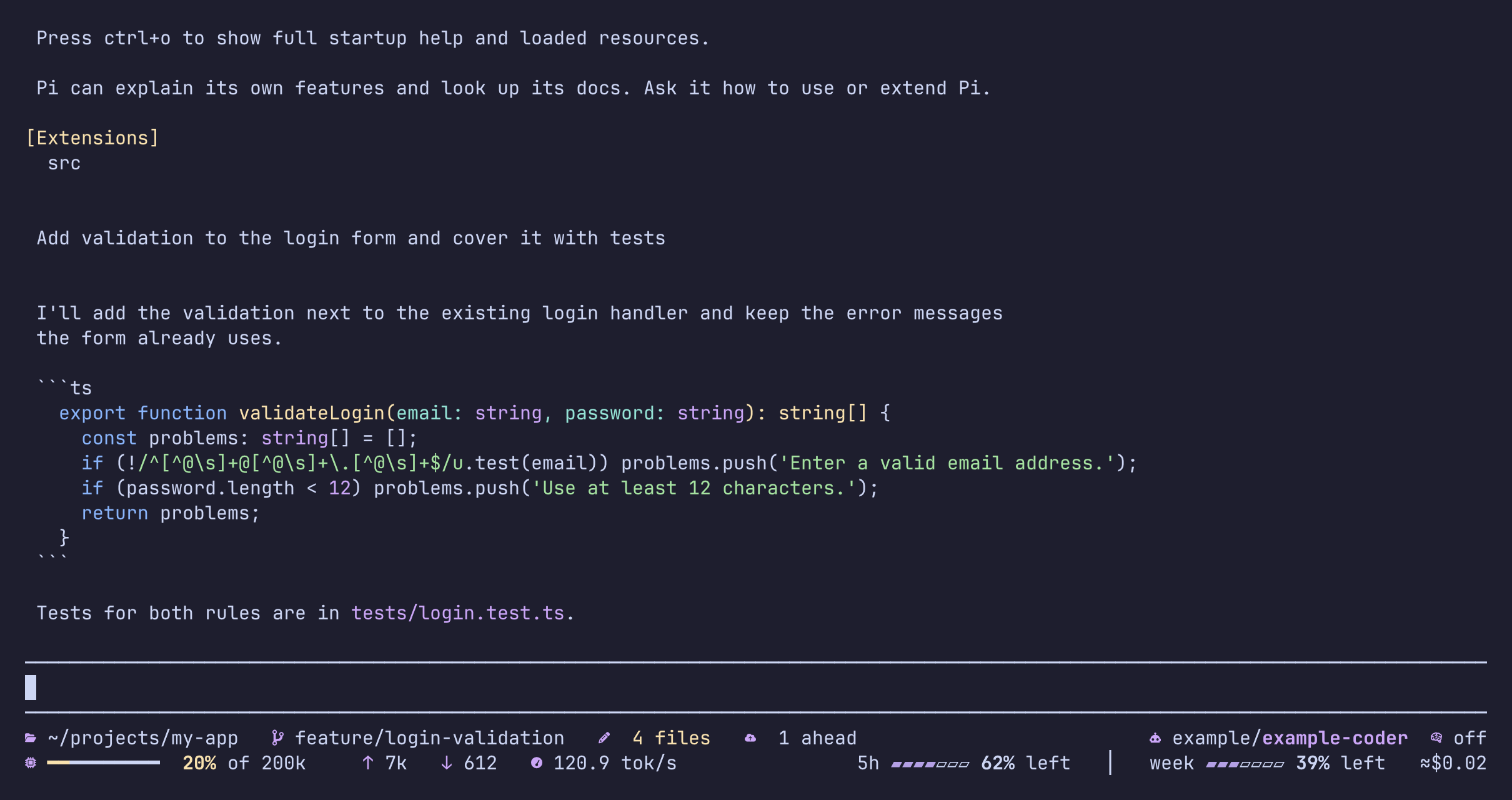
A two-row status footer for Pi: Git, model, context, tokens, cache, speed, provider limits and cost, with explanations behind every value.
Package details
Install pi-footer-dock from npm and Pi will load the resources declared by the package manifest.
$ pi install npm:pi-footer-dock- Package
pi-footer-dock- Version
0.1.4- Published
- Nov 14, 2026
- Downloads
- 575/mo · 244/wk
- Author
- karan_khosla
- License
- Apache-2.0
- Types
- extension
- Size
- 457.7 KB
- Dependencies
- 0 dependencies · 2 peers
Pi manifest JSON
{
  "image": "https://raw.githubusercontent.com/KKhosla7/pi-footer-dock/main/docs/images/footer-wide.png",
  "video": "https://github.com/KKhosla7/pi-footer-dock/releases/download/media/footer-dock-launch.mp4",
  "extensions": [
    "./dist/index.js"
  ]
}
Security note
Pi packages can execute code and influence agent behavior. Review the source before installing third-party packages.
README
Footer Dock





https://github.com/user-attachments/assets/2f7eab93-210e-40e2-8736-d7cc64520ccc
The 30-second tour, also on YouTube.
A two-row status footer for Pi that tells you what is going on. Git, model, context, tokens, cache, speed, provider limits and cost, in two rows that fit your terminal, with an explanation behind every value.


The footer chooses what to show for the width you have. Nothing is cut in the middle of a value: items drop out whole, least important first, and the project name goes last.
Install
pi install npm:pi-footer-dockThen restart Pi (or run /reload). That is all. Full instructions, updating, removing and troubleshooting: SETUP.md.
Icons need a Nerd Font in your terminal. If the icons show up as empty boxes, your font does not have them: run /dock-glyphs for plain symbols that nearly every font has (/dock-glyphs again switches back), or install a Nerd Font. Footer Dock mentions this once, the first time it starts. On a Linux console, a dumb terminal or a terminal with a legacy character set it picks the plain symbols by itself; a choice in Appearance › Icons always wins.
What the footer shows
| Item | What it is | Click the icon | Click the text |
|---|---|---|---|
| Project folder | Where Pi is working | Opens it in your file manager | Explains |
| Git branch | The checked-out branch | Lists branches; Enter prepares the switch | Explains |
| Changed files | Files with uncommitted changes | Lists them; Enter shows the diff | Explains |
| Commits ahead | Commits not pushed yet | Shows where Git is | Explains |
| Model | Provider and model | Picks another model (with search) | Explains |
| Thinking level | The model's reasoning level | Picks another level | Explains |
| Context | How much of the context window is used, and when Pi will compact | Explains | |
| Input, output | Tokens used in this session | Explains | |
| Cache | How much of the last prompt came from the provider's cache | Explains | |
| Speed | Output tokens per second of the last response | Explains | |
| Limit usage | What is left of the provider's 5-hour, weekly and monthly limits, with reset times | Explains | |
| Cost | What this month (or week, day, session) would cost at API prices | Explains |
Every value explains itself
Click the text of any item. The explanation is a live screen, not a paragraph: it updates while it is open, scrolls with the wheel and the arrow keys, and always says what the value reports and when it can be missing.

Limit usage shows, for each window, whether you are ahead of or behind the pace that would last until the reset, and what every marker means:

Cost shows where the money went, by category and by model, and over days, weeks and months (press d, w or m):

Look at your changes
Click the changed-files icon. Move with the arrows, search by typing, press Enter for the diff. The diff carries the line numbers the file has now, and lists the changed lines at the top, so you can find them in your editor.


The list and the diff look again every couple of seconds while they are open, so new changes appear by themselves.
Pick a model or a thinking level
Click the robot or the brain icon. Type to search, Enter to choose, Esc to close; the same icon closes it again.

Settings
Run /dock-settings. Hide any item (at every width or only on narrow ones), choose which limit windows stay when the footer is tight, show limits as percent left or used, choose the period of the footer cost, switch icon sets, and more. Settings are saved in Pi's folder and shared by every Pi window.

Provider limits (off until you turn them on)
Some providers publish how much of a subscription is left (a 5-hour window, a weekly one, a monthly one). Footer Dock can show those windows with their reset times, and whether you are ahead of or behind the pace that would last until the reset. This is off by default: it needs a request you did not make, so you choose. With a supported provider and the setting off, the footer says limits off.
Supported providers
| Provider | Pi provider id | Windows shown | Asks (HTTPS) |
|---|---|---|---|
| ClinePass | clinepass |
5h, week, month | api.cline.bot, /api/v1/users/me/plan/usage-limits |
| OpenCode Go | opencode-go |
5h, week, month | opencode.ai, /zen/go/v1/usage |
| OpenAI Codex | openai-codex |
the windows Codex reports | chatgpt.com, /backend-api/wham/usage |
Other providers show no limits (quota unsupported); OpenAI-style APIs that send rate-limit headers show those, which needs no extra request. Your provider is missing? Adding one is a small, self-contained change: see docs/adding-a-provider.md.
To turn it on: /dock-settings → Limit usage → Ask providers for limits → on.
What turning it on does: Footer Dock asks the provider's own usage service, at the address in the table, with the credential Pi already holds for that provider (obtained through Pi's public API; Footer Dock never reads credential files), at most once every 30 seconds across all your Pi windows. Nothing else is sent. These usage services are not documented as stable: if one changes, the windows disappear rather than being guessed. Turn the setting off and the requests stop at once.
Privacy and safety
- No telemetry, no accounts, no servers of ours. Footer Dock makes no network request except the provider limit check above, and that only if you turned it on, only for the providers in the table.
- Credentials: obtained from Pi at the moment of a request, sent only to the provider's fixed address, never stored, never logged, never shown.
- Git is read-only and inert. Footer Dock only reads. It switches off every program a repository's own configuration could make Git run (
core.fsmonitor, textconv, external diff, filters and so on), so opening a hostile repository cannot run code. It never switches branches itself: choosing a branch only prepares thegit switchcommand in your message box for you to run. - Your history stays on your machine. The cost history is built from Pi's own session logs and cached under your user cache folder; only numbers and folder names are kept, never messages.
- Files it writes:
pi-footer-dock.json(settings) in Pi's folder, and a rebuildable cache under~/.cache/pi-footer-dock. Both are private to your user.
Requirements
- Pi 1.2 or newer, and Node.js 22.19 or newer (the same as Pi).
- A terminal with mouse support for clicking (everything also works from the keyboard and with
/dock-*commands). A Nerd Font gives the best icons;/dock-glyphsswitches to plain symbols. - Tested on Linux. macOS and Windows are expected to work; opening the project folder with the system file manager has not been run on them yet.
Commands
| Command | What it does |
|---|---|
/dock-settings |
The settings menu |
/dock-info [item] |
Explains a footer item |
/dock-quota |
Shows or hides the collapsed limit windows |
/dock-open |
Opens the project folder in your file manager |
/dock-open-with ... |
Chooses another app for that, for example thunar {path} |
/dock-glyphs |
Switches between Nerd Font icons and plain symbols |
/dock-color ... |
Footer colours and bold icons, for example accent #aa55cc |
/dock-refresh |
Reads Git and usage again |
/dock-config ... |
Session-only footer configuration as JSON |
/dock-debug |
Safe diagnostics for a bug report (no content, no secrets) |
Large repositories
The Git items watch the repository for changes. If a repository is too large to watch (thousands of directories), Footer Dock falls back to reading Git after each Pi action and says so in the item's explanation; it never shows a number it did not read.
Other extensions' status lines
Extensions that show a status with Pi's setStatus keep working: Footer Dock shows those texts on one extra line at the bottom, exactly where Pi's own footer would, and the line is absent while nothing sets a status. Extensions that want proper places, settings and explanations register with Footer Dock instead (next section).
For other extensions
Extensions can have Footer Dock manage their footer items, settings and explanations, and Footer Dock needs to know nothing about them: see docs/extending-footer-dock.md.
Contributing
Footer Dock is open source (Apache License 2.0) and contributions are welcome, small ones included.
- Found a bug, or have an idea? Open an issue. For a bug, paste the output of
/dock-debug: it holds counters and settings only, no messages, no secrets and no paths. - Want to change something? Send a pull request. Fixes, tests and documentation improvements can go straight to a pull request; for a new feature or a new data source, open an issue first so we can agree what it should do. CONTRIBUTING.md explains how to set up, what the checks are, and what to keep in mind.
- Writing an extension? Let Footer Dock draw its footer items: docs/extending-footer-dock.md.
- Found a security problem? Please report it privately, see SECURITY.md.
By contributing you agree that your work is licensed under the same Apache License 2.0; there is no contributor agreement to sign.