pi-hud-plus
A claude-hud-style HUD for pi's footer
Package details
Install pi-hud-plus from npm and Pi will load the resources declared by the package manifest.
$ pi install npm:pi-hud-plus- Package
pi-hud-plus- Version
0.3.1- Published
- Nov 19, 2026
- Downloads
- 332/mo · 332/wk
- Author
- lkangd
- License
- MIT
- Types
- extension
- Size
- 162.4 KB
- Dependencies
- 0 dependencies · 2 peers
Pi manifest JSON
{
  "image": "https://raw.githubusercontent.com/lkangd/pi-hud-plus/main/docs/screenshot.png",
  "extensions": [
    "./src/index.ts"
  ]
}Security note
Pi packages can execute code and influence agent behavior. Review the source before installing third-party packages.
README
pi-hud-plus
A claude-hud-style HUD for pi: it replaces pi's footer with model, context, git, tools, cache and session information, configured with claude-hud's field names.
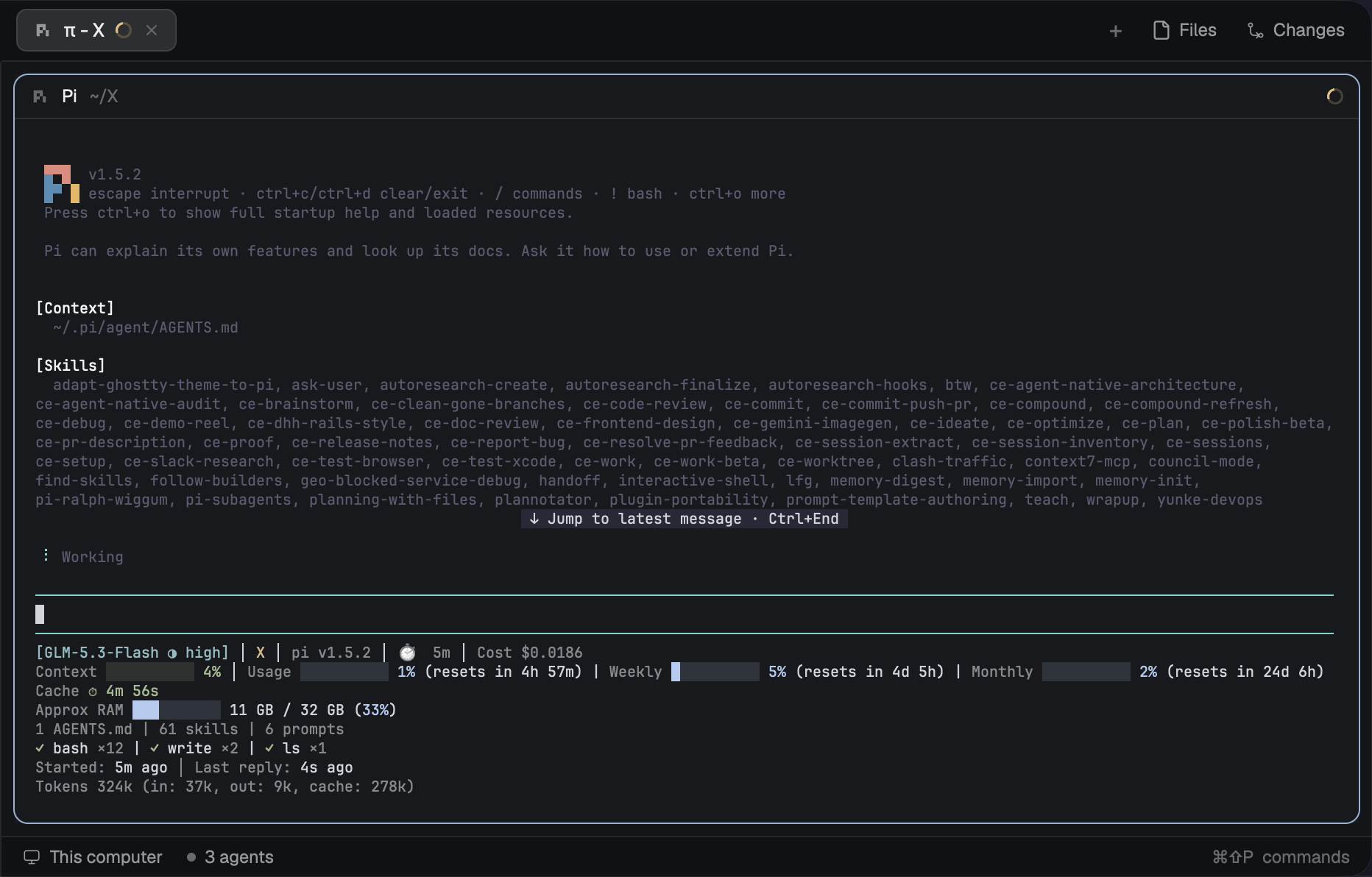
Install
pi install npm:pi-hud-plusOr try it once without installing:
pi -e npm:pi-hud-plusThe HUD runs only in pi's interactive TUI. Print, JSON and RPC modes are left alone.
Commands
/pi-hud:setupasks for a layout, a Preset (Full, Essential or Minimal) and a language, then opens a settings list pre-filled from the Preset./pi-hud:configureopens the same list on your current config. With no config file yet, it runs setup's questions first.
In the list, Enter or Space changes a row. The rows are layout, language, git style (off, branch, branch+dirty, full, file stats), one on/off row per Element, the Custom line, and Reset to preset. Press Esc when you're done: you'll see the changes and confirm before anything is saved. pi-hud-plus then writes ~/.pi/agent/pi-hud-plus.json and reloads.
Only the rows you changed are written. Every other field in the file is kept, including colors, thresholds and extraCommand. If the file isn't valid JSON, the commands refuse to touch it.
Lines and Elements
The default lineLayout is "expanded": one Line per Element, in elementOrder. Lines with nothing to show are left out. Every Line is cut to the terminal width with ….
| Element | What it shows | Toggled by |
|---|---|---|
project |
[model] badge, project path, git:(branch* ↑2 ↓1 [+120 -14]), then session name, pi vX, the Extra command's label, session duration, cost and output speed |
display.showModel, display.showProject, gitStatus.enabled, display.showSessionName, display.showVersion, extraCommand, display.showDuration, display.showCost, display.showSpeed |
context |
Context ██████░░░░ 46%, coloured by the warning and critical thresholds. At or above the critical threshold it adds the latest reply's (in: …, cache: …) split |
display.showContextBar, display.contextValue, display.showTokenBreakdown |
usage |
Usage ██░░░░ 25% (resets in 1h 30m): the 5h Limit window, plus | Weekly … and | Monthly … at or above sevenDayThreshold, or a Balance (Usage ¥4.12). Fetched for Codex, GLM Coding Plan and DeepSeek models, otherwise read from the External usage snapshot file. See Usage limits |
display.showUsage, display.usageValue, display.usageBarEnabled, display.showResetLabel, display.usageCompact, display.usageThreshold, display.sevenDayThreshold, display.externalUsagePath |
promptCache |
Cache ⏱ 3m 45s: time left on the prompt cache since the last reply, yellow near the end, then expired |
display.showPromptCache, display.promptCacheTtlSeconds |
memory |
Approx RAM ████░░ 12 GB / 16 GB (75%): system RAM. Expanded layout only |
display.showMemoryUsage |
environment |
2 AGENTS.md | 5 skills | 3 prompts | 1 MCPs: what shapes the agent's context. MCPs are the distinct mcp__<server>__* tool namespaces |
display.showConfigCounts, display.environmentThreshold |
tools |
Up to two running tools with their target (◐ bash: npm test), then finished tools by count (✓ read ×6) |
display.showTools, display.toolNameMaxLength, display.toolsMaxVisible |
sessionTime |
Started: 42m ago │ Last reply: 1m ago |
display.showSessionStartDate, display.showLastResponseAt, display.timeFormat |
Two Lines aren't Elements and so aren't part of elementOrder:
- Session tokens:
Tokens 722k (in: 41k, out: 19k, cache: 662k), summed over the session the way pi's footer sums them. It comes after the Element Lines. Toggled bydisplay.showSessionTokens. - Extension statuses: other extensions' footer statuses, sorted by key, on one dimmed Line. It is always last. Toggled by
display.showExtensionStatuses.
The Custom line (display.customLine) is static text that goes at the start or end of the project Line (the session Line in the compact layout), depending on display.customLinePosition.
With "lineLayout": "compact", everything goes on one session Line (model badge, context, project and git, then the other enabled Elements), with the tools Line under it. Memory isn't shown, and elementOrder and mergeGroups don't apply.
display.mergeGroups joins Elements that sit next to each other in elementOrder onto one Line, separated by │, when they fit. The default [["context", "usage"]] puts usage beside the context bar. showSeparators draws a rule above the tools Line.
Config
pi-hud-plus reads one JSON file, ~/.pi/agent/pi-hud-plus.json, for every project. There's no per-project file. The file is optional. A file that is missing or doesn't parse counts as empty, so the HUD still renders. Each field is validated on its own: an invalid value falls back to that field's default, and unknown fields are ignored.
The file is read when a session starts. After editing it, run /reload.
Field reference
Top level:
| Field | Default | Values |
|---|---|---|
language |
"en" |
"en", "zh-Hans" ("zh" is accepted as "zh-Hans") |
lineLayout |
"expanded" |
"expanded", "compact" |
showSeparators |
false |
boolean |
pathLevels |
1 |
1, 2, 3: how many trailing directories of the cwd to show |
elementOrder |
["project", "context", "usage", "promptCache", "memory", "environment", "tools", "sessionTime"] |
Elements in Line order. Leaving an Element out hides its Line. Unknown ids and duplicates are dropped |
extraCommand |
"" (off) |
shell command, see Extra command |
gitStatus:
| Field | Default | Values |
|---|---|---|
enabled |
true |
boolean. When off, no git commands run |
showDirty |
true |
boolean: * after the branch when the tree is dirty |
showAheadBehind |
false |
boolean: ↑n ↓n against the upstream |
showFileStats |
false |
boolean: line diff [+n -n] plus a last Line listing up to 6 changed files, newest first (expanded), or file counts !n +n ✘n ?n (compact) |
branchOverflow |
"truncate" |
"truncate" keeps project and git in one segment; "wrap" gives git its own segment |
pushWarningThreshold |
0 (off) |
colour ↑n with colors.warning from this many unpushed commits |
pushCriticalThreshold |
0 (off) |
colour ↑n with colors.critical from this many unpushed commits |
display:
| Field | Default | Values |
|---|---|---|
showModel |
true |
boolean. The badge is prefixed with provider/ when more than one provider is available, like pi's footer |
modelFormat |
"full" |
"full"; "compact" strips a (… context) suffix; "short" also strips a leading Claude |
modelOverride |
"" |
text shown instead of the model name (max 80 chars) |
showThinkingLevel |
false |
boolean: ○ low, ◔ medium, ◑ high, ◕ xhigh in the badge |
showProject |
true |
boolean |
showSessionName |
false |
boolean |
showVersion |
false |
boolean: pi vX |
showDuration |
false |
boolean: ⏱️ 42m since the session started |
showCost |
false |
boolean: Cost $1.87, with (sub) on a subscription |
showSpeed |
false |
boolean: out: 61.4 tok/s of the streaming reply |
showContextBar |
true |
boolean. Off shows the value only |
contextValue |
"percent" |
"percent", "tokens" (92k/200k), "remaining", "both" |
contextWarningThreshold |
70 |
0–100 |
contextCriticalThreshold |
85 |
0–100 |
showTokenBreakdown |
true |
boolean: (in: …, cache: …) at or above the critical threshold |
showUsage |
true |
boolean |
usageValue |
"percent" |
"percent" used, "remaining" |
usageBarEnabled |
true |
boolean |
showResetLabel |
true |
boolean: resets in before the reset time |
usageCompact |
false |
boolean: 5h: 25% (1h 30m) |
usageThreshold |
0 |
0–100: hide usage until 5h or Weekly reaches this |
sevenDayThreshold |
80 |
0–100: show Weekly and Monthly at or above this (0 = always) |
externalUsagePath |
"" |
path of an External usage snapshot file in claude-hud's format |
externalUsageFreshnessMs |
300000 |
ignore the snapshot once its updated_at is older than this |
showPromptCache |
false |
boolean |
promptCacheTtlSeconds |
300 |
positive whole number |
showMemoryUsage |
false |
boolean |
showConfigCounts |
false |
boolean: the Environment line |
environmentThreshold |
0 |
hide the Environment line until the counts add up to this |
showTools |
false |
boolean |
toolNameMaxLength |
0 (no limit) |
cut tool names to this many chars. When set, MCP tools show only their tool name |
toolsMaxVisible |
4 |
how many finished tools to list; 0 lists all |
showSessionStartDate |
false |
boolean |
showLastResponseAt |
false |
boolean |
timeFormat |
"relative" |
"relative" (3m ago), "absolute" (2026-11-14 09:30), "both"; "elapsed" and "elapsedAndAbsolute" read like "relative" and "both" |
showSessionTokens |
false |
boolean |
showExtensionStatuses |
true |
boolean |
mergeGroups |
[["context", "usage"]] |
arrays of at least two Elements; [] turns merging off |
customLine |
"" |
static text (max 80 chars) |
customLinePosition |
"last" |
"first", "last" |
colors: each value is a name ("dim", "red", "green", "yellow", "magenta", "cyan", "brightBlue", "brightMagenta"), a 256-colour index (0–255) or a hex string ("#rrggbb").
| Field | Default | Colours |
|---|---|---|
context |
"green" |
context value and bar below the warning threshold |
usage |
"brightBlue" |
usage below 75% |
usageWarning |
"brightMagenta" |
usage at 75% or more (90% and up is critical) |
warning |
"yellow" |
context at or above the warning threshold, cache about to expire |
critical |
"red" |
context at or above the critical threshold |
model |
"cyan" |
model badge |
project |
"yellow" |
project path |
git |
"magenta" |
git:( ) |
gitBranch |
"cyan" |
branch and ahead/behind |
label |
"dim" |
labels and secondary text |
custom |
208 |
Custom line |
barFilled |
"█" |
one character for the filled part of the bars |
barEmpty |
"░" |
one character for the empty part of the bars |
Example
~/.pi/agent/pi-hud-plus.json:
{
  "pathLevels": 2,
  "gitStatus": {
    "showAheadBehind": true,
    "showFileStats": true
  },
  "display": {
    "showThinkingLevel": true,
    "showCost": true,
    "showTools": true,
    "showPromptCache": true,
    "showConfigCounts": true,
    "showSessionTokens": true,
    "mergeGroups": [["context", "promptCache"]]
  },
  "colors": {
    "model": "#a78bfa",
    "barFilled": "■",
    "barEmpty": "□"
  }
}
Then run /reload.
Extra command
extraCommand runs a shell command (sh -c) and shows its label on the project Line, or near the end of the compact Line. The command must exit 0 and print JSON with a label string:
{ "extraCommand": "echo '{\"label\": \"on-call: alice\"}'" }It runs when a session starts, after each agent run, and every 30 seconds. Each run has a 3-second timeout. Control and escape characters are stripped from the label, and it is cut to 50 characters. If the command fails, times out or prints anything else, no label is shown. To see why, use debug logging.
Usage limits
The usage Element follows the current model. pi-hud-plus recognises the vendor from the model itself (its API and base URL), not the provider's name, so renamed and custom providers work too.
| Vendor | Detected by | Shows | From |
|---|---|---|---|
| Codex (ChatGPT subscription) | the model's API is openai-codex-responses |
5h and Weekly Limit windows (a plan may report only one of them) | the codex.rate_limits frame ChatGPT sends with each reply, else GET https://chatgpt.com/backend-api/wham/usage |
| GLM Coding Plan | base URL host open.bigmodel.cn, bigmodel.cn or api.z.ai |
5h, Weekly (missing on some plans) and Monthly (tool calls) | GET https://open.bigmodel.cn/api/monitor/usage/quota/limit, or the same path on api.z.ai |
| DeepSeek | base URL host api.deepseek.com |
a Balance per currency, e.g. ¥4.12 |
GET https://api.deepseek.com/user/balance |
The HUD sends these requests itself, with the API key or token pi already has for the model. It gets them from pi's model registry, so pi keeps OAuth tokens refreshed, and it never reads auth.json. Each request goes only to that model's own vendor. The Codex endpoint and frame are unofficial ChatGPT internals, and GLM documents its endpoint only in Zhipu's own plugins, so either may change without notice. DeepSeek's endpoint is public API. The api.z.ai host hasn't been tested against a live account.
It refreshes when a session starts, when you switch models, after each agent run and every 5 minutes. Only one request runs at a time, and none is sent within a minute of the last request or Codex frame, so a vendor that's down gets at most one request a minute (a failed request hides the Element). A Codex reply's frame updates the Element right away, so the request after that reply is usually skipped, and a request already running when a frame arrives is ignored. Each request times out after 10 seconds. Switching to another vendor's model, or to a model on another host (GLM's open.bigmodel.cn and api.z.ai are separate accounts), clears the Element until the new data arrives. With display.showUsage off, no requests are sent.
A failed request (no credentials, a timeout, an HTTP error, a reply in an unexpected shape) shows no error. Instead, the Element shows the External usage snapshot, or hides until a later refresh succeeds. To see why the request failed, use debug logging.
External usage snapshot
For any other vendor, or when a vendor's request fails, the HUD can read a JSON file that your own script keeps up to date. Set its path in display.externalUsagePath. The format is claude-hud's:
{
  "updated_at": "2026-11-18T09:30:00Z",
  "five_hour": { "used_percentage": 45, "resets_at": "2026-11-18T12:00:00Z" },
  "seven_day": { "used_percentage": 82, "resets_at": 1795000000 },
  "balance_label": "$12.40"
}updated_atis required: an ISO date string, or epoch seconds or milliseconds (numbers above 10¹² count as milliseconds). Once it's older thandisplay.externalUsageFreshnessMs(5 minutes by default), the file is ignored.five_hour,seven_dayandbalance_labelare each optional, but at least one must be present.used_percentageis 0–100, rounded and clamped.resets_attakes the same forms asupdated_at. If aresets_atdoesn't parse, the whole file is ignored.balance_labelis shown instead of the windows. Control and escape characters are stripped, and it is cut to 50 characters.- The format has no monthly window.
The file is read only while the current model has no data of its own: on the refresh triggers above and on every 1-second clock tick. pi-hud-plus never writes it.
Coexisting with other footer extensions
pi has one footer, and the last extension to set it wins. Other extensions' footer statuses aren't lost: they show on the HUD's Extension statuses Line.
If another footer extension (for example pi-powerbar) takes the footer, pi-hud-plus steps aside. It hides and stops its background work until the next session starts. It also warns once per pi process:
pi-hud-plus: another extension took over pi's footer, so the HUD is hidden. Disable that extension (e.g. pi-powerbar, via
pi config) to see the HUD.
To see the HUD, disable the other footer extension with pi config, then start a new session or run /reload.
Debug logging
Start pi with DEBUG=pi-hud-plus (or DEBUG=*) to log why the Extra command failed, why a Usage limit request failed, or why the config file was ignored. Lines go to ~/.pi/agent/pi-hud-plus-debug.log, not the terminal, because pi owns it.
Language
"language": "zh-Hans" switches the HUD's labels to Simplified Chinese (上下文, 3m前, …). "zh" works too. The default is "en". The language is set only in config; pi-hud-plus doesn't detect your locale.
Differences from claude-hud
- Usage limits: pi has no API for them, so the HUD fetches them itself for the current model's vendor (Codex, the GLM Coding Plan or DeepSeek), using pi's credentials. See Usage limits. For any other model, it reads the External usage snapshot file (
externalUsagePath), as claude-hud does. - Monthly: a third Limit window,
Monthly(本月), after Weekly. It comes from GLM's monthly tool-call pool and, like Weekly, is shown at or abovesevenDayThreshold. In compact form it ismo:. - Balance for DeepSeek: fetched from DeepSeek's API. In claude-hud a Balance comes only from the snapshot's
balance_label. - No
externalUsageWritePath: it copies Claude Code's statusline data, which pi doesn't have. sevenDayThresholddefault: an absentsevenDayThresholdis80, its documented default; claude-hud's validation turns it into0.- Dropped Elements:
addedDirs,agentsandtodoshave no pi equivalent. The output style and Claude Code's mode line are gone too. - Pi equivalents:
pi vXinstead ofCC vX; pi's thinking level instead of Claude's effort level; the Environment line counts AGENTS.md files, skills, prompt templates and MCP servers instead of CLAUDE.md, rules, MCPs and hooks. - Renamed fields, no aliases:
display.showClaudeCodeVersionisdisplay.showVersion, anddisplay.showEffortLevelisdisplay.showThinkingLevel. - Other dropped fields:
maxWidthandforceMaxWidth(pi gives the HUD its width),display.showAddedDirs,addedDirsLayout,showAgents,showTodos,showOutputStyleandautocompactBuffer. - Changed defaults:
elementOrderhas noagents,todosoraddedDirs. It keeps claude-hud'susageaftercontext, andmergeGroupskeeps claude-hud's[["context", "usage"]]. - New fields:
extraCommand(claude-hud's--extra-cmd, now config) anddisplay.showExtensionStatuses. - Debug log:
DEBUG=pi-hud-plusinstead ofDEBUG=claude-hud, written to a file instead of stderr. - Commands:
/pi-hud:setupand/pi-hud:configurereplace/claude-hud:setupand/claude-hud:configure. There's no statusline to install, so setup only writes config, and both use one settings list instead of a series of questions. There's no config file watching: after editing the file by hand, run/reload. maxthinking level: pi'smaxlevel, which claude-hud has no equivalent for, shows as◕likexhigh.- Chinese relative times: keep claude-hud's unit style, so
3m前, not3分钟前. - A pasted claude-hud config still loads: fields that are unknown or have been dropped are ignored.
Credits and license
pi-hud-plus is a port of claude-hud by Jarrod Watts. The render code, colours, layouts, config fields and most of the tests come from it.
MIT. Copyright Jarrod Watts (claude-hud) and lkangd.