pi-mox
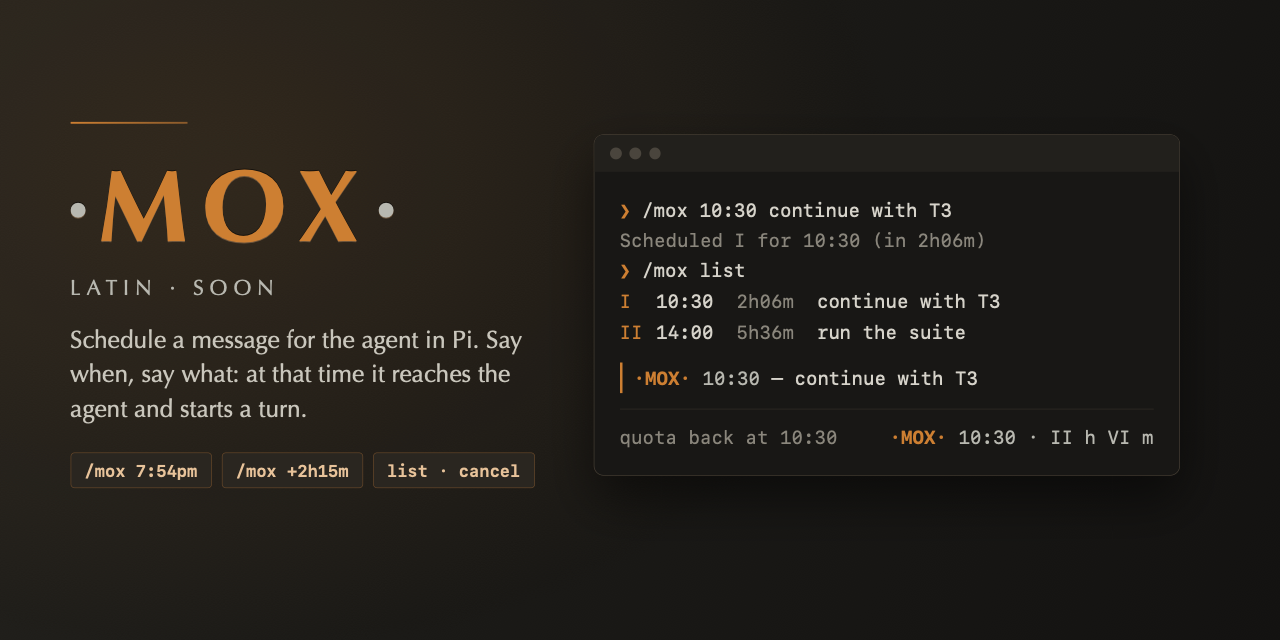
Schedule a message for the agent in Pi: /mox 10:30 (or 7:54pm) <message> delivers it at that time and starts a turn.
Package details
Install pi-mox from npm and Pi will load the resources declared by the package manifest.
$ pi install npm:pi-mox- Package
pi-mox- Version
0.5.0- Published
- Nov 26, 2026
- Downloads
- 1,104/mo · 61/wk
- Author
- jals1212
- License
- MIT
- Types
- extension
- Size
- 37.2 KB
- Dependencies
- 0 dependencies · 2 peers
Pi manifest JSON
{
  "image": "https://raw.githubusercontent.com/jals1212/pi-mox/main/assets/preview.png",
  "extensions": [
    "./extensions/mox.ts"
  ]
}
Security note
Pi packages can execute code and influence agent behavior. Review the source before installing third-party packages.
README
·MOX· pi-mox

Schedule a message for the agent in Pi. Say when, say what, and at that time the message reaches the agent and starts a turn. Mox is Latin for "soon".
Typical use: the session's quota runs out and says it refreshes at 10:30, but it is 8:24. Schedule the next step once and walk away:
/mox 10:30 continúa con T3Install
pi install npm:pi-moxUsage
| Command | What it does |
|---|---|
/mox <time> <message> |
Deliver <message> to the agent at <time> |
/mox list (or /mox) |
Show the pending cues, each message on one line cut at 60 characters with … |
/mox show <id> |
Show one cue with its whole message |
/mox cancel <id> |
Cancel a cue; the id is Roman (II, ii) or Arabic (2) |
list, show and cancel are reserved first words.
Time
- Absolute:
10:30or9:05, 24-hour (0:00–23:59). Today at that time; if it is equal to or before now, tomorrow.24:00,10:60and1030are rejected. - Absolute, 12-hour:
7:54pmor8:16am(am/pmin any case, no space,1:00–12:59).12:05amis just after midnight and12:05pmjust after noon. Same today-or-tomorrow rule;0:30amand13:00pmare rejected. - Relative:
+followed by<n>h,<n>m,<n>sin that order:+2h15m,+90m,+45s,+1h30s. The total must be above zero.
The message is the rest of the line, trimmed and delivered verbatim.
Examples
/mox 10:30 continúa con T3
Scheduled I for 10:30 (in 2h06m): continúa con T3

/mox +5h36m corre la suite
Scheduled II for 14:00 (in 5h36m): corre la suite

/mox list
I   10:30  2h06m  continúa con T3
II  14:00  5h36m  corre la suite

/mox show I
I  10:30  2h06m
continúa con T3

/mox cancel II
Cancelled II (14:00): corre la suite
The footer shows the next cue with a one-line preview of its message, the time left in Roman numerals (hours
omitted at zero, minutes rounded up, under a minute shows I m) followed by the same time in Arabic digits, and
(+N) when more cues wait:
·MOX· 10:30 revisar PR · II h VI m (2h06m) (+1)When a cue is due, the agent receives the message and the conversation shows:
·MOX· 10:30 — continúa con T3Errors (bad time, missing message, unknown id) are shown with a usage line and change nothing.
The agent schedules too
The agent gets a mox tool with the same cues, so it can schedule its own next step ("the quota resets at
10:30, continue then"):
| Action | Parameters | What it does |
|---|---|---|
schedule |
time, message |
Same time grammar as /mox; answers Scheduled I for 10:30 (in 2h06m): <message> |
list |
Every pending cue, the user's and the agent's, in plain text | |
cancel |
id |
Cancels a cue the agent scheduled; cues the user scheduled are refused |
- Limit. At most 3 cues scheduled by the agent can be pending at once; one more is refused with
The agent already has 3 pending cues, the limit. Cancel one or wait for one to be delivered.The user's cues do not count. - Marked. Cues the agent scheduled end in
(agent)in/mox list,/mox show, the footer and the Herdr marker. The user can show and cancel them with/moxas any other cue.
/mox list
II  10:30  2h06m  continúa con T3 (agent)
I   14:00  5h36m  corre la suite
Behavior
Delivery. The message is sent as a follow-up that triggers a turn: when Pi is idle a turn starts at once; when Pi is busy the message waits for the current run to finish.
One shot. A cue fires once and is removed. If delivery fails the error is shown like any other error; there is no retry.
In memory. Cues are kept only while Pi runs. Closing Pi (or ending the session) drops them.
Wall clock. The next cue is checked against the clock at least every 30 seconds, so a cue that came due while the computer was suspended is delivered as soon as it resumes. Timers never keep Pi from exiting.
Herdr. In Herdr, the next cue is published as the
moxtoken (·MOX· 10:30 revisar PR), cleared when no cue is left. To show it, add a$moxrow to the Agents sidebar in Herdr'sconfig.tomland runherdr server reload-config:[ui.sidebar.agents] rows = [["agent"], ["$mox"]]In the Herdr app the same text is the terminal's
moxlabel.Ids. Roman numerals counting up from
Iin each session; an id is never reused, even after a cue is cancelled or fired.
Development
Requires Node.js 22.18 or newer (the sources are TypeScript run with type stripping; there is no build).
npm testsrc/mox.ts: core with no Pi runtime imports: time parsing, Roman numerals, the cue list and scheduler (injectable clock and timers), the command runner.src/wire.ts: connects the core to Pi's extension API.src/herdr.ts: the Herdr marker: pane token over Herdr's socket, Herdr app label throughhc.extensions/mox.ts: the package's Pi extension entry.
Releasing
Branches: work goes to develop through pull requests; main receives develop when a release closes.
- On a
release/X.Y.Zbranch fromdevelop: setversioninpackage.json, rename## UnreleasedinCHANGELOG.mdto## X.Y.Z, and commitrelease X.Y.Z: <summary>. Merge it intodevelop, thendevelopintomain. - Tag
mainwithvX.Y.Zand push the tag. - The release workflow checks the tag against
package.jsonandCHANGELOG.md, runs the tests, and stages the version on npm through trusted publishing, with provenance. Approve it with 2FA:npm stage list, thennpm stage approve <id>, or on npmjs.com. It then creates the GitHub release with the version's CHANGELOG section as notes.
License
MIT