pi-path-bar
A Pi extension for compact paths, folder aliases, and theme-aware Git status
Package details
Install pi-path-bar from npm and Pi will load the resources declared by the package manifest.
$ pi install npm:pi-path-bar- Package
pi-path-bar- Version
0.5.1- Published
- Nov 20, 2026
- Downloads
- 1,174/mo · 885/wk
- Author
- codingbone
- License
- MIT
- Types
- extension
- Size
- 711.6 KB
- Dependencies
- 0 dependencies · 2 peers
Pi manifest JSON
{
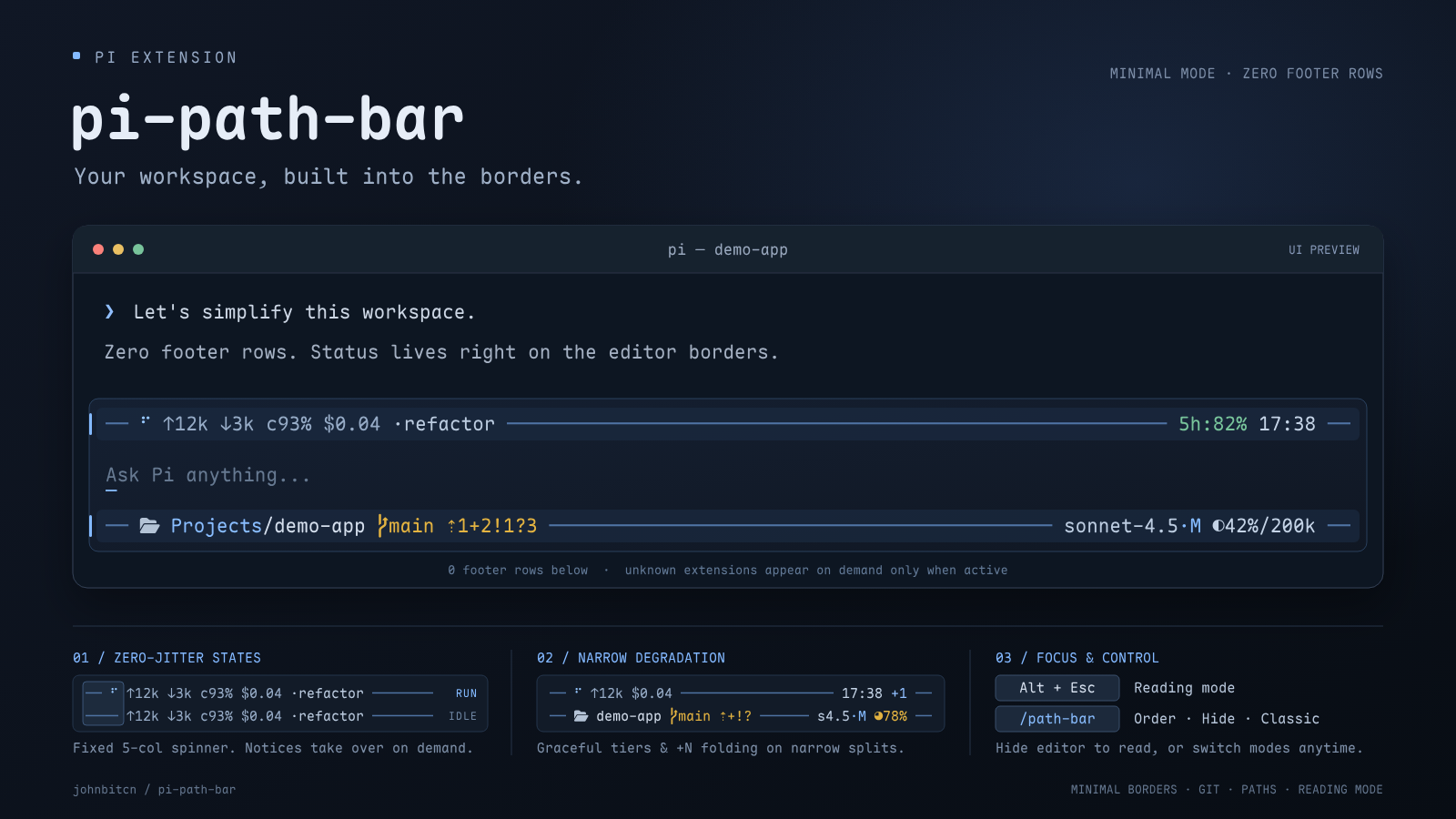
  "image": "https://raw.githubusercontent.com/johnbitcn/pi-path-bar/main/assets/plugins-preview.png",
  "extensions": [
    "./src/index.ts",
    "./src/reading-mode.ts"
  ]
}
Security note
Pi packages can execute code and influence agent behavior. Review the source before installing third-party packages.
README
pi-path-bar
English | 简体中文
Built for small screens and narrow splits. pi-path-bar removes Pi's multi-line footer so your conversation has more room, and adds a one-keystroke reading mode — while keeping your path, Git status, usage, model, and local time in plain sight.
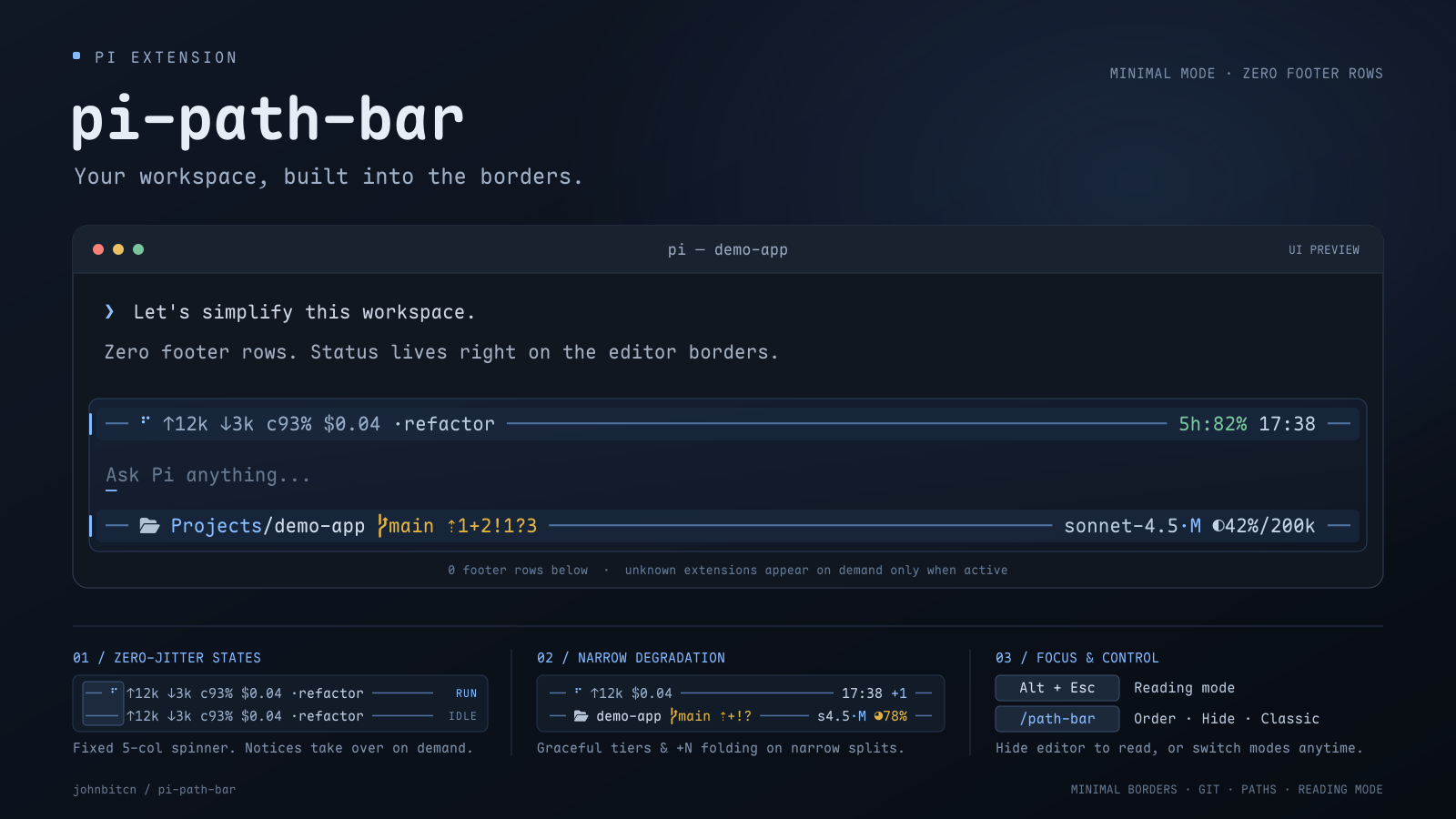
Minimal mode
Enabled by default. On laptops and split panes, a stacked footer wastes vertical space and breaks awkwardly when the terminal gets narrow. Minimal mode fixes both:
- Zero footer rows: Everything moves cleanly onto the editor's top and bottom borders, giving your conversation more vertical space.
- Smooth on narrow splits: The bar shortens paths, Git counts, and context limits as space runs out. It truncates model names from the left to keep the model suffix visible. Extra right-side items fold into
+N. - Calm, jitter-free status: Text stays locked in place when Pi starts or finishes running. Rare notices like retries or compaction appear when needed and clear out right after.
- Clean with other extensions: Popular usage and status extensions stay compact on the top border automatically. Any other extension status appears below only while active and hides when empty.
- Easy to switch back: Turn Minimal mode off anytime in
/path-barto use the classic multi-line footer or Pi's native footer.
Reading mode
Long answers and diffs feel cramped on a small screen when the editor sits at the bottom. Reading mode clears the whole frame in one keystroke:
Alt+Esc(Mac:Option+Esc) or/reading-mode: hide the editor and footer so you can scroll through conversation and tool output distraction-free.EscorAlt+Escagain: return to typing immediately with your draft still intact.
Requires Pi 1.5 or later in fullscreen mode. Use /reading-mode if the shortcut does not respond, and run /reload after switching TUI modes.
Installation
pi install npm:pi-path-barOr install from GitHub:
pi install git:github.com/johnbitcn/pi-path-barIn an existing Pi session, run /reload, then /path-bar to customize settings.
Load only one copy of the extension. Folder icons require a Nerd Font, or you can turn them off in settings.
Settings
Run /path-bar. Use the arrow keys to choose an item, Enter or Space to change it, and Esc to close. Changes apply right away and save automatically. The menu uses English.
| Setting | Default | Choices |
|---|---|---|
| Minimal mode | On | On, Off |
| Path display | Short | Short, Auto, Full, Native footer |
| Folder icon | On | On, Off |
| Git status | On | On, Off |
| Session name | On | On, Off |
| Time format | 24h | 24h, 12h (AM/PM) |
| Footer order | — | Reorder or hide right-side items and clock |
| Add folder alias | — | Name any folder for a shorter display |
| Manage folder aliases | — | Edit or remove aliases |
- Short: abbreviate parent folders and keep the current folder name full.
- Auto: show the full path when there is room; otherwise abbreviate it.
- Full: keep the full path and truncate only at the edge.
- Native footer: restore Pi's built-in footer without losing your settings.
When Minimal mode is off, pi-path-bar renders a compact multi-line footer with local time on the right:

Reorder or hide items
Open Footer order in /path-bar to control what appears on the right side of the bar (including the clock and other extensions). Use up / down to select, < / > (or , / .) to move, and Space to show or hide.
Put what matters most on the left — narrow terminals keep leftmost items visible and fold the rest into +N.
Extension authors: see footer segments.
Folder aliases
Replace long paths with short names you recognize at a glance. Choose Add folder alias in /path-bar, enter a path (or leave blank for the current directory), and give it a name.
For example, naming ~/CloudDrive/Projects/demo-app demo shortens it and all subfolders:
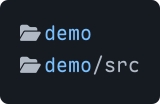
- Aliases apply to the folder and its subfolders (the most specific match wins).
- Edit or remove aliases anytime in Manage folder aliases — your actual folders are never touched.
Git status
See branch state and changes without running git status. Colors follow your active Pi theme (blue when clean, yellow with changes, red on conflicts or active Git operations) and hide outside a repository.

| Indicator | Meaning |
|---|---|
⇣N / ⇡N |
Behind / ahead of upstream |
*N |
Stash entries |
~N |
Conflicted files |
+N |
Staged changes |
!N |
Unstaged changes |
?N |
Untracked files |
Notes
- Settings are shared across projects and saved in
~/.pi/agent/pi-path-bar.json. - Avoid enabling multiple footer-replacement extensions at the same time.
- When upgrading from the standalone reading-mode script, remove
-e ./src/reading-mode.tsfrom your launch arguments.
License
MIT. See Third-party notices for related copyright and license texts. This unofficial extension is not affiliated with or endorsed by Pi or Tide.