pi-pretty-task
Background processes, log tails and scheduled agent wake-ups for pi, behind one panel.
Package details
Install pi-pretty-task from npm and Pi will load the resources declared by the package manifest.
$ pi install npm:pi-pretty-task- Package
pi-pretty-task- Version
1.0.8- Published
- Nov 24, 2026
- Downloads
- 1,656/mo · 881/wk
- Author
- mystery4f
- License
- MIT
- Types
- extension, skill
- Size
- 2.7 MB
- Dependencies
- 0 dependencies · 3 peers
Pi manifest JSON
{
  "image": "https://raw.githubusercontent.com/mystery4f/pi-pretty-task/main/docs/preview.png",
  "skills": [
    "./skills"
  ],
  "extensions": [
    "./src/index.ts"
  ]
}Security note
Pi packages can execute code and influence agent behavior. Review the source before installing third-party packages.
README
pi-pretty-task
Background processes and scheduled agent wake-ups for pi, behind one panel.



A build that takes six minutes. A watcher that runs all afternoon. A loop that wakes the model every ten minutes. They all land in the same list — readable, searchable, stoppable — and the output is still on disk when the turn is over.
Install
pi install npm:pi-pretty-taskRequires pi and Node >= 22.19. A local checkout works too: pi install ./path/to/pi-pretty-task, or pi install git:github.com/mystery4f/pi-pretty-task for the latest main.
Why use it
| You want to… | Use |
|---|---|
| Start a build, dev server or watcher and keep talking to the agent | pretty_task_bg_run |
| Wait for it without sleeping, polling or burning a turn | pretty_task_bg_wait |
| Read what it printed — or only what is new since last time | pretty_task_bg_logs, add follow |
| Find the one error in 40 MB of output | pretty_task_bg_grep |
| Stop it and its children, not just the parent pid | pretty_task_bg_kill |
| Run something after another job succeeds, instead of now | pretty_task_bg_run with after |
| Wake the agent on a schedule — interval or cron | pretty_task_loop_create |
| Find out what that wake-up actually did | pretty_task_loop_list with an id |
| Just look at everything | /tasks, or shift+down |
One panel, three records
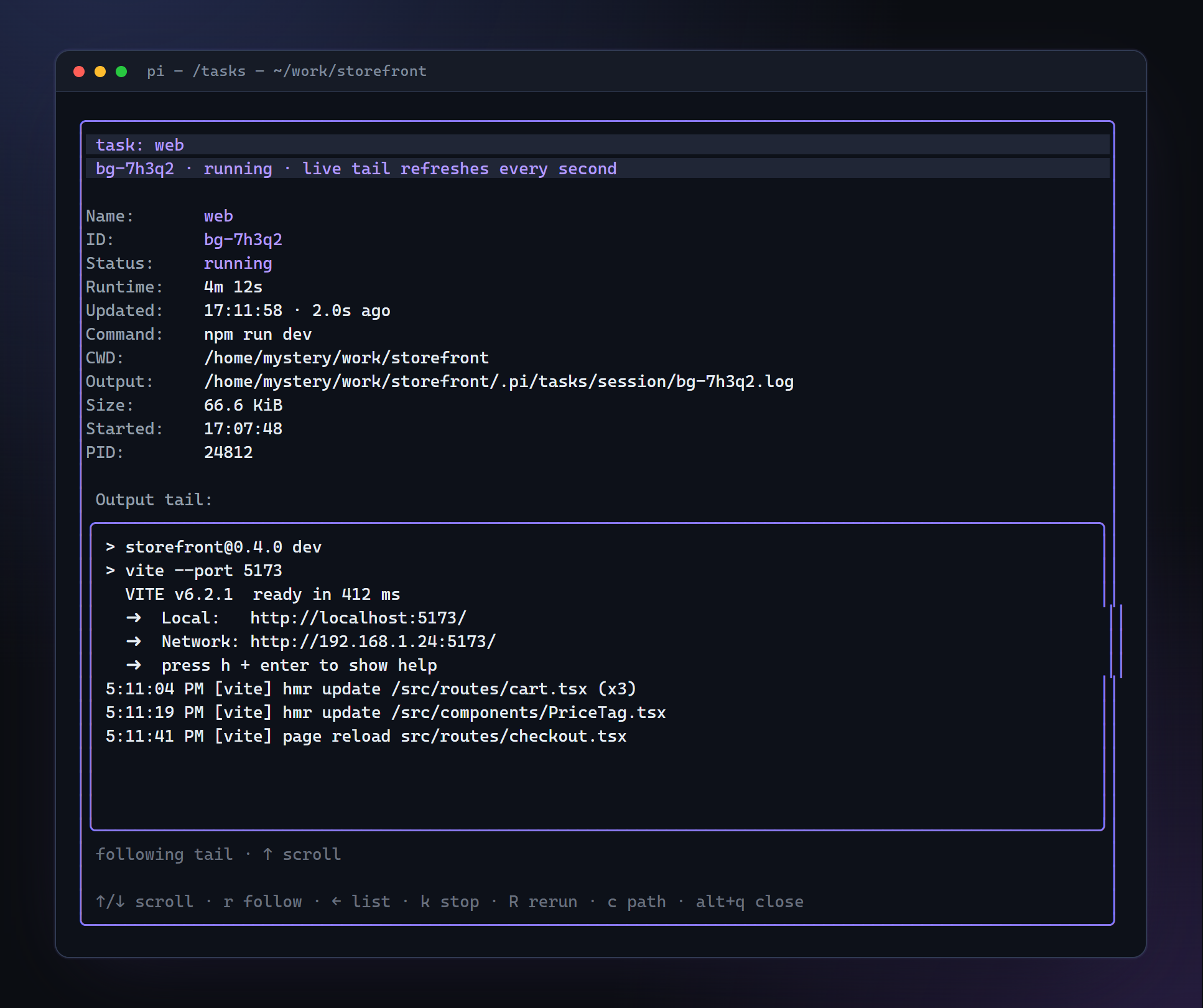
Task — a long-lived shell command in the background, watched, with its whole process tree killable. Output goes to a file, so "what did it print?" survives the turn.
Chain — a command queued behind another task or chain instead of started now. A step is recorded as
waitingand starts only after the step ahead ends with exit 0; a failing step leaves the ones behind itskipped.Loop / Iteration — wake the LLM on a schedule with a preset prompt (
30s/10m/2h, or five-field cron such as0 9 * * 1-5), and record every tool call of the turn that follows, so "what did that loop actually run?" has an answer. Wakes wait for an idle agent instead of interrupting a turn.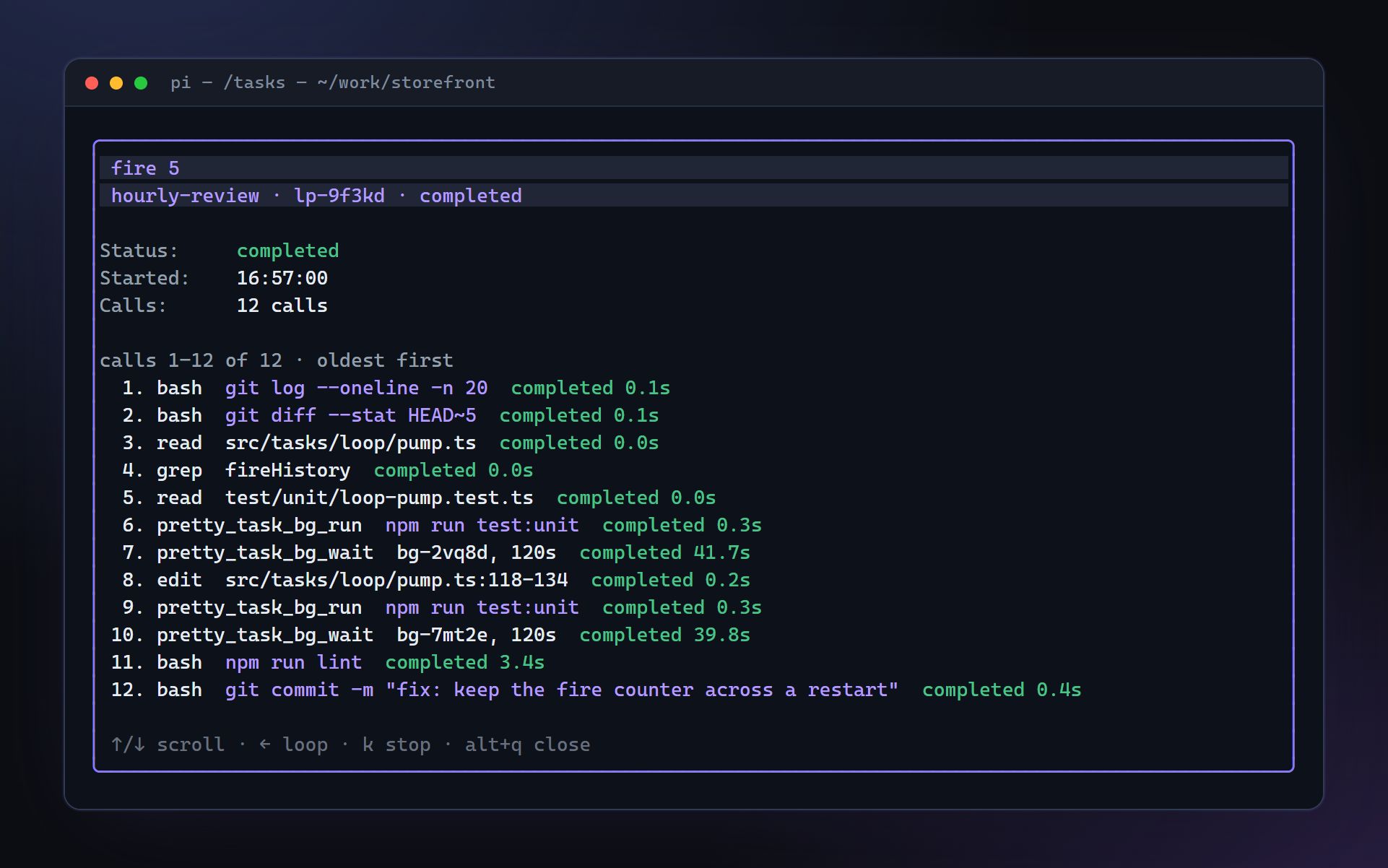
A fire that comes due while the previous one still runs is skipped and counted, never queued. An id says its kind on sight: bg- runs a command, lp- wakes the assistant, ch- is a chain.
Deliberately not here: subagent/delegate/fusion tools, monitors-with-shell, workflow/orchestration families, provider-attested runs. See docs/scope-v1.md.
The panel
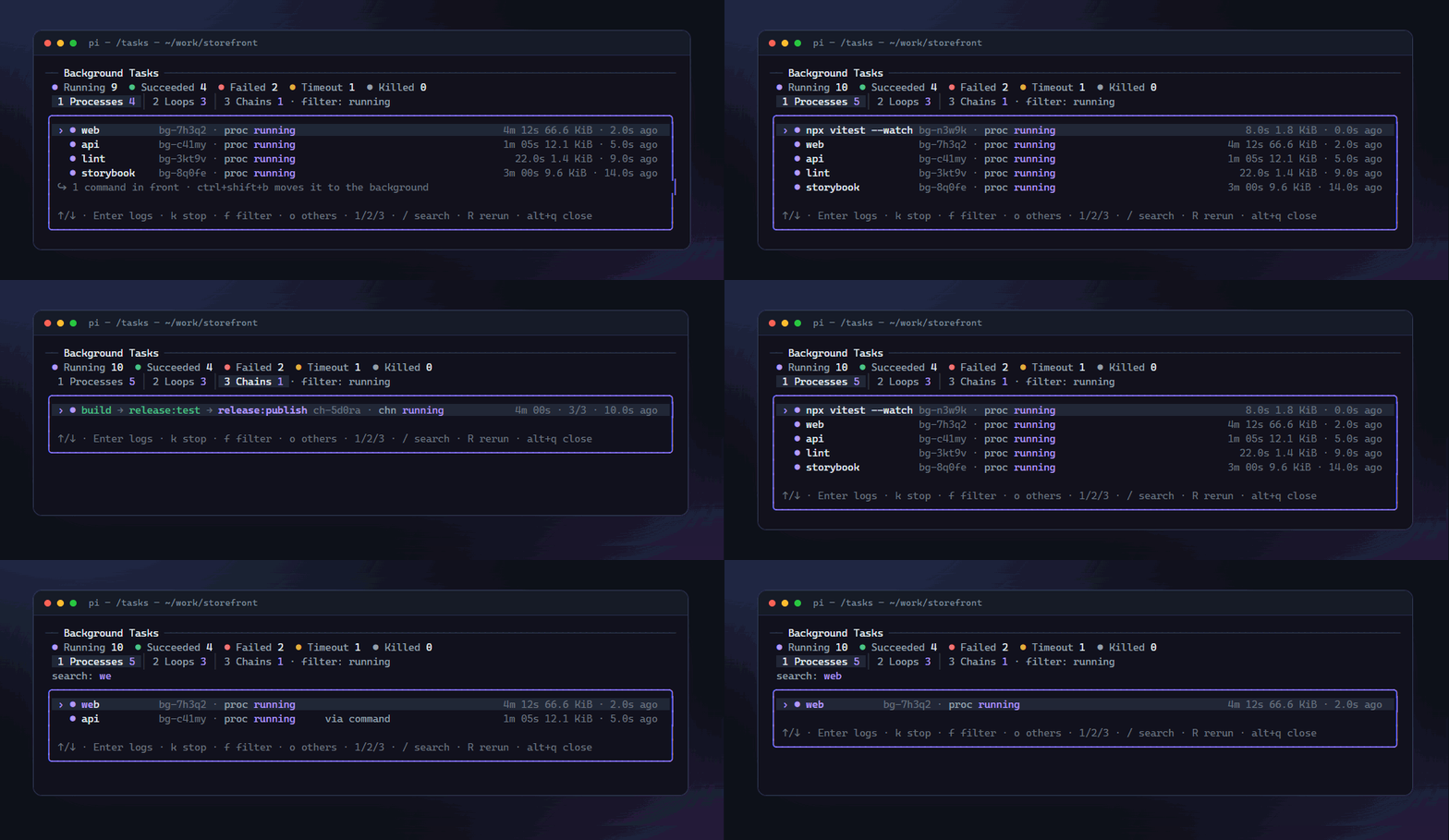
Opens with /tasks or shift+down, and has three tabs — processes, loops, chains. One summary line above the editor stays after it closes; the footer row is shared with every other extension, so the count lives where it can be read.
List keys: ↑/↓ select, Enter open, ← back, k stop, a stop all, f cycle filter (all/running/failed/done), o toggle other sessions' records, R rerun, c show the output path, / search, x close from the list, alt+q close from anywhere (the first press leaves search mode).
↑/↓ · Enter logs · k stop · f filter · o others · 1/2/3 tabs · / search · R rerun · a stop all · alt+q close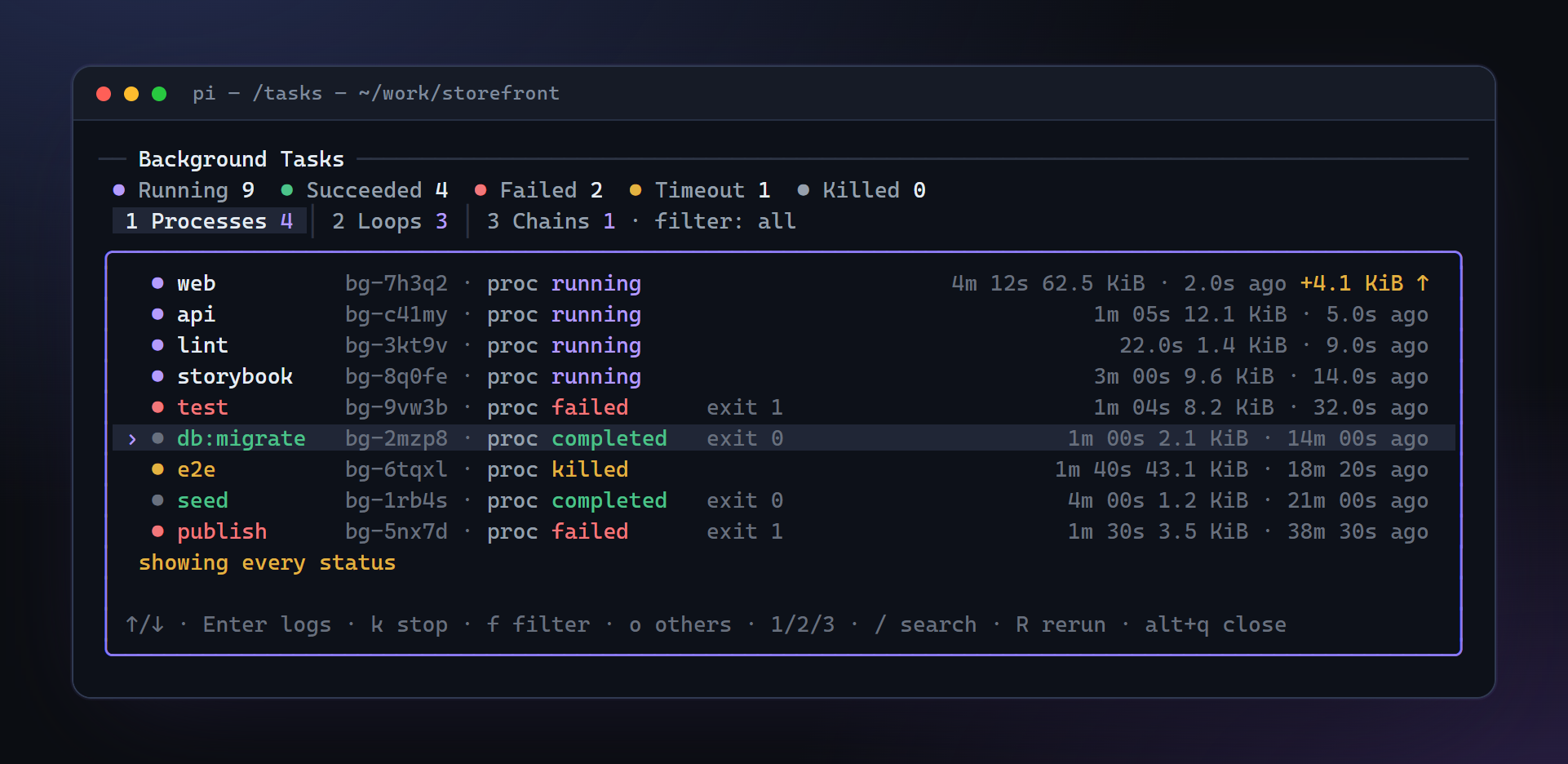
Every image on this page is a screenshot of the shipped panel, not a mock-up: npm run preview renders them from TasksPanel itself, so a change in src/ui/panel/ shows up in the next run instead of drifting away from the picture.
Use it
pretty_task_bg_run    command: "npm run build", name: "build"
pretty_task_bg_status id: "bg-4xq81"
pretty_task_bg_logs   id: "bg-4xq81", follow: true
pretty_task_bg_grep   id: "bg-4xq81", pattern: "error"
pretty_task_bg_wait   id: "bg-4xq81", timeoutSeconds: 120
pretty_task_bg_kill   id: "bg-4xq81"

pretty_task_loop_create schedule: "10m", prompt: "Check the deploy and report drift."
pretty_task_loop_create schedule: "0 9 * * 1-5", command: "npm run nightly"
pretty_task_loop_update id: "lp-9f3kd", action: "pause"
pretty_task_loop_list   id: "lp-9f3kd"
Stopping means the whole tree: SIGTERM, a grace period, SIGKILL, then a poll until the process group is really gone — grandchildren included. On Windows that is taskkill /PID <n> /T.
A command in front can be let go
A long build is already running in front of you — the first frames of the animation above are this exact move. With PI_PRETTY_TASK_ADOPT_FOREGROUND=on, the built-in bash tool — and your own ! commands — run through this extension, so ctrl+shift+b moves the one command currently in front to the background instead of killing it. The call ends with the output it had captured and a ↪ moved to bg-… line, and the command keeps running as an ordinary task: pretty_task_bg_logs, pretty_task_bg_status, pretty_task_bg_kill all work on it.
PI_PRETTY_TASK_FOREGROUND_TIMEOUT does the same on a timer, for the terminal you have already walked away from; 0, the default, never moves anything. A call's own timeout still stops the tree — a timeout is a failure, not a move. The takeover is off by default because it re-registers pi's own shell tools; see ADR-0020.
Tools
| Tool | What it answers |
|---|---|
pretty_task_bg_run |
Start a command; also starts a chain step with after, or a named template with template |
pretty_task_bg_status |
Status, elapsed time, working directory, kill reason |
pretty_task_bg_logs |
The output tail, or follow for only what arrived since the last read |
pretty_task_bg_grep |
Matching lines of the whole output file |
pretty_task_bg_wait |
Wait for a task to end, up to 600 seconds |
pretty_task_bg_kill |
Stop the task and every process it started |
pretty_task_loop_create / _list / _update / _delete |
A schedule, its fires, and its recorded iterations |
Configuration
Every key is read once at load; a value it cannot use fails the extension with the key name instead of silently falling back.
| Key | Default | Meaning |
|---|---|---|
PI_PRETTY_TASK_OUTPUT_CAP_BYTES |
20971520 (20 MiB) |
Output file cap; crossing it kills the tree with reason output_cap |
PI_PRETTY_TASK_MAX_RUNNING_TASKS |
20 |
Running process records per session, children and steps included |
PI_PRETTY_TASK_NOTIFY |
on |
Write an OSC 9 notification to the terminal when a task ends |
PI_PRETTY_TASK_RETENTION_DAYS |
7 |
Session directories older than this are pruned at startup |
PI_PRETTY_TASK_SHELL / _SHELL_PATH |
bash |
Windows shell (cmd, bash) and its absolute path; bash.exe comes from Git for Windows — the one pi was started from, then the git on PATH, the registry, the usual install dirs, then PATH |
PI_PRETTY_TASK_POSIX_SHELL / _POSIX_SHELL_PATH |
bash |
POSIX shell (inherit, bash, sh) and its path |
PI_PRETTY_TASK_ADOPT_FOREGROUND |
off |
Run pi's bash tool and ! commands through this extension, so the command in front can be moved to a task; the powershell tool it registers has no such move |
PI_PRETTY_TASK_FOREGROUND_TIMEOUT |
0 |
Seconds before the command in front is moved to the background by itself; 0 never moves |
Command templates live in <project>/.pi/pretty-task.json and ~/.pi/agent/pretty-task.json, project first, and are read once at load — a file edited mid-session applies after /reload. Adding or changing one is covered by the bundled pretty-task-templates skill.
Full detail, including the shell rules, decoding order and per-call cwd/env: docs/configuration.md.
Documentation
Start at AGENTS.md for the product model and rules, and GLOSSARY.md for the vocabulary. Scope and decisions live in docs/ — docs/scope-v1.md and the ADRs under docs/adr/ — and the index for all of it is the wiki page .llm-wiki/wiki/syntheses/pi-pretty-task-文档索引.md.
Development
npm install
npm run verify    # check + lint + test
npm run build     # emit dist/
npm run preview   # build, then re-render docs/preview*.{png,gif}
npm run check typechecks without emit, npm run lint is Biome, npm run test runs vitest over both projects, npm run test:unit the pure half in seconds. Style is machine-enforced by .editorconfig + Biome; dist/ is build output and is never committed. AGENTS.md has the full verification list.
npm run preview drives the built panel with scripted keystrokes in a headless browser and writes the images on this page; it needs a Chrome or Edge on the machine (PREVIEW_BROWSER points at another one). docs/previews.md covers the frames and the colours.
Releasing
Published to npm by .github/workflows/publish.yml when a GitHub Release is published. Steps, token requirements and the traps: docs/releasing.md.
License
MIT