pi-toolset-permissions
Toolsets, path scope, and bash sandboxes for pi, with patterns that you can edit during a session
Package details
Install pi-toolset-permissions from npm and Pi will load the resources declared by the package manifest.
$ pi install npm:pi-toolset-permissions- Package
pi-toolset-permissions- Version
0.3.1- Published
- Nov 26, 2026
- Downloads
- 1,626/mo · 1,224/wk
- Author
- 00sapo
- License
- GPL-3.0-only
- Types
- extension
- Size
- 737.3 KB
- Dependencies
- 0 dependencies · 3 peers
Pi manifest JSON
{
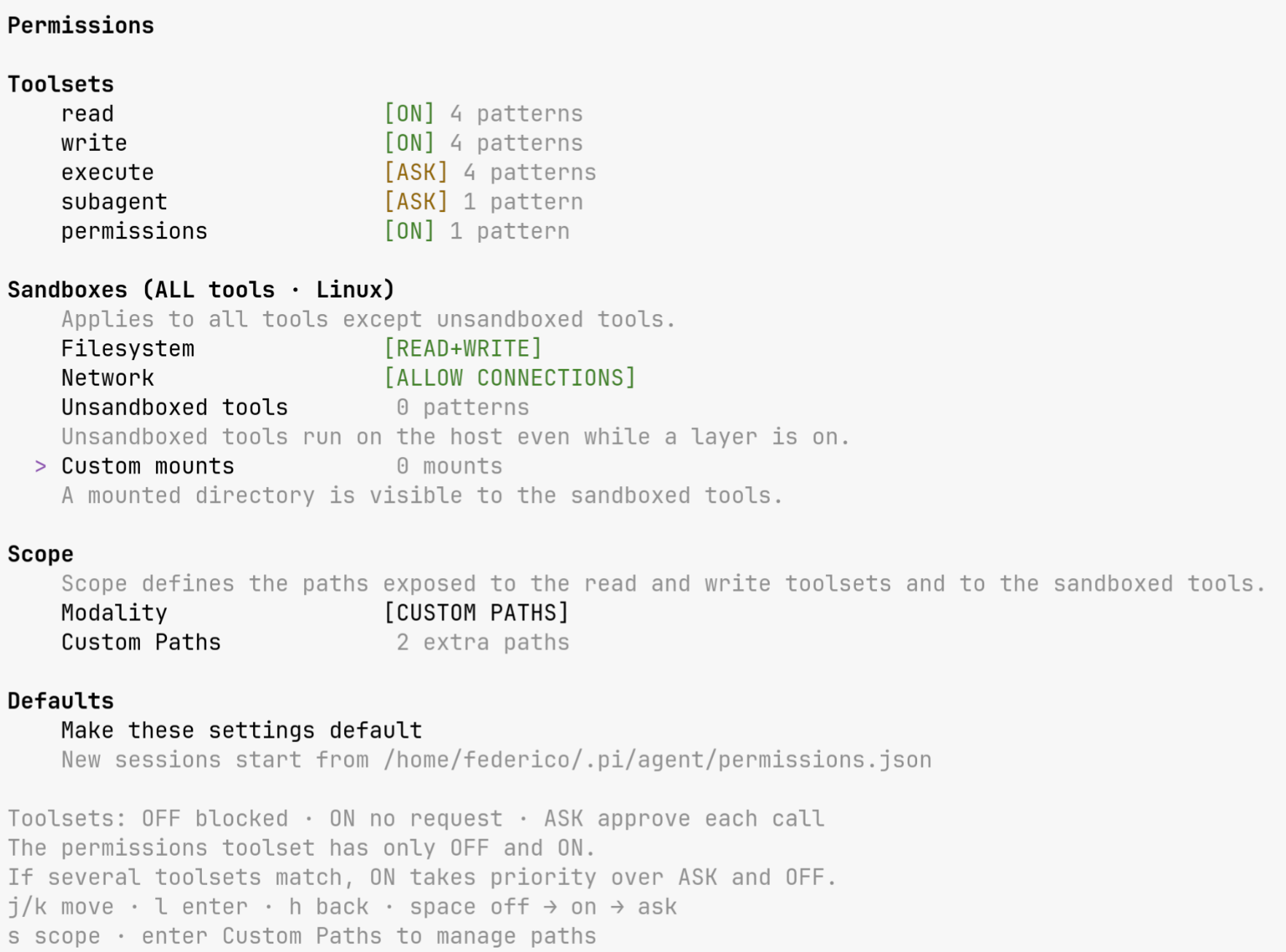
  "image": "https://raw.githubusercontent.com/00sapo/pi-toolset-permissions/v0.2.5/docs/preview.png",
  "extensions": [
    "./src/index.ts",
    "./src/host-tools.ts"
  ]
}
Security note
Pi packages can execute code and influence agent behavior. Review the source before installing third-party packages.
README
pi-toolset-permissions
Do you find managing sandboxes and permissions complicated?
This extension adopts a different modular, on-the-fly approach: you can toggle sets of tools and sandboxes using a simple menu during the session.
You can even tell the AI what it should disable e.g. "forbid writing on that file", or "run in read-only mode now". The extension provides a tool to modify the list of allowed toolsets.
The AI can request state changes when the permissions toolset is on. Turn that toolset off to block these requests.
Main features
- Six toolsets:
read,write,execute,dev,subagent, andpermissions. - Packaged
gitandsshtools, with removable host-execution defaults. - Compatibility with
pi-subagentandherdr. - The LLM can ask you to change the permissions and set your preferred profile.
- Third-party tools sandboxed automatically on Linux.
- Custom toolsets for any additional tool.
- The model asks you before every change.
- In ask-mode, approval shows the exact input, and covers that one call.
- Per-session state, inherited by subagents.
- Allows global path exceptions but allows symlinks to build per-project exceptions.
- Custom mounts: expose one host directory or file to the sandbox, read-only or read-write.
- Make these settings default: the next session starts from them.
Install
pi install npm:pi-toolset-permissionsTry it for one session without saving it:
pi -e npm:pi-toolset-permissionsThen open the screen with /permissions.
Sandbox requirements
- Linux: it wraps any tool and requires
bubblewrapand unprivileged user namespaces. - macOS: it wraps
bashonly, through the built-insandbox-exec. - Windows: no backend exists, and the screen says to start Pi inside WSL2.
Sandboxes automatically mount all the paths listed in your PATH env variable, your home's .gitconfig
and your .profile. Other paths can be added through the UI or asking to the LLM.
Git and SSH tools
Host access: new configurations run git and ssh outside the sandbox, even when network access is forbidden there. They use host credentials and configuration. Git aliases, hooks, credential helpers, forge extensions, and SSH proxy commands can start local programs. The program names are not a security boundary.
The tools belong to the dev toolset: off blocks them and ask requests approval. New defaults include the removable exceptions ^git$ and ^ssh$. Existing saved lists and toolset patterns stay unchanged. To enable host execution in an existing profile, add those exact patterns under Unsandboxed tools and make sure a toolset allows both names. On Linux, removing an exception routes subsequent calls through the sandbox. Existing host SSH connections remain active until stopped or the session closes; stop them before changing the exception.
git replaces the personal forge_cli experiment; it does not remove that separate extension. Its program accepts git (the default), gh, or tea. Supply individual arguments, not a shell command. It inherits credentials, has a 60-second default timeout (maximum 600), and captures at most 1 MiB. Commits, pushes, destructive Git operations and issue changes still require user consent; the tool does not grant it.
{"args":["status","--short"]}
{"program":"gh","args":["pr","list"],"timeout":30}
ssh uses the installed OpenSSH client, the user's SSH config, keys, agent and known_hosts. It preserves host-key verification. It uses noninteractive authentication and does not open a terminal or ask for passwords. A host not already trusted must be set up outside this tool. Managed execution disables background forking and connection multiplexing; other SSH configuration still applies. Remote commands follow the remote shell's quoting rules.
| Action | Result |
|---|---|
run (default) |
Wait for a command to finish; timeout defaults to 60 seconds. |
start |
Return a managed connection ID; no lifetime limit unless timeout is set. A receipt does not prove authentication or port readiness. |
list |
List this session's retained connections without their output. |
status |
Read a connection's state and bounded output by id. |
stop |
Close the connection and its local process group by id on Unix. |
{"args":["server-alias","uname -a"]}
{"action":"start","args":["-N","-L","8080:localhost:80","server-alias"]}
{"action":"start","args":["-N","-D","1080","-J","jump-alias","server-alias"]}
{"action":"status","id":"<returned-id>"}
{"action":"stop","id":"<returned-id>"}
Native arguments also support remote forwarding (-R) and stdio forwarding (-W). There is no interactive stdin channel. SSH retains at most 16 active connections and 64 process records per session, with a rolling 1 MiB output buffer per process. Explicit timeouts range from 1 to 600 seconds. Both tools display at most 2000 lines or 50 KB. Session shutdown and /reload close managed SSH connections; IDs do not survive reload. Remote jobs may outlive a disconnected SSH client. On Windows, cleanup targets the SSH process; Unix process-group cleanup is not available.
The package loads both tool definitions automatically. Loading only src/index.ts directly does not load them: use the package directory or also pass -e ./src/host-tools.ts.
Async subagents in Fleet
On Linux, sandboxed async runs share their run directory with the host. A stable inner session ID links their ownership to the host session, so Fleet can find them after an executor restart. The host transcript stays outside the sandbox. subagent remains sandboxed.
This integration uses a private ownership registry tested with pi-subagents 0.90. Changes to that package may require an adapter update. It does not add host Fleet rows for synchronous foreground children or repair async notification delivery. Runs created before this fix keep their old ownership; use a new run to check visibility after /reload.
Concept
A toolset is a group of tool names. Each toolset has one state: off, on, or ask.
A pattern is a regular expression. The extension tests each pattern against a tool name.
A sandbox is an operating-system boundary for shell commands.
A path scope is the set of directories that file tools can touch. PROJECT ONLY exposes only the project root. CUSTOM PATHS exposes the project root plus saved extra paths. EVERYWHERE removes the path limit.
PROJECT ONLY keeps saved extra paths but does not expose them. Scope also selects the roots for the filesystem sandbox.
A symlink is a path that points to another path. Project symlinks grant access to their existing file or directory targets outside the project. The filesystem sandbox exposes those targets with the selected read or read-write access. It follows links inside linked directories and prevents cycles. Broken links do not expose their parent directories. Links in custom roots do not add exceptions.
File tools must use the project link path, not the direct external path. Shell commands inside the sandbox can also use the exposed target path. Unrelated external paths stay outside the sandbox. A protected path is never fatal, and the sandbox places it when it can. A path below /usr is already visible read-only. A path inside /etc or /run goes back in view through its own bind, so a virtual environment and a configuration directory keep working. Only a whole private tree, or a pseudo filesystem path, is left out with a warning.
The permissions toolset holds the permissions tool. Off blocks state changes through that tool, but still permits approval requests for ask tools.
The /permissions command always works. Use that command to turn the toolset back on.
The permissions toolset has only the on and off states. It does not accept ask, because every change through the tool already asks you to confirm. set_toolset refuses mode: ask for this toolset, and a stored ask value loads as on.
Bash is one tool. Its patterns sit in the execute toolset. The sandbox is a second layer. It starts the whole call inside the boundary, and it does not read the command text.
The model changes the state with the permissions tool. The tool asks you to agree before each change. Without a dialog, the tool cannot change the state.
Use
Open the settings screen:
/permissionsThe main screen groups toolsets, sandboxes, scope, and the defaults row. Custom Paths opens a path submenu inside Scope, and Custom mounts opens one inside Sandboxes.
| Key | Action |
|---|---|
| up/k, down/j | move the selection |
| space | cycle a toolset through off → on → ask → off, toggle a sandbox, or switch the scope |
| enter/l | open toolset patterns, Unsandboxed tools, Custom mounts, or Custom Paths. On a sandbox or Modality, enter acts like space. On the defaults row, it saves the settings |
| s | cycle PROJECT ONLY → EVERYWHERE → CUSTOM PATHS |
| a | add a directory to the paths |
| d | remove the selected extra path in Custom Paths |
| esc/h | close the screen, or leave a submenu |
Each change is saved at once.
License
GPL-3.0-only. Copyright (C) 2026 00sapo. The full text is in LICENSE.