pi-toolset-permissions
Toolsets, path scope, and bash sandboxes for pi, with patterns that you can edit during a session
Package details
Install pi-toolset-permissions from npm and Pi will load the resources declared by the package manifest.
$ pi install npm:pi-toolset-permissions- Package
pi-toolset-permissions- Version
0.2.4- Published
- Nov 20, 2026
- Downloads
- 791/mo · 791/wk
- Author
- 00sapo
- License
- GPL-3.0-only
- Types
- extension
- Size
- 679 KB
- Dependencies
- 0 dependencies · 3 peers
Pi manifest JSON
{
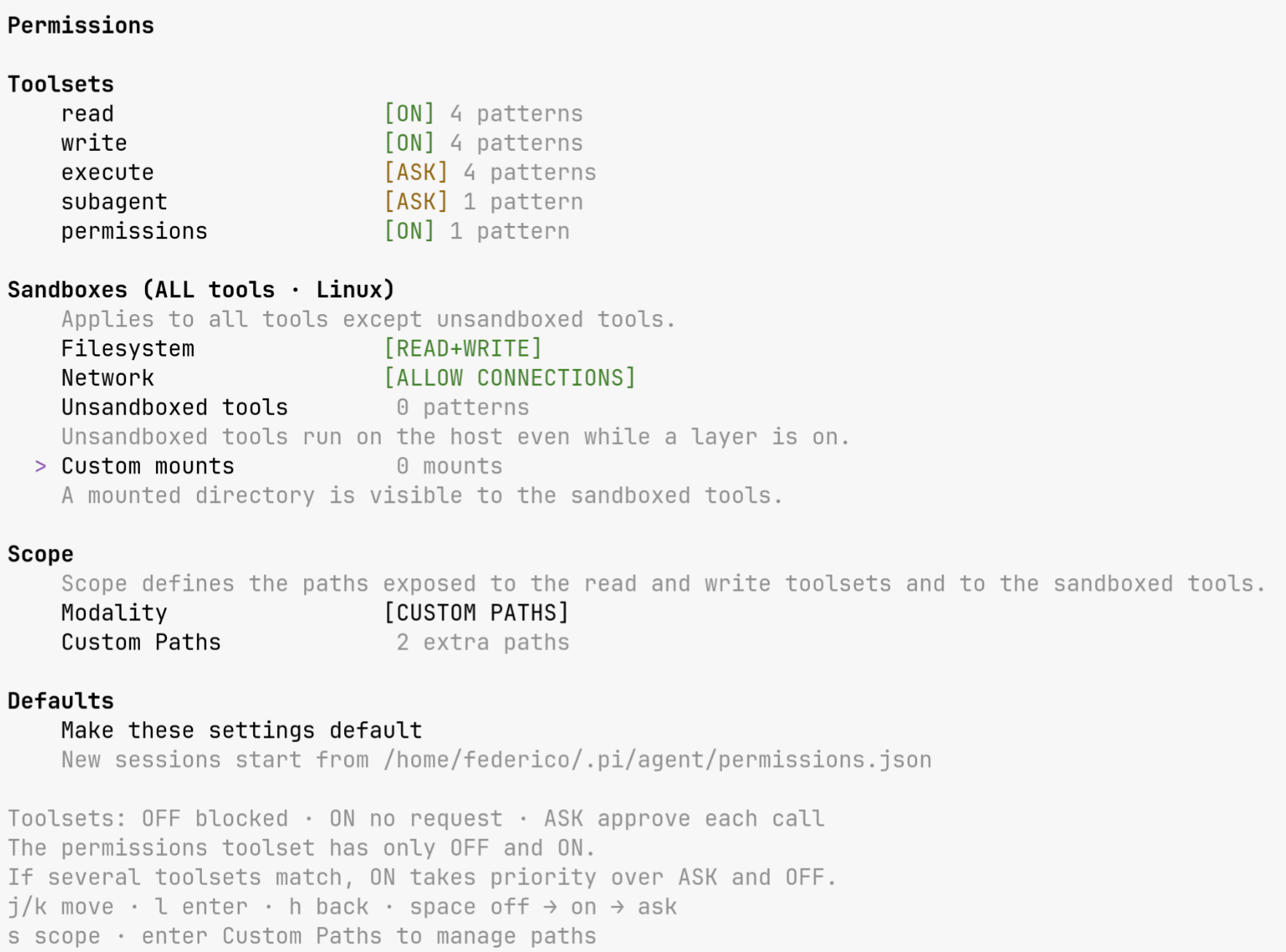
  "image": "https://raw.githubusercontent.com/00sapo/pi-toolset-permissions/v0.2.4/docs/preview.png",
  "extensions": [
    "./src/index.ts"
  ]
}
Security note
Pi packages can execute code and influence agent behavior. Review the source before installing third-party packages.
README
pi-toolset-permissions
Do you find managing sandboxes and permissions complicated?
This extension adopts a different modular, on-the-fly approach: you can toggle sets of tools and sandboxes using a simple menu during the session.
You can even tell the AI what it should disable e.g. "forbid writing on that file", or "run in read-only mode now". The extension provides a tool to modify the list of allowed toolsets.
The AI can request state changes when the permissions toolset is on. Turn that toolset off to block these requests.
Main features
- Five toolsets:
read,write,execute,subagent, andpermissions. - Compatibility with
pi-subagentandherdr. - The LLM can ask you to change the permissions and set your preferred profile.
- Third-party tools sandboxed automatically on Linux.
- Custom toolsets for any additional tool.
- The model asks you before every change.
- In ask-mode, approval shows the exact input, and covers that one call.
- Per-session state, inherited by subagents.
- Allows global path exceptions but allows symlinks to build per-project exceptions.
- Custom mounts: expose one host directory or file to the sandbox, read-only or read-write.
- Make these settings default: the next session starts from them.
Install
pi install npm:pi-toolset-permissionsTry it for one session without saving it:
pi -e npm:pi-toolset-permissionsThen open the screen with /permissions.
Sandbox requirements
- Linux: it wraps any tool and requires
bubblewrapand unprivileged user namespaces. - macOS: it wraps
bashonly, through the built-insandbox-exec. - Windows: no backend exists, and the screen says to start Pi inside WSL2.
Sandboxes automatically mount all the paths listed in your PATH env variable, your home's .gitconfig
and your .profile. Other paths can be added through the UI or asking to the LLM.
Concept
A toolset is a group of tool names. Each toolset has one state: off, on, or ask.
A pattern is a regular expression. The extension tests each pattern against a tool name.
A sandbox is an operating-system boundary for shell commands.
A path scope is the set of directories that file tools can touch. PROJECT ONLY exposes only the project root. CUSTOM PATHS exposes the project root plus saved extra paths. EVERYWHERE removes the path limit.
PROJECT ONLY keeps saved extra paths but does not expose them. Scope also selects the roots for the filesystem sandbox.
A symlink is a path that points to another path. Project symlinks grant access to their existing file or directory targets outside the project. The filesystem sandbox exposes those targets with the selected read or read-write access. It follows links inside linked directories and prevents cycles. Broken links do not expose their parent directories. Links in custom roots do not add exceptions.
File tools must use the project link path, not the direct external path. Shell commands inside the sandbox can also use the exposed target path. Unrelated external paths stay outside the sandbox. Protected system paths remain unavailable as scope roots. If a project link targets a protected path, sandbox startup fails. Only use project links whose targets you trust.
The permissions toolset holds the permissions tool. Off blocks state changes through that tool, but still permits approval requests for ask tools.
The /permissions command always works. Use that command to turn the toolset back on.
The permissions toolset has only the on and off states. It does not accept ask, because every change through the tool already asks you to confirm. set_toolset refuses mode: ask for this toolset, and a stored ask value loads as on.
Bash is one tool. Its patterns sit in the execute toolset. The sandbox is a second layer. It starts the whole call inside the boundary, and it does not read the command text.
The model changes the state with the permissions tool. The tool asks you to agree before each change. Without a dialog, the tool cannot change the state.
Use
Open the settings screen:
/permissionsThe main screen groups toolsets, sandboxes, scope, and the defaults row. Custom Paths opens a path submenu inside Scope, and Custom mounts opens one inside Sandboxes.
| Key | Action |
|---|---|
| up/k, down/j | move the selection |
| space | cycle a toolset through off → on → ask → off, toggle a sandbox, or switch the scope |
| enter/l | open toolset patterns, Unsandboxed tools, Custom mounts, or Custom Paths. On a sandbox or Modality, enter acts like space. On the defaults row, it saves the settings |
| s | cycle PROJECT ONLY → EVERYWHERE → CUSTOM PATHS |
| a | add a directory to the paths |
| d | remove the selected extra path in Custom Paths |
| esc/h | close the screen, or leave a submenu |
Each change is saved at once.
License
GPL-3.0-only. Copyright (C) 2026 00sapo. The full text is in LICENSE.