pi-web-artifact
A PI WEB tab that renders an agent-written page from the workspace in a sandbox and hands element and text comments back to the conversation, with the Pi skill that writes those pages.
Package details
Install pi-web-artifact from npm and Pi will load the resources declared by the package manifest.
$ pi install npm:pi-web-artifact- Package
pi-web-artifact- Version
0.1.1- Published
- Nov 13, 2026
- Downloads
- 519/mo · 519/wk
- Author
- ivolejon
- License
- MIT
- Types
- package
- Size
- 138.3 KB
- Dependencies
- 0 dependencies · 0 peers
Security note
Pi packages can execute code and influence agent behavior. Review the source before installing third-party packages.
README
Artifact

A PI WEB tab that renders an agent-written page in the workspace, lets you annotate elements and selected text, and hands the comments to the conversation as a single message. It ships with the Pi skill that writes those pages.
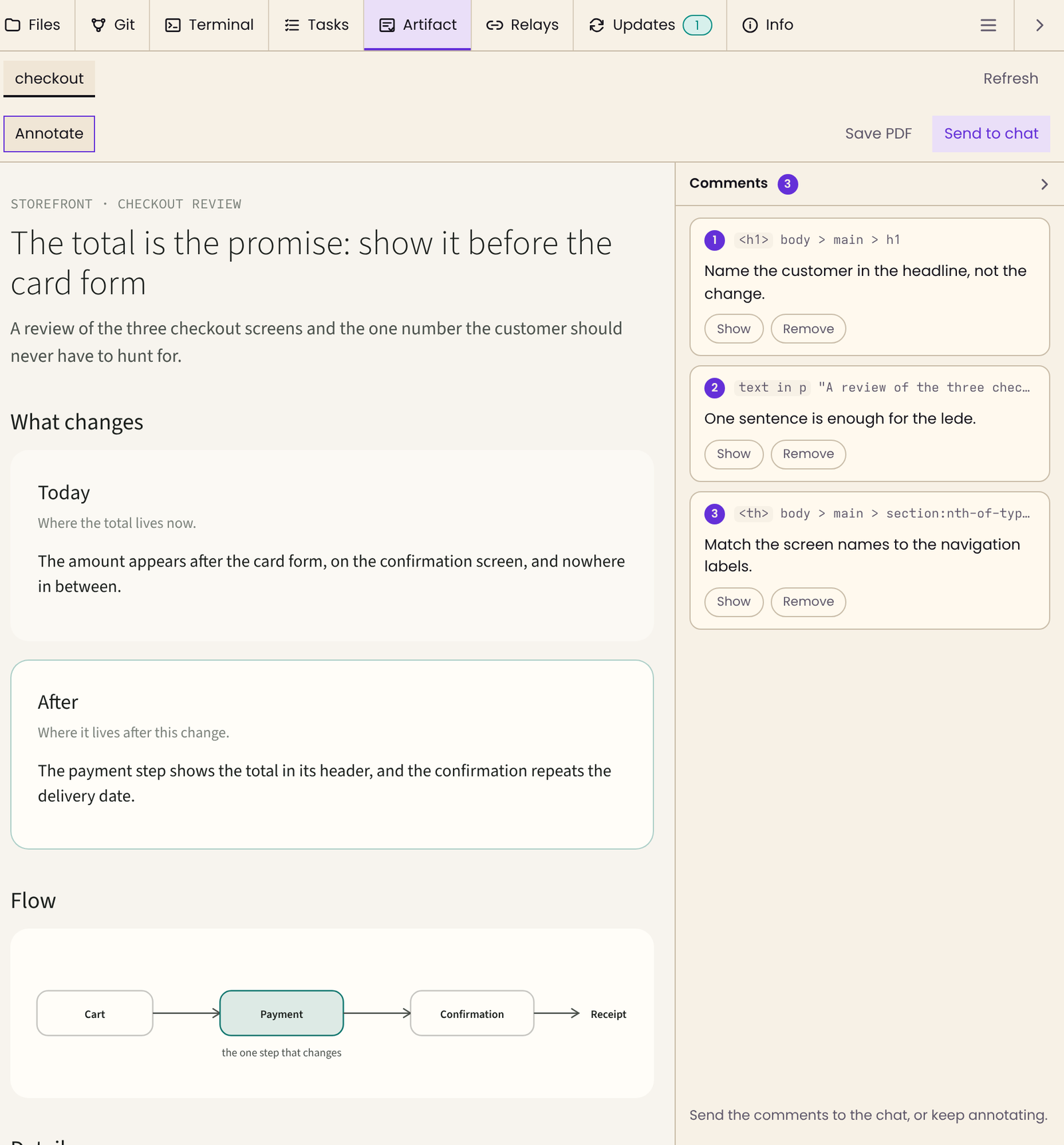
The Artifact tab on a page the agent wrote. Each comment names the element or quotes the selection, and Send to chat turns the list into one message.
Why it is good
- The comment knows what it points at. Every comment carries the target's tag and CSS selector, or the text it quotes, so the agent revises the thing you saw instead of a description of it.
- The page uses the product's design. The skill reads the repository's own colours, type and radii into the page, so a review of a checkout screen looks like the checkout, not like a generic report.
- Review is one message, not a thread. Comments are staged as one chip; the agent receives a numbered list of targets and requested changes, and you decide when to send it.
- It keeps up without losing your place. A revision lands in the same tab and keeps comments, an open draft and scroll. Fold the comments away to see the page at full width.
- Nothing to operate. It is a browser-only plugin: no server, no port, no daemon restart. The artifact runs in a sandbox at an opaque origin, and its policy blocks every network request.
- It travels. Save PDF takes the page to people outside PI WEB, and deep links take the selected page to the ones inside.
How it works
Agent writes test-results/artifact/<session>/<topic>/artifact.html
        │
        ▼
Artifact tab renders it in a sandbox, on the page's own design tokens
        │  you click an element or select text, write a comment
        ▼
Send to chat stages one chip → the agent reads the comments and revises the page
Requirements
PI WEB with browser API v5 and the stylesheet-integration v1 capability (verified on 1.202610.7). The plugin
declares that capability as required, so an older host skips it instead of rendering it unstyled. The skill
needs Node.js 18 or later for its token script and nothing else: no build step, no runtime dependencies.
Install
The tab and /skill:artifact ship in one npm package, so one install registers both. There is no build step
and no service restart. The package is pi-web-artifact.
pi install npm:pi-web-artifactOr open Settings → Pi packages in PI WEB, enter npm:pi-web-artifact, and install it there.
Reload the browser page for the tab. A running Pi session needs /reload, or a new session, before the skill
appears. Pi reads the package declaration after project trust.
Check both:
curl -s http://127.0.0.1:8504/api/plugins | grep -o '"id":"artifact"[^}]*'   # the tab
pi list | grep artifact                                                      # the skill
The host port in the example is the one this package is developed against; use your own. The package itself needs nothing beyond PI WEB and, for the skill, Node.js 18 or later.
To follow main between releases, install the git source instead of the npm source:
pi install git:github.com/ivolejon/pi-web-artifactLocal development
Clone the repository, link it as a local PI WEB plugin, and install the local package for the skill. The
local plugin wins over the package copy, so edits under browser/ show up on the next page reload.
git clone https://github.com/ivolejon/pi-web-artifact.git
ln -sfn "$(pwd)/pi-web-artifact" ~/.pi-web/plugins/artifact
pi install -l ./pi-web-artifact
On a machine where PI_WEB_DATA_DIR is set, link into $PI_WEB_DATA_DIR/plugins instead.
Update
pi update npm:pi-web-artifactOr update it under Settings → Pi packages. Reload the browser page for the tab. A running Pi session
needs /reload for the updated skill. No session-daemon restart is needed, because the package has no server
module. A symlinked development clone is updated with git pull, then a page reload.
Remove
pi remove npm:pi-web-artifactReload the browser page. Settings → PI WEB plugins can also disable the tab without removing the package. If you linked a development clone, delete that symlink.
What it does
- Binds to the open conversation. It shows every
.htmlfile undertest-results/artifact/<session id>/in the selected workspace as a tab, newest first, and shows nothing when no conversation is selected. The session segment is what keeps two conversations in one workspace apart. - Exposes one page at a time, per tab. One strip, one tab per page, the topic name when it is unique and the file name when one topic holds several pages. Arrow keys, Home and End move between tabs, and a strip that scrolls fades at the edge that continues.
- Renders in a sandbox. An
iframewithsandbox="allow-scripts"and noallow-same-origin, so the page runs at an opaque origin: it cannot read the host, its cookies or its DOM. AContent-Security-Policyblocks every network request. Relative stylesheets are read through the file API and inlined; local images are resolved through the host's preview URL, which is the only permitted network origin. - Follows the file. A write from outside the app, such as the agent saving from a terminal, does not always raise a host invalidation, so the panel also compares the artifact's modification time every two seconds while the tab is visible. A changed file is re-read, and the user's comments, open comment field and scroll position are kept.
- Opens itself. When a new page appears for the open conversation, the tab selects itself within a couple of seconds, so the skill writes the page and says nothing. A revision of an existing page never steals the tab back, and loading the app never moves it.
- Collects comments. Annotate is one toggle: on, a click on an element or a text selection opens a
comment field naming the target and its CSS selector; off, clicks stay inside the page as the page intends.
Press Enter to add the comment. Show scrolls the artifact back to it, Remove deletes it.
Comments are kept in
sessionStorageper conversation and page, because the host unmounts the panel whenever another tab is selected. - Sends to the chat. Send to chat stages the comments as a chip in the message box (
setChip), or writes them into the box when the host has no chip support. You press Send; the plugin never posts a message on its own. - Deep links. The panel stores the selected page in the tab's query, and a chat or Files link to a file under the open conversation's directory opens in this tab. A link to another conversation's artifact opens in Files instead.
Folding the comments column
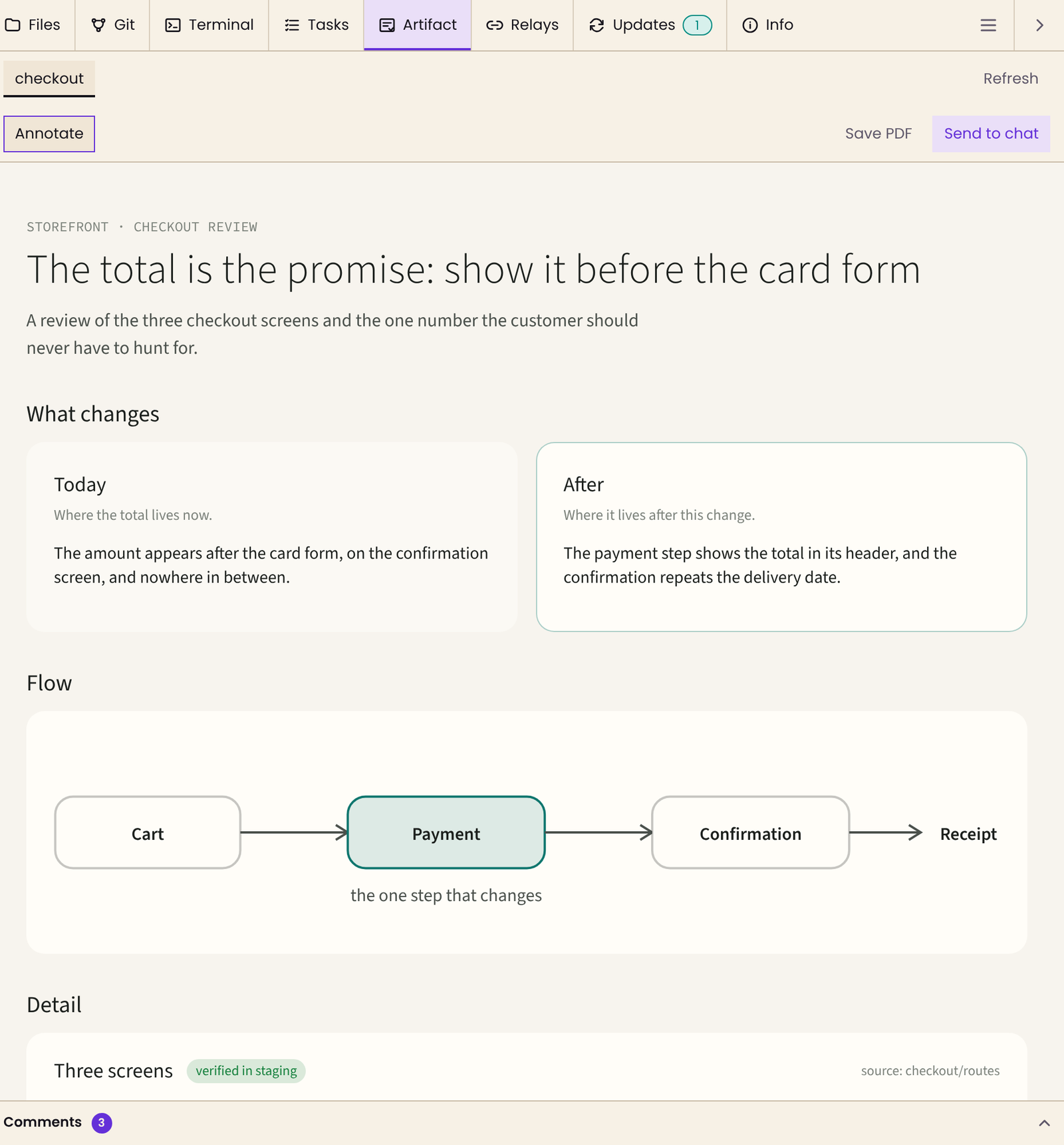
Folded, the column becomes a strip that keeps the count; the artifact takes the full panel width. The choice survives reloads, and a click in the page reopens the column with the comment field.
The column's header is the toggle. It works in both layouts: beside the artifact on a wide panel, below it when the panel is narrow. The strip keeps the comment count even when nothing is open, so the column is always one click away.
Save as PDF
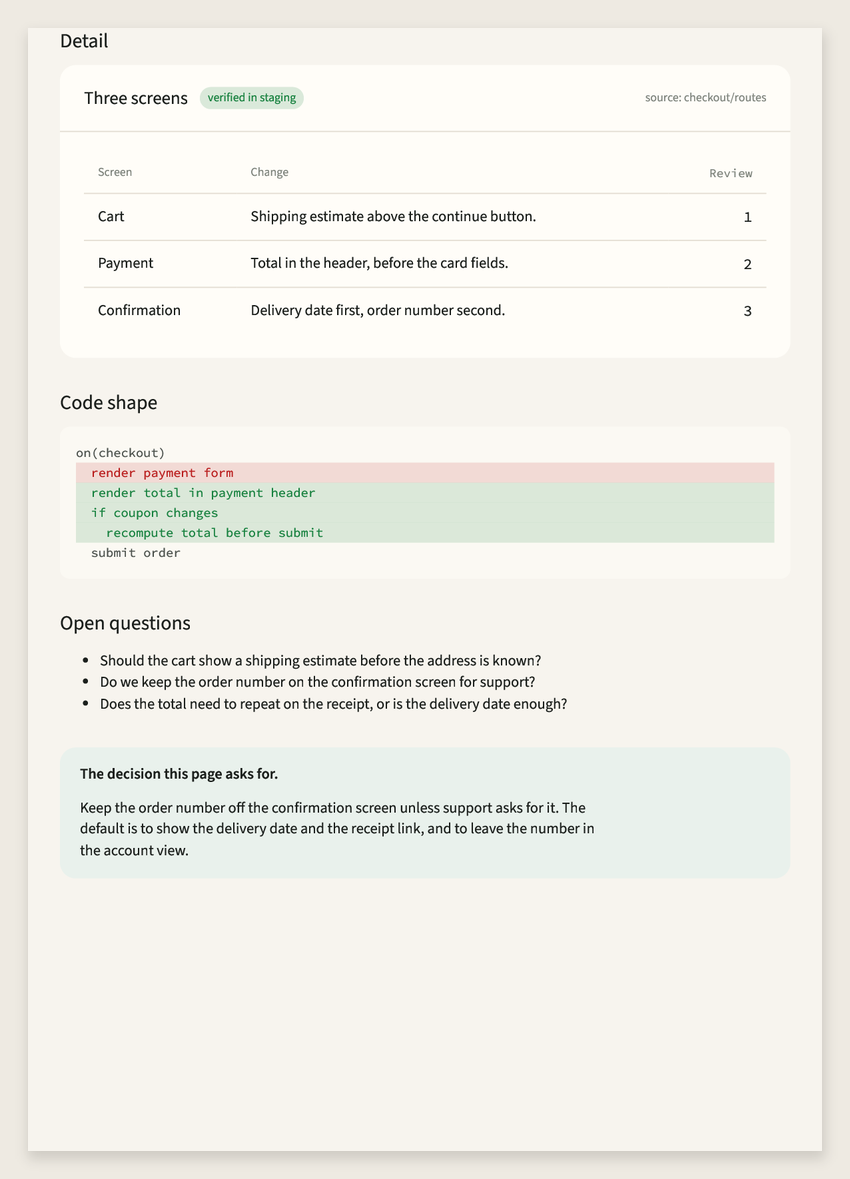
The second page of a Save as PDF export. The table, the diff and the note keep their layout, and the page break falls between blocks rather than through one.
Save PDF prints the artifact alone through the browser's own print pipeline, so the file keeps the page's colours, fonts and selectable text and contains none of the review chrome. The browser has no API that writes a PDF directly, so the print dialog's Save as PDF is the download step, and the suggested file name is the topic. The print stylesheet keeps the background, switches entrance animations off, avoids splitting cards, tables, code blocks and images across pages, and uses the page's own padding as the page margin.
The skill
skills/artifact teaches the agent to build the page: what form to choose, how to take the colours and type
from the repository under review instead of inventing them, and what the comments come back as.
scripts/design-tokens.mjsdiscovers the project's stylesheet, copies its custom properties and its local font files into<run>/tokens.css, and maps them onto the semantic names the structure sheet reads. Exit code 3 means it found no design source, and the neutral defaults carry the page.assets/artifact.cssis the structure sheet: layout, cards, pills, tables, diffs, diagrams. It names no product colour.assets/artifact-template.htmlis the page skeleton to copy.
Files
| File | Role |
|---|---|
package.json |
the piWeb.plugins entry that PI WEB discovers |
browser/ |
the browser-public root: everything the host serves to the page |
browser/pi-web-plugin.js |
contributions: the Artifact tab, its action, file-open routing |
browser/review-panel.js |
the panel element: discovery, rendering, comments, chip staging |
browser/compose.js |
builds the sandboxed document, inlines local assets, injects the annotation script, and builds the print copy |
browser/auto-open.js |
selects the tab when a new page appears for the open conversation |
skills/artifact/ |
the skill, its structure sheet, template and design-token script |
docs/images/ |
the screenshots used by this README |
test/ |
unit tests for the composer and browser tests for the panel, with their harness |
.github/workflows/test.yml |
runs the suite on every push to main and every pull request |
.github/workflows/publish.yml |
tests and publishes a GitHub Release to npm, with provenance |
The package follows the plugin guide's layout. browserRoot is browser, so only that directory is
browser-public; package.json, this README and the skill files are served to nobody. The entry is
browser/pi-web-plugin.js, resolved from the package root, and the package has no server module, so
installing or updating it needs a page reload and never a session-daemon restart.
Two host contracts, not APIs
The plugin guide asks plugins to use only public entrypoints, not internal routes. auto-open.js cannot obey
that and also work while its own tab is closed: a browser plugin gets no context and no navigation function
until its panel is rendered. It therefore relies on two things the API does not promise, both commented
where they are used. Check them after a PI WEB upgrade, and drop the module if either breaks:
- A workspace label renders in every workspace view, so its callback is where the plugin captures its
context. That context's file handle can point at another workspace, so the listing uses the host's
api/machines/<machine>/projects/<project>/workspaces/<workspace>/treeroute with the ids from the URL. - There is no API for selecting a tool from a closed panel, so the switch rewrites the
toolandviewURL parameters and dispatchespopstate.
If either contract changes, the tab stops opening by itself. The panel and the comments keep working, and the page stays one click away.
Publishing
Publishing runs in GitHub Actions: .github/workflows/publish.yml tests, packs one tarball, uploads it as the
pi-web-artifact Actions artifact, and publishes that exact file on a published GitHub Release, with
provenance. The package is published on npm as pi-web-artifact, unscoped and public, and the community
directory finds it through the pi-web.dev-plugin keyword. Treat any npm publish on a workstation as a
bootstrap or an emergency, not the normal release path.
Bootstrap
The first version, 0.1.0, was published from the pipeline with a short-lived granular token that had 2FA
bypass enabled, because npm trusted publishing is configured on an existing package. That is the one-time cost
of a new package: publish 0.1.0 with a bootstrap token or manually, then configure trusted publishing and
release the next version through OIDC. Keep the bootstrap token short-lived, and remove it once the OIDC
publish works.
Trusted publishing
- On npmjs.com, open the package's Settings → Trusted publishing and add a GitHub Actions publisher.
- Enter organization or user
ivolejon, repositorypi-web-artifact, workflow filenamepublish.yml, and leave the environment empty. - Allow npm publish. The workflow also asks for
id-token: write, which it already declares. - Publish a new version within two days, or the new configuration expires and has to be created again. After
the token bootstrap, bump to
0.1.1and release that version to validate the configuration.
Once the OIDC publish succeeds, remove the NPM_TOKEN secret. The workflow detects the missing secret and
switches to trusted publishing automatically. Restricting token access under Settings → Publishing access
afterwards is recommended.
Release a version
npm version patch        # or minor / major; commits the bump and creates the vX.Y.Z tag
git push --follow-tags
gh release create "v$(node -p "require('./package.json').version")" --generate-notes
The release must carry exactly v<package.json version>; the workflow refuses a mismatch. It also refuses a
version that is already on npm. A manual Run workflow on the Publish workflow skips the tag check, for a
retry. The published tarball is also kept as an Actions artifact for the run.
After the run, check npm view pi-web-artifact version and the provenance badge on npm. Installs update with:
pi update npm:pi-web-artifactA browser-only release needs a page reload; a running Pi session needs /reload for the skill. npm search
indexing can take a while before a new package or version appears in the community directory.
Tests
npm install
npx playwright install chromium   # once per machine; --with-deps on Linux CI
npm test
test/compose.test.js covers the composer without a browser: stylesheet inlining and escaping, missing and
remote sheets, image preview URLs and the policy, the annotation script, the print copy and its title, and the
comment text. test/panel.browser.test.js mounts the real <artifact-panel> against an in-memory workspace in
test/support/harness.html: tab order and selection, discovery and session binding, stylesheet rendering,
the comments fold and its persistence, element and text comments, chip staging, draft restoration, the print
document's shape and a real PDF from it, and the stacked layout. GitHub Actions runs both suites on every
push to main and every pull request.
The tests need Node.js 20 or later and Playwright's Chromium. Playwright is a devDependency, and pi installs
packages with production dependencies only, so people who use the plugin never install it.
Verify a change
- Reload the browser, open a conversation that has an artifact under
test-results/artifact/<that session id>/, and open the Artifact tab. - Confirm the page renders with the project's own colours and fonts and no console errors, and that it fills the panel; narrow the window until the comments column moves below the frame. Fold the column and check that the strip keeps the comment count and that a reload keeps it folded.
- Click a heading and a paragraph: both comments must name a selector, and the text comment must quote the selection.
- Press Save PDF, choose Save as PDF in the print dialog, and open the file: the page appears alone, with its colours and selectable text, and a card or code block is not cut across pages.
- Press Send to chat and confirm the chip appears in the message box. Do not press Send unless the conversation you are testing in should receive the comments.
- Select another conversation and confirm the tab shows that conversation's state, with the previous conversation's comments gone. Select none and confirm the notice.
License
MIT. See LICENSE.