pi-web-simple
Local web UI for the pi coding agent — one directory per workspace, in the shell of deepseek-harness
Package details
Install pi-web-simple from npm and Pi will load the resources declared by the package manifest.
$ pi install npm:pi-web-simple- Package
pi-web-simple- Version
0.5.0- Published
- Sep 24, 2026
- Downloads
- 1,349/mo · 1,349/wk
- Author
- milan-he
- License
- MIT
- Types
- extension
- Size
- 3.8 MB
- Dependencies
- 1 dependency · 0 peers
Pi manifest JSON
{
  "image": "https://raw.githubusercontent.com/woxihejinghao/pi-web/main/docs/images/overview-dark.png",
  "extensions": [
    "./extensions"
  ]
}
Security note
Pi packages can execute code and influence agent behavior. Review the source before installing third-party packages.
README
pi-web-simple
English · 简体中文
A local web UI for the pi coding agent — one local directory = one project, each project holding that directory's sessions. The agent core is pi itself, attached over pi --mode rpc subprocesses. The project management model and visual language follow deepseek-harness.
npx pi-web-simple # serves the UI + API on http://127.0.0.1:5319Requires Node.js >= 22.19.0. Binds to 127.0.0.1 only.
Highlights — server-side directory picker · multi-session, one idle-recycled pi process per session · SSE streaming chat with Markdown + shiki highlighting · image input · session fork and topic tree · model picker · right sidebar (file tree, preview, git changes, embedded browser) · full git panel (stage, commit, push, restore, switch branch) · model / plugin / MCP settings.
| Dark theme | Light theme |
|---|---|
 |
 |
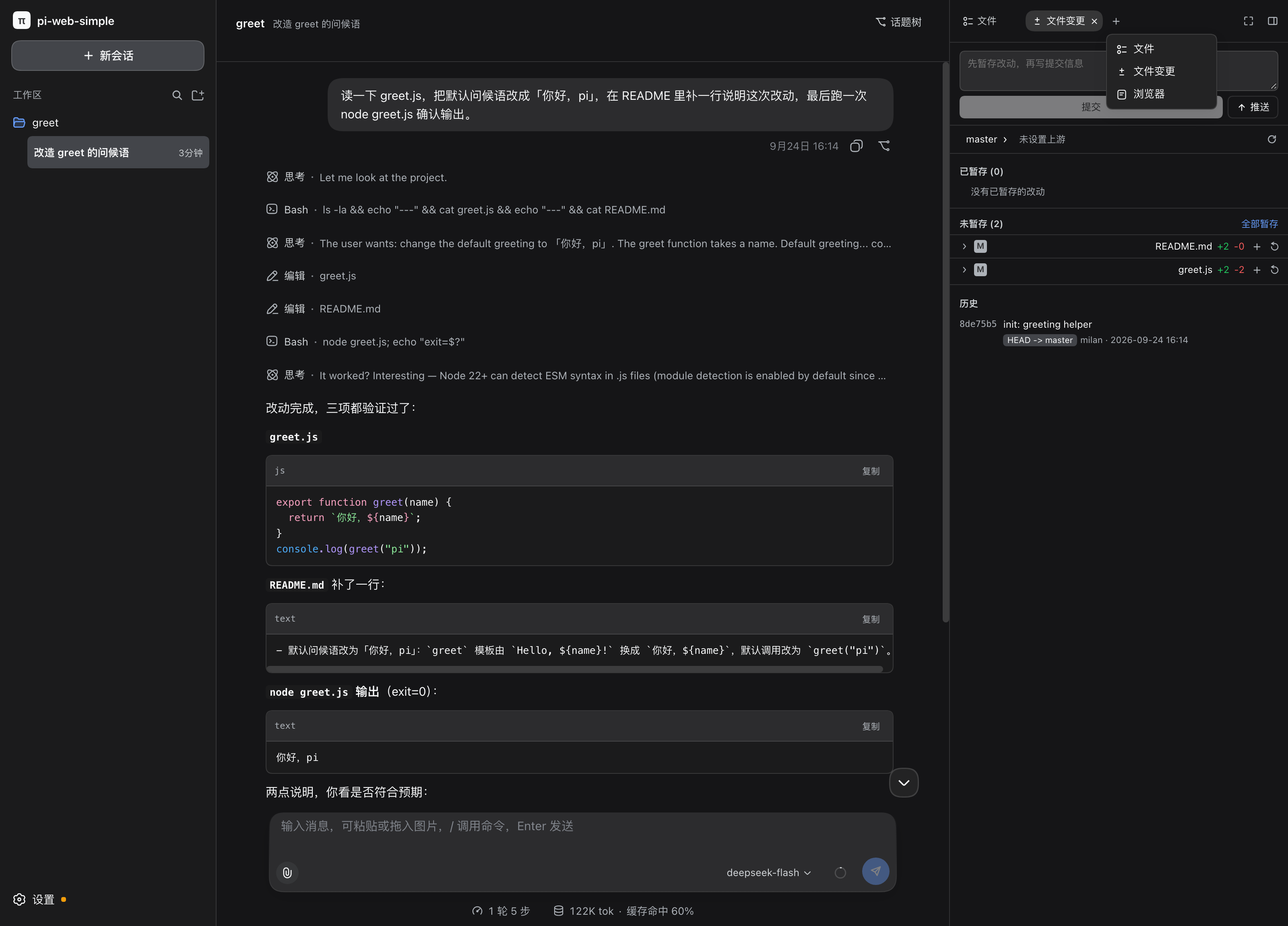
Left: dark theme, right: light theme (follows the system by default, and can be pinned in settings). Both show the same session: workspace and sessions in the left column, the conversation with its thinking and tool calls (read / edit / write / Bash) in the middle, and the file changes on the right, where they can be staged, committed and pushed directly.
pi-web-simple is a local project-management and chat UI built on pi.
The project model and the visual language follow deepseek-harness: one local directory = one project, and each project holds the sessions of that directory. The agent core is pi itself, attached through pi --mode rpc subprocesses.
Browser (React + Vite)
   │  POST /api/*            commands upstream
   │  GET  /api/events (SSE) events downstream
   ▼
Node server (single process)
   ├─ projects      ~/.pi-web-simple/store.json
   ├─ UI prefs      the same store.json (appearance / font size / transcript / send behaviour)
   ├─ providers     ~/.pi/agent/models.json + auth.json (pi exposes no RPC for these)
   ├─ sessions      derived live from pi's own storage
   └─ process pool  one pi RPC subprocess per session (lazy start + idle recycle)
   ▼
node <pi>/dist/cli.js --mode rpc --session <file>   (cwd = project directory)
Quick start
Requires Node.js >= 22.19. The server binds to 127.0.0.1 only.
However you install it, you start the same thing: one process serving the front end and the API on http://127.0.0.1:5319 and opening the browser. Pick a row by how you expect to use it:
| Install | Start it with | Best when |
|---|---|---|
| nothing | npx pi-web-simple |
trying it out, or keeping it off your PATH |
npm install -g pi-web-simple |
pi-web-simple |
you want a plain command from any directory |
pi install npm:pi-web-simple |
/web inside pi |
you already work in a pi session — see below |
The port and the browser are the only two knobs, and all three rows read the same ones:
PI_WEB_SIMPLE_PORT=5400    # listen elsewhere (default 5319)
PI_WEB_SIMPLE_OPEN=0       # do not open a browser
To keep it running after the terminal closes:
PI_WEB_SIMPLE_OPEN=0 nohup pi-web-simple >/tmp/piws.log 2>&1 &
pkill -f 'pi-web-simple/bin/pi-web-simple.js'   # stop it
The address is the same one the dev server puts in the address bar, so there is only one port to remember. Every variable, with defaults: environment variables.
First run: click + in the left column, walk to the target directory in the picker (the shortcuts at the top jump straight to home / Desktop / Documents / Downloads / root, and a path can be pasted into the address bar), then click Choose this directory to add the project. Click + under the project to start a session.
Use it as a pi package
This package is also a pi package, so the UI can be opened from inside a pi session:
pi install npm:pi-web-simpleThen, in pi:
/web            # start the UI: port 5319 by default, opens the browser
/web 5400       # use another port
/web --no-open  # start it without opening a browser
/web status     # is it running?
/web stop       # stop it
The child process started by /web belongs to that pi session and is stopped when pi exits, so no orphan keeps holding the port. Startup failures — a port already in use, for instance — are reported back into pi together with the last few lines of the server log. To keep it running outside pi, use the nohup command above.
Develop from source
pnpm install
pnpm dev
Development runs two processes, so edits take effect immediately:
- front-end dev server:
127.0.0.1:5319(Vite, proxying/apito the back end) - back-end API:
127.0.0.1:4319
The browser still opens port 5319, so the address bar looks the same in both modes.
Other commands:
pnpm build       # build the front end + compile the back end into server/build
pnpm start       # start from the built output (same as npx, port 5319)
pnpm typecheck   # typecheck the front end and the back end
pnpm test        # front-end and back-end tests (vitest)
More documentation
The documents linked below are currently written in Chinese.
- Design notes — why it is built this way: architecture, coexistence with the pi CLI, the trade-offs behind every panel, and the mistakes along the way.
- Known limitations — what it cannot do yet and the trade-offs behind that behaviour; worth a skim before installing.
- Environment variables — all optional, with their defaults.
- Network and privacy — whether it talks to the network, where data lives, and why it must not be exposed publicly.
- Security policy — how to report vulnerabilities, plus behaviour that is by design and not a vulnerability.
Contributions are welcome — see CONTRIBUTING.md (in Chinese).
License
MIT, see LICENSE.
The UI and parts of the server logic are ported and adapted from deepseek-harness (MIT, Copyright (c) 2026 DeepSeek) and @earendil-works/pi-coding-agent (MIT). THIRD_PARTY_NOTICES.md lists the byte-for-byte copied ranges and their sources — that file ships with the source, please keep it.
This is an unofficial project, not affiliated with pi (Earendil Works) or DeepSeek; the π name and marks belong to their respective owners.