@a-t-h-i/bot-lobby
Structured multi-agent software engineering orchestrator for Pi
Package details
Install @a-t-h-i/bot-lobby from npm and Pi will load the resources declared by the package manifest.
$ pi install npm:@a-t-h-i/bot-lobby- Package
@a-t-h-i/bot-lobby- Version
0.6.5- Published
- Sep 28, 2026
- Downloads
- 1,422/mo · 1,422/wk
- Author
- a-t-h-i
- License
- Apache-2.0
- Types
- extension
- Size
- 1.3 MB
- Dependencies
- 0 dependencies · 4 peers
Pi manifest JSON
{
  "image": "https://raw.githubusercontent.com/a-t-h-i/bot-lobby/main/docs/gallery.png",
  "extensions": [
    "./src/index.ts"
  ]
}Security note
Pi packages can execute code and influence agent behavior. Review the source before installing third-party packages.
README
Bot-Lobby
A Pi extension that turns Pi into a multi-agent software team.
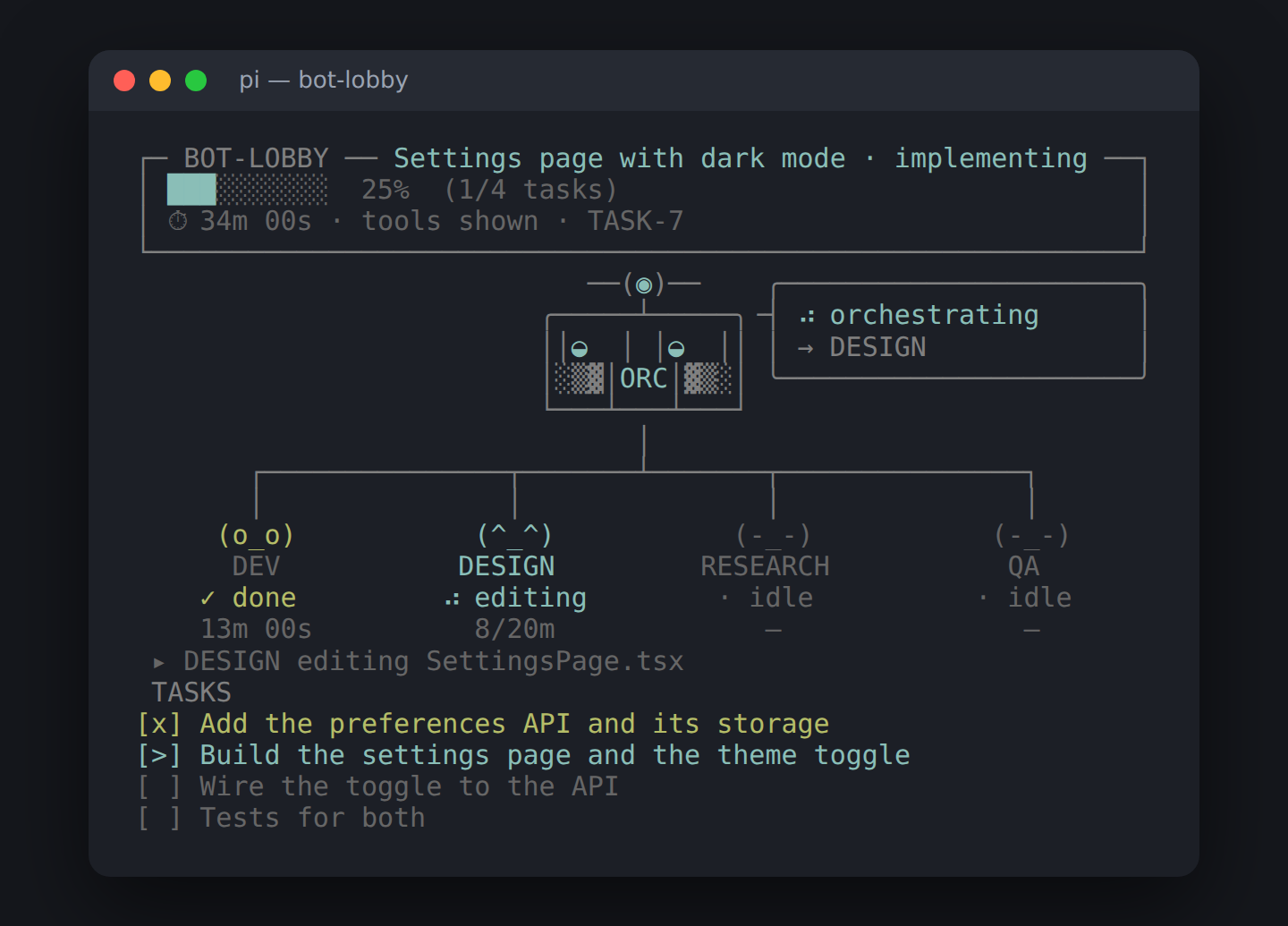
/bot-lobby <request> (or a request typed in the lobby) starts a task, unless
one agent can simply do it: then it goes to the quick-fix agent.
For a task, your Pi session becomes the Master
(the "oracle"): it scouts the codebase, proposes a plan, and delegates the
work to three domain agents — Designer+Frontend, Backend and QA —
each running in its own isolated pi process. QA's reviewer is the quality
gate before anything is marked done.
The rule: LLMs decide, the engine enforces. Agents propose; the
extension validates every state change, permission and approval through one
orchestrate tool.
Install
pi install npm:@a-t-h-i/bot-lobbyTry it once without installing: pi -e npm:@a-t-h-i/bot-lobby. From a source
checkout: pi -e ./src/index.ts (keep prompts/ next to src/).
Nothing else to install: bot-lobby brings its own
questionnaire and web tools, and they work in plain
Pi too, with or without a task. If you installed pi-web-access or
rpiv-ask-user-question for bot-lobby, remove them: they register the same
tool names.
Quick start
/bot-lobby add a login page— starts a task; the lobby opens.- Answer the Master's questions, then approve its proposal.
- Watch the agents work in the lobby (
alt+lshows or hides it).
/bot-lobby settings sets each agent's model, thinking level, time limit and
extra instructions.
Commands
| Command | Does |
|---|---|
/bot-lobby |
Open the lobby (alt+l) |
/bot-lobby <request> |
Start a request: a quick fix when one agent can do it alone, else a task (--task to always make it a task, also when it begins with a command word; --auto to run unattended, --budget 90m to give it a time budget, --fast / --full to pick its track) |
/bot-lobby budget [90m|off] |
Show or set this session's task time budget |
/bot-lobby status | tasks | runs [id] |
Current task, all tasks, recent agent runs |
/bot-lobby approve | amend <text> | decline |
Answer the proposal |
/bot-lobby accept [id] |
Accept a task's work as it is, without a QA pass; the oracle then completes it |
/bot-lobby pause | resume | cancel [id] |
Control a task |
/bot-lobby auto [on|off] |
Auto mode: the oracle finishes the task without asking (alt+g) |
/bot-lobby claim <id> |
Take over a task another session owned |
/bot-lobby start-plan PLAN-… [auto] |
Start a plan saved from the Plan tab |
/bot-lobby settings | config |
Edit settings / show the effective config |
/bot-lobby knowledge |
Knowledge file sizes |
/bot-lobby minimize | restore |
Hide bot-lobby in this session (ctrl+shift+m) |
Quick fix or the team
Before any task exists, bot-lobby asks whether one agent can just do it:
in one file or one area, with nothing to agree between frontend and backend,
no unfamiliar codebase to survey, nothing risky and no decision you must make
first. Jev answers when it is on (classifier.thresholds.quickFixAt,
0.7); plain rules answer otherwise, and whenever Jev is unsure. A request that
says it is self-contained ("a single page", "in one html file") counts even
when it is rich.
When it reads that way, the oracle confirms in one step, without reading
files or planning (route_request), and says so: this looks like a quick
feature, the quick-fix agent is on it. The lobby then hands the request to
the quick-fix agent and switches to the Quick fix tab, where you follow
it. No scouts, proposal, plan or QA. A quick feature (bigger than a small
change, but in one place) runs on its builder's model, thinking and time limit
(DESIGN's for a page) instead of the quick-fix defaults.
Everything else, or anything the oracle judges needs the team, starts as a
task below. --task always makes a task; workflow.routeQuickFixes: false
turns routing off. Without the lobby (a background session, RPC mode) every
request is a task.
How a task runs
full workflow:  request → clarify → scout → propose → approve → plan → implement → QA gate → complete
fast track:     request → implement (only the agents it needs) → QA, if it needs tests → complete
Fast track or full workflow
The moment a task starts, bot-lobby reads the request and decides how serious it is: its size, who has to take part, and whether it takes the fast track or the full workflow. The read is instant and costs no tokens (plain rules, refined by Jev when that is on).
| The request… | Who takes part |
|---|---|
| changes anything that runs in the browser: screens, components, styles, copy, canvas or three.js graphics | DESIGN (frontend) |
| changes an API, the database, auth, jobs or other server-side code | DEV (backend) |
| needs tests: asks for them, fixes a bug, or changes backend logic | QA |
| depends on outside facts: latest versions, docs, standards, third-party APIs | RESEARCH |
A small, clear, low-risk request takes the fast track: the oracle hands it straight to those agents, with no scouts, no proposal to approve and no plan document (the engine keeps a short plan whose steps are the delegations, so the checklist still works). QA takes part only when the change needs tests (its worker writing and running them as the last step, or the QA gate); without it the task completes as soon as the work is in and checked. A copy change is one agent run.
Everything else takes the full workflow below: anything medium or large (a new page, flow or endpoint, a refactor, an upgrade, a vague or many-part request), serious whatever its size (security, auth, passwords, payments, migrations, production, personal data), or unclear (too short, vague, or asking to investigate first).
- The oracle glances at the read once and acts on it, or corrects it with
orchestrate action=track: the full workflow for a change bigger than it reads, the fast track for one that is smaller (before its work is planned), or a member added or dropped. - Once work is under way a track only gets stricter: the full workflow or more members, never QA dropped. A fast task whose worker asks for a new dependency or an architecture change gets QA.
/bot-lobby --fast <request>or--full <request>decides it yourself; the oracle never moves a--fulltask to the fast track.workflow.fastTrack: falseputs every task on the full workflow.- The track shows in the lobby's activity log, the task's details on the
Tasks tab, and
/bot-lobby status.
The full workflow
- Scouts (read-only) investigate the domains the request touches.
- The Master proposes a short bullet list; nothing is built until you approve it.
- Workers implement plan steps, one domain each. Several can run in parallel; they share files through a file desk (claim a file, queue for a busy one, hand it over with a note).
- The QA gate runs once at the end. A failed gate sends fixes back to the
owning domain, a bounded number of times. Only critical or major findings
fail it, and a re-review checks what the last round asked for instead of
starting over. It reviews everything since the commit the task started
from, so committed fixes still count. At the round limit you decide: accept
the work as it is, one more round, or leave it blocked (
/bot-lobby acceptworks any time). It knows who changed each file: this task's workers (planned), a quick fix you ran, work that was there before the task (pre-existing), another task, or no agent at all (unattributed, which the Master asks you about). Quick fixes are never treated as rogue changes or reverted. - A researcher can be summoned for cited web evidence, through bot-lobby's web tools.
Auto mode approves proposals and answers clarifying questions for you; after three nudges without progress it pauses. A task started from a plan agreed in the Plan tab skips approval too.
Safety nets: every agent has a time limit (asked to wrap up at 75%), a
stall watchdog and one retry; Esc aborts every running agent.
Time budget
/bot-lobby --budget 90m <request> (or /bot-lobby budget 90m on the task in
hand, or workflow.taskBudgetMinutes for every task) gives a task 90 minutes
of work time, for the oracle and every agent. The clock runs while the oracle
works and stops while it waits on you.
- The oracle divides the time by scope: each step gets its minutes, and the QA gate keeps a reserve. Every agent is told how long it has and gets a heads-up at 75%.
- When a worker's time is up it stops, keeps its files consistent, and reports what it did, where it left off and how much more it needs. You are asked: DEV was busy with …; left to do: …; it needs 10 more minutes. Give it the time (or another amount) and the same agent carries on where it stopped, its context intact; or stop it there.
- Once the budget is spent no new work starts: the oracle asks you for more (with a reason) or wraps up with what is done. Auto mode gives an agent more once, only from time the task still has, and never grows the budget.
- The lobby shows
34m of 1h 30m, and each agent's12/30m.
A fresh context per task. Every agent runs in its own Pi process with its
own context. The oracle, which is your session, starts each task clean: its
model sees only the conversation since the task started, and once a task ends
your next request starts fresh (the lobby shows context cleared, and the
oracle is told where the finished task's record is). The session file keeps
everything. workflow.freshContext: false in the config turns this off.
The lobby
A full-screen view with a prompt at the bottom that talks to whatever tab is
open. alt+h lists every key.
| Tab | What it is |
|---|---|
| 1 Lobby | The task's status, your conversation with the oracle, an activity log of every tool call, and each agent's latest thought |
| 2 Tasks | Every task and saved plan as a checklist. s starts a plan in a new session, h here; c comments on a plan; a archives, d deletes |
| 3 Plan | Plan a task with a panel of agents before building it (below) |
| 4 Quick fix | One agent makes a change right away, beside any running task; requests the oracle routes here show up too |
| 5 Metrics | Run time, success rate, tokens and cost per model and agent |
Common keys: tab switches tabs, esc browses (arrows, single-key
commands), ctrl+f searches, ctrl+s saves the plan, alt+o browses
sessions, alt+n starts a task in a new session, alt+s opens settings.
Rebind any key under lobby.keys in the config.
Several sessions from one window. alt+n starts a task in a background
Pi session. The Lobby tab can show any session, and your prompt steers it;
● waiting in the tab bar means one has a question for you.
The conversation keeps its newest 100 messages in memory; scroll to the top to load the rest.
Planning
Describe an idea on the Plan tab. Each round, the seats — DEV, DESIGN, QA
and RESEARCH, each on its domain's model — question it in parallel, and the
oracle turns their input into a draft plan plus at most four questions
for you (options with a recommendation first; accept with enter). Whatever
you don't answer is decided with the recommendation and listed under
Assumptions.
- Comment on any line of the draft: click it, or
enter, pick the line,c. 1–4seat or unseat a member;rretries a round;nstarts over.- Round limit: 5 by default (
lobby.maxPlanningRounds, 0 = unlimited). In the last round the oracle alone settles everything still open. ctrl+ssaves the plan as a pending task.
Questions and the web
bot-lobby registers these tools in every Pi session it loads in, so plain Pi has them as well.
The questionnaire
ask_user_question puts up to four questions to you in one overlay, each with
two to four options (the recommended one first). Questions, option
descriptions and previews are Markdown: an option's preview (a layout
sketch, a component mockup, a code snippet, a config) shows beside the list
while that option is focused, under it in a narrow terminal, so design choices
can be compared by looking at them.
↑↓ move · enter choose · space pick several (multi-select) · 1–4
pick · ←→ between questions · the last row takes an answer in your own words
· esc puts the questions away (what you answered is kept). Editor hosts that
run Pi in RPC mode get the same questions through Pi's own dialogs.
Images. An option can also carry an image: a PNG, JPEG, GIF or WebP
file (a screenshot, a rendered mockup), shown above its preview text.
Terminals with the Kitty graphics protocol (Kitty, Ghostty, WezTerm) show the
image itself; other terminals draw PNGs as coloured half-blocks, and name the
file for other formats. BOT_LOBBY_IMAGES=blocks always uses blocks, off
never draws images.
The designer asks you directly. During a task (not in auto mode) the designer worker can put its visual choices to you: its questions reach you through the oracle in the same questionnaire, titled DESIGN asks, with wireframes as previews and, when it can render them, screenshots of each option (saved outside the repository). Its clock and the task's budget stop while you answer, and your answers are recorded as the task's decisions.
The web
| Tool | Does |
|---|---|
web_search |
Numbered results (title, URL, snippet, date) under a search id; filters for recency and sites |
get_search_content |
Reads several results of a search at once |
fetch_content |
Reads one page as Markdown with its title and dates; long pages in parts |
source_check |
Before citing: reachable?, final URL, title, the date the page states |
Search uses the first provider set up: BRAVE_API_KEY, TAVILY_API_KEY,
EXA_API_KEY, SEARXNG_URL (your own instance), else DuckDuckGo, which needs
no key but throttles automated searches; BOT_LOBBY_SEARCH=<provider> picks
one. A provider that fails hands over to the next, and the result says so.
Pages are read as Markdown without menus, scripts, forms or cookie banners,
and marked as untrusted content that is never to be followed as instructions.
Only public http(s) addresses are fetched, redirects included (no
localhost, private networks or cloud metadata endpoints;
BOT_LOBBY_WEB_ALLOW_PRIVATE=1 lifts that, e.g. for a local docs server).
PDFs and images are not read. While a task runs, the oracle leaves the web to
the researcher; the tools come back once the task ends.
The classifier (Jev)
Jev is a fast "System One" model: it answers yes/no, multiple-choice and score questions with probabilities in a few hundred milliseconds, without writing text. With it on, bot-lobby hands Jev the obvious decisions so the large models spend fewer tokens and less time.
Setup. It uses a key Pi already holds:
- OpenCode (free): if you're signed into OpenCode in Pi (
/login opencodeoropencode-go, orOPENCODE_API_KEY), Jev runs on OpenCode Zen's freejev-1.13-free. - TypeSafe: otherwise
/login typesafe→ Use an API key, orTYPESAFE_API_KEY.
Then /bot-lobby settings → Classifier (Jev) → turn it on, and Test
connection. The default host, Auto, picks OpenCode when you have that key,
else TypeSafe.
What it decides (each can be switched off):
| Decision | Effect |
|---|---|
| Planning seats | Each round, only the seats the idea or your latest answers touch sit; 1–4 pins a seat |
| Obvious answers | Answers a question itself when the conversation already makes the recommended option clearly right (≥ 0.9); listed under Assumptions |
| File hints | Agents start with a short list of the files they most likely need, and get a find_relevant_files tool |
| Quick fix or task | Whether one engineer can do a new request alone decides whether it goes to the quick-fix agent (the oracle confirms) |
| Task triage | The task's track and roster use its read (size, domains, research, ambiguity), and the Master gets it as hints; a quick fix that is really a task (large, and not one engineer's work) is held (r run anyway, t make it a task) |
| Effort routing | Simple steps run one thinking level lower; trivial ones on a cheaper model you pick. A routed run that falls short re-runs on your normal settings |
It never gets in the way: any failure, timeout or missing key means bot-lobby decides as it would without it; three failures in a row pause it for ten minutes. Calls and savings show on the Metrics tab.
What is sent: the planning conversation, task text, and file excerpts of
at most 400 characters (never whole files). Gitignored files, .env*, keys,
certificates and anything in classifier.exclude are never sent. If
OpenCode's free model ends, set Model to jev-1.13 (paid); bot-lobby won't
switch on its own.
Configuration
Settings live in ~/.pi/bot-lobby/config.json (BOT_LOBBY_CONFIG_DIR
overrides). Edit them with /bot-lobby settings; /bot-lobby config shows
the result.
{
  "master": { "model": "inherit", "thinking": "high" },
  "agents": {
    "backend": { "model": "anthropic/claude-sonnet-5", "thinking": "medium", "timeoutMs": 900000, "instructions": "" }
  },
  "scout": { "model": "anthropic/claude-haiku-4-5-20251001", "timeoutMs": 480000 },
  "planner": { "thinking": "high", "timeoutMs": 300000 },
  "lobby": { "planningPanel": ["backend", "designer", "qa", "researcher"], "maxPlanningRounds": 5 },
  "workflow": { "maxReviewIterations": 2, "maxParallelWorkers": 3, "stallTimeoutMs": 300000, "wrapUpAt": 0.75, "taskBudgetMinutes": 0, "fastTrack": true, "routeQuickFixes": true },
  "classifier": { "enabled": false, "provider": "auto", "effort": { "cheapModel": "inherit" } }
}- Entries:
master,agents.designer|backend|qa,scout,researcher,quickFix,planner,lobby,workflow,knowledge,classifier. - An agent without a model runs on the session's model. Thinking is one of
off, minimal, low, medium, high, xhigh, max, limited to what the model supports. Scouts always think atlow. instructionsadds your own text to an agent's built-in prompt.- Classifier thresholds and limits (
classifier.thresholds,classifier.fileHints) are edited in the file.
What the engine enforces
| Rule | How |
|---|---|
| Steps happen in order | A state machine validates every action |
| Nothing is built before approval | On the full workflow implement refuses earlier states; only a fast-track task (small, clear, low-risk) starts straight away |
| Scouts and the QA gate can't edit code | Scouts get read-only tools; the QA gate adds only bash for tests |
| New dependencies and architecture changes need approval | Parsed from worker reports; the domain is blocked until resolved |
| Only the Master writes knowledge | Agents can only propose it |
| "Done" is earned | Needs a plan, a passing QA gate that ran checks (or your explicit acceptance), and no open blockers; on the fast track, a finished worker step, and QA's part only when the change needs tests |
| Parallel workers don't clobber files | Edits need a file-desk claim |
| A crash doesn't corrupt a task | State is on disk; tasks resume from their state |
Files on disk
.pi/bot-lobby/
├── <Agent>/knowledge/      knowledge, standards and decisions per agent
├── tasks/TASK-…/           state.json, budget.json, scratchpads, scout and research reports
├── backlog/PLAN-….json     plans saved from the Plan tab
├── archive/                archived tasks and old knowledge
├── sessions/               heartbeats of running Pi sessions
├── cache/files.json        file excerpts for the classifier
├── changes.jsonl           the files each quick fix and worker edited
└── metrics.jsonl           one line per agent run and classifier call
Development
npm install
npm run typecheck
npm test
Live checks (spend tokens or need a key and network):
BOT_LOBBY_E2E=1 node --test test/e2e.test.ts
BOT_LOBBY_LIVE_WEB=1 node --test test/web.test.ts
BOT_LOBBY_JEV_E2E=1 OPENCODE_API_KEY=… node --test test/jev-e2e.test.ts
Source layout: src/workflow (engine), src/master (delegation),
src/execution (subagent processes), src/lobby (the UI),
src/classifier (Jev), src/state (persistence), src/ask (the
questionnaire), src/web (the web tools), prompts/ (agent prompts).
Publishing
Bump the version, then npm publish --access public. Check the tarball
with npm pack --dry-run; it ships src and prompts only.