@a-t-h-i/bot-lobby
Structured multi-agent software engineering orchestrator for Pi
Package details
Install @a-t-h-i/bot-lobby from npm and Pi will load the resources declared by the package manifest.
$ pi install npm:@a-t-h-i/bot-lobby- Package
@a-t-h-i/bot-lobby- Version
0.6.58- Published
- Oct 21, 2026
- Downloads
- 9,005/mo · 1,373/wk
- Author
- a-t-h-i
- License
- Apache-2.0
- Types
- extension
- Size
- 3.9 MB
- Dependencies
- 0 dependencies · 4 peers
Pi manifest JSON
{
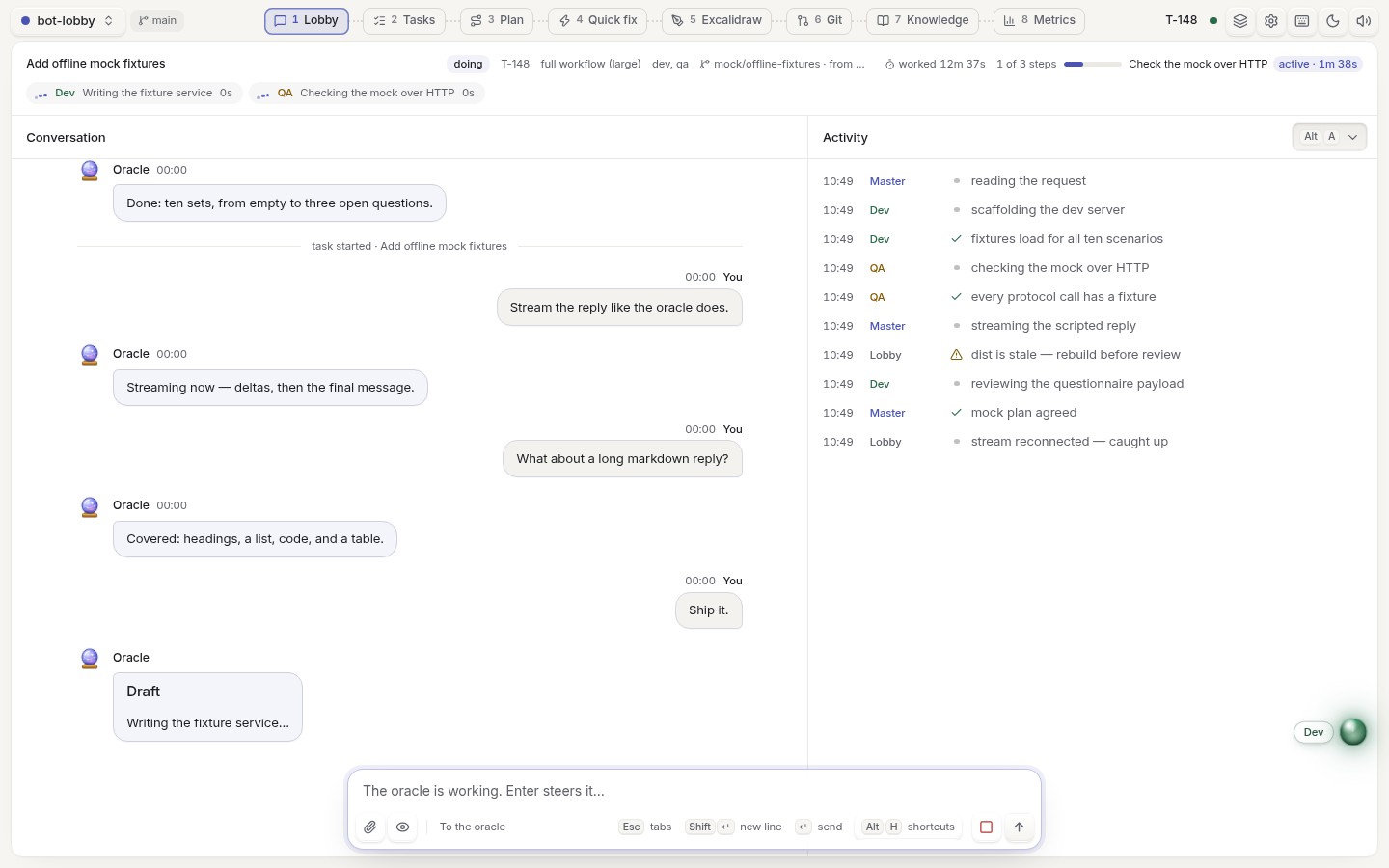
  "image": "https://raw.githubusercontent.com/a-t-h-i/bot-lobby/main/.github/screenshots/lobby.png",
  "extensions": [
    "./src/index.ts"
  ]
}
Security note
Pi packages can execute code and influence agent behavior. Review the source before installing third-party packages.
README
Bot-Lobby
Bot-lobby is a determenistic agentic coding engine. You can come up with a vague description of what you want to create, the agents (Oracle, Dev, Design, QA and Research) ask you a series of questions to help you form a clear picture from the vague description you've provided. The agents can even generate UI mockups that you can pick from. Once you come to an agreement with the agents, they will then get to work, and the harness will enforce the agreed upon plan. The agents are required to follow it faithfully.
I came up with the name bot-lobby from my 6+ years worth of experience in playing online FPS games. The name is normally used as a joke or to mock the other players by stating that you're playing in a bot lobby (playing with robots) because of how incompetent they appear to be. The contrary is true for the bots in bot-lobby though, they are quite smart and capable... Well, depending on the models you choose of course.
AI written wall of text below:
Install
pi install npm:@a-t-h-i/bot-lobbyTry it first with pi -e npm:@a-t-h-i/bot-lobby, or from a checkout with pi -e ./src/index.ts.
The questionnaire and web tools are built in, so don't also install extensions with the same tool names.
Requires Pi 1.3.x (1.3.0 or later).
Use
- In Pi, run
/bot-lobbyto open the lobby in your browser.Ctrl+Shift+Mor/bot-lobby on|offswitches bot-lobby on or off; a new Pi session starts with it off. - Chat with the team in Lobby. Questions, code changes and small fixes happen right there: the
classifier hands each message to the agent whose area it is (a styling question to DESIGN, a
library question to RESEARCH, "where is this?" to a scout), and every reply is labelled with who
wrote it. Start a message with
@design,@dev,@qa,@research,@scoutor@masterto pick who answers yourself. - Type
/plan <idea>to plan it with the panel in Plan, or/task <request>to start it as a task for the team. Follow the agents in Lobby and Tasks; their steps fold into one line in the conversation and open in place.
/bot-lobby <request> in Pi also starts a task. --fast / --full picks the workflow, and
--branch / --worktree isolates it in git. Workers never commit: the oracle commits only the
files the task changed, after the project's linter and a QA pass sized to the change's risk.
The lobby
- Lobby: the team chat. The oracle and the agents answer here, each reply under its agent's
name; each run of agent steps shows inline, and Thinking holds their reasoning. Typing
@or/at the start of a message opens a list of agents or commands to pick from. - Plan: plan with a panel of agents. View plan (
V) opens the draft in a slide-out, where any line takes a comment. - Tasks: every task across sessions as a list or a board, with its steps, timings and Resume.
- Git: use the Pull requests / Issues switch to review pull requests or browse open issues
through
gh. Issues retain descriptions, existing comments, File issue and Plan it; pull-request reviews remain read-only and post nothing. - Knowledge: what each agent has learned about the project, which you can edit, annotate or ask about.
The rail on the left holds settings, the key list, the theme and sounds. The project switcher
(P) opens any folder on the machine running bot-lobby. Background sessions still run tasks;
follow their progress and use Resume in Tasks, without a separate Sessions conversation page.
Git opens pull requests at #/git and #/git/<number>, and issues at #/git/issues and
#/git/issues/<number>. Old #/issues bookmarks redirect to Git. Former Sessions and Excalidraw
addresses fall back to Lobby; Excalidraw integration is removed without deleting saved room links
or external boards.
The composer appears only on Lobby, Tasks, Plan and Knowledge, including supported detail routes and Knowledge's Docs/Chat views. On Git, Metrics and Settings it stays mounted but hidden and inert, preserving drafts and attachments (including uploads that finish while hidden) without taking space.
| Agent | Does |
|---|---|
| Oracle | Your Pi session: questions, plan, delegation and approvals |
| DESIGN | UI, frontend logic, styling and accessibility |
| DEV | Backend, APIs, data, security and integrations |
| QA | The final quality gate, at the depth the change's risk calls for |
| RESEARCH | External facts, with sources |
Keys
Every action button shows its key. Alt+1…Alt+9 switch tabs, j / k move through lists, /
focuses search or the message box, p switches project, d flips the theme and ? lists every key.
Configuration
Settings live in ~/.pi/bot-lobby/config.json (BOT_LOBBY_CONFIG_DIR moves them), and
/bot-lobby config shows what is in effect. Most are also in the lobby's Settings. Tasks and
project knowledge stay in .pi/bot-lobby/ inside your project.
The guide covers the rest: delivery and commits, crash recovery, knowledge and shared scripts, the classifier, delegation, compaction, and MCP tools and skills.