@adeildo/pi-look
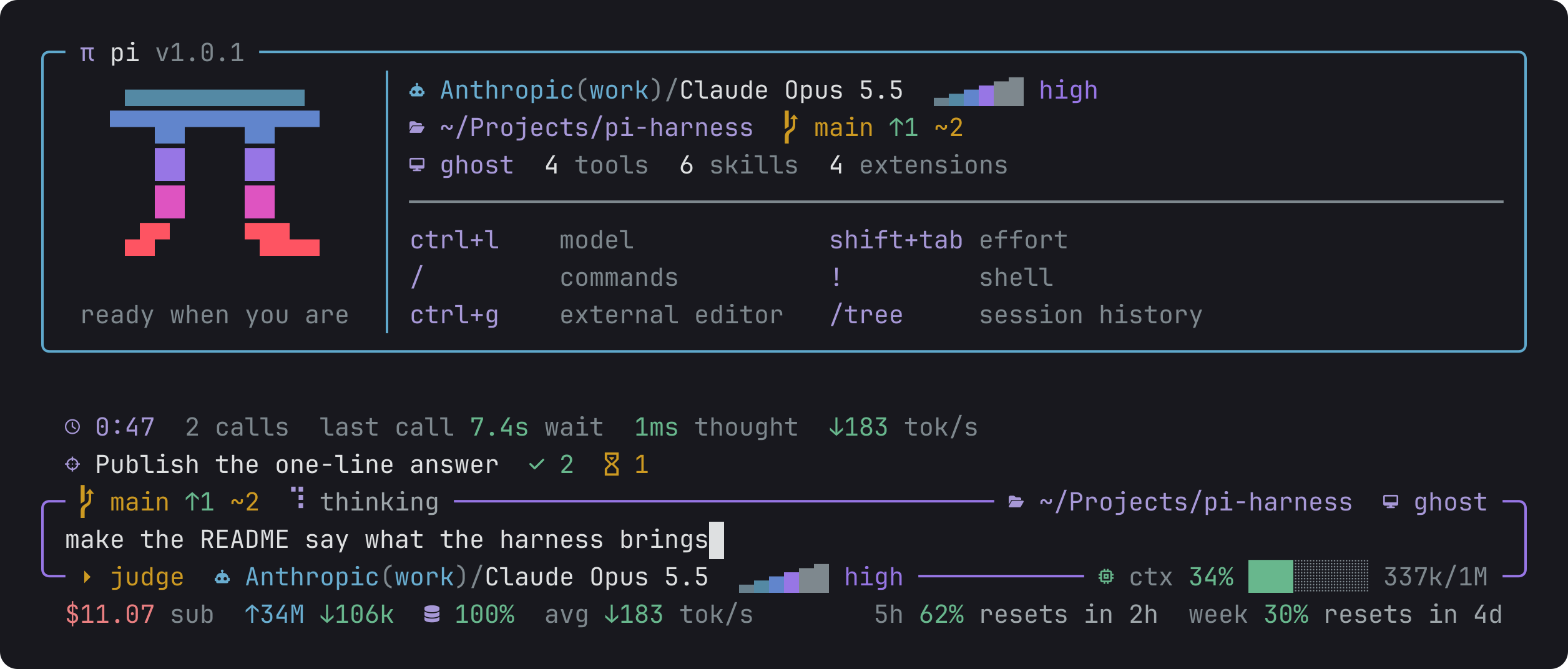
Pi's start screen, a framed editor and the footer, redrawn around the data that matters and painted only with the theme's colours.
Package details
Install @adeildo/pi-look from npm and Pi will load the resources declared by the package manifest.
$ pi install npm:@adeildo/pi-look- Package
@adeildo/pi-look- Version
5.5.0- Published
- Oct 6, 2026
- Downloads
- 804/mo · 804/wk
- Author
- adeildo
- License
- MIT
- Types
- extension
- Size
- 291.2 KB
- Dependencies
- 1 dependency · 3 peers
Pi manifest JSON
{
  "image": "https://raw.githubusercontent.com/felipeadeildo/pi-harness/main/packages/look/assets/preview.png",
  "extensions": [
    "./src/index.ts"
  ]
}
Security note
Pi packages can execute code and influence agent behavior. Review the source before installing third-party packages.
README
The screen
A finished answer takes a box of its own, so you can see what the model wants to run before it runs. The mark of the tool and its name sit on the top line, the command under them, and the reason it was allowed under that, when another model answered it. A line cuts the command off from what it printed, and the bottom line says how it went: a check, a cross, and how long it took. A command still running says running with the time so far. A tool from an MCP server shows its server and tool instead of mcp__server__tool. A tool with no drawing of its own, like the memory calls, gets the same box with its name and arguments on top and its text under the cut.
The strip above the editor is calm on purpose. Nothing moves while the model streams except the stopwatch.
| Piece | Means |
|---|---|
0:12 3 calls |
How long the agent has worked on this prompt, and how many calls to the model it made |
last call 1.7s wait 900ms thought ↓906 tok/s |
The last call: how long the model took to start, how long it thought then wrote, and how fast it writes |
The border around the editor carries the branch with its distance and changes, the folder, the permission mode, the model with an effort meter, and the context. It takes pi's own effort colour, so it warms up as the model thinks harder and turns to the shell colour in bash mode.
The spinner names the state instead of saying "Working": waiting for the first token, thinking, writing, drafting bash while the model writes the call, running bash while it runs.
The footer is the session: the cost, the tokens sent and received, the cache of the last prompt, the average speeds, and last what other packages report, because that changes the most.
It holds still
Numbers change on every frame, and the screen must not move with them.
- Every number sits in a cell of fixed width, so
17and2.8ktake the same room. - A value nobody knows yet shows as
–and does not appear later in the middle of the line. - The working time counts as a stopwatch,
0:59then1:00. - An estimate is drawn quieter, so you know it is one.
- The strip and the footer hold their line from the start, so the editor does not jump when the first answer arrives.
Pi records usage without a duration, so every finished answer leaves one small entry in the session with its time to the first token and its writing time. That is what keeps the averages right after a resume.
Your theme
The look never names a colour. Every piece names a theme token, so it follows whatever theme pi runs, and it moves with it when you change themes. The reference maps each piece to its token.
Settings
Alt+S opens them on the Look tab. You can reorder every piece of the strip, the frame and the footer, pick the frame style, the icons and the separator, and switch off what you do not want. The reference lists every key and every segment.
The framed editor, and the idea of writing into its borders, come from pi-open-tui, which this replaces. The segments with priorities come from oh-my-pi.
Part of pi-harness, which brings every piece in one install.