@adeildo/pi-look
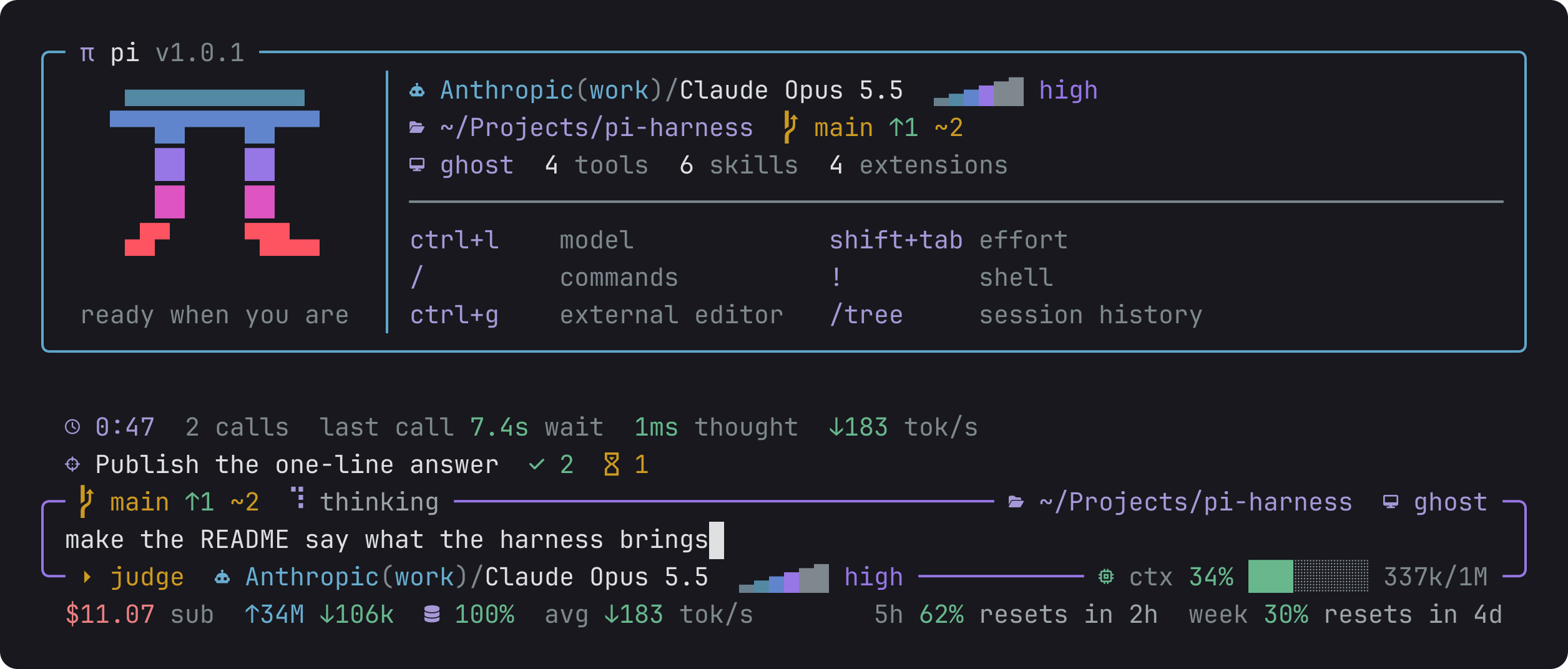
Pi's start screen, a framed editor and the footer, redrawn around the data that matters and painted only with the theme's colours.
Package details
Install @adeildo/pi-look from npm and Pi will load the resources declared by the package manifest.
$ pi install npm:@adeildo/pi-look- Package
@adeildo/pi-look- Version
6.0.0- Published
- Nov 2, 2026
- Downloads
- 3,360/mo · 962/wk
- Author
- adeildo
- License
- MIT
- Types
- extension
- Size
- 392.5 KB
- Dependencies
- 2 dependencies · 3 peers
Pi manifest JSON
{
  "image": "https://raw.githubusercontent.com/felipeadeildo/pi-harness/main/packages/look/assets/preview.png",
  "extensions": [
    "./src/index.ts"
  ]
}
Security note
Pi packages can execute code and influence agent behavior. Review the source before installing third-party packages.
README
While an agent works, you keep checking the same few things: what it is about to run, whether that went well, how long it has been, and what it costs. This package redraws pi's screen around those things. You get a start card, an editor framed with the branch and the model, a box around every command, and a footer with what the session costs.
The start card
The card shows the π, the folder, the branch, the model, and the name that the rooms and the remote page use for this session. Under them, it lists only what changed or waits on you since your last session in the folder:
- an account that needs you to sign in again
- files in conflict, or a branch behind its remote
- a failed CI run on the branch
- a pull request of yours with changes requested or a new comment
- other agents working in the folder
- a plan past 70% of its limit
- a new version of the harness
On a quiet day, the card says that nothing is new. GitHub is asked in the background, so the card never waits for it. Without gh, without a network, or outside GitHub, those lines just stay out.
Each command in a box
Every command gets its own box, so you see it before it runs: the command, who let it run and why, what it printed, and how long it took. For an edit, the box shows the diff, and only the words that changed get a light background.
Alt+O opens the tool output of the session, one call at a time. Ctrl+O opens every call in the transcript.
Above the editor
The strip above the editor stays calm. While the model streams, only the stopwatch moves.
| What you see | What it means |
|---|---|
0:12 3 calls |
How long the agent has worked on this prompt, and how many calls it made to the model |
last call 1.7s wait 900ms thought ↓906 tok/s |
How long the last call took to start, to think and write, and how fast it wrote |
answered in 0:47 2 calls $0.31 |
Once the run ends: how long it took, how many calls, and what it cost |
On the right, the strip shows the card the agent is working on, and the rooms this session is in:
- Each room shows how this session stands there:
●takes part,◐listens,○stepped out. - After the room come its agents, each with what it is doing:
◆working,⚑waiting on you,◇idle.
The messages that you send while the agent works wait above the editor, in a dashed frame. steer means the message goes in between the agent's calls, and next means it goes after the run.
The editor and the footer
The editor's border shows this session's name, the branch, the folder, the permission mode, the model and how full the context is. The footer shows what the session cost, the tokens, the cache, the speeds, and how much of your plan is left.
Nothing on the screen jumps around: every number has a fixed width, and a value that nobody knows yet shows as – instead of popping in later.
Settings
Alt+S opens them on the Look tab. You choose the icons (Nerd Font, Unicode or ASCII, to match your terminal's font), the style of the editor's frame, and whether your messages sit in a frame. Each choice shows a preview before you keep it.
Learn more
- How it works: the strip and the footer in detail, another session over the screen, and how the screen holds still.
- Reference: every setting and the theme token behind each color.
The framed editor comes from pi-open-tui, which this package replaces. The segments with priorities come from oh-my-pi.