@aeondave/pi-persona
Supervised multi-agent orchestration for Pi — async workers, live steering, cross-session collaboration, and switchable personas.
Package details
Install @aeondave/pi-persona from npm and Pi will load the resources declared by the package manifest.
$ pi install npm:@aeondave/pi-persona- Package
@aeondave/pi-persona- Version
1.16.2- Published
- Oct 8, 2026
- Downloads
- 300/mo · 300/wk
- Author
- aeondave
- License
- MIT
- Types
- extension
- Size
- 4.7 MB
- Dependencies
- 0 dependencies · 5 peers
Pi manifest JSON
{
  "image": "https://raw.githubusercontent.com/AeonDave/pi-persona/v1.16.2/assets/banner.png",
  "video": "https://cdn.jsdelivr.net/gh/AeonDave/pi-persona@6655d281ce7965a75303dd704bd29db73db04070/assets/demo1.mp4",
  "extensions": [
    "./src/extension.ts"
  ]
}
Security note
Pi packages can execute code and influence agent behavior. Review the source before installing third-party packages.
README
pi-persona



Give Pi a supervised team.
pi-persona adds supervised multi-agent orchestration to Pi:
async workers, live steering, cross-session collaboration, and switchable personas. It builds on
Pi's native SDK and tool hooks; the extension adds worker supervision and coordination.
Describe the outcome. A supervisor delegates work, gathers results, and checks the outcome;
you can inspect workers, redirect them, or stop a run while it is in progress.
Install · Team workflow · Cross-session collaboration · Personas · Documentation
Install
Requires Pi ≥ 1.0.0, Node.js ≥ 22.19, and Git. Configure a model provider in Pi first.
Run in your terminal:
pi install npm:@aeondave/pi-persona
pi
Then run these commands inside Pi to install the bundled personas and start using one:
/persona seed
/persona dev
Bundled personas are not installed automatically. /persona seed adds missing files and preserves
your customizations.
| Install option | Command |
|---|---|
| This project only | pi install -l npm:@aeondave/pi-persona |
| Pin this release | pi install npm:@aeondave/pi-persona@1.16.2 |
| Update an unpinned install | pi update npm:@aeondave/pi-persona |
| Git alternative | pi install git:github.com/AeonDave/pi-persona@v1.16.2 |
Restart Pi after updating. For a pinned install, install the new version or tag explicitly.
If switching from a Git install, remove that source first with
pi remove git:github.com/AeonDave/pi-persona (use your exact pinned source if applicable),
then install the npm package. Keep only one source configured to avoid loading the extension twice.
What it does
| Capability | What you get |
|---|---|
| Async workers | Specialists with their own roles, skills, and models; results return while the supervisor continues other work |
| Live steering | Inspect a worker, send guidance, or stop a run from the agent panel |
| Cross-session collaboration | Exocom connects independent Pi sessions to exchange findings and coordinate work |
| Councils and flows | Compare perspectives, run repair-and-check loops, or organize work into stages |
| Timers and monitors | Ask for a reminder or a notification when a build, file watcher, or event-producing program reports a change |
| Switchable personas | Choose how the supervisor approaches and orchestrates the work |
Work with your team
Once seeded, you can start directly with pi --persona dev. Describe the work in plain language:
Fix the cancellation bug. Delegate independent investigations, preserve the public API, implement the fix, and run the relevant checks.
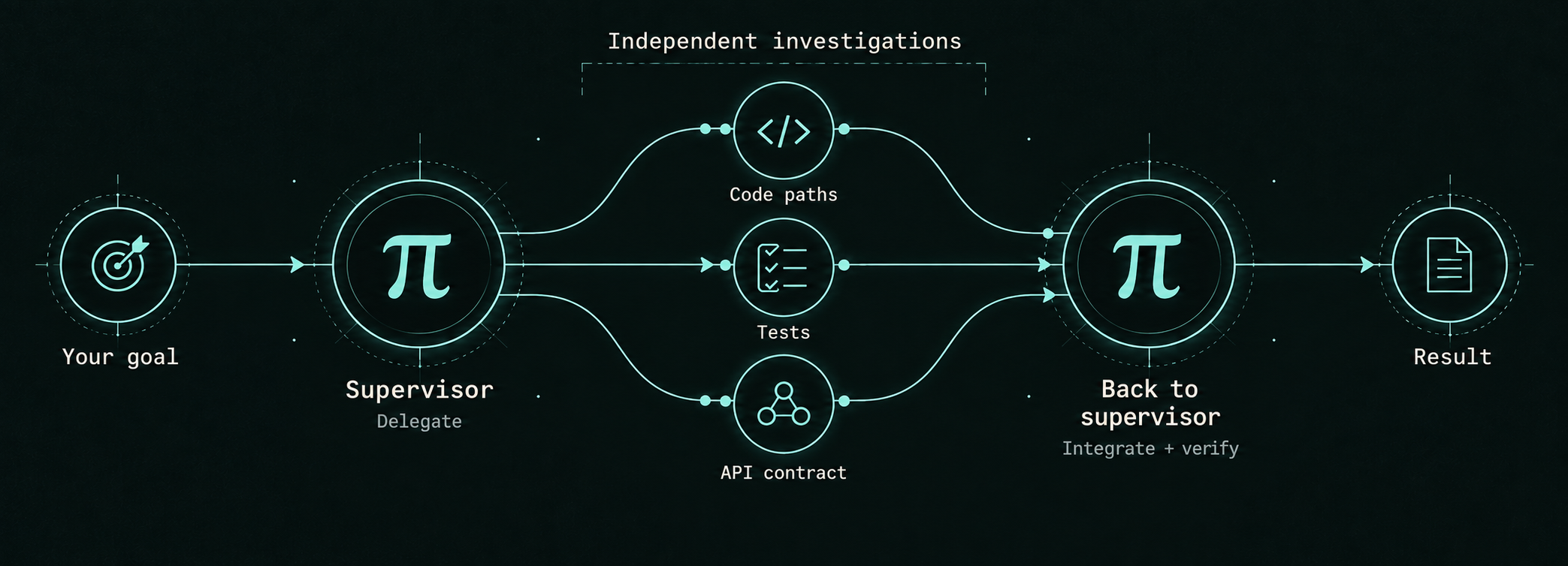
For example, specialists can investigate code paths, tests, and the API contract in parallel. Their findings return to the same supervisor, which integrates them, verifies the fix, and reports the outcome. This is one possible workflow, not a fixed pipeline; dependent steps run in order.
Interactive delegation runs in the background by default. Results return automatically when the supervisor is free; you can inspect or redirect a worker at any point.
Periodic async status appears as a durable, expandable operator-only card (five minutes by default); it does not start a model turn or enter model context. Completions, blocking asks, unread worker messages, and newly stalled workers still use their actionable notification paths.
Launch and control cards show the worker's name. Steering receipts preview the message sent;
expand with Ctrl+O (the default binding) to read it in full. A queued message is not proof that
the worker has acted on it.
| Key or command | Action |
|---|---|
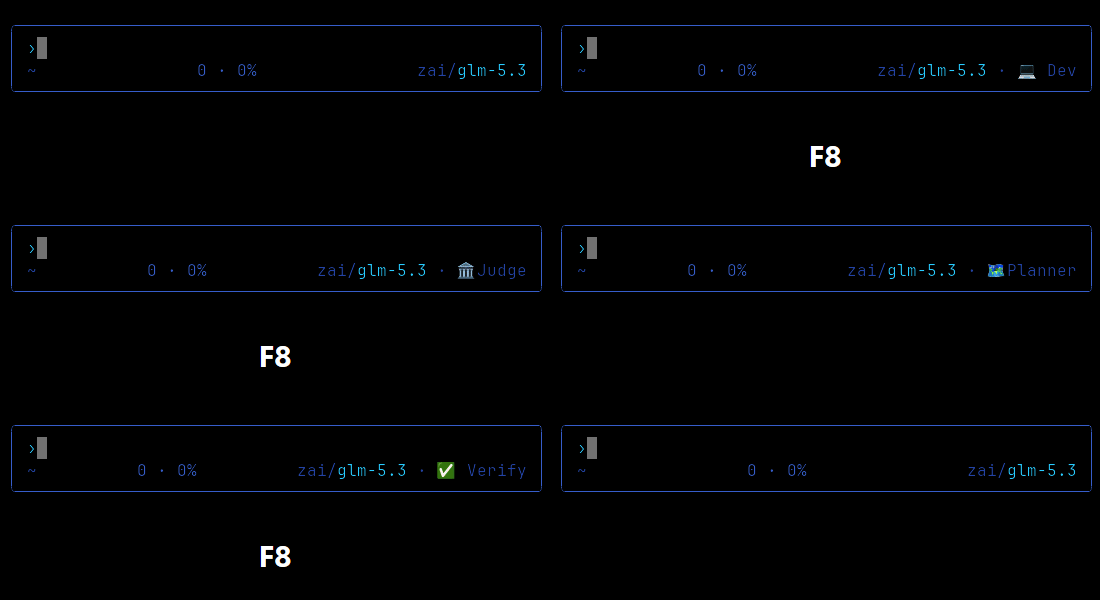
| F8 | Cycle through installed personas |
F9 or /agents |
Open the live agent panel |
| Enter / s / x in the panel | Open output / send guidance / request a stop |
/peek |
Show a compact progress summary |
/persona list |
List installed personas |
/persona off |
Turn off the active persona |
/models <query> |
Find an available model |
/doctor |
Check configuration and available capabilities |
For time-based work, ask “remind me in ten minutes.” For an event, ask “let me know when this build finishes.” Keep Pi open while timers and monitors are running; they are not restored after a restart. See timers and monitors for examples.
Collaborate with another Pi
Use Intercom to message workers managed by the current supervisor. Use Exocom to share findings or coordinate work between independent Pi sessions.
To enable Exocom, open two terminals in the same workspace and start each with:
pi --exocom --persona devThen ask one session to consult the other or agree who handles which files.
Use /exocom to inspect the connection and workspace code.
A session in another workspace can join using that exact, case-sensitive code:
pi --exocom=Ab0T --persona researcherReplace Ab0T with the code shown by /exocom. Both sessions must run on the same machine and
share a Pi agent directory. A peer joining from another workspace can advise and exchange results;
it cannot claim files in the joined workspace.
See the collaboration guide for day-to-day use.
Choose a persona
Personas configure the supervisor's approach and orchestration defaults. Start with dev for
everyday coding, or choose one for the work ahead.
| Persona | Best for |
|---|---|
dev |
Implementing, fixing, and reviewing code |
planner |
Turning an idea into a plan before changing code |
researcher |
Investigating questions and collecting sourced findings |
audit |
Reviewing a change from security, performance, and testing perspectives |
verify |
Repairing failures and checking the result with fresh tests |
swarm |
Applying the same operation across many independent items |
magi |
Comparing three perspectives through a vote, with dissent preserved |
judge |
Having an independent reviewer choose between competing proposals |
elite |
Scoped security assessment and evidence review |
These are editable starting points. Browse the bundled personas and worker agents, or read the practical guide for help choosing a workflow.
Strategies are not restricted to the similarly named persona: council can select judge, magi,
debate, critic-loop, or another installed shape when it adds value. Temporary members allow
custom role-based groups without team files. Model selection includes external arbiters. In councils
and flows, a provider failure or unavailable model can recover once on the supervisor's model, with
the switch visible and both attempts accounted; ordinary delegates keep explicit provider pins strict.
See the reference for an inline council example and recovery limits.
Make it yours
Edit installed personas and agents in ~/.pi/agent/persona/agents/, or add project-specific
overrides in .pi/agents/. Run /persona reload after editing.
/persona seed preserves existing files. /persona restore replaces bundled defaults, so use it
only when you intend to discard customizations to those files.
For optional long-term memory, add pi-persona-mind.
Documentation
| Guide | What's inside |
|---|---|
| Everyday use | Choosing a persona, following work, and reading results |
| Customization reference | Tool APIs, configuration, and copyable recipes |
| Strategies | Teams, councils, flows, and orchestration options |
| Timers and monitors | Reminders and programs that wake the supervisor |
| Architecture | Runtime behavior, boundaries, and design decisions |
| Shared prompts | The optional behavioral layer shared across personas |
| Telemetry | Integration events for companion extensions |
| Changelog | Notable changes, release by release |
Develop
From a checkout:
npm ci
npm run typecheck
npm test
Pi loads the TypeScript extension directly; there is no build step. The CI workflow runs strict typechecking, dependency auditing and the test suite on Linux and Windows. The OpenSSF badge links to the project's scored supply-chain checks; it is not a certification that the code is free of vulnerabilities.
See AGENTS.md for contribution conventions and the security policy for private vulnerability reporting. Licensed under MIT.