@aeondave/pi-persona
Supervised multi-agent orchestration for Pi — async workers, live steering, cross-session collaboration, and switchable personas.
Package details
Install @aeondave/pi-persona from npm and Pi will load the resources declared by the package manifest.
$ pi install npm:@aeondave/pi-persona- Package
@aeondave/pi-persona- Version
1.17.6- Published
- Oct 27, 2026
- Downloads
- 1,377/mo · 380/wk
- Author
- aeondave
- License
- MIT
- Types
- extension
- Size
- 5.4 MB
- Dependencies
- 0 dependencies · 5 peers
Pi manifest JSON
{
  "image": "https://raw.githubusercontent.com/AeonDave/pi-persona/v1.17.6/assets/banner.png",
  "video": "https://cdn.jsdelivr.net/gh/AeonDave/pi-persona@6655d281ce7965a75303dd704bd29db73db04070/assets/demo1.mp4",
  "extensions": [
    "./src/extension.ts"
  ]
}
Security note
Pi packages can execute code and influence agent behavior. Review the source before installing third-party packages.
README
pi-persona



Give Pi a supervised team.
pi-persona adds supervised multi-agent orchestration to Pi:
async workers, live steering, cross-session collaboration, and switchable personas. It builds on
Pi's native SDK and tool hooks; the extension adds worker supervision and coordination.
Describe the outcome. A supervisor delegates work, gathers results, and checks the outcome;
you can inspect workers, redirect them, or stop a run while it is in progress.
Install · Team workflow · Cross-session collaboration · Personas · Documentation
Install
Requires the latest stable Pi (currently 1.4.0), Node.js ≥ 22.19, and Git. Update Pi together with this plugin; historical Pi releases are not maintained. Configure a model provider in Pi first.
Run in your terminal:
pi install npm:@aeondave/pi-persona
pi
Then run these commands inside Pi to install the bundled personas and start using one:
/persona seed
/persona dev
Bundled personas are not installed automatically. /persona seed adds missing files and preserves
your customizations.
| Install option | Command |
|---|---|
| This project only | pi install -l npm:@aeondave/pi-persona |
| Pin this release | pi install npm:@aeondave/pi-persona@1.17.6 |
| Update an unpinned install | pi update npm:@aeondave/pi-persona |
| Git tag 1.17.6 | pi install git:github.com/AeonDave/pi-persona@v1.17.6 |
Restart Pi after updating. For a pinned install, install the new version or tag explicitly.
If switching from a Git install, remove that source first with
pi remove git:github.com/AeonDave/pi-persona (use your exact pinned source if applicable),
then install the npm package. Keep only one source configured to avoid loading the extension twice.
What it does
| Capability | What you get |
|---|---|
| Async workers | Specialists with their own roles, skills, models, and thinking levels; results return while the supervisor continues other work |
| Retained results | Bounded reports remain available after reload and can be read in pages without restarting workers |
| Live steering | Inspect a worker, send guidance, or stop a run from the agent panel |
| Cross-session collaboration | Exocom connects independent Pi sessions to exchange findings and coordinate work |
| Councils and flows | Compare perspectives, run repair-and-check loops, or organize work into stages |
| Timers and monitors | Ask for a reminder or a notification when a build, file watcher, or event-producing program reports a change |
| Switchable personas | Choose how the supervisor approaches and orchestrates the work |
Work with your team
Once seeded, you can start directly with pi --persona dev. Describe the work in plain language:
Fix the cancellation bug. Delegate independent investigations, preserve the public API, implement the fix, and run the relevant checks.
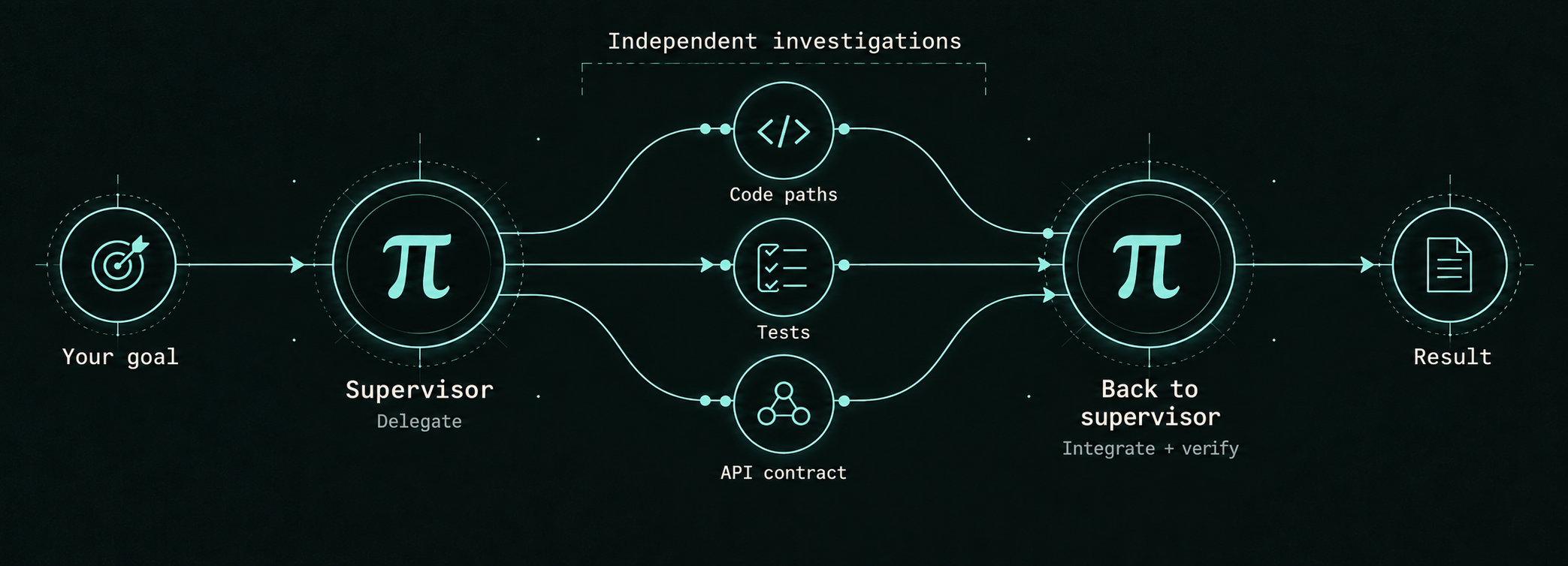
For example, specialists can investigate code paths, tests, and the API contract in parallel. Their findings return to the same supervisor, which integrates them, verifies the fix, and reports the outcome. This is one possible workflow, not a fixed pipeline; dependent steps run in order.
Interactive delegation, councils and flows always run in the background; there is no blocking mode, so you
can inspect, redirect, or stop a run at any point. Results return automatically when the supervisor is free, and
the model is told to end its turn rather than sleep, poll, or arm a timer to wait. Headless pi -p
blocks for the single turn and returns results inline.
Ordinary progress updates the live agent rows and F9 without adding periodic chat cards.
A stall warning shows how long no progress was observed; a later progress-resumed card closes that
episode. These operator-only cards do not start a model turn or enter model context. Periodic status
cards are opt-in through the progress check-in interval in /persona-settings (off by default).
Completions, blocking asks, and unread worker messages keep their supervisor wake paths.
Launch and control cards show the worker's name. Steering receipts preview the message sent;
expand with Ctrl+O (the default binding) to read it in full. A queued message is not proof that
the worker has acted on it.
| Key or command | Action |
|---|---|
| F8 | Cycle through installed personas |
F9 or /agents |
Open the live agent panel (sub-agents, armed timers and active monitors) |
| Enter / s / x / X in the panel | Open a group overview or worker output / send guidance / request a stop / stop every running agent from the tree (press twice) |
/peek |
Show a compact progress summary |
/flow <name> <task> |
Run a flow (/flow alone lists them with descriptions; a gate: true phase pauses for your approval). /orchestrate <task> runs the active persona's orchestration: block (no bundled persona declares one; they use council: via the council tool) |
/persona list |
List installed personas |
/persona off |
Turn off the active persona |
/persona models [council-persona] |
Refresh the catalog and reselect council models for the active persona |
/persona-settings |
Open pi-persona's settings in the TUI or RPC UI |
/persona-settings show |
Show a read-only settings report, including in headless sessions |
/models [query] |
Show recent model candidates with cost hints, or search the full catalog |
/doctor |
Check configuration and available capabilities |
The settings panel also includes Mind and Flow when those updated companions are loaded; all three
use one persona/settings.json. Skill Optimizer keeps its separate configuration.
In F9, select a group and press Enter to compare its workers, then open a worker's output. Escape returns to the group. Model, thinking effort, current activity and cumulative usage remain distinct. Completed delegate legs keep a short result preview until the batch finishes; use Intercom for the retained report afterward. Large groups keep hidden activity and pending asks visible in the compact summary without expanding the widget over your conversation.
For time-based work, ask “remind me in ten minutes.” For an event, ask “let me know when this build
finishes.” Keep Pi open while timers and monitors are running; they are not restored after a restart.
While armed, each shows as a row in the agent panel (F9) with its countdown, and x cancels it.
See timers and monitors for examples.
Collaborate with another Pi
Use Intercom to message workers managed by the current supervisor. Use Exocom to share findings or coordinate work between independent Pi sessions.
To enable Exocom, open two terminals in the same workspace and start each with:
pi --exocom --persona devUse /exocom to inspect the connection and workspace code. Sessions can exchange one-way messages,
record a voluntary task, or share a bounded evidence excerpt. Creating a task does not start work in
the other session; a peer chooses whether to take it.
A session in another workspace can join using that exact, case-sensitive code:
pi --exocom=Ab0T --persona researcherReplace Ab0T with the code shown by /exocom. Both sessions must run on the same machine and
share a Pi agent directory. A peer joining from another workspace can advise, exchange results, and
take read-only tasks; it cannot claim or take tasks that declare write paths in the joined workspace.
See the cross-session collaboration guide for the task, invitation, ask and evidence workflows.
Choose a persona
Personas configure the supervisor's approach and orchestration defaults. Start with dev for
everyday coding, or choose one for the work ahead.
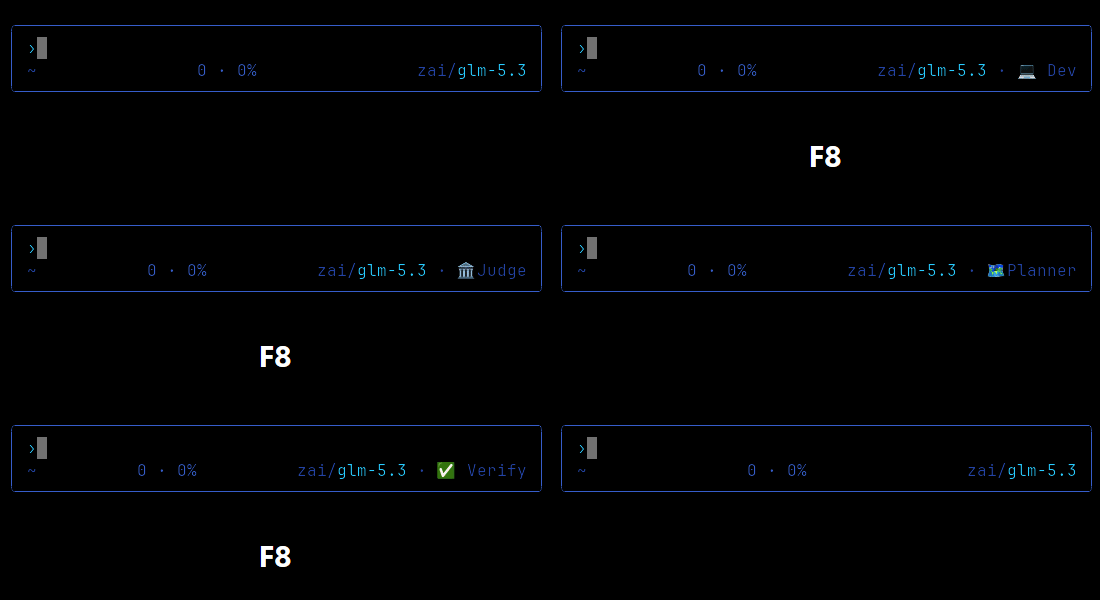
| Persona | Best for |
|---|---|
dev |
Implementing, fixing, and reviewing code |
data |
Data engineering, science, and analysis with explicit definitions, evidence, and uncertainty |
planner |
Turning an idea into a drafted, critiqued plan before changing code |
researcher |
Investigating questions and collecting sourced findings |
audit |
Reviewing a change from correctness, security, performance, and testing perspectives |
verify |
Repairing failures and checking the result with fresh tests |
swarm |
Applying the same operation across many independent items |
magi |
Comparing three perspectives through a vote, with dissent preserved |
judge |
Having an independent reviewer choose between competing proposals |
elite |
Red and blue security work: pentest, detection and response, purple loops, hardening validation |
These are editable starting points. Browse the bundled personas and worker agents, or read the practical guide for help choosing a workflow.
Strategies are not restricted to the similarly named persona: council can select judge, magi,
debate, critic-loop, or another installed shape when it adds value. Temporary members allow
custom role-based groups without team files. Model selection includes external arbiters. In councils
and flows, a provider failure or unavailable model can recover once on the supervisor's model, with
the switch visible and both attempts accounted; ordinary delegates keep explicit provider pins strict.
To replace old council assignments without changing supervisors, run /persona models magi
(or /persona models for the active council). Cancel a choice to keep its previous value.
See the reference for an inline council example and recovery limits.
Make it yours
Edit installed personas and agents in ~/.pi/agent/persona/agents/, or add project-specific
overrides in .pi/agents/. Run /persona reload after editing.
/persona seed adds missing bundled defaults and preserves existing files. /persona restore overwrites all bundled defaults
(personas, agents, teams, flows, contracts, presets and shared prompts), discarding customizations
to those files. It does not delete additional custom files: a persona pippo.md or an agent
pluto.md remains untouched. A custom file using the same destination as a bundled default is
replaced. Settings, credentials, sessions and project-local overrides are not reset.
/persona-settings is separate from Pi's /settings: it edits pi-persona preferences and saved
persona model assignments, not native Pi or compaction settings. In the TUI, / filters settings,
r resets the selected saved override, and m opens model assignment editing. Scalar preference
changes apply after restarting Pi or Pi's native /reload, not /new; /persona reload only
refreshes persona definitions. Model changes apply to future runs. See configuration and settings.
The Context settings show idle compaction as unavailable pending a Pi fix. Its implementation is retained with the agreed defaults (off, 15 minutes idle, context above 40%, one attempt per idle period), but cannot run or be enabled on the current host. Updating Pi alone will not activate it; Persona must first qualify the fix. Status and evidence.
Optional memory companion
pi-persona-mind 0.8.7 adds durable
project/persona memory, session notes and a visible automatic consolidation worker. It requires
pi-persona 1.17.5 or later. Install it with pi install npm:@aeondave/pi-persona-mind, then restart
Pi or run /reload. See its README for scope,
automatic-review limits and undo.
Documentation
| Guide | What's inside |
|---|---|
| Everyday use | Choosing a persona, following work, and reading results |
| Cross-session collaboration | Voluntary tasks, optional offers, asks, evidence and presence between Pi sessions |
| Customization reference | Tool APIs, configuration, and copyable recipes |
| Strategies | Teams, councils, flows, and orchestration options |
| Timers and monitors | Reminders and programs that wake the supervisor |
| Architecture | Runtime behavior, boundaries, and design decisions |
| Shared prompts | The optional behavioral layer shared across personas |
| Telemetry | Integration events for companion extensions |
| Changelog | Notable changes, release by release |
Develop
From a checkout:
npm ci
npm run typecheck
npm test
Pi loads the TypeScript extension directly; there is no build step.
Qualify the installed tarball on the current host without provider traffic or your profile with
node scripts/qualify-package.mjs --host <absolute-path-to-pi-coding-agent-package>.
The narrower source-SDK contract check is
node --import tsx scripts/qualify-host.mjs <absolute-path-to-pi-coding-agent-package>; both reject historical host versions.
The CI workflow runs strict
typechecking, dependency auditing and the test suite on Linux and Windows. The OpenSSF badge links to the project's
scored supply-chain checks; it is not a certification that the code is free of vulnerabilities.
See AGENTS.md for contribution conventions and the security policy for private vulnerability reporting. Licensed under MIT.