@aisensiy/pi-live-speed
See token speed live in Pi's footer, while the model is still generating.
Package details
Install @aisensiy/pi-live-speed from npm and Pi will load the resources declared by the package manifest.
$ pi install npm:@aisensiy/pi-live-speed- Package
@aisensiy/pi-live-speed- Version
1.1.1- Published
- Oct 8, 2026
- Downloads
- 454/mo · 13/wk
- Author
- aisensiy
- License
- MIT
- Types
- extension
- Size
- 371.9 KB
- Dependencies
- 0 dependencies · 1 peer
Pi manifest JSON
{
  "image": "./docs/screenshot.png",
  "video": "./docs/demo.mp4",
  "extensions": [
    "./src/index.ts"
  ]
}
Security note
Pi packages can execute code and influence agent behavior. Review the source before installing third-party packages.
README
pi-live-speed
See how fast your model is generating, while it's still generating.
Live token speed in Pi's footer. No commands to run, no dashboard to open, no waiting for the response to finish.
⚡ ~42.0 tok/s · ttft 2.3s · gen 4.1s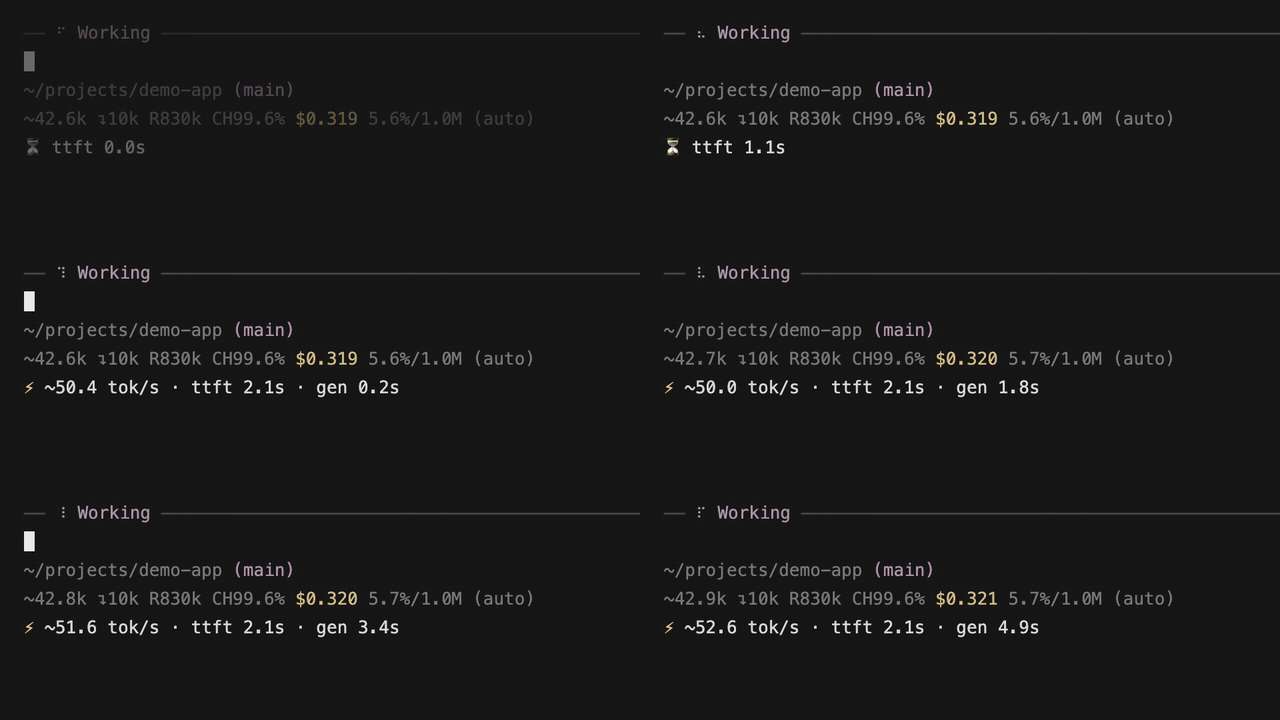
- Live speed: refreshes every 250 ms, even when the stream pauses.
- Live waiting time: see how long you've been waiting for the first token.
- Final speed: replaces the
~estimate with provider-reported usage when the response ends. - Stays out of the way: uses Pi's status area without replacing the footer.
Install
Requires Node.js 22.19+ and Pi. Tested with Pi 0.87.1.
pi install npm:@aisensiy/pi-live-speedOr install straight from Git:
pi install git:github.com/aisensiy/pi-live-speedRestart Pi or run /reload, then send a message. If you previously installed token-speed.ts, disable or remove it first to avoid duplicate displays.
Live display, response logs and cancellation have been checked on the author's machine. Testing on a second machine is next.
Good to know
~ means an estimate during streaming. Final speed uses reported output tokens over the client-observed generation time, including stalls. It is not server-side decoding speed.
Performance logging is enabled by default, without conversation text. See logging and configuration to disable it, and measurement details for the exact timing and log format.
Development
npm ci
npm run check
npm pack --dry-run