@alasano/pi-exa
Exa-powered web search, content retrieval, answers, and agentic search tools for pi
Package details
Install @alasano/pi-exa from npm and Pi will load the resources declared by the package manifest.
$ pi install npm:@alasano/pi-exa- Package
@alasano/pi-exa- Version
0.1.0- Published
- Jun 21, 2026
- Downloads
- not available
- Author
- alasano
- License
- MIT
- Types
- extension, skill
- Size
- 370 KB
- Dependencies
- 0 dependencies · 3 peers
Pi manifest JSON
{
  "extensions": [
    "./extensions"
  ],
  "skills": [
    "./skills"
  ],
  "image": "https://raw.githubusercontent.com/alasano/house-of-pi/master/packages/pi-exa/assets/screenshot.png"
}
Security note
Pi packages can execute code and influence agent behavior. Review the source before installing third-party packages.
README
@alasano/pi-exa
Exa-powered web search, content retrieval, answers, and agentic search tools for pi. This package has parity with the official Exa MCP server's current search and content-retrieval tools, then adds two Pi-specific capabilities: Exa's Answer API and the newly announced Exa Agent API for long-running research workflows.
It also ships a bundled exa-search skill that guides the agent on when to search, when to fetch, when to use Answer, and when to escalate to Exa Agent without flooding context.
Prerequisites
You need an Exa API key.
Install
pi install npm:@alasano/pi-exa
Authentication
Set EXA_API_KEY in the environment before starting pi, or run:
/exa-auth set
The command stores credentials under the pi agent directory for this package only.
Settings
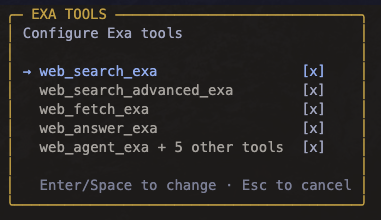
Run /exa-settings to open the tool settings overlay. Search, advanced search, fetch, and answer can be toggled individually. Agent lifecycle tools are toggled as one group so create/get/list/cancel/delete/events stay consistent.
Disabled tools are removed from the agent's active tool list immediately for the next turn.
Skill
The package includes the exa-search skill. It guides the agent to:
- start with lightweight search for source discovery
- use advanced search only when filters or content controls matter
- fetch selected URLs instead of dumping broad page text
- use Answer for concise sourced answers
- use the newly announced Exa Agent API for deeper multi-hop or long-running async research workflows
- retrieve the full stored Agent result after compact background completion notices
Workflow
Use the tools as a pipeline:
web_search_exafor normal source discovery.web_search_advanced_exawhen domains, dates, categories, freshness, summaries, highlights, subpages, or extracted text matter.web_fetch_exafor selected URLs that need full markdown content.web_answer_exawhen a direct answer with sources is enough.web_agent_exawhen the task is bigger than search: long-running research, multi-hop source gathering, or structured output across many sources.
Foreground Agent runs return the full Agent result to the agent. Background Agent runs return promptly, show a persistent status panel, and send a compact completion notice that tells the agent to call web_agent_get_exa before using detailed findings.
Tools (10)
Search, Content, And Answers
| Tool | Description |
|---|---|
web_search_exa |
Search the web with compact, highlight-first results for normal source discovery. |
web_search_advanced_exa |
Search with filters and content controls: domains, dates, categories, freshness, summaries, highlights, subpages, text extraction, and response context. |
web_fetch_exa |
Retrieve clean markdown/text content from selected known URLs. Defaults to bounded content so fetches stay focused. |
web_answer_exa |
Ask Exa's Answer API for a direct sourced answer when a result list would be too much. |
Exa Agent
web_agent_exa is the main Agent tool. Use it for high-value async workflows that need more than search/fetch/answer: long-running research, structured JSON output, or multi-hop source gathering.
| Tool | Role |
|---|---|
web_agent_exa |
Create an Agent run. Supports foreground wait mode and background tracking. |
web_agent_get_exa |
Retrieve the full stored Agent result, including text, structured output, citation grounding, usage, and cost. |
web_agent_list_exa |
List recent Agent runs to find IDs or inspect statuses. |
web_agent_cancel_exa |
Cancel a queued or running Agent run. |
web_agent_delete_exa |
Delete a stored Agent run when explicitly requested. |
web_agent_events_exa |
Inspect stored lifecycle events or replay the event stream for debugging/progress history. |
Agent Modes
| Mode | Behavior |
|---|---|
mode: "wait", monitor: "stream" |
Foreground run with server-sent lifecycle events. Best default when the user needs the result in the current turn. |
mode: "wait", monitor: "poll" |
Foreground run using GET /agent/runs/{id} polling. Useful if streaming is undesirable. |
mode: "background" |
Returns the run ID immediately, tracks the run in a pi widget, and sends a compact follow-up when it finishes. monitor is ignored in background mode. |
Output And Context Discipline
- Search defaults to compact highlights rather than full page text.
- Advanced search returns extracted text by default; use
textMaxCharactersfor broad queries. - Fetch is for selected known URLs, not broad discovery.
- Agent foreground/get results return full structured output and citation grounding to the agent.
- Background completion notices stay compact and instruct the agent to retrieve the full result before answering in detail.
- Ctrl+O in the UI exposes expanded previews/raw API diagnostics without changing what the agent receives.