pi-linear
Linear integration for pi with 64+ tools covering issues, projects, documents, initiatives, comments, relations, and more. Includes multi-workspace auth and a per-tool settings overlay.
Prerequisites
You need a Linear API key. To create one:
- Go to Linear Settings > Account > Security & Access > API
- Click Create key and give it a name (e.g. "pi")
- Under Permissions, select Only select permissions with Read and Write enabled. Leave Admin unchecked.
- Under Team access, choose All teams you have access to or scope to specific teams if you prefer
- Click Create and copy the key
Install
pi install npm:@alasano/pi-linear
Authentication
The extension can use either stored workspaces or the LINEAR_API_KEY environment variable. Stored workspaces are preferred by default so multi-account switching keeps working even if LINEAR_API_KEY is set globally.
Use the /linear-auth command to manage workspaces and choose the auth preference:
| Command |
Description |
/linear-auth add <name> |
Add a workspace with an API key (prompts for key) |
/linear-auth remove <name> |
Remove a workspace (shows selector if name omitted) |
/linear-auth switch <name> |
Switch active workspace and prefer stored workspaces |
/linear-auth prefer workspace|env |
Choose whether stored workspaces or LINEAR_API_KEY are tried first |
/linear-auth status |
Show auth preference, active source, and configured workspaces |
/linear-auth |
Same as status |
When you add your first workspace, it becomes active automatically. Adding a second workspace prompts you to switch. After a /reload with two or more workspaces configured, the agent gets a linear_switch_workspace tool and can switch between them when asked.
Default auth resolution order (/linear-auth prefer workspace):
- Active stored workspace (if any workspaces are configured)
LINEAR_API_KEY environment variable (fallback when no workspace is active)- Interactive prompt (asks you to set up a key)
Environment auth resolution order (/linear-auth prefer env):
LINEAR_API_KEY environment variable- Active stored workspace (fallback when
LINEAR_API_KEY is not set)
- Interactive prompt (asks you to set up a key)
Credentials and auth preference are stored at ~/.pi/agent/extensions/linear/credentials.json.
Tool settings
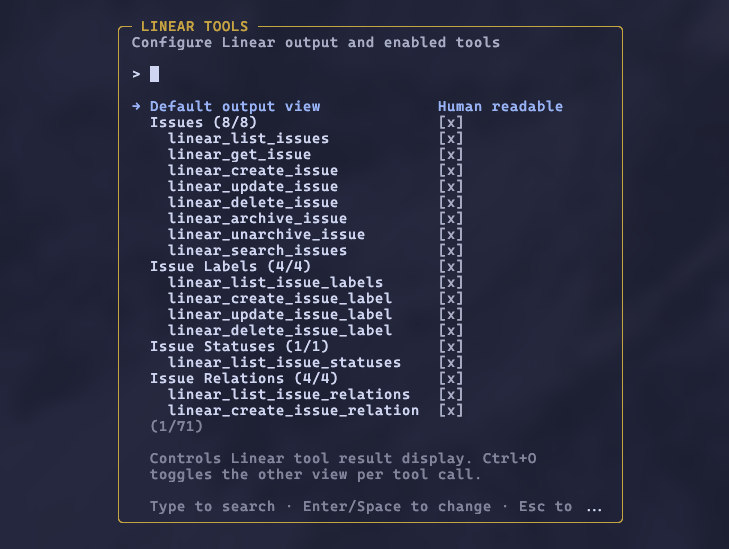
Run /linear-settings to open an overlay where you can choose the default output view and enable or disable tools by category or individually. Linear results default to a human-readable view, with full JSON available via Ctrl+O; you can flip the default to full JSON if you prefer. Disabled tools are removed from the LLM's context entirely. Preferences persist across sessions.
Tools (64)
Enum values, sort keys, and filter value hints in the tool schemas mirror Linear's GraphQL schema introspection.
Issues
| Tool |
Description |
linear_list_issues |
List issues with filters, pagination, and sort |
linear_get_issue |
Get full issue details by identifier (ENG-123) or id |
linear_create_issue |
Create an issue with full IssueCreateInput support |
linear_update_issue |
Update an issue with full IssueUpdateInput support |
linear_delete_issue |
Delete an issue (admins can permanently delete) |
linear_archive_issue |
Archive or trash an issue |
linear_unarchive_issue |
Restore an archived issue |
linear_search_issues |
Search issues by text, with optional comment search and team boost |
Issue Labels
| Tool |
Description |
linear_list_issue_labels |
List issue labels with team filter |
linear_create_issue_label |
Create an issue label |
linear_update_issue_label |
Update an issue label |
linear_delete_issue_label |
Delete an issue label |
Issue Statuses
| Tool |
Description |
linear_list_issue_statuses |
List workflow states (issue statuses) |
Issue Relations
| Tool |
Description |
linear_list_issue_relations |
List issue relations |
linear_create_issue_relation |
Create a relation (blocks, duplicate, related, similar) |
linear_update_issue_relation |
Update a relation |
linear_delete_issue_relation |
Delete a relation |
Projects
| Tool |
Description |
linear_list_projects |
List projects with filters, pagination, and sort |
linear_get_project |
Get full project details by id |
linear_save_project |
Create or update a project |
linear_delete_project |
Delete a project |
linear_archive_project |
Archive or trash a project |
linear_unarchive_project |
Restore an archived project |
List and search results include pageInfo in the JSON output for cursor pagination. Project list results use a bounded summary selection, and linear_get_project plus project save results include the project's markdown content body.
Project Labels
| Tool |
Description |
linear_list_project_labels |
List project labels |
linear_create_project_label |
Create a project label |
linear_update_project_label |
Update a project label |
linear_delete_project_label |
Delete a project label |
Project Relations
| Tool |
Description |
linear_list_project_relations |
List project relations |
linear_create_project_relation |
Create a project relation |
linear_update_project_relation |
Update a project relation |
linear_delete_project_relation |
Delete a project relation |
Documents
| Tool |
Description |
linear_list_documents |
List documents with filters and pagination |
linear_get_document |
Get full document details by id |
linear_create_document |
Create a document |
linear_update_document |
Update a document |
linear_delete_document |
Delete a document |
linear_unarchive_document |
Restore an archived document |
Comments
| Tool |
Description |
linear_list_comments |
List comments with filters and pagination |
linear_create_comment |
Create a comment on an issue, project update, etc. |
linear_update_comment |
Update a comment |
linear_delete_comment |
Delete a comment |
Initiatives
| Tool |
Description |
linear_list_initiatives |
List initiatives with filters, pagination, and sort |
linear_get_initiative |
Get full initiative details by id |
linear_save_initiative |
Create or update an initiative |
linear_delete_initiative |
Delete an initiative |
linear_archive_initiative |
Archive an initiative |
linear_unarchive_initiative |
Restore an archived initiative |
Milestones
| Tool |
Description |
linear_list_milestones |
List project milestones |
linear_get_milestone |
Get milestone details by id |
linear_save_milestone |
Create or update a milestone |
linear_delete_milestone |
Delete a milestone |
Teams
| Tool |
Description |
linear_list_teams |
List teams with workflow states |
linear_get_team |
Get team details by id |
Users
| Tool |
Description |
linear_list_users |
List users |
linear_get_user |
Get user details by id |
Workspaces
| Tool |
Description |
linear_switch_workspace |
Switch active workspace (only available with 2+ workspaces) |
Custom Views & Cycles
| Tool |
Description |
linear_list_views |
List custom views of any type (filter, pagination, order) |
linear_get_view |
Get a custom view by id or slug (incl. project/initiative views) |
linear_create_view |
Create an issues/projects/initiatives/updates view |
linear_update_view |
Update a custom view by id (name, filters, icon, color, shared) |
linear_delete_view |
Delete a custom view by id |
linear_set_view_preferences |
Set display preferences (grouping & columns) for a custom view |
linear_list_cycles |
List cycles (filter by team, pagination, order) |
linear_get_cycle |
Get cycle details by id or slug |
linear_create_cycle |
Create a cycle for a team (startsAt / endsAt, optional name) |
linear_update_cycle |
Update a cycle by id (name, dates, completion) |
linear_archive_cycle |
Archive a cycle by id and unlink its assigned issues |
Custom view display settings (group by assignee/status/priority, show Estimate/Due date
columns) are stored per user via linear_set_view_preferences; open the view afterwards to
see the grouping applied.
Requirements
- Pi interactive mode (settings overlay uses the widget API)