pi-linear
Linear integration for pi with 55+ tools covering issues, projects, documents, initiatives, comments, relations, and more. Includes multi-workspace auth and a per-tool settings overlay.
Prerequisites
You need a Linear API key. To create one:
- Go to Linear Settings > Account > Security & Access > API
- Click Create key and give it a name (e.g. "pi")
- Under Permissions, select Only select permissions with Read and Write enabled. Leave Admin unchecked.
- Under Team access, choose All teams you have access to or scope to specific teams if you prefer
- Click Create and copy the key
Install
pi install npm:@alasano/pi-linear
Authentication
The extension auto-detects the LINEAR_API_KEY environment variable if set globally. No setup needed in that case.
For multi-workspace support or if you don't have the env var, use the /linear-auth command:
| Command |
Description |
/linear-auth add <name> |
Add a workspace with an API key (prompts for key) |
/linear-auth remove <name> |
Remove a workspace (shows selector if name omitted) |
/linear-auth switch <name> |
Switch active workspace (shows selector if name omitted) |
/linear-auth status |
Show current auth source and configured workspaces |
/linear-auth |
Same as status |
When you add your first workspace, it becomes active automatically. Adding a second workspace prompts you to switch. After a /reload with two or more workspaces configured, the agent gets a linear_switch_workspace tool and can switch between them when asked.
Auth resolution order:
- Active stored workspace (if any workspaces are configured)
LINEAR_API_KEY environment variable (fallback when no workspaces configured)- Interactive prompt (asks you to set up a key)
Credentials are stored at ~/.pi/agent/state/extensions/linear/credentials.json.
Tool settings
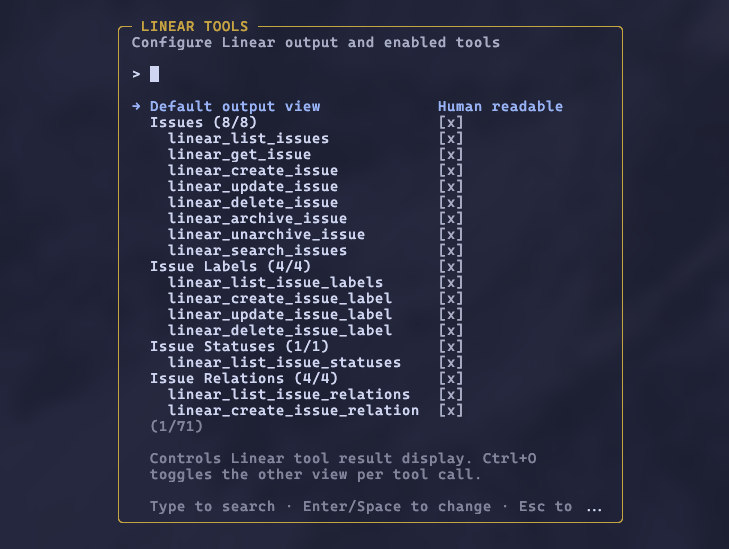
Run /linear-settings to open an overlay where you can choose the default output view and enable or disable tools by category or individually. Linear results default to a human-readable view, with full JSON available via Ctrl+O; you can flip the default to full JSON if you prefer. Disabled tools are removed from the LLM's context entirely. Preferences persist across sessions.
Tools (55)
Issues
| Tool |
Description |
linear_list_issues |
List issues with filters, pagination, and sort |
linear_get_issue |
Get full issue details by identifier (ENG-123) or id |
linear_create_issue |
Create an issue with full IssueCreateInput support |
linear_update_issue |
Update an issue with full IssueUpdateInput support |
linear_delete_issue |
Delete an issue (admins can permanently delete) |
linear_archive_issue |
Archive or trash an issue |
linear_unarchive_issue |
Restore an archived issue |
linear_search_issues |
Search issues by text, with optional comment search and team boost |
Issue Labels
| Tool |
Description |
linear_list_issue_labels |
List issue labels with team filter |
linear_create_issue_label |
Create an issue label |
linear_update_issue_label |
Update an issue label |
linear_delete_issue_label |
Delete an issue label |
Issue Statuses
| Tool |
Description |
linear_list_issue_statuses |
List workflow states (issue statuses) |
Issue Relations
| Tool |
Description |
linear_list_issue_relations |
List issue relations |
linear_create_issue_relation |
Create a relation (blocks, duplicate, related, similar) |
linear_update_issue_relation |
Update a relation |
linear_delete_issue_relation |
Delete a relation |
Projects
| Tool |
Description |
linear_list_projects |
List projects with filters, pagination, and sort |
linear_get_project |
Get full project details by id |
linear_save_project |
Create or update a project |
linear_delete_project |
Delete a project |
linear_archive_project |
Archive or trash a project |
linear_unarchive_project |
Restore an archived project |
Project Labels
| Tool |
Description |
linear_list_project_labels |
List project labels |
linear_create_project_label |
Create a project label |
linear_update_project_label |
Update a project label |
linear_delete_project_label |
Delete a project label |
Project Relations
| Tool |
Description |
linear_list_project_relations |
List project relations |
linear_create_project_relation |
Create a project relation |
linear_update_project_relation |
Update a project relation |
linear_delete_project_relation |
Delete a project relation |
Documents
| Tool |
Description |
linear_list_documents |
List documents with filters and pagination |
linear_get_document |
Get full document details by id |
linear_create_document |
Create a document |
linear_update_document |
Update a document |
linear_delete_document |
Delete a document |
linear_unarchive_document |
Restore an archived document |
Comments
| Tool |
Description |
linear_list_comments |
List comments with filters and pagination |
linear_create_comment |
Create a comment on an issue, project update, etc. |
linear_update_comment |
Update a comment |
linear_delete_comment |
Delete a comment |
Initiatives
| Tool |
Description |
linear_list_initiatives |
List initiatives with filters, pagination, and sort |
linear_get_initiative |
Get full initiative details by id |
linear_save_initiative |
Create or update an initiative |
linear_delete_initiative |
Delete an initiative |
linear_archive_initiative |
Archive an initiative |
linear_unarchive_initiative |
Restore an archived initiative |
Milestones
| Tool |
Description |
linear_list_milestones |
List project milestones |
linear_get_milestone |
Get milestone details by id |
linear_save_milestone |
Create or update a milestone |
linear_delete_milestone |
Delete a milestone |
Teams
| Tool |
Description |
linear_list_teams |
List teams with workflow states |
linear_get_team |
Get team details by id |
Users
| Tool |
Description |
linear_list_users |
List users |
linear_get_user |
Get user details by id |
Workspaces
| Tool |
Description |
linear_switch_workspace |
Switch active workspace (only available with 2+ workspaces) |
Requirements
- Pi interactive mode (settings overlay uses the widget API)