@alexeiled/pi-fusion
Stronger answers for hard Pi questions via a parallel model panel + judge, built on pi-subagents
Package details
Install @alexeiled/pi-fusion from npm and Pi will load the resources declared by the package manifest.
$ pi install npm:@alexeiled/pi-fusion- Package
@alexeiled/pi-fusion- Version
0.5.2- Published
- Jul 13, 2026
- Downloads
- 1,654/mo · 274/wk
- Author
- alexeiled
- License
- MIT
- Types
- extension, skill
- Size
- 216.8 KB
- Dependencies
- 0 dependencies · 3 peers
Pi manifest JSON
{
  "extensions": [
    "./src/index.ts"
  ],
  "skills": [
    "./skills"
  ],
  "subagents": {
    "agents": [
      "./agents"
    ]
  },
  "image": "https://raw.githubusercontent.com/alexei-led/pi-fusion/master/docs/assets/fusion-icon.png"
}
Security note
Pi packages can execute code and influence agent behavior. Review the source before installing third-party packages.
README
pi-fusion




Parallel models. One judge. Better answers.
pi-fusion is a Pi extension for hard technical questions.
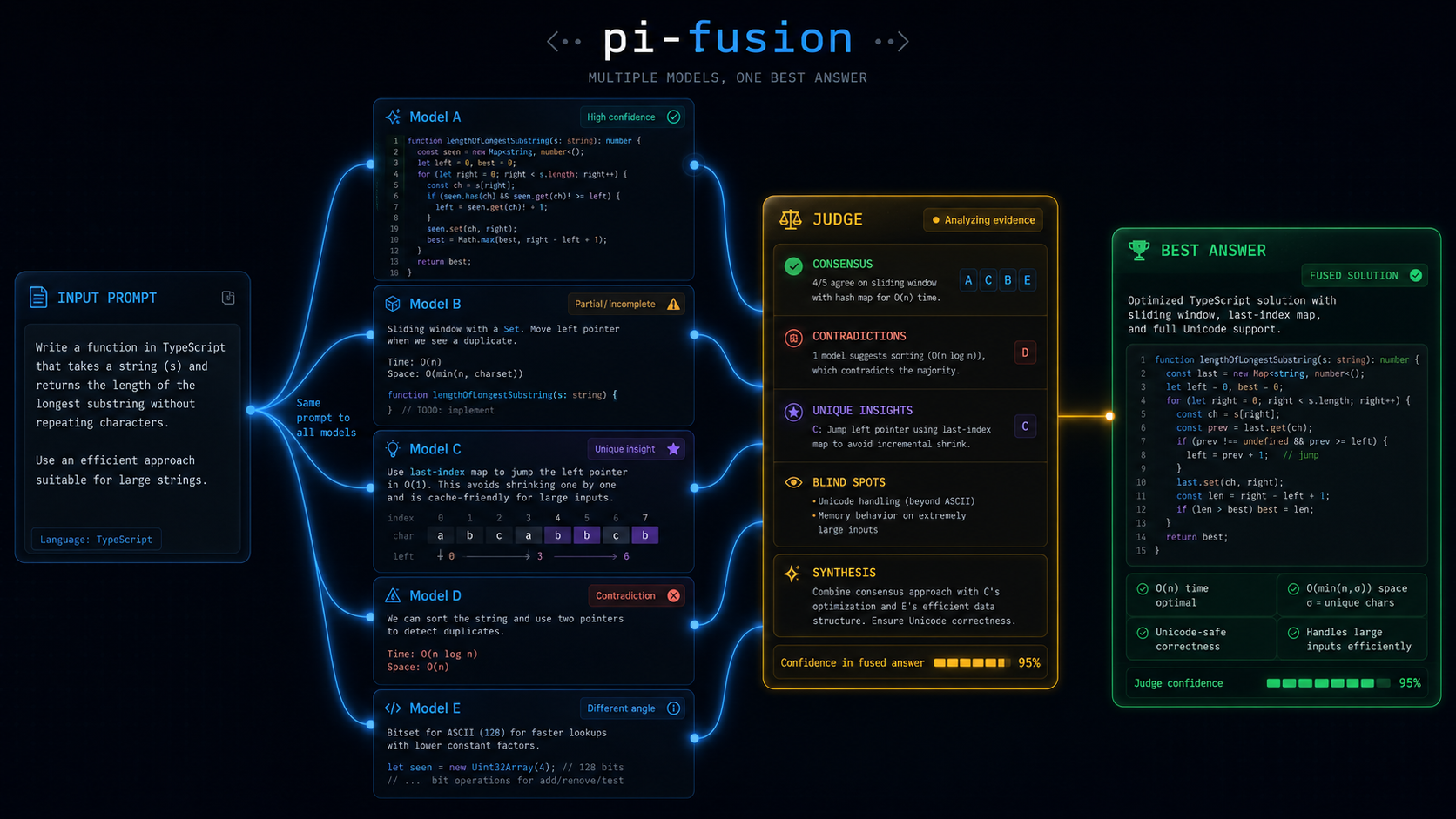
It uses pi-subagents to send the same prompt through a small parallel model panel,
then asks a judge agent to compare the outputs and return the best realistic answer.
CI covers lint, typecheck, unit tests, integration tests, package smoke tests,
and npm pack --dry-run.
Why Fusion exists
Hard questions are often bottlenecked by one model's search path.
pi-fusion trades latency for diversity:
- the same prompt fans out to several model runs in parallel
- each model explores the problem from a different training prior and reasoning path
- overlap raises confidence
- disagreement exposes risk
- the judge keeps the strongest parts and drops weak, partial, or conflicting ones
This is evidence selection, not majority vote.
%%{init: {"theme": "base", "flowchart": {"curve": "basis", "nodeSpacing": 28, "rankSpacing": 48}, "themeVariables": {"background": "#050816", "fontFamily": "ui-monospace, SFMono-Regular, Menlo, Monaco, Consolas, monospace", "primaryTextColor": "#E5F0FF", "lineColor": "#38bdf8", "tertiaryColor": "#0b1220"}}}%%
flowchart LR
  classDef prompt fill:#071321,stroke:#38bdf8,color:#dbeafe,stroke-width:2px;
  classDef modelA fill:#081223,stroke:#38bdf8,color:#dbeafe,stroke-width:2px;
  classDef modelB fill:#120826,stroke:#a855f7,color:#f3e8ff,stroke-width:2px;
  classDef modelC fill:#08180f,stroke:#22c55e,color:#dcfce7,stroke-width:2px;
  classDef modelD fill:#241307,stroke:#f59e0b,color:#fef3c7,stroke-width:2px;
  classDef modelE fill:#260712,stroke:#ff4d8d,color:#ffd1e7,stroke-width:2px;
  classDef judge fill:#2b1905,stroke:#f59e0b,color:#fef3c7,stroke-width:3px;
  classDef answer fill:#062814,stroke:#22c55e,color:#dcfce7,stroke-width:3px;
  classDef note fill:#0b1220,stroke:#475569,color:#cbd5e1,stroke-width:1px;

  P["input prompt<br/>same question to every model"]:::prompt

  subgraph PANEL[parallel model panel]
    direction TB
    A["model A<br/>strong baseline candidate"]:::modelA
    B["model B<br/>finds contradiction"]:::modelB
    C["model C<br/>adds unique insight"]:::modelC
    D["model D<br/>fast practical path"]:::modelD
    E["model E<br/>catches edge case"]:::modelE
  end

  J["judge<br/>consensus • contradictions • blind spots"]:::judge
  R["best answer<br/>selected or synthesized"]:::answer
  N["not majority vote<br/>best evidence wins"]:::note

  P --> A
  P --> B
  P --> C
  P --> D
  P --> E

  A --> J
  B --> J
  C --> J
  D --> J
  E --> J

  J --> R
  J -.-> N

  linkStyle 0,5 stroke:#38bdf8,stroke-width:3px;
  linkStyle 1,6 stroke:#a855f7,stroke-width:3px;
  linkStyle 2,7 stroke:#22c55e,stroke-width:3px;
  linkStyle 3,8 stroke:#f59e0b,stroke-width:3px;
  linkStyle 4,9 stroke:#ff4d8d,stroke-width:3px;
  linkStyle 10 stroke:#22c55e,stroke-width:4px;
  linkStyle 11 stroke:#94a3b8,stroke-width:2px,stroke-dasharray: 5 5;
Why a panel can beat one model
Single-model answers are brittle on hard tasks. They are limited by one model's priors, one reasoning path, and one failure mode.
A panel helps because:
- different models are trained differently and make different bets
- errors are less correlated, so blind spots do not line up perfectly
- consensus is a useful confidence signal without pretending certainty
- disagreement tells you where the answer is fragile
- a judge can select or synthesize the best realistic answer from the set
The result is slower, but usually better for design choices, risk review, tricky debugging, and research-heavy questions. It is not intended for routine edits, formatting, or obvious one-step fixes.
What the judge actually does
The judge gets:
- the original prompt
- every panel output
- panel failures and blind spots
- the configured judge model
It then:
- finds consensus
- preserves real disagreements
- spots weak or incomplete answers
- pulls forward unique insights worth keeping
- returns one clear recommendation and next step
It does not edit files or spawn more subagents. It does one job: choose or synthesize the best realistic answer.
Good fit
Use it for questions like:
- Which design should we choose?
- What will break if I change this?
- Is this PR or release flow safe?
- What did I miss?
- What is the right test strategy here?
Do not use it for trivial edits, formatting, or obvious one-step fixes.
Commands
/fusion
/fusion <prompt>
/fusion --profile <name> <prompt>
/fusion -p <name> <prompt>
/fusion status
/fusion stop
/fusion init
Plan execution RPC
Other Pi extensions can control Fusion through the versioned event-bus contract
fusion:rpc:v1:
- emit requests on
fusion:rpc:v1:request - listen for the response on
fusion:rpc:v1:reply:<requestId>before emitting - send
{ "version": 1, "requestId": "...", "method": "...", "params": {} } - receive
{ "version": 1, "requestId": "...", "method": "...", "success": true, "data": {} }or a failure with a typederror
Methods:
ping— return the RPC version and supported methodsstart— requirespromptand a non-emptyoperationId; accepts optionalprofile. Reusing an operation ID returns the original run instead of starting another, including after Fusion restores the Pi session history.status— return structured run state byoperationId,runId, or the current/last runresult— return a terminal run and report; active runs returnnot_readycancel— cancel the selected active run, or report that the selected terminal run was not cancelledadopt— confirm and return a run from restored session history byrunId
start returns { operationId, replayed, run }. status and result
return { run }. cancel returns { cancelled, run? }. adopt returns
{ adopted: true, run }. Run state contains runId, optional operationId,
phase, terminal, and optional report or error.
Failure codes are invalid_request, unsupported_method, busy, not_found,
not_ready, unavailable, start_failed, cancel_failed, and internal.
busy, not_ready, and lookup failures include structured details when available.
Quick start
Requirements:
- Pi
- Node.js 22.19+
pi-subagents
pi install npm:pi-subagents
pi install npm:@alexeiled/pi-fusion
Then reload Pi:
/reload
For commands, config, and troubleshooting details, see docs/user-guide.md.
Notes
- Bare
/fusionshows a short command summary. - Config is optional. Defaults work. Use
/fusion initwhen you want project config. - Project config lives at
.pi/fusion.json. Global config lives at~/.pi/agent/fusion.json. - Output appears as a Pi custom message. Active progress also uses the
fusionstatus key. - Active runs are reconciled from
pi-subagentslifecycle artifacts, not only completion events. pi-fusiondoes not own the footer.- Prompts and inspected snippets may be sent to every configured panel provider and to the judge through
pi-subagents. - Reports include available per-panel and judge time, aggregate model time, usage, estimated cost, and model failure details. Missing provider usage is shown as unknown;
$0.0000remains a known zero-cost value. Modelis lifecycle metadata.Configured modelis the profile request; both appear when execution differs from the request.stopWhenPanelAgreesis an opt-in profile setting. It requires matching high-confidence decision records with no request for more evidence, stops only unfinished panelists, and still runs the judge.
Read more
docs/user-guide.md— commands, config, profiles, privacy, troubleshootingDEVELOPMENT.md— contributor workflow