@aliou/pi-neuralwatt
Package details
Install @aliou/pi-neuralwatt from npm and Pi will load the resources declared by the package manifest.
$ pi install npm:@aliou/pi-neuralwatt- Package
@aliou/pi-neuralwatt- Version
0.16.0- Published
- Sep 18, 2026
- Downloads
- 1,723/mo · 396/wk
- Author
- aliou
- License
- MIT
- Types
- extension
- Size
- 123.4 KB
- Dependencies
- 2 dependencies · 3 peers
Pi manifest JSON
{
  "video": "https://assets.aliou.me/github/aliou/pi-neuralwatt/demo.mp4",
  "extensions": [
    "./extensions/provider/index.ts",
    "./extensions/command-quotas/index.ts",
    "./extensions/quota-warnings/index.ts",
    "./extensions/sub-bar-integration/index.ts"
  ]
}Security note
Pi packages can execute code and influence agent behavior. Review the source before installing third-party packages.
README

Pi Neuralwatt Extension
A Pi extension that adds Neuralwatt as a model provider, giving you access to open-source models through an OpenAI-compatible API with energy transparency.
Installation
Get API Key
Sign up here to get an API key (referral link).
Configure Credentials
The extension uses Pi's credential storage. Add your API key to ~/.pi/agent/auth.json (recommended):
{
  "neuralwatt": { "type": "api_key", "key": "your-api-key-here" }
}
Or set environment variable:
export NEURALWATT_API_KEY="your-api-key-here"
Install Extension
# From npm
pi install npm:@aliou/pi-neuralwatt

# From git
pi install git:github.com/aliou/pi-neuralwatt

# Local development
pi -e ./extensions/provider/index.ts
Usage
Once installed, select neuralwatt as your provider and choose from available models:
/model neuralwatt meta-llama/Llama-4-Maverick-17B-128E-Instruct-FP8
API surface
Neuralwatt serves every model on two APIs. Pick one via /neuralwatt:settings → API (or set provider.api in the extension config):
openai-completions(default) — the OpenAI-compatiblechat/completionsendpoint;anthropic-messages— the Anthropic-compatiblePOST /v1/messagesendpoint (vLLM-backed), which streams native tool use and thinking blocks.
The setting swaps the whole provider (same model ids on both sides) and applies on /reload. Usage/cost accounting and quota tracking work on both surfaces: per-request quota headers only exist on chat-completions responses, while /v1/messages streams carry the same data as : energy / : cost SSE comments.
Quota Command
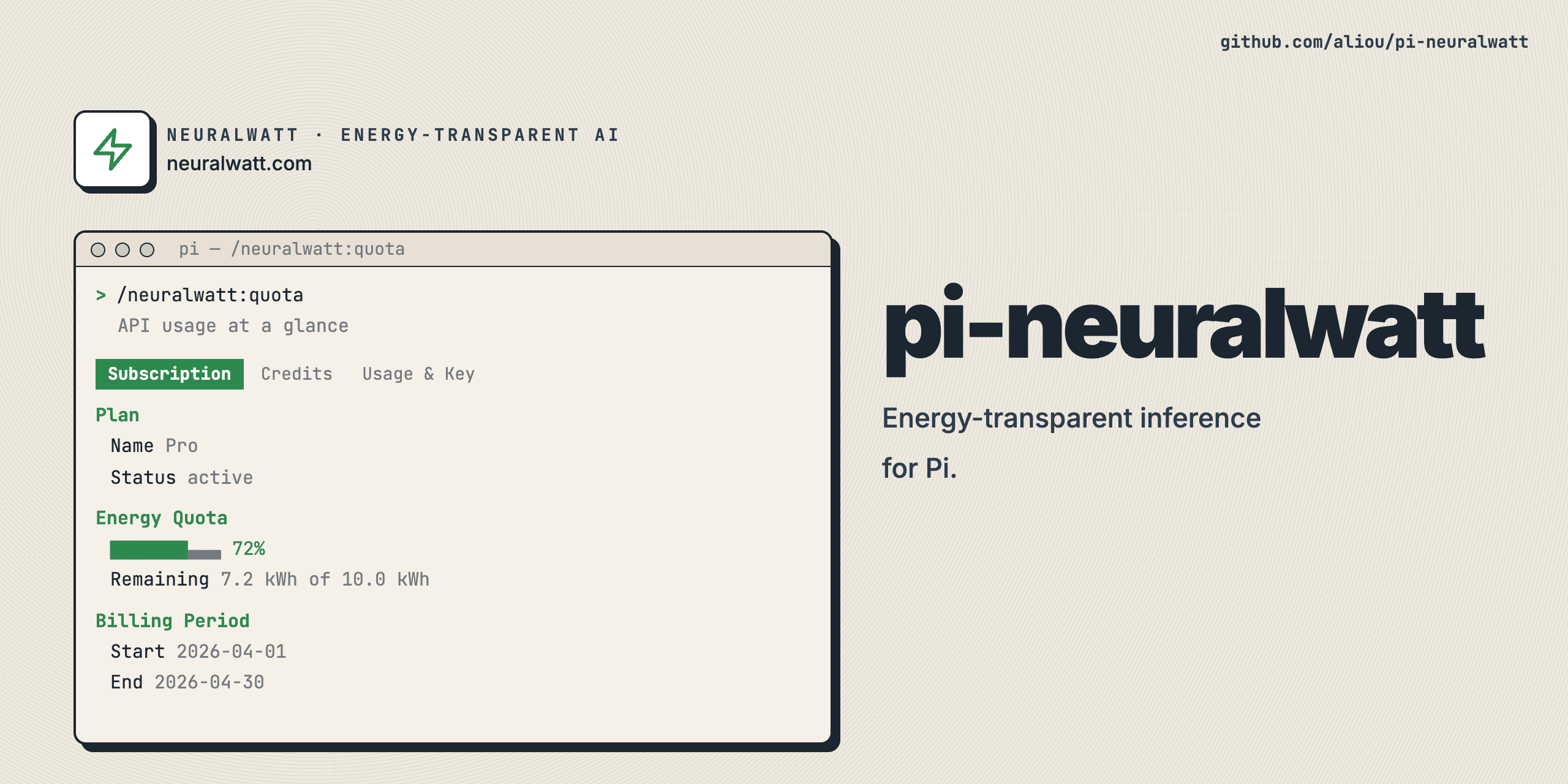
Check your API usage at a glance:
/neuralwatt:quota
The quota command shows three tabs:
- Subscription (when subscribed) — plan details, energy quota with progress bar, billing period
- Credits — credit balance with progress bar, accounting method
- Usage & Key — monthly usage (cost, requests, tokens, energy), API key info, key allowance, rate limits
https://github.com/user-attachments/assets/a8994940-c467-4744-a0f2-833cb63923ff
Quota Warnings
When enabled, the extension notifies you when credits or energy are running low. When you have an active subscription, only energy warnings fire (credits are on-demand top-up only). Warnings use escalation on severity transitions and have a cooldown for warning level.
Sub-bar Integration
When a Neuralwatt model is active, the footer status bar shows live quota usage (credits and energy). The status updates after each response and on session start.
Settings
Configure features with /neuralwatt:settings:
- API — Choose between
openai-completions(default) andanthropic-messages; applies on/reload - Quota command — Show/hide
/neuralwatt:quota - Quota warnings — Enable/disable low quota notifications
- Sub-bar integration — Show/hide usage in status bar
The provider itself cannot be disabled — it is always loaded.
Configuration uses nested per-feature sections. Existing flat config files are migrated automatically, with a backup written next to the migrated config.
Model Refresh
Neuralwatt registers its public models without network access. Opening /model refreshes the catalog from the API in the background (authenticated when an API key is configured). pi update --models forces an immediate refresh.
Pi stores the complete effective Neuralwatt catalog in ~/.pi/agent/models-store.json for offline startup. Current hardcoded public definitions remain authoritative when cached models are restored.
Adding or Updating Models
Public models are hardcoded in extensions/provider/models/public-models.ts and validated against the live API. To update:
- Run
pnpm test— it fetches/v1/modelsand compares against hardcoded definitions - Fix any discrepancies (missing models, changed context windows)
- Re-run
pnpm testto confirm
Development
Setup
git clone https://github.com/aliou/pi-neuralwatt.git
cd pi-neuralwatt

# Install dependencies (sets up pre-commit hooks)
pnpm install && pnpm prepare
Pre-commit hooks run on every commit:
- TypeScript type checking
- Biome linting
- Biome formatting with auto-fix
Commands
# Type check
pnpm run typecheck

# Lint
pnpm run lint

# Format
pnpm run format

# Test
pnpm run test
Release
This repository uses Changesets for versioning.
Requirements
- Pi coding agent v0.80.8+
- Neuralwatt API key (configured in
~/.pi/agent/auth.jsonor viaNEURALWATT_API_KEY)