@aliou/pi-synthetic
Package details
Install @aliou/pi-synthetic from npm and Pi will load the resources declared by the package manifest.
$ pi install npm:@aliou/pi-synthetic- Package
@aliou/pi-synthetic- Version
0.23.1- Published
- Jul 19, 2026
- Downloads
- 2,624/mo · 466/wk
- Author
- aliou
- License
- MIT
- Types
- extension
- Size
- 140.6 KB
- Dependencies
- 2 dependencies · 4 peers
Pi manifest JSON
{
  "video": "https://assets.aliou.me/github/aliou/pi-synthetic/demo.mp4",
  "extensions": [
    "./extensions/provider/index.ts",
    "./extensions/web-search/index.ts",
    "./extensions/command-quotas/index.ts",
    "./extensions/sub-bar-integration/index.ts",
    "./extensions/quota-warnings/index.ts",
    "./extensions/usage-status/index.ts"
  ]
}Security note
Pi packages can execute code and influence agent behavior. Review the source before installing third-party packages.
README

Pi Synthetic Extension
A Pi extension that adds Synthetic as a model provider, giving you access to open-source models through Synthetic's OpenAI-compatible API.
Installation
Get API Key
Sign up at synthetic.new to get an API key (referral link).
Configure Credentials
The extension uses Pi's credential storage. Add your API key to ~/.pi/agent/auth.json (recommended):
{
  "synthetic": { "type": "api_key", "key": "your-api-key-here" }
}
Or set environment variable:
export SYNTHETIC_API_KEY="your-api-key-here"
Credentials are resolved in this order:
- CLI
--api-keyflag auth.jsonentry forsynthetic- Environment variable
SYNTHETIC_API_KEY
Install Extension
# From npm
pi install npm:@aliou/pi-synthetic

# From git
pi install git:github.com/aliou/pi-synthetic

# Local development
pi -e .
Usage
Once installed, select synthetic as your provider and choose from available models:
/model synthetic hf:moonshotai/Kimi-K2.5
Model Hosting
All models are accessed through Synthetic's API. Some models are hosted by Synthetic directly (provider: "synthetic" in the model config); others are proxied by Synthetic to upstream backends such as Fireworks or Together.
Synthetic also provides permanent aliases (syn:large:text, syn:small:text, syn:large:vision, syn:small:vision) that route to the current best model for each category. These aliases are stable across model rotations — using an alias means no reconfiguration when models change. Alias models are always visible even when Proxied Models is disabled.
By default, new installs show only Synthetic-hosted models. You can enable proxied models in /synthetic:settings under Models > Proxied Models. Existing configurations keep proxied models enabled to preserve prior behavior.
The provider field in extensions/provider/models.ts is for maintenance only and is stripped before registering models with Pi, so users always select the synthetic provider.
Web Search Tool
The extension registers synthetic_web_search — a zero-data-retention web search tool. At session start, it checks the Synthetic quotas API in the background even when another provider is selected. The tool is available only after that check confirms a Synthetic subscription; it remains hidden for pay-as-you-go accounts, missing credentials, and quota API failures.
Reasoning Levels
Synthetic reasoning models are mostly binary on/off (a single medium toggle in Pi's UI). The exception is hf:zai-org/GLM-5.2, which exposes two tiers plus off:
- off →
none(disable reasoning) - high →
high(GLM High tier, lower) - max →
max(GLM Max tier, highest — nativemaxthinking level, accepted by Synthetic's OpenAI shim)
Other Pi levels (minimal, low, medium, xhigh) are hidden for GLM-5.2. Aliases such as syn:large:text inherit this map from their target at build time. The max level is opt-in and was added in Pi 0.80.6.
Quotas Command
Check your API usage:
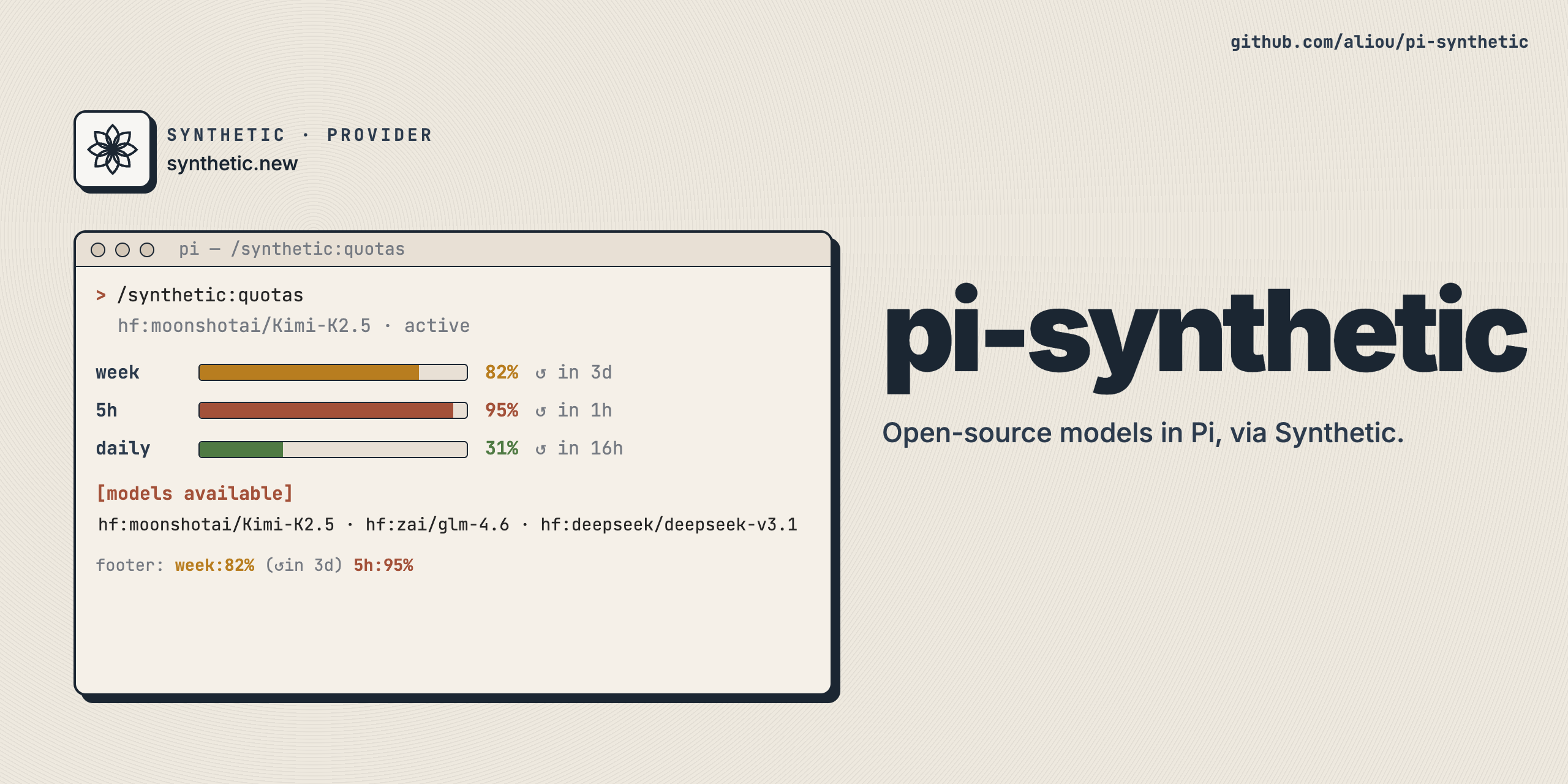
/synthetic:quotas
Utility API Proxy
Web search and quotas can use a proxy instead of https://api.synthetic.new. Configure it with /synthetic:settings under Connection > Utility API Proxy. The proxy is only used for /v2/search and /v2/quotas; model provider calls still use Synthetic's OpenAI-compatible endpoint directly.
If the proxy requires auth, pi-synthetic still requires a Synthetic API key and sends Authorization: Bearer .... If the proxy does not require auth, disable Requires auth and these utility calls skip API key checks and omit Authorization.
Usage Status
When a Synthetic model is active, the footer status bar shows live quota usage (e.g. week:82% (↺in 3d) 5h:95%). Colors follow the same severity assessment as quota warnings: green by default, yellow/red only when projected usage is at risk. The status auto-refreshes every 60 seconds and after each turn.
Quota Warnings
The extension automatically notifies you when you approach or exceed your Synthetic API quotas. Notifications fire on severity transitions and escalations, not as repeated reminders for the same level. Recovered quotas can notify again if they later become risky.
When quota warnings are enabled, the extension keeps bounded local history to account for rolling refills and avoid extrapolating short usage bursts across weekly quotas. Weekly projections estimate recent credit burn from daily trends across capacity tiers without treating capacity changes as usage, then apply the current tier's refill rate. Warning messages state the projection horizon. History is retained for 14 days, capped at 5 MiB, and stored under $XDG_STATE_HOME/pi-synthetic/quota-history or Pi's agent state directory. No history directory is created while quota warnings are disabled.
For weekly credits and rolling five-hour requests, projections warn at 80%, become high at 90%, and critical when exhaustion is projected within the 24-hour or one-hour horizon respectively. Warnings also show the estimated time to 100% when usage is draining faster than it refills. Without enough history, these windows fall back to the same thresholds using current usage.
Disabling Features
Each feature (provider, web search, quotas command, sub bar integration, usage status, quota warnings) is a separate Pi extension. You can disable individual features using pi config:
pi config extensions.disabled add @aliou/pi-synthetic/quota-warnings
This prevents the quota-warnings extension from loading while keeping the rest of pi-synthetic active. Replace quota-warnings with web-search, command-quotas, sub-bar-integration, usage-status, or provider to disable other features.
The Proxied Models and Utility API Proxy settings are not loadable extension features. They are regular settings controlled through /synthetic:settings.
Adding or Updating Models
Models are hardcoded in extensions/provider/models.ts. Entries are a union of concrete models and thin aliases (syn:* IDs).
Adding a concrete model
- Edit
extensions/provider/models.ts - Append a concrete model following the
SyntheticModelConfiginterface - Set
providerto the upstream backend Synthetic uses for that model, such assynthetic,fireworks, ortogether - Run
pnpm run typecheckto verify
Adding an alias model
- Add a thin
{ id, name, aliasFor }entry at the top ofSYNTHETIC_MODELS - Set
idandnamefrom the Synthetic API - Set
aliasForto"hf:" + hugging_face_idfrom the Synthetic API - The resolved alias inherits all fields from the target at build time
When Synthetic changes which model an alias routes to, update only the aliasFor field.
Development
Setup
git clone https://github.com/aliou/pi-synthetic.git
cd pi-synthetic

# Install dependencies (sets up pre-commit hooks)
pnpm install && pnpm prepare
Pre-commit hooks run on every commit:
- TypeScript type checking
- Biome linting
- Biome formatting with auto-fix
Commands
# Type check
pnpm run typecheck

# Lint
pnpm run lint

# Format
pnpm run format

# Test
pnpm run test
Test Locally
pi -e .
Release
This repository uses Changesets for versioning.
Note: Automatic NPM publishing is currently disabled. To publish manually:
- Create a changeset:
pnpm changeset - Version packages:
pnpm version - Publish (when ready): Uncomment the publish job in
.github/workflows/publish.yml
Requirements
- Pi coding agent v0.80.6+
- Synthetic API key (configured in
~/.pi/agent/auth.jsonor viaSYNTHETIC_API_KEY) for model provider calls and authenticated utility API calls