@alphacoder-v0/pi-loops
An automation layer for pi: cron + stateful loops with a triage inbox, maker/checker verification, dynamic triggers, MCP notifications and tools, lifecycle hooks, session archives. A non-invasive pi extension.
Package details
Install @alphacoder-v0/pi-loops from npm and Pi will load the resources declared by the package manifest.
$ pi install npm:@alphacoder-v0/pi-loops- Package
@alphacoder-v0/pi-loops- Version
0.22.3- Published
- Sep 16, 2026
- Downloads
- 1,716/mo · 1,716/wk
- Author
- alphacoder-v1
- License
- MIT
- Types
- extension, skill
- Size
- 1.6 MB
- Dependencies
- 0 dependencies · 4 peers
Pi manifest JSON
{
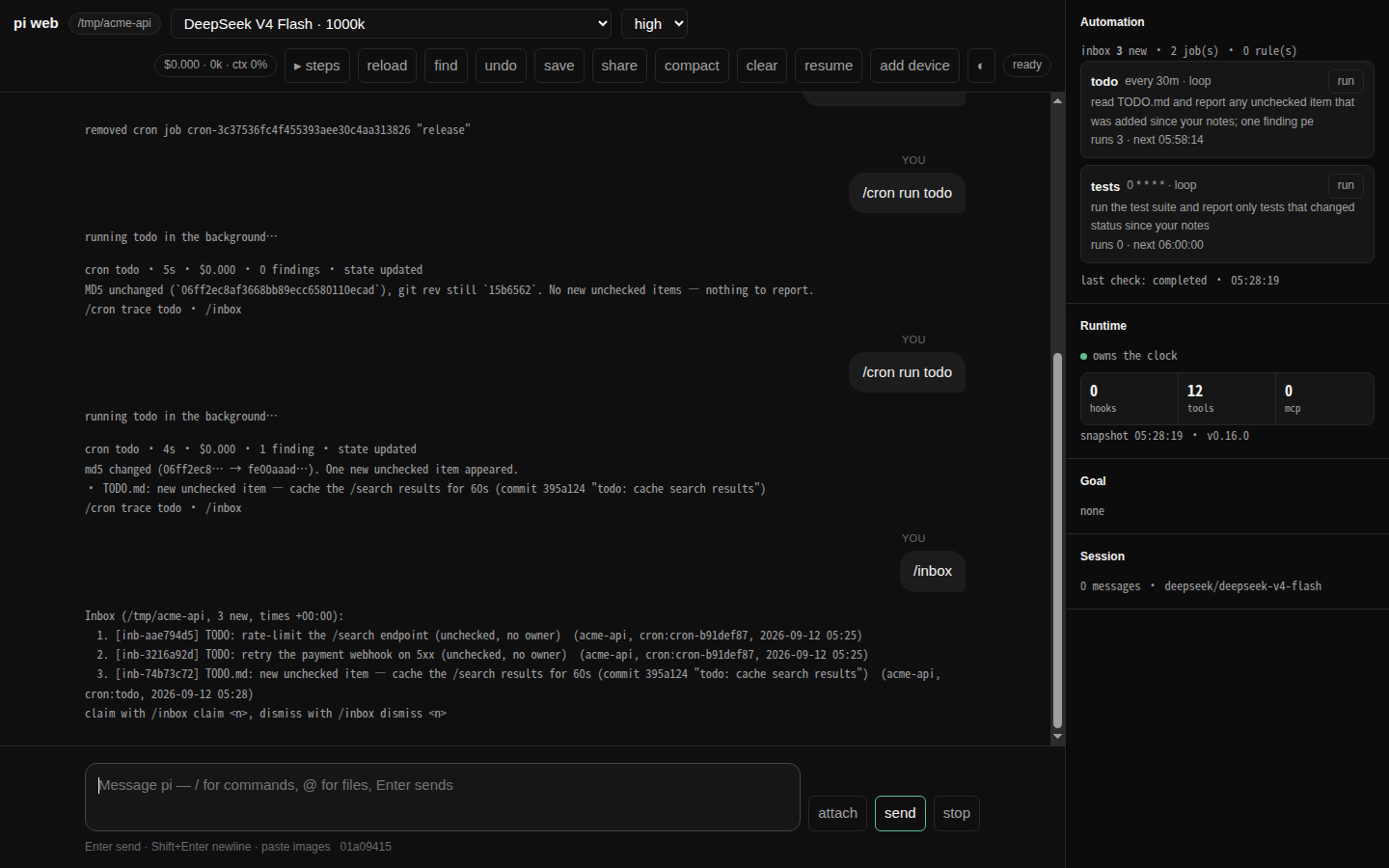
  "image": "https://raw.githubusercontent.com/alphacoder-v0/pi-loops/main/docs/screenshot.png",
  "skills": [
    "./skills"
  ],
  "extensions": [
    "./src/extension-entry.ts"
  ]
}
Security note
Pi packages can execute code and influence agent behavior. Review the source before installing third-party packages.
README
pi-loops
English · 中文
An automation layer for pi, shipped as a plain pi extension. Nothing in pi is patched.
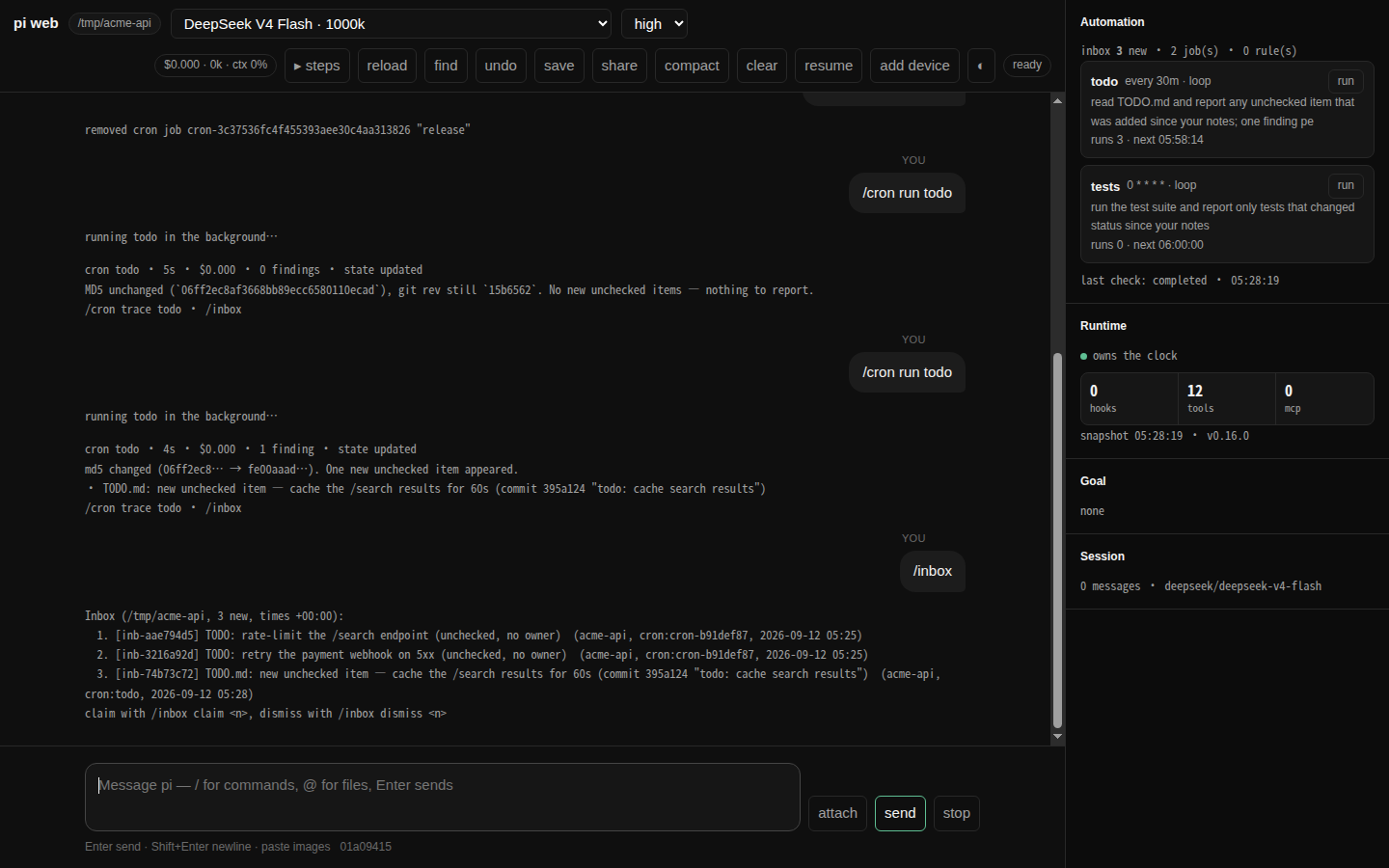
A loop wakes up with the notes its last run left, does the work in a sub-agent that starts clean, and files what it found. You read the findings when you want to, and claim the ones worth a turn. It all keeps running after you close pi.
Why this exists
Some work should happen while nobody is watching: the issues opened overnight, the dependency that picked up a CVE, the test that started failing on main. An agent can do any of it, but only when you sit down and ask — so the asking is the work. And the two obvious ways to automate it put the result in the wrong place: a prompt on a timer interrupts you with something you did not want now, and a script writes to a log nobody opens.
"Stop prompting the agent. Build loops that prompt the agent for you." — Addy Osmani, Loop Engineering
So the run happens in a sub-agent that never touches your conversation — nothing lands while you are mid-thought. What it finds waits in an inbox rather than a log: an inbox line is one you can claim, a log line is one you have to go looking for. And it starts from what the last run wrote down, so what reaches you is what changed rather than everything that is there.
Install
Node ≥ 22.6 (pi loads the TypeScript sources directly) and pi ≥ 0.84.3 to load it into — 0.85 is
what this is tested against, and an older pi is refused at load with a line that names the version
it needs, rather than a link error naming one missing export. Nothing else: pi-loops has no
runtime dependencies. What you do want first is a provider you can actually talk to — run pi, send
one message, make sure you get an answer. pi-loops runs sub-agents while you are not watching, and
the first sign of credentials that do not work should not be an empty inbox tomorrow morning.
pi install npm:@alphacoder-v0/pi-loops                      # from npm, following new releases
pi install git:github.com/alphacoder-v0/pi-loops@v0.22.3    # or from GitHub, at a pinned tag
pi install /path/to/pi-loops                                # or a local checkout — `pi install .` in this repo
pi -e /path/to/pi-loops                                     # or none of them: try it for one run, installing nothing
Install one of them, not two. Two copies register the same tools, and pi refuses to load the
second — Tool "cron_create" conflicts with …, and it exits. If you are working on the code, the
checkout is the one to keep.
Then restart pi, and that is the whole install: /cron, /inbox, /triggers and /goal are
registered by the extension itself, so they work with nothing on your PATH and no launcher. The
pi-loops command is a separate thing, needed only for the browser window and the shell
subcommands — The browser window, and the command line
sets it up when you want it. The package also ships a skill (skills/pi-loops), so the agent knows
when to reach for cron_create, new_trigger and the inbox on its own.
Your first loop
/cron add --stateful --name todo "0 9 * * *" read TODO.md and report any unchecked item that was not in your notes last run
Every morning a fresh sub-agent runs with the notes it wrote last time, does the work, and hands back two things: the notes for tomorrow, and any finding worth your attention. The notes go to a Markdown file, the findings go to the inbox, and your conversation is never touched. (The run says which is which in tags that a program reads rather than you — docs/loops.md has them.) Here are two runs of that loop, half an hour apart — the first:
cron todo · 5s · $0.000 · 0 findings · state updated
md5 unchanged (`06ff2ec8af3668bb89ecc6580110ecad`), git rev still `15b6562`. No new unchecked items — nothing to report.
/cron trace todo · /inbox
The second, after one commit:
cron todo · 4s · $0.000 · 1 finding · state updated
md5 changed (06ff2ec8… → fe00aaad…). One new unchecked item appeared.
• TODO.md: new unchecked item — cache the /search results for 60s (commit 395a124 "todo: cache search results")
/cron trace todo · /inbox
The first run found nothing worth saying and said nothing; the second noticed one change and reported only that. That is what the notes between runs buy — without them every run reports the whole file every morning, and you stop reading it by Thursday. What they filed waits in the inbox:
/inbox
Inbox (/tmp/acme-api, 3 new, times +00:00):
  1. [inb-aae794d5] TODO: rate-limit the /search endpoint (unchecked, no owner)  (acme-api, cron:cron-b91def87, 2026-09-12 05:25)
  2. [inb-3216a92d] TODO: retry the payment webhook on 5xx (unchecked, no owner)  (acme-api, cron:cron-b91def87, 2026-09-12 05:25)
  3. [inb-74b73c72] TODO.md: new unchecked item — cache the /search results for 60s (commit 395a124 "todo: cache search results")  (acme-api, cron:todo, 2026-09-12 05:28)
claim with /inbox claim <n>, dismiss with /inbox dismiss <n>
The third finding is the run above; the two over it came from another loop in the same checkout, three minutes earlier. The inbox is one queue per project rather than one per job, so everything watching this repo lands in the same list and you triage it in one pass.
/cron                  # what is scheduled here, and when it next runs
/cron run 1            # do not wait until 9am — run it now and watch
/inbox claim 1         # hand finding #1 to the agent as a real turn
/inbox dismiss 2       # not interesting
/inbox dismiss 3 that file is generated, ignore it    # the loop is told why on its next run
Loops worth stealing
/cron add --stateful --name main-watch "0 9 * * *" read the commits on main since the revision in your notes, report anything that changes the public API, and record the new head revision
The others are variations on this shape. The notes carry a revision, and only what changed since it earns a line in your inbox.
/cron add --stateful --name deps "0 8 * * 1" run npm audit and report advisories whose id is not already in your notes; append every id you report to that list
The watermark here is a list rather than a revision, and the loop appends to it as it reports. The
notes are plain Markdown you can read and correct (/cron state deps).
/cron add --verify --name ci every 30m run the test suite and report only tests that changed status since your notes
--verify implies --stateful and puts a second, adversarial sub-agent between the findings and
you: a flake that failed once is exactly what should be stopped there, with the reason in
/cron trace ci 1 checker. It fails open — if the checker itself breaks, the findings still reach
the inbox, marked unverified, because a broken checker must not silence the loop.
/cron add --stateful --cwd /srv/acme-api --model openai/gpt-5.5 "0 7 * * *" summarize what changed in this repo since your notes
A job records its directory and model at creation, so it is not tied to the window it was typed in:
--cwd runs it in another checkout (absolute, or relative to this project — no shell, so nothing
expands ~), and --model pins it whatever this session is on (/cron set <ref> --model - unpins).
And eight you do not write at all: /recipe add issue-loop runs the issue tracker as a state
machine that two loops turn, /recipe add autoresearch runs one experiment per run against a
contract you wrote, and daily-digest, pr-watch, ci-sweeper, deps-sweeper,
changelog-draft and ecosystem do what their names say — each a directory of playbooks copied
into the project, installed with one question and one confirmation, and /recipe show says
what its runs may never do before you say yes (docs/recipes.md). Three are
starters that only read and file findings: daily-digest, pr-watch, changelog-draft.
Two that are not loops:
/new-trigger when ~/build.done exists, run cargo test and show me the result
A condition instead of a clock: a sub-agent re-checks it every [triggers] poll_interval_secs (600
by default) and acts when it holds — once, unless you ask for a repeat.
/cron add in 45m remind me to look at the deploy
No --stateful, so this is a plain job: in 45 minutes the prompt lands in this conversation and
is answered there rather than filed — a reminder belongs in the chat, a nightly report does not.
Before you leave it running overnight
/cron cost             # what automation has spent today
/cron disable --all    # pause every job in this project
Set a cap in ~/.pi/agent/loops/config.toml before you rely on it:
[limits]
daily_budget_usd = 5.0
When the last pi quits, a headless host takes over the clock so the 9am run happens whether or not
you are at the machine, and hands it back the next time you open pi (/cron host,
pi-loops host status). If you would rather it did not, put [host] auto = false in the same file.
The browser window, and the command line
pi-loops is the part that needs a launcher: pi install puts the package under pi's managed
directory rather than on your PATH, so the command does not exist yet. You are not asked to fix
that by hand — the first pi session after pi install offers to put pi-loops on your PATH, and
keeps that launcher working afterwards if pi ever moves the package. Say no and nothing is written,
and you are not asked again; /pi-loops install-launcher writes one whenever you change your mind:
/pi-loops install-launcher # from inside pi, where the extension is already loaded
# or from a shell, on a machine where pi is never opened — the same command, by absolute path
cd ~/.pi/agent/npm/node_modules/@alphacoder-v0/pi-loops    # installed from npm
cd ~/.pi/agent/git/github.com/alphacoder-v0/pi-loops       # installed from GitHub
node src/cli-entry.mjs install-launcher
Any of them writes a launcher into the first of ~/.local/bin and /usr/local/bin that is already
on your PATH, and refuses rather than guessing if neither is — pass --dir <dir> to say where.
After that, pi-loops works from anywhere:
pi-loops                              # start a session — browser here, terminal over ssh
pi-loops --tui                        # the terminal one, when you want it
pi-loops --continue                   # pick up the newest session in this directory
pi-loops sessions|inspect|export|import and pi-loops host status|abort|stop need no pi session
open at all. They are for backups from cron or CI, restoring on a fresh machine, and looking in on
the headless host. See docs/cli.md.
At a local terminal the bare command opens the browser front end; over ssh, or with no terminal at
all, it runs pi itself, because a browser on the far machine helps nobody. Pass --web or --tui
when that guess is wrong. Anything else you pass goes straight to pi (pi-loops --model anthropic/claude-opus-5 -e .).
Both windows are complete pi sessions — the browser one runs pi --mode rpc behind a page — so the
session file, --resume, your models, tools and extensions are the same either way, and the model
and thinking level you last chose start the next session whichever window it opens in. The browser
one is a session and not a viewer: what a person can still do after the window changed is a release
gate, and docs/web-ui-parity.md has it line by line.
Even starting over stays in the window — clear begins a new session, resume goes back to an
earlier one in this project, compact summarises what is there and says what it did, as buttons
or as /clear, /new, /resume and /compact <what to keep> in the composer. None of them
deletes anything; the session you leave is a file that resume lists.
It serves http://127.0.0.1:4173/ by default, with a token that lives in a file, so the address
is the same one tomorrow and is worth bookmarking (--port moves it if 4173 is spoken for). The
first visit leaves a cookie and you never see the token again. Running pi-loops while one is
already up opens that window instead of failing on the port; --no-auth drops even that, on a
machine only you use.
From a phone, the best route is tailscale serve --bg 4173: this server stays on loopback and the
tailnet does TLS and identity. On the same wifi, pi-loops --host 0.0.0.0 works too (and refuses
--no-auth). Press add device in a browser that is already signed in and point the phone at the
QR it shows: nothing to type, that device stays signed in, and the page can go on the home screen.
Keeping it up to date
pi-loops upgrade                      # take the newest release
pi-loops upgrade --check              # just say whether there is one
It reads the release tags from the repository this copy came from, compares them with what you are
running, and installs the newest the same way this copy was installed. For a GitHub install that is
the only way to move: pi update --extensions keeps the clone on the ref you pinned
(docs/cli.md). An npm install made without a version is one pi update --extensions
moves as well, and upgrade leaves it that way; one pinned to an exact version stays pinned, to the
new one.
Restart pi (or run pi-loops again) to load it. The launcher does not need reinstalling: pi keeps a
package at the same path whatever its version — ~/.pi/agent/npm/node_modules/<name> or
~/.pi/agent/git/<host>/<owner>/<repo>.
Releases are tags on GitHub, published to npm under the same version; CHANGELOG.md says what is in each one.
Uninstall
pi remove npm:@alphacoder-v0/pi-loops # or git:github.com/alphacoder-v0/pi-loops, or the checkout path — whatever you installed
State stays in ~/.pi/agent/loops until you delete it.
Commands
| Command | What it does |
|---|---|
/cron add [--stateful] [--verify] "<schedule>" <prompt> |
Schedule a job: a plain job belongs to this chat and injects its result here (it sleeps while this session is not open), --stateful makes a loop that runs wherever the clock is, with memory and inbox routing, --verify adds the checker |
/cron, /cron all |
This project's jobs, or every project on this machine |
/cron enable|disable|remove <ref> |
Pause, resume or delete one job — and write an audit entry into the session, as add does |
/cron disable --all |
Pause every job in this project (--all-projects for the machine); /cron enable --all resumes |
/cron run <ref> |
Fire one job now instead of waiting for its schedule |
/cron state <ref> |
The loop's notes — the Markdown it carries from one run to the next |
/cron runs [ref] |
The run log: when it fired, what it cost, what it found |
/cron trace <job> [k] [checker] |
The k-th latest run's full sub-agent transcript, maker or checker |
/cron set <job> … |
Change a job in place — --prompt, --schedule, model, thinking, timeout, name — keeping its id, and therefore its notes |
/cron cost [today|7d|all] |
What automation has cost, against [limits] daily_budget_usd |
/cron scheduler |
Which pi process currently owns the timer |
/cron host [start|stop] |
The headless host that keeps the clock after the last pi quits |
/cron clear <ref> |
Release a run marker left behind by a process that is gone |
/cron gc |
Remove plain jobs whose session was deleted (they are parked as disabled first) |
/cron panel on|off |
The side panel above the editor: Triggers, Inbox, Cron, MCP |
/cron snapshot |
Write what only this process knows — connected MCP servers and their tools, active tools, hooks, who owns the clock — into the session as a pi_loops_snapshot entry, for a front end that is not a terminal |
/inbox [list|all|claim <n>|dismiss <n> [reason]|clear] [--all] |
Triage findings from stateful loops. This project's by default, --all for every project — the same scoping /cron and /triggers use. A reason given with dismiss is shown to the loop's next run |
/goal [<condition>], /goal pause|resume|clear |
Hold the session to a stop condition: after every turn an evaluator with no tools decides whether it is met, and sends the agent back to work if not (max 8 continuations). Bare /goal shows the one in force |
/new-trigger <natural language> |
Create a condition-based rule ("when ~/build.done exists, run cargo test") |
/triggers [status|rules|enable|disable|remove|running|audit [N]|abort] |
Dynamic rules: what exists, what is running, what happened |
/triggers run <id> |
Check one rule now instead of waiting for its poll slot |
/triggers set <id> --model|--thinking|--timeout |
Change what a rule runs with — the settings that decide how an unattended action behaves |
/triggers sources, /triggers hooks |
Every source feeding the trigger runtime: each connected MCP server, whose notifications can fire a rule; the local crontab; the dynamic checker |
/triggers panel [on|off] |
The same panel, toggled from the trigger side |
/session-export [path], /session-import <path> |
Portable .pisession archive: transcript + jobs + rules + loop state (in the browser front end, /session export and /session import too; /sessions lists) |
/session-share [--public] |
Upload a redacted transcript as a GitHub gist via gh, after showing you what it contains. (pi has its own /share, which sends the raw session elsewhere first — see docs/session-archive.md) |
/recipe [list|show|add|update|remove <name>] |
Install a packaged way of running this project on loops — the issue tracker as a state machine, or one research experiment per run — with one question and one confirmation (docs/recipes.md) |
/pi-loops [install-launcher] |
Version and paths; install-launcher puts the pi-loops command on your PATH |
A schedule is a 5-field cron expression, or one of hourly / daily / weekly (also 每天), or
every 30m, in 10m, at <ISO>. The @hourly / @daily / @weekly / @monthly spellings work
too, and they are not the same thing: daily is 09:00, @daily is midnight. All of it runs on this
machine's clock (which clock, and what the twice-yearly change does to
it). A <ref> is the number on screen, the job id, an
unambiguous prefix of it, or the --name you gave it — and /crontab and /loop are aliases of
/cron.
Tools for the model: cron_create, cron_list, cron_remove, set_cron_job_state,
new_trigger, list_triggers, remove_trigger, set_trigger_state, plus every tool of every
configured MCP server. Five of them stop and ask you: creating or removing a trigger, removing a
cron job — cron_remove twice over, a preview the model must show you before the approval itself —
and any state change that turns automation on, or touches another project's. They are the
operations that decide what runs while nobody is watching.
Documentation
Loops and the inbox are the centre of this. On the same clock there are also plain cron jobs that inject a prompt into this chat, triggers that wait for a condition instead of a time, MCP push notifications, and lifecycle hooks — each has a page here.
- docs/loops.md — cron jobs, stateful loops, the inbox, maker/checker
- docs/triggers.md — dynamic triggers and the trigger runtime
- docs/mcp.md — MCP notification sources and tool registration (
mcp.toml) - docs/hooks.md — lifecycle hooks (
hooks.toml), includingrun_start/run_endfor scheduled runs - docs/goal.md —
/goal: holding a session to a stop condition - docs/recipes.md —
/recipe: a project run on loops, installed in one command; the issue loop and autoresearch, and how to write your own - docs/session-archive.md —
/session-export,/session-import - docs/cli.md — the
pi-loopscommand line: export, import, the inbox, and looking in on the host - docs/downstream.md — what a program may depend on: a recipe directory,
run_start/run_end,pi-loops inbox --json; nothing else - docs/web-ui-parity.md — what the browser front end owes you, line by line
- docs/configuration.md — paths,
config.toml, flags, environment - docs/design.md — architecture: what each piece is built out of, and the decisions behind it
- docs/troubleshooting.md — symptom first: nothing fired, a run failed, findings never arrived, the window stopped answering
- examples/ — a dependency-free MCP push server to try notifications with
- CHANGELOG.md, AGENTS.md for contributors
Where things live
| Path | What |
|---|---|
~/.pi/agent/loops/jobs.json |
cron jobs (machine-global, each with its cwd) |
~/.pi/agent/loops/state/<id>.md |
loop notes — plain Markdown |
~/.pi/agent/loops/inbox.jsonl |
the inbox |
~/.pi/agent/loops/runs.jsonl, sessions/<id>/ |
run log and full sub-agent transcripts |
~/.pi/agent/loops/logs/pi-<pid>.log |
what each pi process's automation did |
~/.pi/agent/loops/triggers.json, triggers-audit.jsonl |
dynamic rules and trigger audit |
~/.pi/agent/loops/{config,mcp,hooks}.toml |
configuration |
~/.pi/agent/loops/scheduler.json |
which pi process currently owns the timer |
Set PI_LOOPS_DIR to relocate all of it. The notes are yours to edit when the agent got something
wrong, and logs/pi-<pid>.log is the file to read after an overnight failure.
Automation outlives the window it was set up in
Scheduled work is only worth trusting if it survives you closing the editor. So "pi was restarted" is treated here as the normal case rather than the exception.
Jobs are machine-global and never expire. Any open pi can own the timer:
leadership is a file with a heartbeat, and when the process holding it exits or dies, the next tick
in another window picks it up. A project's trigger checks run in a pi that is open in that project,
so a result that belongs in a conversation lands in the right one. A tick a loop missed while
nothing was running is caught up once, collapsed rather than replayed; a plain job's is not, because
its prompt was written for a conversation that is gone (--catchup and --no-catchup override
either way).
Sub-agents are sessions opened inside the interactive pi through its SDK, not child processes: they
share its live MCP servers — the browser tab that is already logged in, the database session that is
already open — along with its extensions, model and thinking level. The headless host has no parent
session to share, so its runs connect their own MCP clients from mcp.toml: a server that was live
only because you had a window open is not live at 3am.
docs/design.md has the architecture and the reasoning behind each of these.
Non-invasive by construction
Only pi's public extension API is used. find <pi install> -newer package.json is empty after
installing pi-loops; ~/.pi/agent gains one packages entry and the loops/ directory.
Uninstalling is pi remove.
Acknowledgements
Inspired by, and rewritten from, pie.
License
MIT