@apat183/pi-buddy
An animated π mascot for pi — a launch header, a live state widget beside your editor, and a custom spinner. Configurable placement and alignment.
Package details
Install @apat183/pi-buddy from npm and Pi will load the resources declared by the package manifest.
$ pi install npm:@apat183/pi-buddy- Package
@apat183/pi-buddy- Version
0.1.2- Published
- Jul 28, 2026
- Downloads
- 464/mo · 22/wk
- Author
- apat183
- License
- MIT
- Types
- extension
- Size
- 37.2 KB
- Dependencies
- 0 dependencies · 2 peers
Pi manifest JSON
{
  "extensions": [
    "./index.ts"
  ],
  "image": "https://raw.githubusercontent.com/apat183/pi-buddy/main/media/demo.gif"
}Security note
Pi packages can execute code and influence agent behavior. Review the source before installing third-party packages.
README
pi-buddy
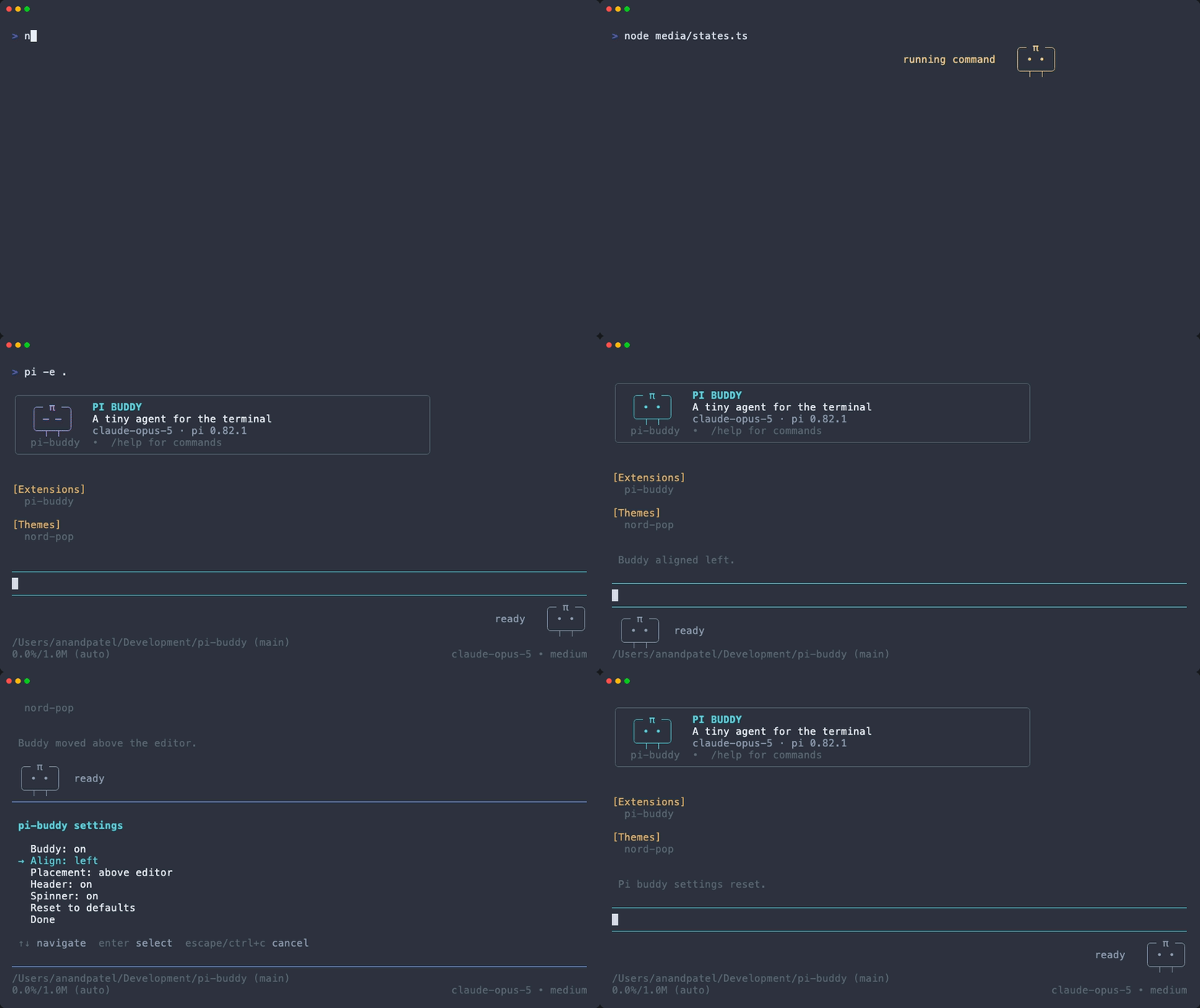
An animated π mascot for pi. It adds a launch header, a small companion beside your editor that reacts to what the agent is doing, and a matching working spinner. Everything is configurable and remembered between sessions.
Install
pi install npm:@apat183/pi-buddy
Then /reload, or restart pi.
To try it without installing:
pi -e npm:@apat183/pi-buddy
What it does
Launch header — a banner with the mascot, the active model and the pi version, replacing pi's default header.
Buddy widget — three little rows beside your editor. The eyes animate and the label changes with the agent's state:
State Shown when readyidle, waiting for you thinkingthe model is streaming readinga read-ish tool is running searchinggrep / glob / symbol search / LSP navigation writingwrite / edit / patch running commandbash and friends workingany other tool done!a tool just finished uh-oha tool failed Working spinner — pi's streaming indicator becomes animated π frames.
The extension is TUI-only. In --print, JSON and RPC modes it does nothing at
all, so it is safe to leave installed for scripted runs.
Commands
| Command | What it does |
|---|---|
/buddy |
print the current settings |
/buddy config |
interactive settings picker |
/buddy on / /buddy off |
show or hide the buddy |
/buddy align left|right |
which side of the terminal the buddy hugs |
/buddy place above|below |
position relative to the editor |
/buddy header on|off |
custom launch header |
/buddy spinner on|off |
custom working spinner |
/buddy reset |
restore defaults |
/buddy header-reset is kept as an alias of /buddy header off.
Arguments tab-complete. Every change applies immediately and is saved — no restart needed.
Alignment
The status label mirrors to the inner side of the mascot, so it always reads inward from the edge it is docked to:
/buddy align left
╭─ π ─╮
│ • • │  thinking
╰─┬─┬─╯

/buddy align right                       terminal edge ┐
                                            ╭─ π ─╮    │
                                 thinking   │ • • │    │
                                            ╰─┬─┬─╯    │
On a terminal too narrow for both, the label is dropped rather than clipping the mascot.
align is horizontal and handled by this extension; place is vertical and
maps to pi's own aboveEditor / belowEditor widget placement.
Configuration file
Settings live in ~/.pi/agent/pi-buddy/config.json and are written whenever you
change something with /buddy:
{
  "enabled": true,
  "align": "right",
  "placement": "belowEditor",
  "header": true,
  "spinner": true
}
enabledis the master switch — turning it off removes the widget, the header and the custom spinner.- Unknown keys are ignored and invalid values fall back to their default, so a hand-edited file can never stop pi from starting. A file that is not valid JSON is reported once and replaced by the defaults on the next write.
Compatibility
Tested against pi 0.82.x on Node 24 (Node ≥ 22 required). The package
declares @earendil-works/pi-coding-agent and @earendil-works/pi-tui as
peer dependencies with a * range, per the
pi packages guide — it always uses the
copies bundled with your pi installation and ships no runtime dependencies of
its own.
Development
git clone https://github.com/apat183/pi-buddy
cd pi-buddy
npm install
npm run check          # tsc --noEmit + node --test

npm run dev:on         # load the working copy into pi instead of the published one
# edit, then /reload inside pi
npm run dev:off        # switch back to the published package
Releases are automated: npm version patch && git push --follow-tags builds
and publishes from GitHub Actions using npm trusted publishing (OIDC), with
provenance. Then pi update --extensions picks it up.
To re-record the demo (requires vhs):
./media/record.sh
It runs against a throwaway agent directory, so the recording shows only this extension and none of your local configuration.
Notes
- The mascot idea comes from pi's own
examples/extensions/custom-header.ts. - Unrelated to the
pi-buddypackage on npm by NerfEko, which is a different (and much larger) companion extension. This one is deliberately small: one mascot, no roster, no model calls.
License
MIT