@ayhanblt/ay-pi
Provider-agnostic tier routing for Pi: picks the kind of work, the tier, the tools and (in auto mode) the model for every prompt
Package details
Install @ayhanblt/ay-pi from npm and Pi will load the resources declared by the package manifest.
$ pi install npm:@ayhanblt/ay-pi- Package
@ayhanblt/ay-pi- Version
2.1.0- Published
- Oct 30, 2026
- Downloads
- 854/mo · 842/wk
- Author
- ayhanblt
- License
- MIT
- Types
- extension
- Size
- 50.1 KB
- Dependencies
- 0 dependencies · 1 peer
Pi manifest JSON
{
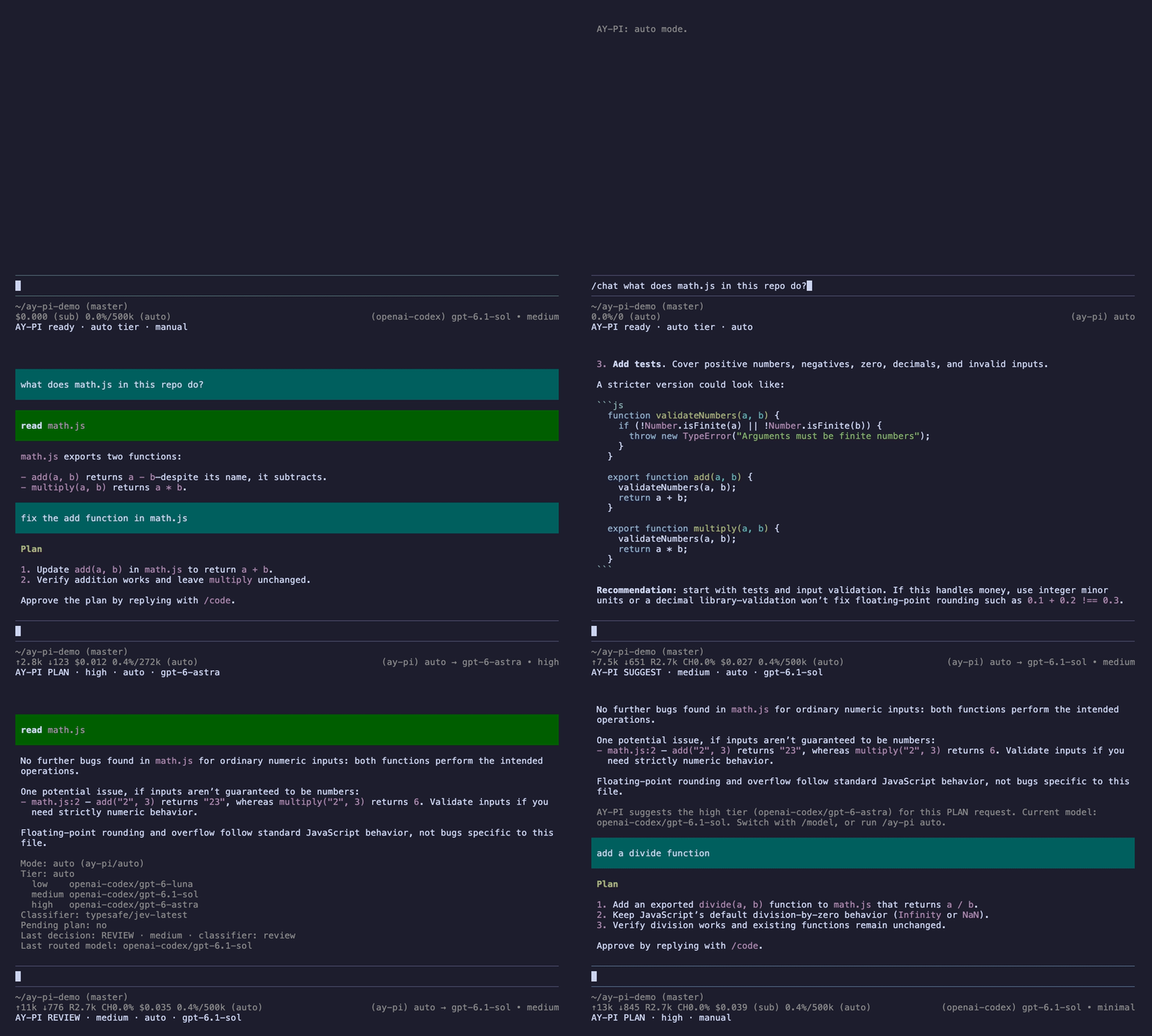
  "image": "https://raw.githubusercontent.com/ayhanblt/ay-pi/main/docs/assets/demo.gif",
  "extensions": [
    "./dist/index.js"
  ]
}
Security note
Pi packages can execute code and influence agent behavior. Review the source before installing third-party packages.
README
AY-PI is an extension for the Pi coding agent. Before every prompt it decides what kind of work you are asking for, and then:
- 🧭 picks the tier: a quick question gets a cheap model, a plan gets your strongest one;
- 🔒 scopes the tools: only coding turns can use Pi's edit, write and bash tools;
- 🤖 picks the model in auto mode, or just suggests one in manual mode.
your prompt ──▶ behavior (CHAT, SUGGEST, REVIEW, PLAN, CODE) ──▶ tier (low, medium, high) ──▶ modelIt works with every provider Pi supports. You choose the models, AY-PI chooses the tier.
Install
pi install npm:@ayhanblt/ay-piRequires Pi 1.4 or newer.
Set up in 3 steps
1. Log in to the providers you use:
/login2. Put a model into each tier. Each command opens a model picker:
/ay-pi add low       → a fast, cheap model
/ay-pi add medium    → your everyday model
/ay-pi add high      → your strongest model
Check the result with /ay-pi:
Mode: manual (openai-codex/gpt-6.1-sol)
Tier: auto
  low    openai-codex/gpt-6-luna
  medium openai-codex/gpt-6.1-sol
  high   openai-codex/gpt-6-astra
Classifier: none (auto)
Pending plan: no
You can add more than one model to a tier. They form a fallback chain: the first usable one answers.
3. Turn on auto mode:
/ay-pi autoThe footer now shows AY-PI ready · auto tier · auto. You are ready.
💡 Optional but recommended: add Jev so you can skip the commands and just type.
Your first session, step by step
The examples below use the tiers from step 2. Watch the footer after each prompt.
Ask a question. A cheap model answers, files stay untouched.
/chat what does math.js do?AY-PI CHAT · low · auto · gpt-6-luna
Get a review. Findings only, no edits.
/review math.jsAY-PI REVIEW · medium · auto · gpt-6.1-sol
Plan the change. Your strongest model writes a plan under a ## Plan heading. AY-PI keeps it.
/plan fix add() in math.js and add a testAY-PI PLAN · high · auto · gpt-6-astra
Talk about the plan. Still read-only; AY-PI reminds you that a plan is waiting.
what are the risks of this plan?AY-PI CHAT · medium · auto · gpt-6.1-sol
Implement it. Type /code and press Enter (pick code if autocomplete shows a list). The plan is handed to the coding model, and the file tools are switched back on.
/codeAY-PI CODE · medium · auto · gpt-6.1-sol
/code with text adds a note: /code also update the README. If the model answers /plan with a question instead of a plan, your earlier plan stays pending.
Let Jev decide
Without a classifier, AY-PI only knows what your commands tell it. A prompt without a command gets the safe default: CHAT, medium tier, read-only.
With Jev, a small and fast classification model, you can just type. A decision costs a fraction of a cent and adds little latency.
1. Add your key: run /login, choose TypeSafe and paste your API key (or set TYPESAFE_API_KEY).
2. Check it: /ay-pi jev shows the classifier AY-PI uses. /ay-pi shows it on the Classifier: line.
3. Just type:
| You type | AY-PI decides |
|---|---|
what does math.js do? |
CHAT · low |
which improvements would you suggest for this code? |
SUGGEST · medium |
review math.js, is there a bug? |
REVIEW · medium |
plan adding a multiply function, don't write code yet |
PLAN · high, the plan is kept |
only show the address (answering the plan's question) |
PLAN · high, planning goes on |
ok, go ahead (while a plan is pending) |
CODE · medium, the plan is implemented |
add a subtract function to math.js |
CODE · medium |
what are the architectural implications of a monorepo? dig deep |
CHAT · medium (hard, so one tier up) |
Commands still win: /plan, /code and the others skip the classifier.
For every prompt without a command, AY-PI asks three typed questions:
- task: is this
CHAT,SUGGEST,REVIEW,PLANorCODE? - file changes: does the user want files changed now?
- complexity: trivial, ordinary or hard? Trivial work moves one tier down, hard work one tier up.
While a plan is pending, it also asks whether the message approves the plan.
To keep your files safe, CODE needs at least 80% on "file changes"; below that the turn runs as SUGGEST. A task answer under 50% is ignored and the safe default is used.
Real verdicts from a test session (the prompts were typed in Turkish; complexity runs from 0 = trivial to 2 = hard):
| Prompt | Decision | Jev's answers |
|---|---|---|
math.js ne işe yarıyor? (what does math.js do?) |
CHAT · low |
CHAT 100% · file changes 2% · complexity 0.18 |
bu kodda hangi iyileştirmeleri önerirsin? (which improvements would you suggest?) |
SUGGEST · medium |
SUGGEST 95% · file changes 7% · complexity 0.94 |
math.js'i gözden geçir, hata var mı? (review math.js, any bugs?) |
REVIEW · medium |
REVIEW 100% · file changes 11% · complexity 0.85 |
| plan adding a multiply function | PLAN · high, plan kept |
PLAN 100% · file changes 7% · complexity 0.76 |
tamam, uygula (ok, go ahead) while the plan is pending |
CODE · medium, plan approved |
approves the plan 95% |
math.js'e subtract fonksiyonu ekle (add a subtract function) |
CODE · medium |
CODE 100% · file changes 83% (≥ 80%) |
| a deep question about monorepo architecture | CHAT · medium |
CHAT 96% · file changes 4% · complexity 1.96, so one tier up |
classifier is auto by default: the first available Jev model, else any other classifier Pi offers (OpenRouter, OpenCode, Cloudflare Workers AI, OpenAI, llama.cpp). Pick one with /ay-pi classifier provider/model, or turn it off with /ay-pi classifier off.
Reading the footer
AY-PI CODE · low→medium · auto · gpt-6.1-sol
      │      │            │      └─ the model that answered (auto mode only)
      │      │            └─ auto or manual mode
      │      └─ the decided tier; "low→medium" means low was empty or unusable
      └─ the behavior for this prompt
Before the first prompt it reads AY-PI ready · auto tier · auto. /ay-pi shows the same, plus the reason for the last decision.
Modes and tiers
Auto mode (/ay-pi auto): the selected model is ay-pi/auto. For each prompt it picks the first usable model of the decided tier. Tool follow-ups stay on the same model, so the prompt cache stays warm.
Manual mode (/ay-pi manual): you pick the model with /model. AY-PI still scopes the tools and adds the instructions, and tells you when it would pick another tier:
AY-PI suggests the high tier (openai-codex/gpt-6-astra) for this PLAN request.Pin a mode with F2 (next) and F3 (previous): auto → CHAT → SUGGEST → REVIEW → PLAN → CODE → auto. Every prompt then runs as that behavior, as if you typed its command, until you switch again; a command still wins for its own prompt. Handy without a classifier, or when you plan for a while and then code for a while. Without the keys: /ay-pi mode plan (or chat, suggest, review, code, auto). The footer shows PLAN (pinned).
Pin a tier for the session with /ay-pi tier high (or low, medium). Every prompt then uses that tier. /ay-pi tier auto gives the choice back.
Fallback: if a tier is empty or its models are unusable, the neighbouring tier answers (a missing high falls back to medium before low). A failed request is retried on the next model of the chain.
Working with other extensions
AY-PI routes prompts. It is not a plan extension and not a sandbox, so it stays out of other extensions' way:
- Their tools are theirs. Read-only turns block only Pi's own
edit,writeandbash. AY-PI never changes the active tool list, so tools that other extensions add or switch off stay as they set them. - Their turns are theirs. When another extension starts a turn (a goal loop, a subagent result, a custom message), AY-PI does not classify it, scope it or add instructions. It only routes it, on the last tier.
- Subagents are the main agent's helpers. The main agent's turn decides; a subagent just does the task it was given. In a Pi started by AY-PI's Pi (a subagent process), AY-PI adds no commands, decisions, instructions or tool scoping. If the subagent inherited
ay-pi/auto, it runs on the main agent's current tier. (Subagents that run inside the same Pi process are not told apart.) - Plannotator works out of the box. AY-PI asks Plannotator for its phase on every turn (through Plannotator's documented event API). While its plan mode plans, the plan tier answers, questions and answers included; once you approve, the code tier executes. Those turns are Plannotator's: no instructions, no tool scoping, no
## Plancapture, in either scope. The footer showsPLAN (Plannotator). With plan mode off, AY-PI routes as usual. - Using another plan extension? (a
/planmode, ...) Set"scope": "routing". AY-PI then only picks the tier and model: no instructions, no tool scoping, no## Plancapture, so your plan extension runs its own flow. - Two
/plancommands? When another extension registers the same command, Pi renames both (/plan:1,/plan:2) and AY-PI warns you at startup. Rename AY-PI's or turn it off inay-pi.json, then/reload:
{
  "scope": "routing",
  "commands": { "plan": "ay-plan", "review": false }
}
In auto mode the thinking level follows the behavior (low for CHAT, high for PLAN), so it can differ from a level another extension set.
Reference
Behaviors
| Behavior | For | Default tier | Can change files |
|---|---|---|---|
CHAT |
Questions and explanations | low | no |
SUGGEST |
Options and recommendations | medium | no |
REVIEW |
Code review and audits | medium | no |
PLAN |
Designing work before coding | high | no |
CODE |
Implementing, fixing, refactoring, tests | medium | yes |
"Cannot change files" means Pi's edit, write and bash tools are blocked for that turn. AY-PI is a router, not a sandbox: tools from other extensions are left to those extensions.
Commands
| Command | Effect |
|---|---|
/chat, /suggest, /review, /plan, /code + prompt |
Run the prompt as that behavior |
/code alone |
Implement the pending plan, or else what the conversation has settled on |
/ay-pi |
Mode, tiers, classifier, pending plan, last decision |
/ay-pi auto / /ay-pi manual |
Switch mode |
| F2 / F3 | Pin the next / previous mode |
/ay-pi mode chat|suggest|review|plan|code|auto |
Pin or unpin the behavior for this session |
/ay-pi tier low|medium|high|auto |
Pin or unpin the tier for this session |
/ay-pi add <tier> / /ay-pi remove <tier> |
Edit a tier's model list |
/ay-pi jev |
Show the classifier status and how to add a key |
/ay-pi classifier auto|off|provider/model |
Choose the classifier |
/ay-pi reload |
Re-read the configuration files |
AY-PI walks down this ladder and stops at the first rung that applies:
- Command or pinned mode.
/chat,/suggest,/review,/planor/code, else the mode pinned with F2/F3. No model is called to decide. - Pending plan. After a
PLANturn, its## Plansection is kept./codeimplements it; with a classifier, "looks good, go ahead" does too. When thePLANturn asked a question instead, the classifier also checks whether your next message answers it; if so, planning goes on (PLAN · high) instead of dropping toCHAT. - Classifier. If Jev (or another classifier) is available, its answers pick the behavior and the tier.
- Safe default.
CHAT, medium tier, read-only.
CODE is reached only through /code (or the pinned CODE mode), an approved plan, or a classifier that is at least 80% sure files should change.
Each decision is stored in the session as an ay-pi.decision entry, so you can see later why a turn ran the way it did.
/ay-pi add and /ay-pi classifier write ~/.pi/agent/ay-pi.json. You can also edit it by hand:
{
  "tiers": {
    "low": ["anthropic/claude-haiku-4-5"],
    "medium": ["anthropic/claude-sonnet-4-5", "openai-codex/gpt-5.6-terra"],
    "high": ["openai-codex/gpt-5.6-sol"]
  },
  "classifier": "auto"
}- Models are
provider/model, as shown in/model. classifier:auto,off, or a specificprovider/model.scope:full(default) orrouting, see Working with other extensions.commands: rename a behavior command ("plan": "ay-plan") or turn it off ("plan": false). Read from this file only;/reloadapplies it.shortcuts: change the mode keys ("nextMode": "f4") or turn one off ("previousMode": false). Defaults aref2andf3: unused by Pi and sent the same way by every terminal (on Mac laptops press Fn too). Pi reads no Shift/Ctrl/Alt with F keys, and skips keys it reserves (listed under[Extension issues]at startup). Read from this file only;/reloadapplies it.- A trusted project can override keys in
.pi/ay-pi.json(exceptcommandsandshortcuts).
Troubleshooting
| Problem | Fix |
|---|---|
/code shows a list of other commands |
Pick code in the list (or keep typing after /code ) and press Enter |
Every prompt runs as CHAT · medium |
No classifier: use a command, or add Jev |
AY-PI: no tier models configured yet |
Add models with /ay-pi add low, medium, high |
Classifier: none in /ay-pi |
Run /login → TypeSafe, then check /ay-pi jev |
| The answer came from another tier than expected | Look for low→medium in the footer: that tier is empty or unusable |
AY-PI warns that /plan was renamed to /plan:1 |
Another extension registers /plan too: set "commands": { "plan": "ay-plan" } (or false) and /reload |
A plan extension's flow is replaced by AY-PI's ## Plan |
Set "scope": "routing" (not needed for Plannotator) |
| F2 does nothing | On a Mac laptop press Fn+F2, or pick another key with "shortcuts"; /ay-pi mode always works |
| Every prompt runs as the same behavior | A mode is pinned (PLAN (pinned) in the footer): press F2/F3 until auto, or /ay-pi mode auto |
Development
npm install
npm run typecheck
npm test
npm run build        # bundles src/ into extension/ay-pi/dist
The published package lives in extension/ay-pi. See docs/architecture.md for the code layout.
License
MIT