@ayhanblt/ay-pi
Modes and model routing for Pi: every prompt runs as chat, suggest, review, plan or code on the right tier, with plan-then-code built in. Provider-agnostic.
Package details
Install @ayhanblt/ay-pi from npm and Pi will load the resources declared by the package manifest.
$ pi install npm:@ayhanblt/ay-pi- Package
@ayhanblt/ay-pi- Version
2.2.1- Published
- Nov 3, 2026
- Downloads
- 1,227/mo · 1,209/wk
- Author
- ayhanblt
- License
- MIT
- Types
- extension
- Size
- 70.6 KB
- Dependencies
- 0 dependencies · 1 peer
Pi manifest JSON
{
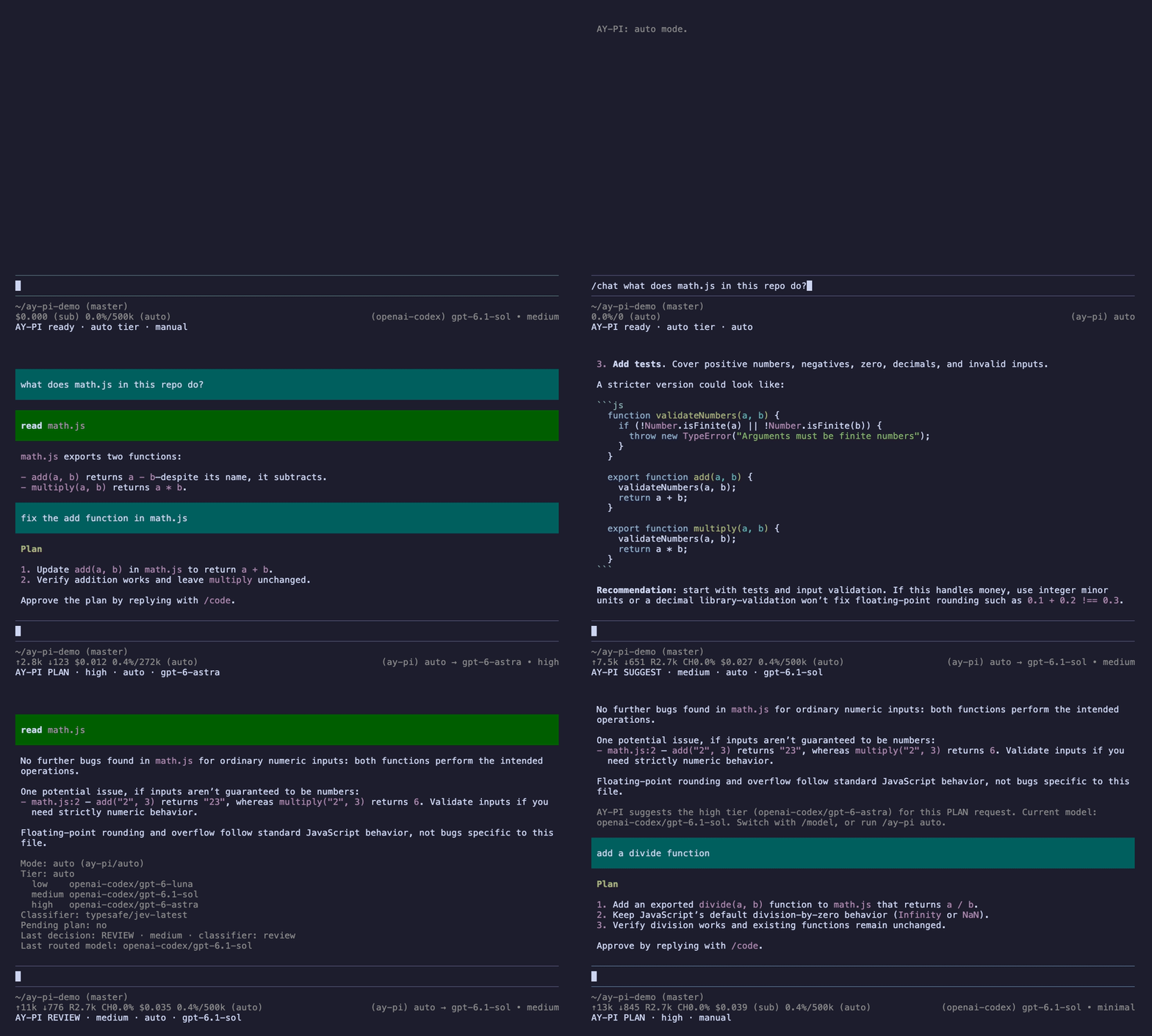
  "image": "https://raw.githubusercontent.com/ayhanblt/ay-pi/main/docs/assets/demo.gif",
  "extensions": [
    "./dist/index.js"
  ]
}
Security note
Pi packages can execute code and influence agent behavior. Review the source before installing third-party packages.
README
Features
- 🧭 Five modes. Chat, suggest, review, plan and code. Only code can edit files; the others read and answer.
- 🤖 The right model for each prompt. Put your models into three tiers. Quick questions go to your fast model, plans to your strongest one.
- 🛠️ Your own commands. Add
/explain,/secor/fix, each with its own mode, tier and note. Rename or turn off the built-in ones. All from a menu. - 📌 Pin a mode. Press F2 to stay in review or plan for a while, without typing a command every time.
- 📋 Plan, then code. Plans are kept, refined over as many messages as you like, and implemented when you say so.
- 🧠 Or just type. With the optional Jev classifier, AY-PI reads plain prompts and picks the mode itself.
- 🧩 Plays well with others. Plannotator, goal loops, subagents and review extensions keep working; a
routingscope steps aside for other plan extensions.
Works with every provider Pi supports. You choose the models, AY-PI chooses the tier.
Quick start
pi install npm:@ayhanblt/ay-piThen, inside Pi (1.4 or newer):
/ay-pi add low       pick a fast, cheap model
/ay-pi add medium    pick your everyday model
/ay-pi add high      pick your strongest model
/ay-pi auto          let AY-PI switch models for you
That's it. Type a command and your prompt:
/chat what does calc.js do?               → CHAT · low,  read-only
/review calc.js                           → REVIEW · medium, read-only
/plan fix add() and add a test            → PLAN · high, the plan is kept
/code                                     → CODE · medium, the plan is implemented
💡 Add Jev to skip the commands and just type.
How it works
For every prompt AY-PI picks a mode, the mode picks a tier, and the tier picks a model:
your prompt ──▶ mode ──▶ tier ──▶ model| Mode | For | Default tier | Can edit files |
|---|---|---|---|
CHAT |
Questions and explanations | low | no |
SUGGEST |
Options and recommendations | medium | no |
REVIEW |
Code review and audits | medium | no |
PLAN |
Designing work before coding | high | no |
CODE |
Implementing, fixing, refactoring, tests | medium | yes |
The mode comes from the first of these that applies:
- A command you typed:
/chat,/review,/plan, ... or one of your own. - A pinned mode, set with F2/F3.
- A plan in progress (see Plans).
- The classifier, if you added Jev.
- The safe default:
CHAT, medium tier, read-only.
CODE is the only mode that can edit files, and it is reached only on purpose: /code, the pinned CODE mode, an approved plan, or a classifier that is at least 80% sure you want files changed. Read-only modes block Pi's edit, write and bash tools and look around with read, grep, find and ls.
Reading the footer
AY-PI CODE (/fix) · low→medium · auto · your-everyday-model · 📋 plan waiting
      │             │            │      │                     └─ a plan is waiting (or 📝 planning)
      │             │            │      └─ the model that answered (auto mode only)
      │             │            └─ auto or manual mode
      │             └─ the tier; "low→medium" means low was empty or unusable
      └─ the mode, and the command or pin that chose it
Before a prompt, and right after you pin a mode, it reads AY-PI ready · REVIEW (pinned) · auto tier · auto.
Customize
Everything is in one menu:
/ay-pi settings→ Commands (/chat /suggest /review /plan /code)
Shortcuts (next mode F2, previous F3)
Tiers (low 1, medium 1, high 1 models)
Classifier: auto
Scope: full
DoneYour own commands
A command is a mode, an optional tier, and an optional note: a sentence sent along with every prompt you type after it. Some ideas:
| Command | Mode · tier | Note |
|---|---|---|
/explain |
CHAT · low | Explain simply, with one short example. |
/sec |
REVIEW · high | Look only for security issues: injection, auth, secrets. |
/fix |
CODE · low | Only fix the exact line mentioned; touch nothing else. |
/design |
PLAN · high | (the built-in /plan, renamed) |
In Commands you can:
- add a command (
+ New command: name, mode, tier, note); - rename a built-in one, for example
/plan→/designwhen another extension owns/plan; - change a built-in one's tier or add a note to it;
- turn off a built-in one you never use.
A note steers the model; it never unlocks tools (that is the mode's job) or picks a model (that is the tier's). Only the built-in code command implements a waiting plan, whatever you call it; /fix and other code commands leave the plan waiting. Pi registers commands when it loads, so the menu offers to reload Pi after a change.
Shortcuts
F2 pins the next mode and F3 the previous one: auto → CHAT → SUGGEST → REVIEW → PLAN → CODE → auto. While a mode is pinned, every prompt runs in it until you switch back; a command still wins for its own prompt. Without the keys: /ay-pi mode review (or chat, suggest, plan, code, auto).
Any key in Pi's syntax works (f4, ctrl+shift+m, ...), and off turns one off. On a Mac laptop press Fn with the F keys. Pi reads no Shift, Ctrl or Alt with F keys, so shift+f2 is refused.
Tiers
Each tier is a list of models; the first usable one answers and the rest are its fallbacks. If a whole tier is empty or unusable, a neighbouring tier answers (high falls back to medium before low). /ay-pi tier high pins a tier for the session; /ay-pi tier auto gives the choice back.
Auto mode (/ay-pi auto) selects the virtual model ay-pi/auto, which switches to the tier's model on each prompt. Tool follow-ups stay on the same model, so the prompt cache stays warm. Manual mode (/ay-pi manual, or any model picked with /model) keeps your model and only tells you when another tier would fit better:
AY-PI suggests the high tier (your-strongest-model) for this PLAN request.Scope
full(default): modes, tool scoping, instructions and plans.routing: only the tier and the model. Use it next to another plan extension, so that extension runs its own flow. Notes you gave your own commands are still sent.
Let Jev decide
Jev is a small, fast classification model. With it you can just type: a decision costs a fraction of a cent and adds little latency.
- Run
/login, choose TypeSafe and paste your API key (or setTYPESAFE_API_KEY). /ay-pi jevshows the classifier AY-PI found.- Type:
| You type | AY-PI decides |
|---|---|
what does calc.js do? |
CHAT · low |
which improvements would you suggest for this code? |
SUGGEST · medium |
review calc.js, is there a bug? |
REVIEW · medium |
plan adding a multiply function, don't write code yet |
PLAN · high, the plan is kept |
ok, go ahead (while a plan waits) |
CODE · medium, the plan is implemented |
add a subtract function to calc.js |
CODE · medium |
what does a monorepo mean for our architecture? dig deep |
CHAT · medium (hard, so one tier up) |
Commands and pinned modes still win: they skip the classifier.
For every prompt without a command, AY-PI asks three typed questions:
- task: is this
CHAT,SUGGEST,REVIEW,PLANorCODE? - file changes: does the user want files changed now?
- complexity: trivial, ordinary or hard? Trivial work moves one tier down, hard work one tier up.
While a plan waits, it also asks whether the message approves it; right after a plan question, whether the message answers it. The plan text itself is never sent.
CODE needs at least 80% on "file changes"; below that the turn runs as SUGGEST. A task answer under 50% is ignored and the safe default is used.
classifier is auto by default: the first available Jev model, else any other classifier Pi offers (OpenRouter, OpenCode, Cloudflare Workers AI, OpenAI, llama.cpp). Pick one with /ay-pi classifier provider/model, or turn it off with /ay-pi classifier off.
Plans
After a PLAN turn, AY-PI keeps the ## Plan section of the answer and asks:
AY-PI: the plan is ready. What next?
→ Implement it now
  Keep planning (talk it through; it is applied when you say so)
Later (the plan waits)- Implement it now hands the plan to the code tier, with the file tools on.
- Keep planning (
📝 planning): write your changes plainly, over as many messages as you need; each one refines the plan. Say "ok, implement it" when it is final. - Later (
📋 plan waiting): talk about other things;/codeimplements the plan whenever you are ready.
A command still works in the middle of a plan, so /chat what are the risks? is a cheap side question that leaves the plan alone.
Works with other extensions
AY-PI stays out of other extensions' way:
- Their tools are theirs. Only Pi's own
edit,writeandbashare ever blocked. In full scope AY-PI adds itsay_pi_submit_plantool and, whenbashis on, Pi's read-onlygrep,findandls. It never removes a tool. - Their turns are theirs. When another extension starts a turn (a goal loop, a review, a subagent result), AY-PI only picks the model for it, on the last tier.
- Plannotator works out of the box. While its plan mode plans, your plan tier answers; once you approve in Plannotator's browser view, your code tier executes. The footer shows
PLAN (Plannotator). - Subagents started as separate Pi processes get no commands or tool scoping. If they inherit
ay-pi/auto, they run on the main agent's current tier. - Another
/plan? Pi renames both (/plan:1,/plan:2) and AY-PI warns at startup. Rename AY-PI's in/ay-pi settings→ Commands.
Reference
Commands
| Command | Effect |
|---|---|
/chat, /suggest, /review, /plan, /code + prompt |
Run the prompt in that mode |
| Your own commands | Run the prompt with their mode, tier and note |
/code alone |
Implement the waiting plan, or else what the conversation has settled on |
| F2 / F3 | Pin the next / previous mode |
/ay-pi |
Mode, tiers, classifier, commands, waiting plan, last decision |
/ay-pi settings |
Edit commands, shortcuts, tiers, classifier and scope |
/ay-pi auto / /ay-pi manual |
Switch between auto and manual mode |
/ay-pi mode chat|suggest|review|plan|code|auto |
Pin or unpin a mode |
/ay-pi tier low|medium|high|auto |
Pin or unpin a tier |
/ay-pi add <tier> / /ay-pi remove <tier> |
Edit a tier's models |
/ay-pi jev |
Show the classifier and how to add a key |
/ay-pi classifier auto|off|provider/model |
Choose the classifier |
/ay-pi reload |
Re-read the configuration files |
The menu writes ~/.pi/agent/ay-pi.json; you can also edit it by hand:
{
  "tiers": {
    "low": ["provider/fast-model"],
    "medium": ["provider/everyday-model", "other-provider/fallback-model"],
    "high": ["provider/strongest-model"]
  },
  "classifier": "auto",
  "scope": "full",
  "commands": {
    "plan": "design",
    "review": false,
    "explain": { "behavior": "CHAT", "tier": "low", "instructions": "Explain simply, with one short example." }
  },
  "shortcuts": { "nextMode": "f4", "previousMode": false }
}tiers:provider/modelreferences, as shown in/model.classifier:auto,off, or aprovider/model.scope:fullorrouting.commands: rename ("plan": "design"), turn off ("review": false), change ("code": { "tier": "high" }) or add ("explain": { ... }). Pi's own command names are refused.shortcuts:nextModeandpreviousMode, a key orfalse.- A trusted project can override keys in
.pi/ay-pi.json, exceptcommandsandshortcuts, so a repository cannot slip a note into your/code.
Changes to commands and shortcuts need /reload. If the file is broken, AY-PI says why at startup and runs on defaults until you fix it.
Troubleshooting
| Problem | Fix |
|---|---|
Every prompt runs as CHAT · medium |
No classifier: use a command, or add Jev |
| Every prompt runs as the same mode | A mode is pinned (REVIEW (pinned)): press F2/F3 until auto, or /ay-pi mode auto |
AY-PI: no tier models configured yet |
Add models with /ay-pi add low, medium, high |
Classifier: none in /ay-pi |
Run /login → TypeSafe, then check /ay-pi jev |
| The answer came from another tier | low→medium in the footer: that tier is empty or unusable |
/code shows a list of other commands |
Pick code in the list (or keep typing after /code ) and press Enter |
| A new or renamed command does not show up | Commands are registered when Pi loads: run /reload |
| The plan question keeps coming back | Pick "Keep planning" to refine without being asked |
| F2 does nothing | On a Mac laptop press Fn+F2, or pick another key in /ay-pi settings; /ay-pi mode always works |
AY-PI warns that /plan was renamed to /plan:1 |
Another extension registers /plan too: rename AY-PI's in /ay-pi settings → Commands |
| A plan extension's flow is replaced by AY-PI's | Set the scope to routing (not needed for Plannotator) |
/btw (pi-btw) says No API key found for ay-pi |
pi-btw answers in its own session, where ay-pi/auto does not exist. Give it a real model once: /btw:model <provider> <model> <api> |
Plannotator switches away from ay-pi/auto while planning |
Its plannotator.json sets phases.*.model. Remove those lines to let AY-PI pick the tier |
A footer extension shows think:off |
It shows the level of ay-pi/auto, which has none of its own. AY-PI sets the real level per mode on each request |
Development
npm install
npm run typecheck
npm test
npm run build        # bundles src/ into extension/ay-pi/dist
The published package lives in extension/ay-pi. See docs/architecture.md for the code layout.
License
MIT